
Javac的命令
关于命令,还可以查看《Java 7程序设计》一书后面的附录A
As per javac source docs, there are 4 kinds of options:
standard public options, e.g. -classpath
extended public options, beginning -X, e.g. -Xlint
hidden options -- not public or documented, e.g. -fullversion
even more hidden options -- typically for debugging the compiler, beginning -XD, e.g. -XDrawDiagnostics
1、G("-g") 在生成的class文件中包含所有调试信息(行号、变量、源文件)
2、G_NONE("-g:none") 在生成的class文件中不包含任何调试信息。
3、G_CUSTOM("-g:")
-g:{keyword list}
Generate only some kinds of debugging information, specified by a comma separated list of keywords. Valid keywords are:
(1)source Source file debugging information
(2)lines Line number debugging information
(3)vars Local variable debugging information
4、DIAGS("-XDdiags=")
5、NOWARN("-nowarn") 不生成任何警告

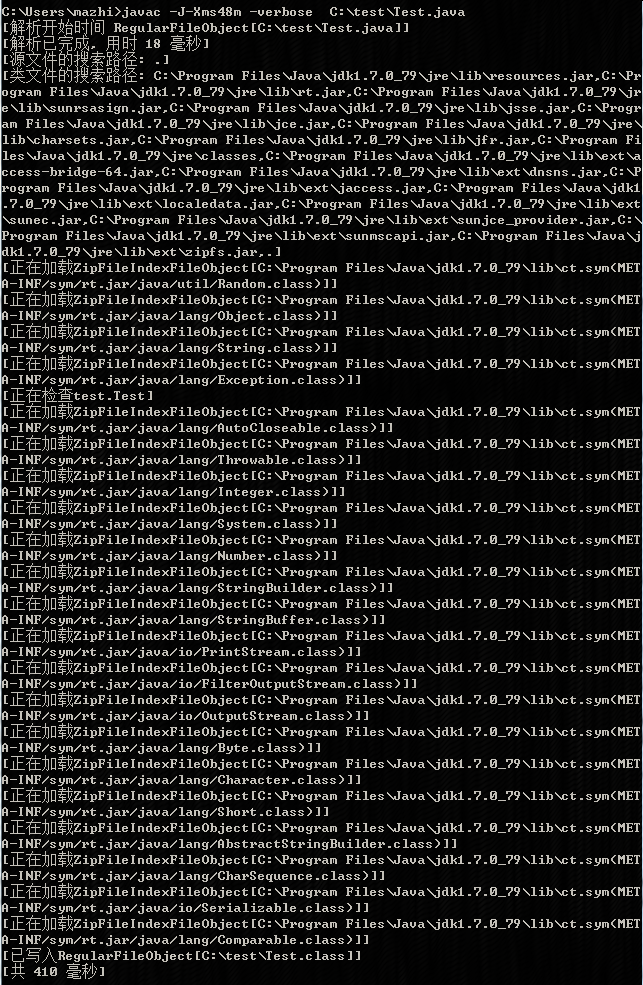
6、VERBOSE("-verbose") 输出有关编译器正在执行的操作的消息
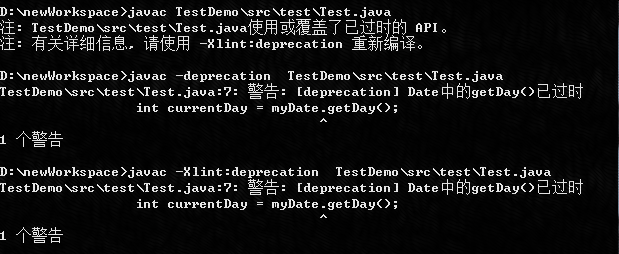
7、DEPRECATION("-deprecation")
Show a description of each use or override of a deprecated member or class. Without -deprecation,
javac shows a summary of the source files that use or override deprecated members or classes.
-deprecation is shorthand for -Xlint:deprecation.
源代码如下:
java.util.Date myDate = new java.util.Date();
int currentDay = myDate.getDay();
9、S("-s")
Specify the directory where to place generated source files. The directory must already exist; javac will not create it.
If a class is part of a package, the compiler puts the source file in a subdirectory reflecting the package name,
creating directories as needed. For example, if you specify -s C:\mysrc and the class is called com.mypackage.MyClass,
then the source file will be placed in C:\mysrc\com\mypackage\MyClass.java.
10、IMPLICIT("-implicit:") 指定是否为隐式引用文件生成类文件
11、ENCODING("-encoding") 指定源文件使用的字符编码

如果没有指定,则使用平台默认的编码方式,Win7默认的是GBK,如下:
System.getProperty("file.encoding");
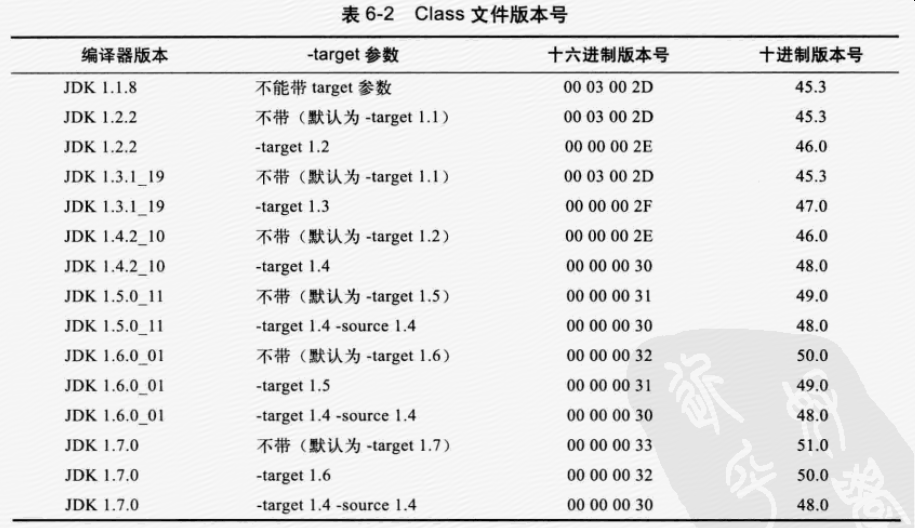
12、SOURCE("-source") 提供与指定版本的源兼容性
13、TARGET("-target") 生成特定 VM 版本的类文件
-source 指定用哪个版本的编译器对java源码进行编译-target 指定生成的class文件将保证和哪个版本的虚拟机进行兼容。我们可以通过-target 1.2来保证生成的class文件能在1.2虚拟机上进行运行,但是1.1的虚拟机就不能保证了。
14、VERSION("-version")

15、FULLVERSION("-fullversion")

16、HELP("-help") 输出标准选项的提要
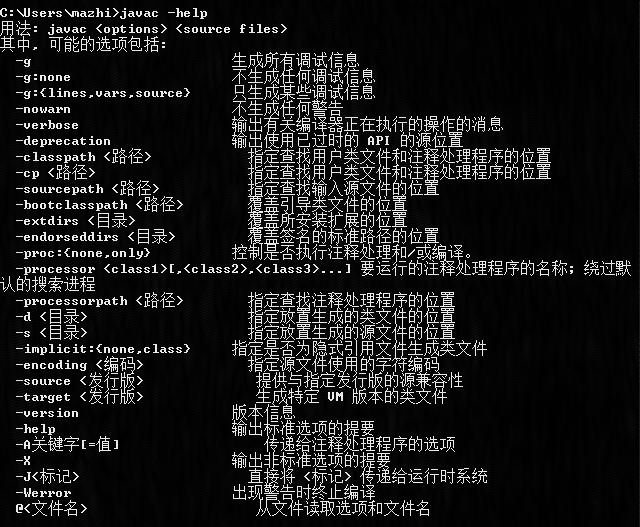
17、X("-X") 列出非标准选项

18、J("-J") 直接将<标记>传递给运行时系统,如javac -J-Xms48m Test.java // set the startup memory to 48M.

用 -J 将选项传给执行用 Java 编写的应用程序的虚拟机是一种公共约定。
19、XSTDOUT("-Xstdout") 将编译器信息输出到文件中。缺省情况下,编译器信息送到 System.err 中

20、-Xmaxerrs numberSet the maximum number of errors to print.
21、-Xmaxwarns numberSet the maximum number of warnings to print.
22、-Xprefer:{newer,source}
Specify which file to read when both a source file and class file are found for a type. (See Searching For Types). If -Xprefer:newer is used, it reads the newer of the source or class file for a type (default). If the -Xprefer:source option is used, it reads source file. Use -Xprefer:source when you want to be sure that any annotation processors can access annotations declared with a retention policy of SOURCE.
23、WERROR("-Werror") 出现警告时终止编译
24、XD("-XD") 可以参考:
(1)https://blogs.oracle.com/sundararajan/entry/javac_s_hidden_options
(2)https://blogs.oracle.com/sundararajan/week-end-fun-with-the-java-compiler-source-code
举个例子,如下:
package test;

public class Test {

	public static void main(String[] args) {
		String[] s = null;
		for(String k:s){
			System.out.println(k);
		}
	}

}

则生成的文件如下:
package test;

public class Test {

    public Test() {
        super();
    }

    public static void main(String[] args) {
        String[] s = null;
        for (String[] arr$ = s, len$ = arr$.length, i$ = 0; i$ < len$; ++i$) {
            String k = arr$[i$];
            {
                System.out.println(k);
            }
        }
    }
}
25、XJCOV("-Xjcov") 为Java Code Coverage Tools准备的命令
在Gen类中这个是开启genCrt的命令,可能与CRT有关。
参考:
(1)https://en.wikipedia.org/wiki/Java_Code_Coverage_Tools
(2)https://www.youtube.com/watch?v=OAglQAb2bBY 视频案例
26、-Xpkginfo:[always,legacy,nonempty]
Control whether javac generates package-info.class files from package-info.java files. Possible mode arguments for this option include the following.
- (1)always
-
Always generate a
package-info.classfile for everypackage-info.javafile. This option may be useful if you use a build system such as Ant, which checks that each.javafile has a corresponding.classfile. - (2)legacy
-
Generate a
package-info.classfile only if package-info.java contains annotations. Don't generate apackage-info.classfile if package-info.java only contains comments.Note: A
package-info.classfile might be generated but be empty if all the annotations in the package-info.java file haveRetentionPolicy.SOURCE. - (3)nonempty
-
Generate a
package-info.classfile only if package-info.java contains annotations withRetentionPolicy.CLASSorRetentionPolicy.RUNTIME.
27、MOREINFO("-moreinfo")
28、COMPLEXINFERENCE("-complexinference")
29、PROMPT("-prompt")
30、DOE("-doe")
31、WARNUNCHECKED("-warnunchecked")
32、O("-O") 优化代码以缩短执行时间。使用 -O 选项可能使编译速度下降、生成更大的类文件并使程序难以调试
参考:
(1) http://www.cnblogs.com/xiazdong/p/3216220.html?utm_source=tuicool&utm_medium=referral
(2)-Xlint http://www.javaworld.com/article/2073587/javac-s--xlint-options.html
(3)不懂的命令看官方文档:http://docs.oracle.com/javase/7/docs/technotes/tools/windows/javac.html
(4)http://docs.oracle.com/javase/6/docs/technotes/tools/solaris/javac.html#nonstandard
(5)http://blog.csdn.net/hudashi/article/details/7058998
Javac的命令的更多相关文章
- javac的命令(-Xbootclasspath、-classpath与-sourcepath等)
当编译源文件时,编译器常常需要识别出类型的有关信息.对于源文件中使用.扩展或实现的每个类或接口,编译器都需要其类型信息.这包括在源文件中没有明确提及.但通过继承提供信息的类和接口. 例如,当扩展 ja ...
- Javac的命令(-Xlint)
在OptionName类中的枚举定义如下: XLINT("-Xlint"), XLINT_CUSTOM("-Xlint:"), -Xlint Enabl ...
- 将Java和Javac的命令在控制台的输出重定向到txt文件
当我们在Windows控制台窗口执行程序时,输入如下命令: demo.exe > out.txt 就可以把demo程序的输出重定向到out.txt文件里面. 但是这种方法对于java和javac ...
- java-关于java_home配置,classpath配置和javac,java命令,javac编译器,和java虚拟机之间的关系
在每个人学习java的第一步,都是安装jdk ,jre,配置java_home,classpath,path. 为什么要做这些?在阅读java-core的时候,看到了原理,p141. 一 关于类的共享 ...
- Javac的命令(注解相关)
1.-Akey[=value] Options to pass to annotation processors. These are not interpreted by javac directl ...
- 在CMD窗口中使用javac和java命令进行编译和执行带有包名的具有继承关系的类
一.背景 最近在使用记事本编写带有包名并且有继承关系的java代码并运行时发现出现了很多错误,经过努力一一被解决,今天我们来看一下会遇见哪些问题,并给出解决办法. 二.测试过程 1.父类代码 pack ...
- 命令查看java的class字节码文件、verbose、synchronize、javac、javap
查看Java字节码 1 javac –verbose查看运行类是加载了那些jar文件 HelloWorld演示: public class Test { public static void main ...
- javac不是内部或外部命令在win10上的解决方案
Path环境变量能够让你在任何路径都能使用命令,可能你百度谷歌了各种方案都无法解决javac无法使用的问题,那么你可以试试如下解决方案: 首先博主配置了JAVA_HOME 参数为 C:\Program ...
- 【总结】java命令解析以及编译器,虚拟机如何定位类
学Java有些日子了,一直都使用IDE来写程序.这样的好处就是能让我连如何用命令行编译,解释执行Java源代码都不知道,就更不清楚JDK中的编译器和虚拟机(包含字节码解释器)是如何定位到类文件的.悲哀 ...
随机推荐
- MySQL—练习
前面学习了MySQL的语句的基本用法,这里就开始做一些MySQL练习,这套题目一共45题,属于比较简单的,初学先试着做这个. 参考链接:https://www.cnblogs.com/SJP666/p ...
- 深海划水队项目--七天冲刺之day6
站立式会议:由于有位项目组成员回家了,所以由微信群在线讨论代替. 昨天已完成的任务:界面优化,实现方块的移动,旋转和下降. 今天已完成的任务:设置游戏按键,检查重合.检查是否超出边界.检查是否可以下落 ...
- [Erlang21]Erlang性能分析工具eprof fporf的应用
前段时间项目改代码突然cpu波动很大,排查了好久都没有找到原因,只能求助于性能测试工具 : <<Erlang程序设计>>----Joe Armstorng[哈哈,登月第一人 ...
- TSQL--验证身份证是否有效
/****** Object: UserDefinedFunction [dbo].[udf_IsvalidIDCard] Script Date: 02/27/2014 16:03:20 ***** ...
- Hadoop 集群配置记录小结
Hadoop集群配置往往按照网上教程就可以"配置成功",但是你自己在操作的时候会有很多奇奇怪怪的问题出现, 我在这里整理了一下常见的问题与处理方法: 1.配置/etc/hosts ...
- CodeIgniter使用中写的一些文章
CI的captcha替代类库: http://www.ifixedbug.com/posts/codeigniter-captcha-library 原生的captcha不是太好用,自己组装一个吧. ...
- 【javascript】点击复制内容的实现
各种站点有很多类似的代码,不过都是拿来即用,连个解释也没有.大概看了一下,现在主要使用的有两种办法: 1.documen.execCommand("Copy")或者window.c ...
- web api 跨域问题的解决办法
在APP_Start文件夹下面的WebApiConfig.cs文件夹配置跨域 public static class WebApiConfig { public static void Registe ...
- iOS 获取 UITabViewController 和 UINavigationController 的图标位置
这些图标是放在 UITabBar 和 UINavigationBar 里的.所以只要遍历它们的 subViews,找到类型是 UIButton 的就可以了. 所有想获取它们的相对位置很容易. 获取到相 ...
- python当中的装饰器
1.装饰器 首先我们来说一下一个软件的设计原则:开闭原则,又被称为开发封闭原则,你的代码对功能的扩展是开放的,你的程序对修改源代码是封闭的.这样的软件设计思路可以更好的维护和开发. 开放:对功能扩展开 ...