
P4factory ReadMe Quickstart 安装p4factory
操作系统:
Ubuntu 14.04
前言
在之前,我直接从P4.org给的GitHub网址上下载了p4factory,但是在根据ReadMe的内容进行QuickStart的时候,发生了shell脚本cd错误。
在得到了国际友人的帮助之下,我发现首先要把这个仓库fork过来,然后在自己的fork分支下进行修改。
询问及解答的地址:When I fellow the step in ReadMe: ./autogen.sh, I found a problem
PS:不知道怎么感谢人家,于是点了他的关注。
准备过程:Git操作
参考我的前一篇博文:Git 使用ssh密钥
在文章的最后,顺便把GitHub上的P4factory内容clone了下来。
实际操作过程(参考ReadMe)
Important: git submodules
We often update the submodules for this repo. This is why we recommend that you run the following command whenever pulling the latest version of master:
git submodule update --init --recursive
在之前的尝试中,我直接拷贝了原master的zip,但是并没有从git中下载下来submodules的内容,导致文件夹为空。
在cd进p4factory之后,执行该操作:

Quickstart
To install all the Ubuntu 14.04 dependencies, run
./install_deps.sh
Before running the simulator, you need to create veth interfaces that the simulator can connect to. To create them, you need to run:
sudo p4factory/tools/veth_setup.sh
We use autoconf tools to generate makefiles. Run the following commands to prepare your workspace.
cd p4factory

./autogen.sh

./configure
注意:上述各步结束之后,都会返回p4factory目录。
To validate your installation and test the simulator on a simple P4 target, do the following:
cd p4factory/targets/basic_routing/

make bm

sudo ./behavioral-model
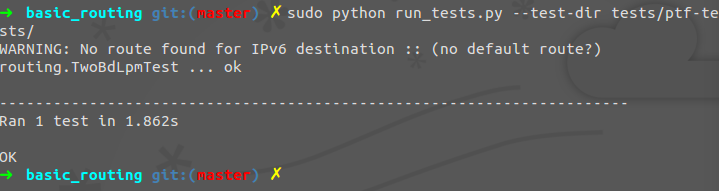
To run a simple test, run this in a different terminal:
cd p4factory/targets/basic_routing/

sudo python run_tests.py --test-dir tests/ptf-tests/
大概的意思是,在Ubuntu上安装依赖关系,然后安装配置工具balabala,最后跑了一个例子,按照顺序一步步下来即可。
注意,命令所提到的文件名称p4factory是和ReadMe一样的,如果你是直接从原仓库下下来的话,名称是p4factory-master。
2016/9/24
P4factory ReadMe Quickstart 安装p4factory的更多相关文章
- P4factory ReadMe 剩余部分
Building and Running a Target Each P4 program (called a 'target') is set up in a directory under tar ...
- p4factory 解决“g++: internal compiler error: Killed (program cc1plus)” make error问题
参考:解决: g++: internal compiler error: Killed (program cc1plus) 在安装p4factory的时候,执行: ./install_deps.sh ...
- P4行为模型BMV2依赖关系安装:thrift nanomsg nnpy安装
由于安装p4factory的步骤需要OF的支持,我需要下载p4的行为模型BMV2: thrift是支持BMV2的软件框架:nanomsg是一个实现了几种"可扩展协议"的高性能通信库 ...
- PTF 安装及简单测试 Packet Testing Framework
PTF PTF is a Python based dataplane test framework. It is based on unittest, which is included in th ...
- 安装配置dradis
github:https://github.com/dradis/dradis-ce/blob/master/README.md安装出现错误:== Copying sample files == == ...
- windows下安装KeystoneJS
安装参考: http://keystonejs.com/zh/getting-started/ http://jsnoder.com/kjs/quickstart 安装前提条件: 安装 Node.JS ...
- dubbo与zookeeper安装手册
原文 示例提供者安装 (+) (#) 安装: wget http://code.alibabatech.com/mvn/releases/com/alibaba/dubbo-demo-provider ...
- linux —— ubuntu 初次安装问题
本文收集了我自己安装ubuntu系统时的一些想法和遇到的一些问题,以及一些我自己感兴趣的软件的安装方法等 1. 50G ubuntu 分区方案 <plan> <key> / & ...
- CentOS 如何安装git server + Gitolite 【配置不成功需要再测试2015-8-20】
安装git 关于安装git 可以参考 http://gitolite.com/gitolite/install.html 里面有官方的介绍 1. Git 的工作需要调用 curl,zlib,open ...
随机推荐
- SignalR实现在线聊天室功能
一.在线聊天室 1.新建解决方案 SignalROnlineChatDemo 2.新建MVC项目 SignalROnlineChatDemo.Web (无身份验证) 3.安装SignalR PM> ...
- nginx集群配置
一.nginx集群目标 以nginx作为代理服务器,分别在两台部署web站点的机器上面轮询访问. 3台机器IP地址分别为: 1)192.168.189.133 (nginx代理服务器) 2)192 ...
- 170710、springboot编程之启动器Starter详解
此文系参考网络大牛的,如有侵权,请见谅! Spring Boot应用启动器基本的一共有N(现知道的是44)种:具体如下: 1)spring-boot-starter 这是Spring Boot的核心启 ...
- Yii2框架添加API Modules
原文链接:http://www.itnose.net/detail/6459353.html : 一.环境部署 1. read fucking Yii Documents. http://www.yi ...
- SQL Server 存储过程生成流水号
SQL Server利用存储过程生成流水号 USE BiddingConfig SET QUOTED_IDENTIFIER ON SET ANSI_NULLS ON GO -- =========== ...
- 【转】jQuery.ajax向后台传递数组问题
$.ajax({ url: "/xxx", type: "GET", data: { "boxIds": boxIds, "box ...
- C++中的.和::和:和->的区别
在学习C++的过程中我们经常会用到.和::和:和->,在此整理一下这些常用符号的区别. 1.A.B则A为对象或者结构体: 2.A->B则A为指针,->是成员提取,A->B是提取 ...
- RAC 性能分析 - 'log file sync' 等待事件
简介 本文主要讨论 RAC 数据库中的'log file sync' 等待事件.RAC 数据库中的'log file sync' 等待事件要比单机数据库中的'log file sync' 等待事件复杂 ...
- 阿里云centos7.2 安装mysql 6.5
[root@111 ~]# uname -aLinux bxhs 3.10.0-327.22.2.el7.x86_64 #1 SMP Thu Jun 23 17:05:11 UTC 2016 x86_ ...
- 解决:对COM 组件的调用返回了错误 HRESULT E_FAIL
调用SHDOCVW(web浏览器) COM组件的时候,返回了错误 HRESULT E_FAIL.总结如下: 1. 在控制面板--->管理工具--->服务 中,开启Distributed T ...