
vim 安装Vundle.vim
1.下载
git clone https://github.com/VundleVim/Vundle.vim.git ~/.vim/bundle/Vundle.vim
2.配置vimrc
set nocompatible              " be iMproved, required

filetype off                  " required

" set the runtime path to include Vundle and initialize

set rtp+=~/.vim/bundle/Vundle.vim

call vundle#begin()

" alternatively, pass a path where Vundle should install plugins

"call vundle#begin('~/some/path/here')

" let Vundle manage Vundle, required

Plugin 'VundleVim/Vundle.vim'

" The following are examples of different formats supported.

" Keep Plugin commands between vundle#begin/end.

" plugin on GitHub repo

Plugin 'tpope/vim-fugitive'

" plugin from http://vim-scripts.org/vim/scripts.html

" Plugin 'L9'

" Git plugin not hosted on GitHub

Plugin 'git://git.wincent.com/command-t.git'

" Install L9 and avoid a Naming conflict if you've already installed a

" different version somewhere else.

" Plugin 'ascenator/L9', {'name': 'newL9'}

" All of your Plugins must be added before the following line

Plugin 'mzlogin/vim-markdown-toc'

call vundle#end()            " required

filetype plugin indent on    " required

" To ignore plugin indent changes, instead use:

"filetype plugin on

"

" Brief help

" :PluginList       - lists configured plugins

" :PluginInstall    - installs plugins; append `!` to update or just :PluginUpdate

" :PluginSearch foo - searches for foo; append `!` to refresh local cache

" :PluginClean      - confirms removal of unused plugins; append `!` to auto-approve removal

"

" see :h vundle for more details or wiki for FAQ

" Put your non-Plugin stuff after this line
3.重新加载vim,进行安装

4.安装vim-markdown-toc
只需要将
Plugin 'mzlogin/vim-markdown-toc'
放到配置上面
然后执行
:PluginInstall
5.使用vim-markdown-toc
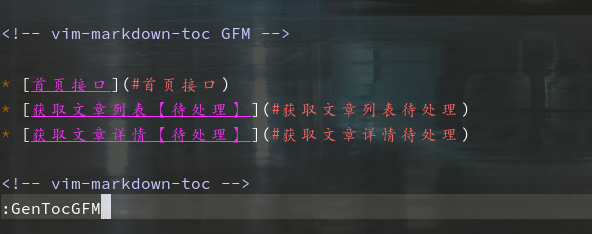
:GenTocGFM

Generate table of contents in GFM link style.

This command is suitable for Markdown files in GitHub repositories, like README.md, and Markdown files for GitBook.

:GenTocRedcarpet

Generate table of contents in Redcarpet link style.

This command is suitable for Jekyll or anywhere else use Redcarpet as its Markdown parser.

:GenTocGitLab

Generate table of contents in GitLab link style.

This command is suitable for GitLab repository and wiki.

:GenTocMarked

Generate table of contents for iamcco/markdown-preview.vim which use Marked markdown parser.
vim 安装Vundle.vim的更多相关文章
- vim 安装vundle 之curl
百度出来的博客文章,配置curl.cmd 的内容win7 x64 好像有误 贴下正确的 @rem Do not use "echo off" to not affect any c ...
- win下gvim或者linux下的vim安装vundle都适用的配置文件 - 在当前目录及其子目录下**, 的所有文件* 中, 搜索当前光标所在的单词
gvim下的普通配置: if v:lang =~ "utf8$" || v:lang =~ "UTF-8$" set fileencodings=utf-8,g ...
- Vim使用Vundle安装代码补全插件(YouCompleteMe)
安装 Vundle 它的使用方法很简单,安装一个插件只需要在 ~/.vimrc 按照规则中添加 Plugin 的名称,某些需要添加路径,之后在 Vim 中使用:PluginInstall既可以自动化安 ...
- vim实战:插件安装(Vundle,NerdTree)
一:插件管理器Vundle 1.简介 Vundle是vim的一个插件管理器, 同时它本身也是vim的一个插件.插件管理器用于方便.快速的安装.删除.Vim更新插件.vim Vundle插件官方地址:h ...
- vim添加Vundle插件
1.git clone https://github.com/VundleVim/Vundle.vim.git ~/.vim/bundle/Vundle.vim 2.vim /etc/vimrc se ...
- Vim安装使用和配置
卸载vim sudo apt-get remove --purge vim (--purge 是完全删除,会连配置文件一起删除) 也可以使用yum等其它方式安装 ,如果提示apt-get命令不存在可以 ...
- MAC vim安装gruvbox主题
gruvbox是一款优秀的vim配色方案,但是却不是vim自带的配色方案,这里记录一下安装过程. gruvbox官网:https://github.com/morhetz/gruvbox gruvbo ...
- Vim 安装 YouCompleteMe
Vim 下的自动补全,最好的工具莫过于 YouCompleteMe,官方文档在这里 http://valloric.github.io/YouCompleteMe/ 安装稍显复杂,以下记录我的过程. ...
- Linux基础(六) Vim之vundle插件
背景 Vim缺乏默认的插件管理器,所有插件的文件都散布在~/.vim下的几个文件夹中,插件的安装与更新与删除都需要自己手动来,既麻烦费事,又可能出现错误. Vundle简介 Vundle 是 Vim ...
随机推荐
- eclipse项目更换svn共享库
eclipse项目更换svn共享库 参考内容: http://blog.csdn.net/yang5726685/article/details/59111586 已经共享过的svn项目,更换资源库时 ...
- shell脚本分析nginx日志
shell脚本分析nginx日志: name=`awk -F ',' '{print $13":"$32}' $file | awk -F ':' '{print $4}'`ech ...
- svn-maven-tomcat自动发布脚本
#!/bin/sh #svn-maven-tomcat自动发布脚本 #变量设置 svnpath=svn://10.60.10.120/研发部/xx-maven svnusername=xxx svnp ...
- Redis构建文章聚合信息分类网站
本系列教程内容提要 Java工程师之Redis实战系列教程教程是一个学习教程,是关于Java工程师的Redis知识的实战系列教程,本系列教程均以解决特定问题为目标,使用Redis快速解决在实际生产中的 ...
- CentOS 目录结构详解
linux 目录结构 linux目录树 /: 根目录,一般根目录下只存放目录,不要存放文件,/etc./bin./dev./lib./sbin应该和根目录放置在一个分区中/bin:/usr/bin: ...
- drop user 报错ora-00604
问题描述: SQL> show user USER is "SYS" SQL> drop user efmis_zhongyang cascade; drop user ...
- Oracle等待事件之等待事件详解
一. 等待事件的相关知识:1.1 等待事件主要可以分为两类:即空闲(IDLE)等待事件和非空闲(NON-IDLE)等待事件.1). 空闲等待事件指ORACLE正等待某种工作,在诊断和优化数据库的时候, ...
- android使用library
http://www.vogella.com/tutorials/AndroidLibraryProjects/article.html 介绍support lib使用 http://de ...
- 棋盘游戏---hdu1281(最大匹配)
题目链接:http://acm.hdu.edu.cn/showproblem.php?pid=1281 题目大意:就是车和车之间不能发生攻击.还有一部分位置不可以放置棋子. 解题思路:一行一列 ...
- mysql 数据操作 单表查询 concat_ws() 定义显示格式
有个需求用concat以这种格式打印查询 mysql> select concat(name,':',age) from employee; +----------------------+ | ...