
一个实现 手机端“输入验证码 ”效果Demo
之前在“掘金”上看到这样一个demo 我觉得很有意思,于是今天把它搬下来,记在自己的“小本本”里
也许会对以后的项目有点用,若要自己去实现这样一个案例也能实现,但是可能没有那么“妙”。
想法:
1、使用label标签做显示验证码的框,
2、然后每个label for属性指向同一个 id 为vcode 的input,
3、为了能够触发input焦点, 将input 改透明度样式隐藏,
4、这样就实现了 点击label触发 input焦点,调用键盘。
运行效果:
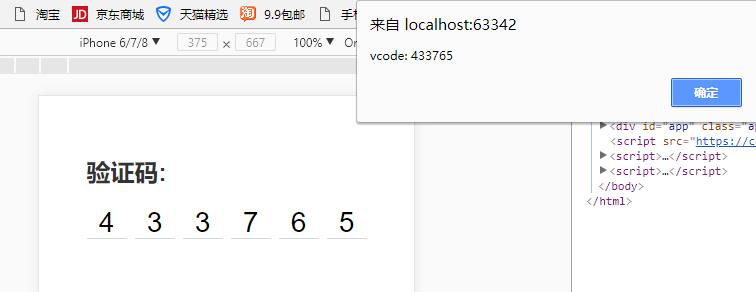
示例代码:
结构部分html:
<div id="app" class="app">

    <h2 class="heading-2">验证码:</h2>

    <div class="v-code">

        <input

                ref="vcode"

                id="vcode"

                type="tel"

                maxlength="6"

                v-model="code"

                @focus="focused = true"

                @blur="focused = false"

                :disabled="telDisabled">

        <label

                for="vcode"

                class="line"

                v-for="item,index in codeLength"

                :class="{'animated': focused && cursorIndex === index}"

                v-text="codeArr[index]"

        >

        </label>

    </div>

</div>
css部分:
<style>

        * {

            margin:;

            padding:;

            box-sizing: border-box;

        }

        body {

            background-color: #ffffff;

            font-family: -apple-system, PingFang SC, Hiragino Sans GB, Helvetica Neue, Arial;

            -webkit-tap-highlight-color: transparent;

        }

        .app {

            padding-left: 20px;

            padding-right: 20px;

            padding-top: 60px;

            max-width: 320px;

            margin-left: auto;

            margin-right: auto;

        }

        .heading-2 {

            color: #333333;

        }

        .v-code {

            margin-top: 20px;

            display: -webkit-box;

            display: -ms-flexbox;

            display: flex;

            -webkit-box-pack: justify;

            -ms-flex-pack: justify;

            justify-content: space-between;

            -webkit-box-align: center;

            -ms-flex-align: center;

            align-items: center;

            position: relative;

            width: 280px;

            margin-left: auto;

            margin-right: auto;

        }

        .v-code input {

            position: absolute;

            top: 200%;

            opacity:;

        }

        .v-code .line {

            position: relative;

            width: 40px;

            height: 32px;

            line-height: 32px;

            text-align: center;

            font-size: 28px;

        }

        .v-code .line::after {

            display: block;

            position: absolute;

            content: '';

            left:;

            width: 100%;

            bottom:;

            height: 1px;

            background-color: #aaaaaa;

            transform: scaleY(.5);

            transform-origin: 0 100%;

        }

        .v-code .line.animated::before {

            display: block;

            position: absolute;

            left: 50%;

            top: 20%;

            width: 1px;

            height: 60%;

            content: '';

            background-color: #333333;

            animation-name: coruscate;

            animation-duration: 1s;

            animation-iteration-count: infinite;

            animation-fill-mode: both;

        }

        @keyframes coruscate {

            0% {

                opacity: 0

            }

            25% {

                opacity: 0

            }

            50% {

                opacity: 1

            }

            75% {

                opacity: 1

            }

            to {

                opacity: 0

            }

        }

    </style>
Javascript部分
1、通过CDN引入vue.js
<script src="https://cdn.bootcss.com/vue/2.5.16/vue.min.js"></script>
2、代码
var app = new Vue({

        el: '#app',

        data: {

            code: '',

            codeLength: 6,

            telDisabled: false,

            focused: false

        },

        computed: {

            codeArr() {

                return this.code.split('')

            },

            cursorIndex() {

                return this.code.length

            }

        },

        watch: {

            code(newVal) {

                this.code = newVal.replace(/[^\d]/g,'')

                if (newVal.length > 5) {

                    // this.telDisabled = true

                    this.$refs.vcode.blur()

                    setTimeout(() => {

                        alert(`vcode: ${this.code}`)

                    }, 500)

                }

            }

        },

    })
此文章并非原创。。。。。
一个实现 手机端“输入验证码 ”效果Demo的更多相关文章
- slideToggle+slideup实现手机端折叠菜单效果
折叠菜单的效果,网上有很多的插件,比如bootstrap的 Collapse ,很好用也很简单,但是如果你使用的不是bootstrap框架,就会造成很多不必要的麻烦,比如默认样式被修改,代码冗余等等, ...
- html5 手机端 通讯录 touch 效果
不说那么多直接上代码. <html> <head> <meta http-equiv="Content-Type" content="tex ...
- 手机端3d旋转木马效果+保存图片到本地
<!DOCTYPE html> <html> <head> <title></title> <meta charset="U ...
- serverSpeed是一个android手机端到服务器间udp/tcp对比测速软件
https://github.com/eltld/serverSpeed https://github.com/c-wind/serverSpeed https://github.com/PeterK ...
- 适应手机端的jQuery图片滑块动画DEMO演示
在线预览 下载地址 实例代码 <!DOCTYPE html PUBLIC "-//W3C//DTD XHTML 1.0 Transitional//EN" "htt ...
- jQuery手机端触摸卡片切换效果
效果:http://hovertree.com/code/run/jquery/a1gr3gm9.html 可以用手机查看效果. 代码如下: <!doctype html> <htm ...
- bootstrap实现 手机端滑动效果,滑动到下一页,jgestures.js插件
bootstrap能否实现 手机端滑动效果,滑动到下一页 jgestures.js插件可以解决,只需要引入一个JS文件<script src="js/jgestures.min.js& ...
- 关于h5手机端上拉加载和下拉刷新效果-1
1.手机端目前很火的效果,上拉加载,和下拉刷新.目前主要使用 iscroll 框架来实现.先推荐一个iscroll中文学习的网站,不要感谢,我是雷锋. 2.https://iiunknown.gitb ...
- [UWP小白日记-15]在UWP手机端实时限制Textbox的输入
说实话重来没想到验证输入是如此的苦逼的一件事情. 网上好多验证都是在输入完成后再验证,我的想法是在输入的时候就限制输入,这样我就不用再写代码来验证了 应为是手机端,所以不用判断其他非法字符,直 ...
随机推荐
- RESTORE DATABASE命令还原SQLServer 2005 数据库
--返回由备份集内包含的数据库和日志文件列表组成的结果集. --主要获得逻辑文件名 USE master RESTORE FILELISTONLY FROM DISK = 'g:\back.Bak' ...
- sql:MySql create FUNCTION,VIEW,PROCEDURE
use geovindu; #函数 DELIMITER $$ drop function if exists f_GetDepartmentName $$ CREATE function f_GetD ...
- BZOJ1031 [JSOI2007]字符加密
Description 喜欢钻研问题的JS同学,最近又迷上了对加密方法的思考.一天,他突然想出了一种他认为是终极的加密办法 :把需要加密的信息排成一圈,显然,它们有很多种不同的读法.例如下图,可以读作 ...
- JS原生带小白点轮播图
咱们刚刚说了js原生轮播图,现在给他加上可以随着一起走动的小圆点吧! css代码: *{ margin:0px; padding: 0px; } ul{ width: 2500px; height: ...
- css多行文本省略号(...)
如果实现单行文本的溢出显示省略号同学们应该都知道用text-overflow:ellipsis属性来,当然还需要加宽度width属来兼容部分浏览. 实现单行文本省略 <!DOCTYPE html ...
- GoJs实现流程管理图
GoJS是一个实现交互类图表(比如流程图,树图,关系图,力导图等等)的JS库. 可以加入诸多功能.如流程判断,节点处理等等.GOJS在设计上极大的减轻了开发人员的开发成本.
- Python学习---Model拾遗[2]180318
Model的字段及字段参数: Model字段: 数字 字符串(带正则的字段) 时间 文件 特殊字段:(一对一,一对多,多对多) Models.py ...
- MySQL 数据库--内置功能
一 视图 视图:是一个虚拟表(非真实存在),其本质是[根据SQL语句获取动态的数据集,并为其命名],用户使用时只需使用[名称]即可获取结果集,可以将该结果集当做表来使用. 优点:们可以把查询过程中的临 ...
- 019.2 map集合类
Map<k,v>Map:双列集合,一次存一对,键值对,类似于python的字典.共性功能:1.添加 v put(key,value) //返回key的旧值 putAll ...
- [T-ARA][괜찮아요][没关系]
歌词来源: 没关系:http://music.163.com/#/song?id=22704448 没关系(Remix Ver.):http://music.163.com/#/song?id=258 ...