
3.3 文件I/O
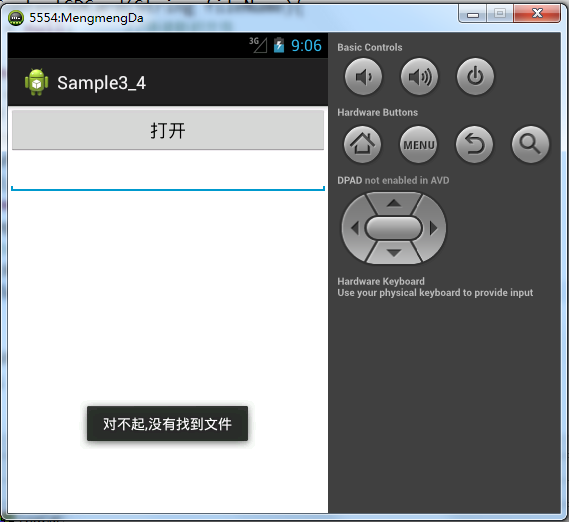
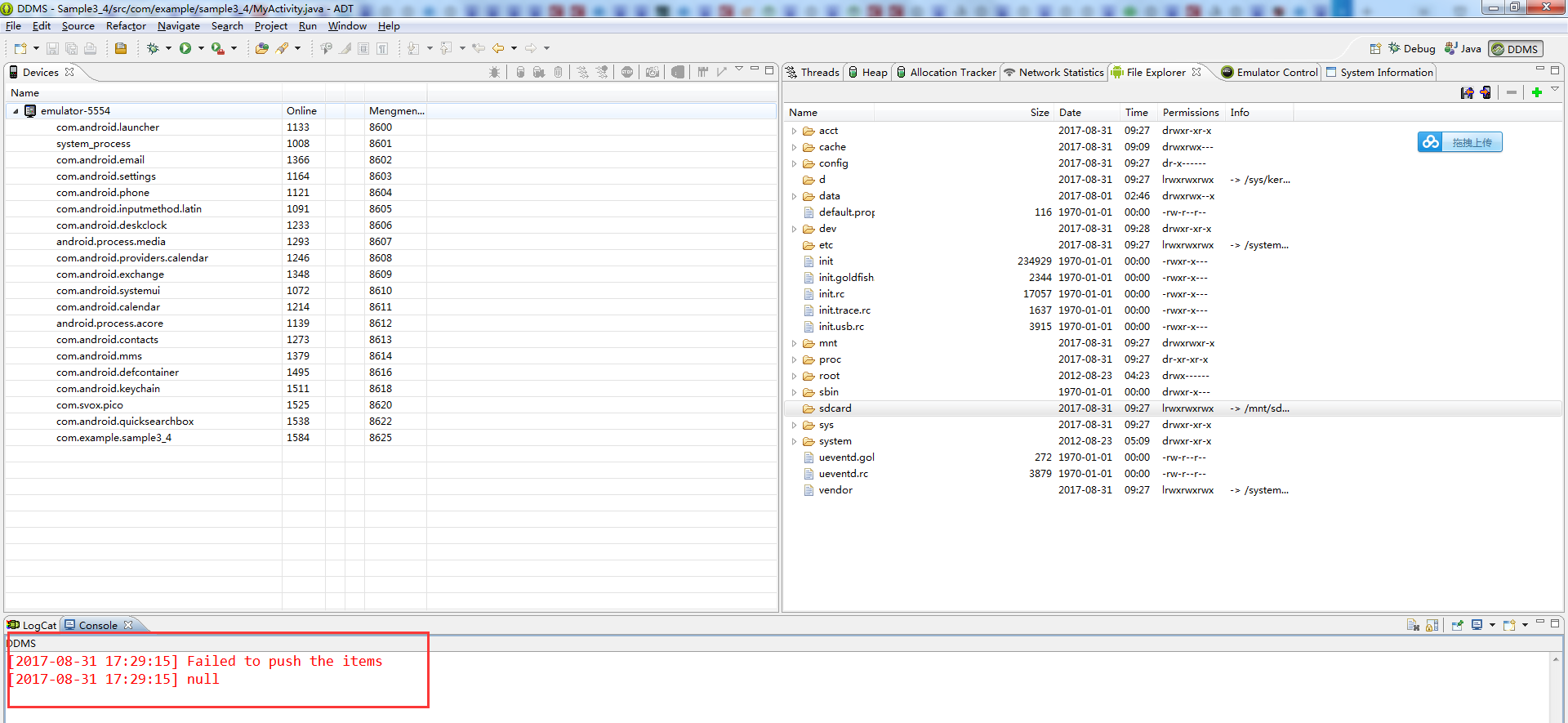
错误的解决方法请参考:http://liangruijun.blog.51cto.com/3061169/673776
3.3.2 访问手机中的存储文件夹
3.3.3 读取assets中的文件
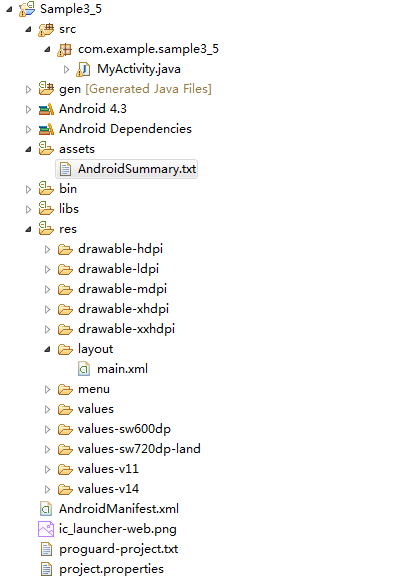
package com.example.sample3_5;

import java.io.ByteArrayOutputStream;

import java.io.IOException;

import java.io.InputStream;

import android.os.Bundle;

import android.app.Activity;

import android.content.res.AssetManager;

import android.content.res.Resources;

//import android.view.Menu;

import android.view.View;

import android.widget.Button;

import android.widget.EditText;

import android.widget.Toast;

public class MyActivity extends Activity {

    private Button but;             //打开按钮

    private EditText etContent;

    @Override

    protected void onCreate(Bundle savedInstanceState) {

        super.onCreate(savedInstanceState);

        setContentView(R.layout.main);

        but = (Button) findViewById(R.id.Button01);

        but.setOnClickListener(new View.OnClickListener() {

            //private EditText etContent;

            //private String contentResult;

            @Override

            public void onClick(View v) {

                etContent = (EditText) findViewById(R.id.EditText01);

                loadFromAssert("AndroidSummary.txt");

            }

        });

    }

/*

    @Override

    public boolean onCreateOptionsMenu(Menu menu) {

        // Inflate the menu; this adds items to the action bar if it is present.

        getMenuInflater().inflate(R.menu.main, menu);

        return true;

    }*/

    //public String loadFromAssert(String fileName){

    public void loadFromAssert(String fileName){

        //String content = null;                                   //结果字符串

        //final String content = null;                                   //结果字符串

        try {

            //InputStream is = this.getResources().getAssets().open(fileName);

            Resources resources = this.getResources();

            AssetManager assets = resources.getAssets();

            InputStream is = assets.open(fileName);

            int ch = 0;

            ByteArrayOutputStream baos = new ByteArrayOutputStream();

            byte[] buff = null;

            while((ch=is.read())!=-1){

                baos.write(ch);

            }

            buff = baos.toByteArray();

            baos.close();

            is.close();

            //content = new String(buff,"UTF-8");

            final String content = new  String(buff,"UTF-8");                                   //结果字符串

            runOnUiThread(new Runnable(){

                @Override

                public void run() {

                    // TODO Auto-generated method stub

                    etContent.setText(content);

                }

            });

        } catch (IOException e) {

            // TODO Auto-generated catch block

            Toast.makeText(this, "对不起,没有找到指定文件!!!", Toast.LENGTH_SHORT).show();

            e.printStackTrace();

        }

        //return content;

    }

}
package com.example.sample3_5;

import java.io.ByteArrayOutputStream;

import java.io.IOException;

import java.io.InputStream;

import android.os.Bundle;

import android.app.Activity;

import android.content.res.AssetManager;

import android.content.res.Resources;

//import android.view.Menu;

import android.view.View;

import android.widget.Button;

import android.widget.EditText;

import android.widget.Toast;

public class MyActivity extends Activity {

    private Button but;             //打开按钮

    @Override

    protected void onCreate(Bundle savedInstanceState) {

        super.onCreate(savedInstanceState);

        setContentView(R.layout.main);

        but = (Button) findViewById(R.id.Button01);

        but.setOnClickListener(new View.OnClickListener() {

            @Override

            public void onClick(View v) {

                EditText etContent = (EditText) findViewById(R.id.EditText01);

                String contentResult = loadFromAssert("AndroidSummary.txt");

                etContent.setText(contentResult);

            }

        });

    }

/*

    @Override

    public boolean onCreateOptionsMenu(Menu menu) {

        // Inflate the menu; this adds items to the action bar if it is present.

        getMenuInflater().inflate(R.menu.main, menu);

        return true;

    }*/

    public String loadFromAssert(String fileName){

        String content = null;                                   //结果字符串

        try {

            InputStream is = this.getResources().getAssets().open(fileName);

            int ch = 0;

            ByteArrayOutputStream baos = new ByteArrayOutputStream();

            byte[] buff = null;

            while((ch=is.read())!=-1){

                baos.write(ch);

            }

            buff = baos.toByteArray();

            baos.close();

            is.close();

            content = new String(buff,"UTF-8");

        } catch (IOException e) {

            // TODO Auto-generated catch block

            Toast.makeText(this, "对不起,没有找到指定文件!!!", Toast.LENGTH_SHORT).show();

            e.printStackTrace();

        }

        return content;

    }

}
<?xml version="1.0" encoding="utf-8"?>

<manifest xmlns:android="http://schemas.android.com/apk/res/android"

    package="com.example.sample3_5"

    android:versionCode="1"

    android:versionName="1.0" >

    <uses-sdk

        android:minSdkVersion="8"

        android:targetSdkVersion="17" />

    <application

        android:allowBackup="true"

        android:icon="@drawable/icon"

        android:label="@string/app_name"

        android:theme="@style/AppTheme" >

        <activity

            android:name="com.example.sample3_5.MyActivity"

            android:label="@string/app_name" >

            <intent-filter>

                <action android:name="android.intent.action.MAIN" />

                <category android:name="android.intent.category.LAUNCHER" />

            </intent-filter>

        </activity>

    </application>

</manifest>
<?xml version="1.0" encoding="utf-8"?>

<LinearLayout xmlns:android="http://schemas.android.com/apk/res/android"

    android:layout_width="fill_parent"

    android:layout_height="fill_parent"

    android:orientation="vertical" >

    <Button

        android:text="打开"

        android:id="@+id/Button01"

        android:layout_width="fill_parent"

        android:layout_height="wrap_content"

        >

        </Button>                              <!-- 添加Button按钮 -->

       <ScrollView

           android:id="@+id/ScrollView01"

           android:layout_height="wrap_content"

           android:layout_width="fill_parent">

           <EditText

             android:editable="false"

               android:id="@+id/EditText01"

               android:layout_width="fill_parent"

               android:layout_height="wrap_content"

               >

               </EditText>                         <!-- 添加EditText -->

           </ScrollView>                           <!-- 添加ScrollView -->

</LinearLayout>
3.3 文件I/O的更多相关文章
- Mapreduce的文件和hbase共同输入
Mapreduce的文件和hbase共同输入 package duogemap; import java.io.IOException; import org.apache.hadoop.co ...
- mapreduce多文件输出的两方法
mapreduce多文件输出的两方法 package duogemap; import java.io.IOException; import org.apache.hadoop.conf ...
- 01.SQLServer性能优化之----强大的文件组----分盘存储
汇总篇:http://www.cnblogs.com/dunitian/p/4822808.html#tsql 文章内容皆自己的理解,如有不足之处欢迎指正~谢谢 前天有学弟问逆天:“逆天,有没有一种方 ...
- SQL Server 大数据搬迁之文件组备份还原实战
一.本文所涉及的内容(Contents) 本文所涉及的内容(Contents) 背景(Contexts) 解决方案(Solution) 搬迁步骤(Procedure) 搬迁脚本(SQL Codes) ...
- SQLSERVER将一个文件组的数据移动到另一个文件组
SQLSERVER将一个文件组的数据移动到另一个文件组 有经验的大侠可以直接忽视这篇文章~ 这个问题有经验的人都知道怎麽做,因为我们公司的数据量不大没有这个需求,也不知道怎麽做实验 今天求助了QQ群里 ...
- SQL Server中的高可用性(2)----文件与文件组
在谈到SQL Server的高可用性之前,我们首先要谈一谈单实例的高可用性.在单实例的高可用性中,不可忽略的就是文件和文件组的高可用性.SQL Server允许在某些文件损坏或离线的情况下,允 ...
- C# ini文件操作【源码下载】
介绍C#如何对ini文件进行读写操作,C#可以通过调用[kernel32.dll]文件中的 WritePrivateProfileString()和GetPrivateProfileString()函 ...
- 【小程序分享篇 一 】开发了个JAVA小程序, 用于清除内存卡或者U盘里的垃圾文件非常有用
有一种场景, 手机内存卡空间被用光了,但又不知道哪个文件占用了太大,一个个文件夹去找又太麻烦,所以我开发了个小程序把手机所有文件(包括路径下所有层次子文件夹下的文件)进行一个排序,这样你就可以找出哪个 ...
- 【原】Android热更新开源项目Tinker源码解析系列之二:资源文件热更新
上一篇文章介绍了Dex文件的热更新流程,本文将会分析Tinker中对资源文件的热更新流程. 同Dex,资源文件的热更新同样包括三个部分:资源补丁生成,资源补丁合成及资源补丁加载. 本系列将从以下三个方 ...
- GreenDao 数据库:使用Raw文件夹下的数据库文件以及数据库升级
一.使用Raw文件夹下的数据库文件 在使用GreenDao框架时,数据库和数据表都是根据生成的框架代码来自动创建的,从生成的DaoMaster中的OpenHelper类可以看出: public sta ...
随机推荐
- 将vim的UltiSnips的快捷键彻底从tab键中分离
在我之前的<<vim之补全1>>和<<vim之补全2>>中曾经成功的将vim的supertab和UltiSnips共用一个tab键, 这样做的优点的两种 ...
- 用nginx实现分布式限流
1.前言 一般对外暴露的系统,在促销或者黑客攻击时会涌来大量的请求,为了保护系统不被瞬间到来的高并发流量给打垮, 就需要限流 . 本文主要阐述如何用nginx 来实现限流. 听说 Hystrix 也可 ...
- 2018年为什么要学习Linux?Linux运维的前景还好吗?
Linux一直是很多人入行IT的首选,无论是从入行难度还是职业寿命来说,Linux运维都比开发有着更大的优势.为了得到高薪工作,很多人在Linux学习过程中付出了非常大的努力,最终也得到了不错的收获. ...
- PAT_A1018#Public Bike Management
Source: PAT A1018 Public Bike Management (30 分) Description: There is a public bike service in Hangz ...
- 16.2 【C# 5】调用者信息特性
16.2.1 基本行为 .NET 4.5引入了三个新特性(attribute),即 CallerFilePathAttribute . CallerLineNumber- Attribute 和 Ca ...
- 16.1 foreach 循环中捕获变量的变化
在 foreach 循环内的匿名函数(通常为Lambda表达式)中捕获循环 变量时要格外小心.代码清单16-1就展示了这样一个简单的示例,它看上去似乎会输出 x . y . z . string[] ...
- POJ-2135-Farm Tour(最大费用最小流)模板
Farm Tour POJ - 2135 When FJ's friends visit him on the farm, he likes to show them around. His farm ...
- Python 7 列表 for 字典,嵌套
列表: 基本格式:变量名 = [元素1,元素2,元素3] 创建:A = ['访客','admin',19] 或 A = list(['armin','admin',19]), 后者更倾向于转换为 ...
- win7安装gmpy2
1.下载地址:https://pypi.python.org/pypi/gmpy2 2.安装python和pip python 安装 下载: https://www.python.org/getit/ ...
- ural 1468
写了好久,不知道为什么不过,也不清楚到底卡在哪里... 只好看别人的代码,感觉除了HASH不一样外,倒没什么特别之处.同时参考那论文写的.. http://blog.csdn.net/jyysc201 ...