
Service(服务)简单使用
1.Service(服务)是一个一种可以在后台执行长时间运行操作而没有用户界面的应用组件。服务可由其他应用组件启动(如Activity),服务一旦被启动将在后台一直运行,即使启动服务的组件(Activity)已销毁也不受影响。
2.Service的创建
public class MyService extends Service {

    private static final String TAG = "MyService";

public MyService() {

    }

    @Override

    public IBinder onBind(Intent intent) {

        Log.i(TAG, "onBind: ");

        throw new UnsupportedOperationException("Not yet implemented");

    }
@Override
public void onCreate() {
    super.onCreate();
    Log.i(TAG, "onCreate: ");

}

@Override
public void onDestroy() {
    super.onDestroy();
    Log.i(TAG, "onDestroy1: ");
}

@Override
public int onStartCommand(Intent intent, int flags, int startId) {
    Log.i(TAG, "onStartCommand: ");
    return super.onStartCommand(intent, flags, startId);

}
}
配置:exported="true"表示允许当前程序之外的程序访问该服务。 enabled="true"表示是否启用该服务。
   <service

            android:name=".MyService"

            android:enabled="true"

            android:exported="true"></service>
服务的2个启动方式:
<1>启动状态
当应用组件(如 Activity)通过调用 startService() 启动服务时,服务即处于“启动”状态。一旦启动,服务即可在后台无限期运行,即使启动服务的组件已被销毁也不受影响,除非手动调用才能停止服务, 已启动的服务通常是执行单一操作,而且不会将结果返回给调用方。
 Intent intent=new Intent(this,MyService.class);

 startService(intent);
 // stopService(intent);
运行程序时会调用程序的 onCreate, onStartCommand
当退出程序再次进入时,会调用onStartCommand,服务创建后再次启动,不会再次调用OnCreate方法。
<2>绑定状态
当应用组件通过调用 bindService() 绑定到服务时,服务即处于“绑定”状态。绑定服务提供了一个客户端-服务器接口,允许组件与服务进行交互、发送请求、获取结果,甚至是利用进程间通信 (IPC) 跨进程执行这些操作。 仅当与另一个应用组件绑定时,绑定服务才会运行。 多个组件可以同时绑定到该服务,但全部取消绑定后,该服务即会被销毁。
public class MyService extends Service {

    private static final String TAG = "MyService";

    private DownloadBinder mBinder=new DownloadBinder();

    public MyService() {

    }

    class DownloadBinder extends Binder{

        public void startDown(){

            Log.i(TAG, "startDown: ");
        // 这里添加操作

        }

    }

    @Override

    public IBinder onBind(Intent intent) {

        // TODO: Return the communication channel to the service.

        Log.i(TAG, "onBind: ");

        return mBinder;

    }

    @Override

    public void onCreate() {

        super.onCreate();

        Log.i(TAG, "onCreate: ");

    }

    @Override

    public void onDestroy() {

        super.onDestroy();

        Log.i(TAG, "onDestroy1: ");

    }

    @Override

    public int onStartCommand(Intent intent, int flags, int startId) {

        Log.i(TAG, "onStartCommand: ");

        return super.onStartCommand(intent, flags, startId);

    }

}
public class MainActivity extends AppCompatActivity {

    private MyService.DownloadBinder downloadBinder;

    private ServiceConnection connection=new ServiceConnection() {

        @Override

        public void onServiceConnected(ComponentName name, IBinder service) {

            downloadBinder= (MyService.DownloadBinder) service;

            downloadBinder.startDown();

        }

        @Override

        public void onServiceDisconnected(ComponentName name) {

        }

    };

    @Override

    protected void onCreate(Bundle savedInstanceState) {

        super.onCreate(savedInstanceState);

        setContentView(R.layout.activity_main);

        Intent intent=new Intent(this,MyService.class);

        bindService(intent,connection,BIND_AUTO_CREATE);

    }

    @Override

    protected void onDestroy() {

        super.onDestroy();

        unbindService(connection);

    }

}
运行启动程序会调用:onCreate onBind (downloadBinder.startDown()) 由于使用的bind启动方式,当activity销毁时,Service也会被销毁。
3.使用前台服务
Service几乎都是在后台运行的,但是服务的优先级比较低,当系统出现内存不足的情况时,就有可能会被回收掉。如果希望服务可以一直保持运行状态,而不会被系统内存不足的原因导致回收,我们可以考虑使用前天服务。前台服务与后台服务的不同在于,前台服务会一直有一个运行的图标在系统的状态栏显示。下拉状态栏时可以看到更多的信息。类似通知的效果。
创建一个前台服务:
在Service中的onCreate中,创建通知。
   @Override

    public void onCreate() {

        super.onCreate();

        Log.i(TAG, "onCreate: ");

        Intent intent1=new Intent(this,MainActivity.class);

        PendingIntent pi=PendingIntent.getActivity(this,0, intent1,0);

        Notification notification=new Notification.Builder(this)

                .setContentTitle("天气预告")

                .setContentText("天气晴朗,多云")

                .setWhen(System.currentTimeMillis())

                .setSmallIcon(R.mipmap.yun)

               .setLargeIcon(BitmapFactory.decodeResource(getResources(),R.mipmap.yun))

                .setContentIntent(pi)

                .build();

        startForeground(1,notification);

    }
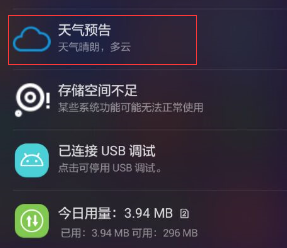
使用Inten启动Service,调用,onCreate,onStartCommand。当删去该通知时并没有销毁Service,没有走onDestory。
 Intent intent=new Intent(this,MyService.class);

 startService(intent);
4. IntentService 类
Service中的代码默认是运行在主线程中的,因此不能直接在Service中处理一些耗时操作。而IntentService很好的帮助我们可以在其中进行操作,并会自动停止服务。
public class MyIntentService extends IntentService {

    private static final String TAG = "MyIntentService";

    public MyIntentService() {

        /**

         * 必须实现父类的有参构造

         */

        super("MyIntentService");

    }

    @Override

    protected void onHandleIntent(Intent intent) {

        /**

         *   Intent是从Activity发过来的,携带识别参数,根据参数不同执行不同的任务

         */

        String action = intent.getExtras().getString("param");

        if(action.equals("100")){

            Log.i(TAG, "onHandleIntent: 100");

        }else{

                Log.i(TAG, "onHandleIntent: 200");

            }

        try {

            Thread.sleep(2000);

        } catch (InterruptedException e) {

            e.printStackTrace();

        }

    }

}
     Intent startServiceIntent = new Intent(this,MyIntentService.class);

        Bundle bundle = new Bundle();

        bundle.putString("param", "200");

        startServiceIntent.putExtras(bundle);

        startService(startServiceIntent);
5.生命周期
<1>通过startService启动服务
Intent intent=new Intent(MainActivity.this,MyService.class);

startService(intent);
第一次调用onCreate ,onStartCommand 再次多次启动只会走onStartCommand方法,而不会再走onCreate方法。
<2>通过stopService停止服务
  Intent intent=new Intent(MainActivity.this,MyService.class);

  stopService(intent);
调用方法:onDestroy
<3>通过bindService启动服务:
调用方法: onCreate onBind,当多次启动bindService时 onCreate onBind都不会再调用,都是只执行一次。
<4>通过unbindService(connection)停止:
调用方法 onUnbind onDestroy 多次调用unbindService也是只走一次 onUnbind onDestroy 。
Service(服务)简单使用的更多相关文章
- linux添加软件的service start/stop快捷服务(简单版)
首先我们先需要一款软件,例如“apache” 安装解压至相应目录“/home/aaa/apache” 开始操作:进入“/etc/init.d/”中,新建一个service服务运行脚本“tomcat”, ...
- Android 综合揭秘 —— 全面剖释 Service 服务
引言 Service 服务是 Android 系统最常用的四大部件之一,Android 支持 Service 服务的原因主要目的有两个,一是简化后台任务的实现,二是实现在同一台设备当中跨进程的远程信息 ...
- Android中Service(服务)详解
http://blog.csdn.net/ryantang03/article/details/7770939 Android中Service(服务)详解 标签: serviceandroidappl ...
- Android Service 服务
一. Service简介 Service是android 系统中的四大组件之一(Activity.Service.BroadcastReceiver.ContentProvider),它跟Activi ...
- C# Windows Service服务的创建和调试
前言 关于Windows服务创建和调试的文章在网络上的很多文章里面都有,直接拿过来贴在这里也不过仅仅是个记录,不会让人加深印象.所以本着能够更深刻了解服务项目的创建和调试过程及方法的目的,有了这篇记录 ...
- Android Service 服务(一)—— Service .
http://blog.csdn.net/ithomer/article/details/7364024 一. Service简介 Service是android 系统中的四大组件之一(Activit ...
- User Profile Service服务未能登录,无法登录
不知你是否遇到这样的问题,某一天你打开PC,开机正常,可当你输入正确的密码回车,却发现Vista或Win7拒绝让你登录,提示"User Profile Service 服务未能登录.无法加载 ...
- .NET C# 创建WebService服务简单的例子
Web service是一个基于可编程的web的应用程序,用于开发分布式的互操作的应用程序,也是一种web服务 WebService的特性有以下几点: 1.使用XML(标准通用标记语言)来作为数据交互 ...
- Linux下用gSOAP开发Web Service服务端和客户端程序
网上本有一篇流传甚广的C版本的,我参考来实现,发现有不少问题,现在根据自己的开发经验将其修改,使用无误:另外,补充同样功能的C++版本,我想这个应该更有用,因为能用C++,当然好过受限于C. 1.gS ...
随机推荐
- Django 的 一些基本操作:视图函数,路由配置
当安装好Django 通过上篇的随笔创好项目我们就能来耍下了, 但你会在你的项目中发现有一个settings.py 的文件,对的你肯定想到了需要配置,好了话不多说 Settings.py 找到下面的位 ...
- VMware虚拟机共享文件夹问题: /mnt下没有hgfs文件夹
在使用vmware虚拟机共享文件夹功能的时候,发现在/mnt目录下面没有hgfs文件夹,但是vmware-tool的命令vmhgfs-fuse确实存在于系统中.在使用vmhgfs-fuse建立宿主机到 ...
- 【leecode】小练习(简单8题)
def twoSum(nums, target): """ 给定 nums = [2, 7, 11, 15], target = 9 因为 nums[0] + nums[ ...
- JSCH实现文件上传下载至sftp服务器
文件服务器采用FreeSSHd,文件服务器配置就不细说了. 直接上代码,该代码可以直接使用. import com.jcraft.jsch.*; import java.io.InputStream; ...
- Vue学习之路第十一篇:为页面元素设置class类样式
1.class为页面元素的一个属性,通过前面第五篇的内容可知,操作属性需要使用到v-bind指定(也可简写为 :). 2.先来看一个简单的页面样式内容: <!DOCTYPE html> & ...
- CENTOS 7发送邮件测试
centos7作为126邮箱客户端发送邮件测试. 首先安装客户端软件: yum install sendmail mailx -y 配置邮箱设置: 开启smtp发件协议 配置授权码,写入配置文件. 追 ...
- assound.conf
pcm.!dmix {type dmixipc_key 5678293ipc_key_add_uid yesslave {pcm "hw:0,0"period_time 0peri ...
- uni-app 之验证码
手机APP---验证码 最近公司在开发手机APP,app避不可免的就是登录了,emmmm 登录验证码那必须的是有的,我们公司发给我们的图片是酱紫的~~ 这个要求大家应该都能看懂,做这个手机号啊,验证码 ...
- Ubuntu中无法update的解决办法
我输入 sudo apt-get update 出现错误: /etc/apt$ sudo apt-get update Err http://security.ubuntu.com precise-s ...
- PatentTips - Optimizing power usage by factoring processor architectural events to PMU
BACKGROUND Processor power consumption has become a major issue in recent years. The current trend o ...