
【转】Maven的安装与使用(ubuntu)
原文: http://www.cnblogs.com/yunwuzhan/p/5900311.html
https://maven.apache.org/guides/getting-started/maven-in-five-minutes.html
Maven in 5 Minutes
Prerequisites
You must have an understanding of how to install software on your computer. If you do not know how to do this, please ask someone at your office, school, etc or pay someone to explain this to you. The Maven mailing lists are not the best place to ask for this advice.
Installation
Maven is a Java tool, so you must have Java installed in order to proceed.
First, download Maven and follow the installation instructions. After that, type the following in a terminal or in a command prompt:
- mvn --version
It should print out your installed version of Maven, for example:
- Apache Maven 3.0.5 (r01de14724cdef164cd33c7c8c2fe155faf9602da; 2013-02-19 14:51:28+0100)
- Maven home: D:\apache-maven-3.0.5\bin\..
- Java version: 1.6.0_25, vendor: Sun Microsystems Inc.
- Java home: C:\Program Files\Java\jdk1.6.0_25\jre
- Default locale: nl_NL, platform encoding: Cp1252
- OS name: "windows 7", version: "6.1", arch: "amd64", family: "windows"
Depending upon your network setup, you may require extra configuration. Check out the Guide to Configuring Maven if necessary.
If you are using Windows, you should look at Windows Prerequisites to ensure that you are prepared to use Maven on Windows.
Creating a Project
You will need somewhere for your project to reside, create a directory somewhere and start a shell in that directory. On your command line, execute the following Maven goal:
- mvn archetype:generate -DgroupId=com.mycompany.app -DartifactId=my-app -DarchetypeArtifactId=maven-archetype-quickstart -DinteractiveMode=false
If you have just installed Maven, it may take a while on the first run. This is because Maven is downloading the most recent artifacts (plugin jars and other files) into your local repository. You may also need to execute the command a couple of times before it succeeds. This is because the remote server may time out before your downloads are complete. Don't worry, there are ways to fix that.
You will notice that the generate goal created a directory with the same name given as the artifactId. Change into that directory.
- cd my-app
Under this directory you will notice the following standard project structure.

The src/main/java directory contains the project source code, the src/test/java directory contains the test source, and the pom.xml file is the project's Project Object Model, or POM.
The POM
The pom.xml file is the core of a project's configuration in Maven. It is a single configuration file that contains the majority of information required to build a project in just the way you want. The POM is huge and can be daunting in its complexity, but it is not necessary to understand all of the intricacies just yet to use it effectively. This project's POM is:
- <project xmlns="http://maven.apache.org/POM/4.0.0" xmlns:xsi="http://www.w3.org/2001/XMLSchema-instance"
- xsi:schemaLocation="http://maven.apache.org/POM/4.0.0 http://maven.apache.org/xsd/maven-4.0.0.xsd">
- <modelVersion>4.0.0</modelVersion>
- <groupId>com.mycompany.app</groupId>
- <artifactId>my-app</artifactId>
- <version>1.0-SNAPSHOT</version>
- <packaging>jar</packaging>
- <name>Maven Quick Start Archetype</name>
- <url>http://maven.apache.org</url>
- <dependencies>
- <dependency>
- <groupId>junit</groupId>
- <artifactId>junit</artifactId>
- <version>4.8.2</version>
- <scope>test</scope>
- </dependency>
- </dependencies>
- </project>
What did I just do?
You executed the Maven goal archetype:generate, and passed in various parameters to that goal. The prefix archetype is the plugin that contains the goal. If you are familiar with Ant, you may conceive of this as similar to a task. This goal created a simple project based upon an archetype. Suffice it to say for now that a plugin is a collection of goals with a general common purpose. For example the jboss-maven-plugin, whose purpose is "deal with various jboss items".
Build the Project
- mvn package
The command line will print out various actions, and end with the following:
- ...
- [INFO] ------------------------------------------------------------------------
- [INFO] BUILD SUCCESSFUL
- [INFO] ------------------------------------------------------------------------
- [INFO] Total time: 2 seconds
- [INFO] Finished at: Thu Jul 07 21:34:52 CEST 2011
- [INFO] Final Memory: 3M/6M
- [INFO] ------------------------------------------------------------------------
Unlike the first command executed (archetype:generate) you may notice the second is simply a single word - package. Rather than a goal, this is a phase. A phase is a step in the build lifecycle, which is an ordered sequence of phases. When a phase is given, Maven will execute every phase in the sequence up to and including the one defined. For example, if we execute the compile phase, the phases that actually get executed are:
- validate
- generate-sources
- process-sources
- generate-resources
- process-resources
- compile
You may test the newly compiled and packaged JAR with the following command:
- java -cp target/my-app-1.0-SNAPSHOT.jar com.mycompany.app.App
Which will print the quintessential:
- Hello World!
------------------------------------------------------------------------------------------------------------
Maven的安装与使用(ubuntu)
一.安装Maven
1.下载Maven,http://mirrors.tuna.tsinghua.edu.cn/apache/maven/maven-3/3.3.9/binaries/apache-maven-3.3.9-bin.tar.gz。
2.解压,移动到相应文件夹:


3.在/etc/profile中配置对应环境变量:

4.mvn -v查看版本信息

二、Maven的使用及基本了解
创建java项目:

生成对应目录结构:
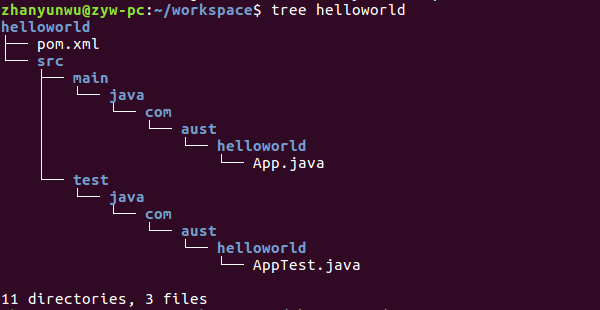
1)Maven插件:mvn archetype:generate 就表示调用maven-archetype-plugin的generate目标,实际上就是让maven-archetype-plugin生成一个很简单的项目结构,ubuntu中Ctrl+H可查看隐藏文件,我的插件在/home/zhanyunwu/.m2/repository/org/apache/maven/plugins/maven-archetype-plugin目录下。我们同样可以使用其他插件: ,在项目helloworld路径下运行,可发现在项目根目录下多了.classpath和.project文件,该插件使得项目可以导入到eclipse中去。还可以使用archetype插件选择其他模板建立如javaweb项目。
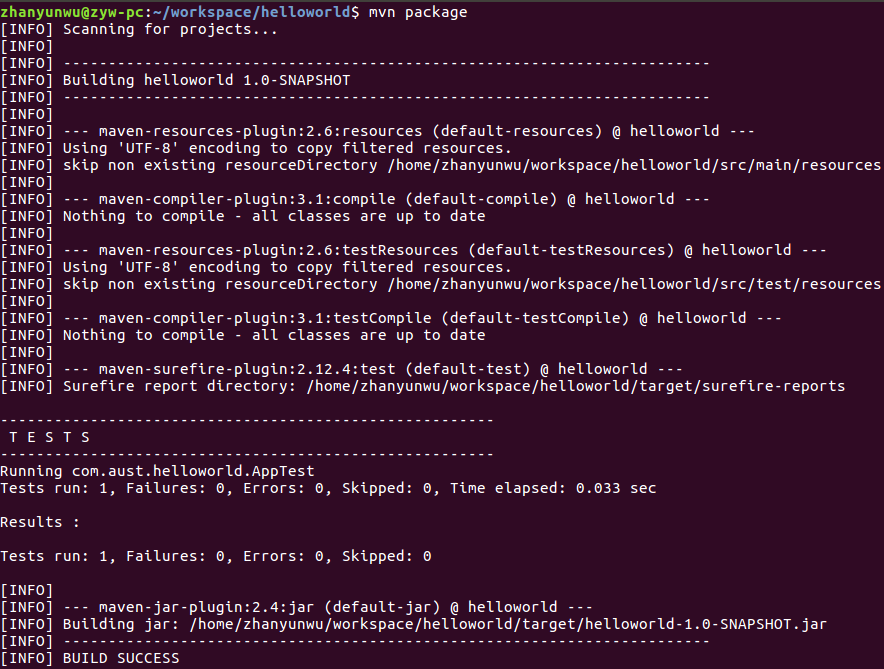
2)Maven生命周期:除了自己调用插件,也可把相应插件目标与生命周期阶段绑定,来调用插件。例如 在helloworld路径下mvn package 会依次执行默认生命周期中直到包括 package 阶段前的所有阶段的插件目标。如下图,调用编译,测试,打包等插件。
【转】Maven的安装与使用(ubuntu)的更多相关文章
- Maven的安装与使用(ubuntu)
一.安装Maven 1.下载Maven,http://mirrors.tuna.tsinghua.edu.cn/apache/maven/maven-3/3.3.9/binaries/apache-m ...
- Maven的安装、配置及使用入门
Maven的安装.配置及使用入门 本书代码下载 大家可以从我的网站下载本书的代码:http://www.juvenxu.com/mvn-in-action/,也可以通过我的网站与我取得联系,欢迎大家与 ...
- MyEclipse对Maven的安装
好记性不如烂笔头,记录一下. 操作系统:windows 7 MyEclipse2015 JDK1.7 maven的下载链接,点这里下载apache-maven-3.0.4-bin.tar.gz. 下载 ...
- 04.ubuntu下kvm 命令行安装64位ubuntu报"Couldn't find hvm kernel for Ubuntu tree."的问题
1.安装ubuntu时使用的virt-install的配置: virt-install \ --name test4 \ --ram 1024 \ --disk path=/data/01_ubunt ...
- (二)Maven的安装与环境配置
想要安装 Apache Maven在Windows 系统上, 需要下载 Maven 的 zip 文件,并将其解压到你想安装的目录,并配置 Windows 环境变量. 所需工具 : 1.JDK 2.Ma ...
- Maven的安装配置
本文主要是针对mac os系统下maven的安装教程. 1.首先验证是否有jdk.java -version,没有需要手工安装 2.maven的下载地址:http://maven.apache.org ...
- maven本地安装jar包同时生成pom文件
maven 本地安装jar包:mvn install:install-file -Dfile=本地路径/ojdbc12.jar -DgroupId=com.oracle -DartifactId=oj ...
- 64位win7硬盘安装64位ubuntu 13.04
最近本来是准备通过升级的方式把ubuntu从12.04升级到12.10再升级到13.04的,但是升级到12.10之后,可能是因为某一步的操作不当,出现无法进入系统的情况.不过还好的是升级之前保存了主要 ...
- MyEclipse下Maven的安装配置
Maven常用命令: •mvn archetype:generate :创建 Maven 项目 •mvn compile :编译源代码 •mvn test-compile :编译测试代码 •mvn t ...
随机推荐
- jQueryTools-Scrollable.js
转载一篇例子,学习使用: <!DOCTYPE html PUBLIC "-//W3C//DTD XHTML 1.0 Transitional//EN" "http: ...
- 关于GIT使用过程中遇到的问题
npm构建,将所需要安装的依赖添加至package.json文件中,使用cnpm i进行安装 #拉去指定项目的默认分支: git pull http://username:password@gitla ...
- C# 多线程系列(六)
同步 当多个线程共享一些数据的时候,我们就需要使用同步技术,确保一次只有一个线程访问合改变共享状态.注意,同步问题与争用和死锁有关. 例: ; static void Add() { ; i < ...
- Educational Codeforces Round 42 (Rated for Div. 2)
A. Equator(模拟) 找权值的中位数,直接模拟.. 代码写的好丑qwq.. #include<cstdio> #include<cstring> #include< ...
- React容器组件和展示组件
Presentational and Container Components 展示组件 - 只关心它们的样子. - 可能同时包含子级容器组件和展示组件,一般含DOM标签和自定的样式. ...
- SQL基本操作——HAVING
HAVING:在 SQL 中增加 HAVING 子句原因是,WHERE 关键字无法与合计函数一起使用. 我们拥有下面这个 "Orders" 表: O_Id OrderDate Or ...
- Spring Boot项目中使用 TrueLicense 生成和验证License(服务器许可)
一 简介 License,即版权许可证,一般用于收费软件给付费用户提供的访问许可证明.根据应用部署位置的不同,一般可以分为以下两种情况讨论: 应用部署在开发者自己的云服务器上.这种情况下用户通过账号登 ...
- AcDbTable 类
Table 例子学习笔记在这个例子中,ARX向我们展示了ACDBTABLE类的一些基本操作方法,ACDBTABLE类是ACAD2005及其以后的产品,应该是说ACDBDATATABLE的升级产品,Ac ...
- 【转载】使用IntelliJ IDEA 配置Maven(入门)
1. 下载Maven 官方地址:http://maven.apache.org/download.cgi 解压并新建一个本地仓库文件夹 2.配置本地仓库路径 3.配置maven环境变量 ...
- react typescript 父组件调用子组件
//父组件import * as React from 'react'import { Input } from 'antd'const Search = Input.Searchimport &qu ...