
iOS开发之新浪微博山寨版代码优化
之前发表过一篇博客“IOS开发之新浪围脖”,在编写代码的时候太偏重功能的实现了,写完基本功能后看着代码有些别扭,特别是用到的四种cell的类,重复代码有点多,所以今天花点时间把代码重构一下。为了减少代码的重复编写把cell中相同的部分抽象成父类,然后继承。不过也是结合着storyboard做的。在优化时转发的View和评论的View相似,于是就做了个重用。在原来的代码上就把cell的代码进行了重写,所以本篇作为补充,关键代码还得看之前的博客。
1.第一种cell,只有微博内容,没有图片,效果如下:
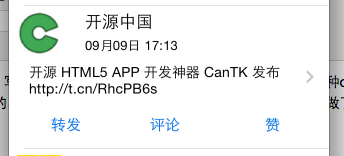
cell对应的代码如下:
TextTableViewCell.h
 #import <UIKit/UIKit.h>

 //TableView要回调的block,用于把cell中的按钮的tag传给TableView

 typedef  void (^MyCellBlock) (UITableViewCell * cell, int tag);

 @interface TextTableViewCell : UITableViewCell

 //接收block块

 -(void)setMyCellBlock:(MyCellBlock) block;

 //接收字典

 -(void) setDic:(NSDictionary *)dic;

 @end
TextTableViewCell.m(带图片的cell继承于这个cell)
 #import "TextTableViewCell.h"

 @interface TextTableViewCell()

 @property (strong, nonatomic) IBOutlet UIImageView *headImage;

 @property (strong, nonatomic) IBOutlet UILabel *nameLabel;

 @property (strong, nonatomic) IBOutlet UILabel *dateLabel;

 @property (strong, nonatomic) IBOutlet UILabel *weiboTextLabel;

 @property (strong, nonatomic) NSDictionary *dic;

 @property (strong, nonatomic) MyCellBlock block;

 @end

 @implementation TextTableViewCell

 //获取传入的block块

 -(void)setMyCellBlock:(MyCellBlock)block

 {

     self.block = block;

 }

 //获取传入的参数,用于给我们的cell中的标签赋值

 -(void) setDic:(NSDictionary *)dic

 {

     //设置头像

    [self.headImage setImageWithURL:[NSURL URLWithString:dic[@"user"][@"profile_image_url"]]];

     //设置昵称

     self.nameLabel.text = dic[@"user"][@"name"];

     //设置时间

     NSDateFormatter *iosDateFormater=[[NSDateFormatter alloc]init];

     iosDateFormater.dateFormat=@"EEE MMM d HH:mm:ss Z yyyy";

     //必须设置,否则无法解析

     iosDateFormater.locale=[[NSLocale alloc]initWithLocaleIdentifier:@"en_US"];

    NSDate *date=[iosDateFormater dateFromString:dic[@"created_at"]];

      //目的格式

      NSDateFormatter *resultFormatter=[[NSDateFormatter alloc]init];

      [resultFormatter setDateFormat:@"MM月dd日 HH:mm"];

     self.dateLabel.text = [resultFormatter stringFromDate:date];

     //设置微博博文

     self.weiboTextLabel.text = dic[@"text"];

 }

 //通过block回调来返回按钮的tag

 - (IBAction)tapCellButton:(id)sender {

     UIButton *button = sender;

     self.block(self, button.tag);

 }

 - (void)awakeFromNib

 {

     // Initialization code

 }

 - (void)setSelected:(BOOL)selected animated:(BOOL)animated

 {

     [super setSelected:selected animated:animated];

     // Configure the view for the selected state

 }

 @end
2、上面的代码有点多,如果我们再加第二个cell(原微博带图片的)就简单多了,可以继承与上面的cell
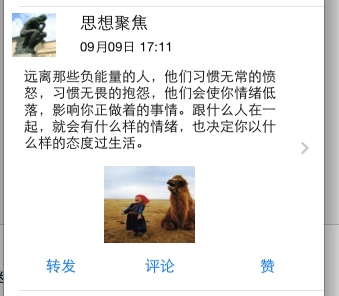
ImageTableViewCell.m的代码如下:(只把要添加的东西加上即可,是不是代码少多了)
@interface ImageTableViewCell()

@property (strong, nonatomic) IBOutlet UIImageView *contentImage;

@end

@implementation ImageTableViewCell

-(void)setDic:(NSDictionary *)dic

{

    [super setDic:dic];

    [self.contentImage setImageWithURL:[NSURL URLWithString:dic[@"thumbnail_pic"]]];

}

@end
3.第三种cell,是转发微博不带图片的,如下:
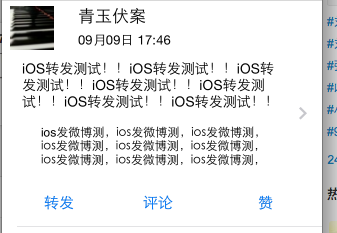
ReTextTableViewCell也是继承于TextTableViewCell. ReTextTableViewCell.m的代码如下:
 @interface ReTextTableViewCell ()

 @property (strong, nonatomic) IBOutlet UILabel *weiboTextLabel;

 @property (strong, nonatomic) IBOutlet NSLayoutConstraint *textHeightConstraint;

 @property (strong, nonatomic) IBOutlet UITextView *reTextView;

 @end

 @implementation ReTextTableViewCell

 -(void)setDic:(NSDictionary *)dic

 {

     [super setDic:dic];

     //移除约束

     [self removeConstraint:self.textHeightConstraint];

     //给据text的值求出textLabel的高度

     NSString *text = dic[@"text"];

     NSDictionary * dic1 = @{NSFontAttributeName: [UIFont systemFontOfSize:]};

     CGRect frame = [text boundingRectWithSize:CGSizeMake(, ) options:NSStringDrawingUsesLineFragmentOrigin attributes:dic1 context:nil];

     //创建新的约束

     NSString *heightValue = [NSString stringWithFormat:@"V:[_weiboTextLabel(%lf)]",frame.size.height+];

     NSArray *constraint = [NSLayoutConstraint constraintsWithVisualFormat:heightValue options: metrics:nil views:NSDictionaryOfVariableBindings(_weiboTextLabel)];

     self.textHeightConstraint = constraint[];

     [self addConstraint:self.textHeightConstraint];

     self.weiboTextLabel.text = text;

     self.reTextView.text = dic[@"retweeted_status"][@"text"];

 }

 @end
4.第四种cell就是转发带图片的啦,效果如下:
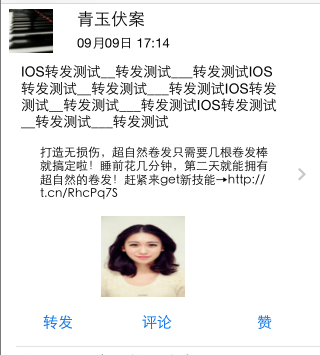
因为第四种cell只比第三种cell多啦张图片,所以继承于第三种cell即可,代码如下:
#import "ReImageTableViewCell.h"

@interface ReImageTableViewCell()

@property (strong, nonatomic) IBOutlet UIImageView *contentImageView;

@end

@implementation ReImageTableViewCell

-(void)setDic:(NSDictionary *)dic

{

    [super setDic:dic];

    [self.contentImageView setImageWithURL:[NSURL URLWithString:dic[@"retweeted_status"][@"thumbnail_pic"]]];

}

@end
来看一下最终的运行效果:

由上面的界面可以清楚的看到转发和评论的界面是基本一致的,所以我们在代码中可以用一个ViewController来控制这个视图,通过点击不同的按钮来拼接不同的url. 选择的业务逻辑如下:
     if ([self.tag isEqualToValue:@])

     {

         [self post:comments_create Content:@"comment"];

     }

     if ([self.tag isEqualToValue:@])

     {

         [self post:repost_test Content:@"status"];

     }
在转发页面中用到啦一个TextView, 我们给键盘上添加了一个Toolbar来进行键盘的回收,代码如下:
     //TextView的键盘定制回收按钮

     UIToolbar * toolBar = [[UIToolbar alloc]initWithFrame:CGRectMake(, , , )];

     UIBarButtonItem * item1 = [[UIBarButtonItem alloc]initWithBarButtonSystemItem:UIBarButtonSystemItemDone target:self action:@selector(tapDone:)];

     UIBarButtonItem * item2 = [[UIBarButtonItem alloc]initWithBarButtonSystemItem:UIBarButtonSystemItemFlexibleSpace target:nil action:nil];

     UIBarButtonItem * item3 = [[UIBarButtonItem alloc]initWithBarButtonSystemItem:UIBarButtonSystemItemFlexibleSpace target:nil action:nil];

     toolBar.items = @[item2,item1,item3];

     self.commentsTextView.inputAccessoryView =toolBar;
在要回调的方法中回收键盘:
 - (IBAction)tapDone:(id)sender {

     [self.commentsTextView resignFirstResponder];

 }
iOS开发之新浪微博山寨版代码优化的更多相关文章
- IOS开发之新浪微博OAuth2
说明:微博开放接口的调用,如发微博.关注等,都是需要获取用户身份认证的.目前微博开放平台用户身份鉴权主要采用的是OAuth2.0.为了方便开发者开发.测试自己的应用. OAuth2.0较1.0相比,整 ...
- IOS开发之微信山寨版
为了犒劳自己的学习内容,就山寨个微信的视图控制吧.拿着微信,仔细的看了一下,主要用到了TabBarController以及配置TabBarItem, NavigationController以及配置N ...
- 我的iOS开发系列博文
之前目录性的总结了发表过的关于OC方面的文章,今天在目录性的总结一下有关iOS开发的文章.走过路过不要错过哦,今天的博文也全都是干货.写技术博客与大家交流一下思想也是不错的. 下面是我的技术博客中有关 ...
- iOS开发之山寨版新浪微博小结
在之前的博客IOS开发之新浪围脖中获取微博的内容是使用我自己的access_token来请求的数据,那么如何让其他用户也能登陆并获取自己的微博内容呢?接下来就是OAuth和SSO出场的时候啦.OAut ...
- iOS开发之微信聊天工具栏的封装
之前山寨了一个新浪微博(iOS开发之山寨版新浪微博小结),这几天就山寨个微信吧.之前已经把微信的视图结构简单的拖了一下(IOS开发之微信山寨版),今天就开始给微信加上具体的实现功能,那么就先从微信的聊 ...
- iOS开发系列--通讯录、蓝牙、内购、GameCenter、iCloud、Passbook系统服务开发汇总
--系统应用与系统服务 iOS开发过程中有时候难免会使用iOS内置的一些应用软件和服务,例如QQ通讯录.微信电话本会使用iOS的通讯录,一些第三方软件会在应用内发送短信等.今天将和大家一起学习如何使用 ...
- iOS开发系列--网络开发
概览 大部分应用程序都或多或少会牵扯到网络开发,例如说新浪微博.微信等,这些应用本身可能采用iOS开发,但是所有的数据支撑都是基于后台网络服务器的.如今,网络编程越来越普遍,孤立的应用通常是没有生命力 ...
- iOS开发之浅谈MVVM的架构设计与团队协作
今天写这篇博客是想达到抛砖引玉的作用,想与大家交流一下思想,相互学习,博文中有不足之处还望大家批评指正.本篇博客的内容沿袭以往博客的风格,也是以干货为主,偶尔扯扯咸蛋(哈哈~不好好工作又开始发表博客啦 ...
- IOS开发基础知识碎片-导航
1:IOS开发基础知识--碎片1 a:NSString与NSInteger的互换 b:Objective-c中集合里面不能存放基础类型,比如int string float等,只能把它们转化成对象才可 ...
随机推荐
- Linux命令dos2unix 从windows转换到linux --- nuix2dos从linux转换到windows
dos2unix命令用来将DOS格式的文本文件转换成UNIX格式的(DOS/MAC to UNIX text file format converter).DOS下的文本文件是以\r\n作为断行标志的 ...
- 中文字符匹配js正则表达式
普遍使用的正则是[\u4e00-\u9fa5],但这个范围并不完整.例如: /[\u4e00-\u9fa5]/.test( '⻏' ) // 测试部首⻏,返回false 根据Unicode 5 ...
- JSON数据和对象
在js中像数字类型.字符串类型.布尔类型这些都不能再被拆分,属于基本类型.与之相对有一种复杂类型:对象类型,它是本身由多个其他类型组合而成的. 创建对象有两种方法,一.new Object()创建一个 ...
- IIS 连接 oracle报Oracle.DataAccess版本错误解决办法
通过IIS连接oracle时报“Could not load file or assembly 'Oracle.DataAccess, Version=2.112.3.0, Culture=neutr ...
- poj3629
//(队列)poj3629 /* #include <iostream> #include <queue> #include <algorithm> using n ...
- Smart3D系列教程3之 《论照片三维重建中Smart3D几个工作模块的功能意义》
[摘要] 近年来,倾斜摄影测量技术是国际测绘遥感领域近年发展起来的一项高新技术,利用照片进行三维重建成为一项关键性的技术.Smart3D软件,是照片三维重建主流软件之一,本文将就Smart3D建模软件 ...
- python 之 Django 小案例
一, F Q # F 使用查询条件的值 # # from django.db.models import F # models.Tb1.objects.update(num=F('num')+1) ...
- 有关于canvas几个新知识点
对于canvas的初学者来说,以下几点应该是不知道的知识点: 1.canvas有兼容IE6/7/8的脚本文件 下载地址:https://github.com/arv/explorercanvas 2. ...
- Unity之CharacterController 碰撞问题总结
CharacterController 不会受到scene的重力影响,自带物理碰撞检测,在脱离导航网格的应用场景下(比如飞行),是很有优势的Unity原生工具组件.如果在复杂的应用场景里,会有多种CC ...
- Excel表格数据导入到SQLServer数据库
转载:http://blog.csdn.net/lishuangzhe7047/article/details/8797416 步骤: 1,选择要插入的数据库--右键--任务--导入数据 2,点击下一 ...