
sysbench_fileio.sh
当我--file-total-size=30G 并且指定3个文件的时候,结果是产生3个10G的文件,然而--max-time=20被忽视了,虽然指定了20s的限制,实际上是在prepare阶段,--max-time参数无效
[root@jiangyi01.sqa.zmf /home/ahao.mah/ALIOS_QA/tools/sysbench]

#sysbench --batch --test=fileio --max-requests=0 --max-time=20 --num-threads=10 --file-num=3 --file-block-size=16384 --file-total-size=30G --file-fsync-all=on --file-test-mode=seqwr --file-fsync-freq=100   --file-fsync-mode=fsync --file-fsync-end=on prepare

sysbench 0.5:  multi-threaded system evaluation benchmark

3 files, 10485760Kb each, 30720Mb total

Creating files for the test...

Extra file open flags: 0

Creating file test_file.0

Creating file test_file.1

Creating file test_file.2

32212254720 bytes written in 239.40 seconds (128.32 MB/sec).
可见,确实是3个10G的文件
-rw------- 1 root root 10737418240 Jan 20 14:08 test_file.0

-rw------- 1 root root 10737418240 Jan 20 14:10 test_file.1

-rw------- 1 root root 10737418240 Jan 20 14:11 test_file.2

[root@jiangyi01.sqa.zmf /home/ahao.mah/ALIOS_QA/tools/sysbench]

#echo "10737418240/1024/1024/1024" | bc

10
从iostat -dx 可以看到prepare阶段,写入速度却是是在150MB/s左右
[root@jiangyi01.sqa.zmf /home/ahao.mah]

#iostat -dx 1

Device:         rrqm/s   wrqm/s     r/s     w/s    rkB/s    wkB/s avgrq-sz avgqu-sz   await r_await w_await  svctm  %util

sdb               0.00     0.00    0.00    0.00     0.00     0.00     0.00     0.00    0.00    0.00    0.00   0.00   0.00

sda               0.00     0.00    0.00  299.00     0.00 152576.00  1020.58   144.11  433.07    0.00  433.07   3.34 100.00

sdl               0.00     0.00    0.00    0.00     0.00     0.00     0.00     0.00    0.00    0.00    0.00   0.00   0.00

sdg               0.00     0.00    0.00    0.00     0.00     0.00     0.00     0.00    0.00    0.00    0.00   0.00   0.00

sdi               0.00     0.00    0.00    0.00     0.00     0.00     0.00     0.00    0.00    0.00    0.00   0.00   0.00

sdc               0.00     0.00    0.00    0.00     0.00     0.00     0.00     0.00    0.00    0.00    0.00   0.00   0.00
[root@jiangyi01.sqa.zmf /home/ahao.mah]

#echo "152576.00/1024" |bc

149

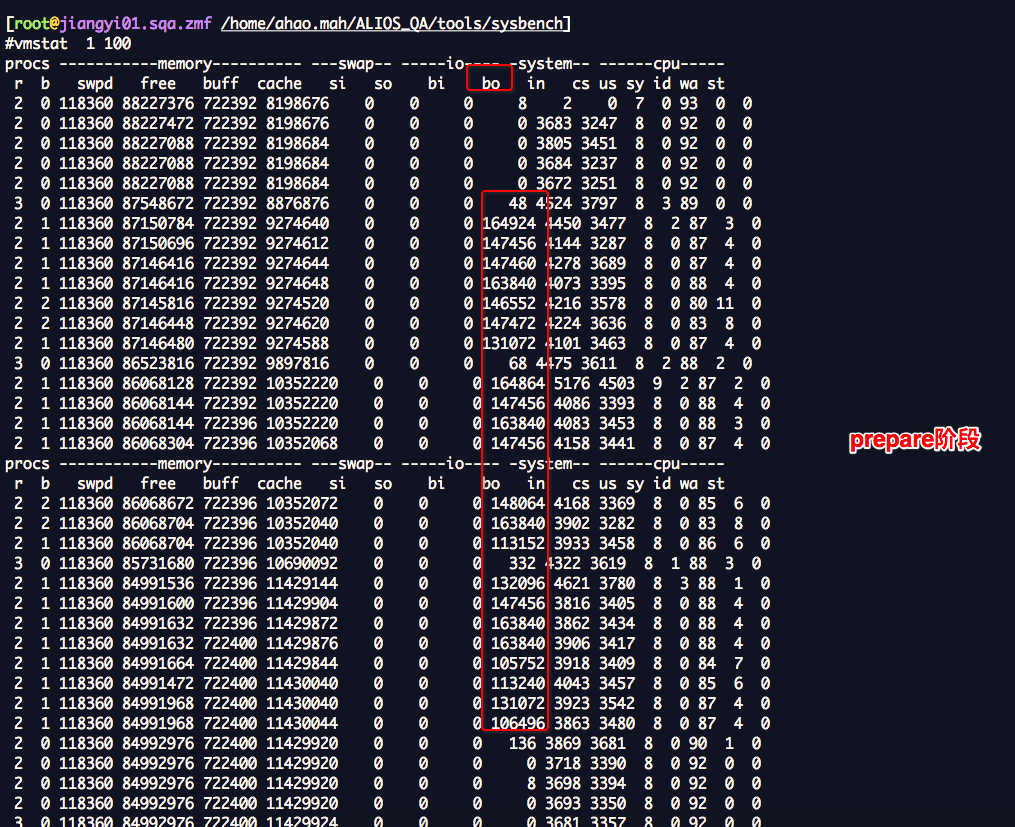
run阶段 ,可以指定--max-time=10 ,最大运行时间10s,
sysbench --batch --test=fileio --max-requests=0 --max-time=10 --num-threads=10 --file-num=3 --file-block-size=16384 --file-total-size=3G --file-fsync-all=on --file-test-mode=seqwr --file-fsync-freq=100 --file-fsync-mode=fsync --file-fsync-end=on run
[root@jiangyi01.sqa.zmf /home/ahao.mah/ALIOS_QA/tools/sysbench]

#sysbench --batch --test=fileio --max-requests=0 --max-time=10 --num-threads=10 --file-num=3 --file-block-size=16384 --file-total-size=3G --file-fsync-all=on --file-test-mode=seqwr --file-fsync-freq=100   --file-fsync-mode=fsync --file-fsync-end=on run

sysbench 0.5:  multi-threaded system evaluation benchmark

Running the test with following options:

Number of threads: 10

Random number generator seed is 0 and will be ignored

Extra file open flags: 0

3 files, 1Gb each

3Gb total file size

Block size 16Kb

Calling fsync() after each write operation.

Using synchronous I/O mode

Doing sequential write (creation) test

Threads started!

Operations performed:  0 reads, 3236 writes, 3236 Other = 6472 Total

Read 0b  Written 50.562Mb  Total transferred 50.562Mb  (5.053Mb/sec)

  323.39 Requests/sec executed

General statistics:

    total time:                          10.0064s

    total number of events:              3236

    total time taken by event execution: 99.3885s

    response time:

         min:                                 25.02ms

         avg:                                 30.71ms

         max:                                127.37ms

         approx.  95 percentile:              41.80ms

Threads fairness:

    events (avg/stddev):           323.6000/5.73

    execution time (avg/stddev):   9.9388/0.16
[root@jiangyi01.sqa.zmf /home/ahao.mah/ALIOS_QA/tools/sysbench]

#vmstat  1 100

procs -----------memory---------- ---swap-- -----io---- -system-- ------cpu-----

 r  b   swpd   free   buff  cache   si   so    bi    bo   in   cs us sy id wa st

 2  0 118252 88090768 722400 8331964    0    0     0     9    2    0  7  0 93  0  0

 2  0 118252 88090736 722400 8331964    0    0     0    64 3728 3371  8  0 92  0  0

 2  0 118252 88090704 722400 8331964    0    0     0     0 3711 3312  8  0 92  0  0

 3 10 118252 88221872 722400 8199968    0    0     0  1172 5417 6645  8  0 89  2  0

 2  1 118240 88219456 722400 8201592    0    0     0  5028 9756 14749  8  0 85  6  0

 2 10 118240 88216768 722400 8205732    0    0     0  5872 10912 17274  8  0 85  6  0

 2  1 118240 88213424 722400 8210756    0    0     0  5744 10617 16673  8  0 85  6  0

 2  1 118240 88207472 722400 8217140    0    0     0  6080 11200 17877  8  0 85  6  0

 2  1 118240 88199480 722400 8221092    0    0     0  5900 11029 17113  9  0 85  6  0

 2  1 118240 88195040 722400 8226416    0    0     0  6120 10819 17081  8  0 85  6  0

 2  1 118240 88190576 722400 8232228    0    0     0  5896 11299 18021  8  0 85  6  0

 4  7 118240 88185984 722400 8236884    0    0     0  6040 10974 17456  8  0 85  6  0

 2  1 118240 88179416 722400 8243020    0    0     0  6312 11982 19169  8  0 84  7  0

 3  0 118240 88175520 722400 8248028    0    0     0  3536 7896 11291  8  0 88  4  0

 2  0 118240 88173376 722400 8250004    0    0     0     8 3866 3435  8  0 92  0  0

 2  0 118240 88173344 722400 8250036    0    0     0     0 3681 3283  8  0 92  0  0

 2  0 118240 88173344 722400 8250036    0    0     0     0 3706 3308  8  0 92  0  0

 2  0 118240 88173344 722400 8250040    0    0     0     0 3677 3278  8  0 92  0  0

procs -----------memory---------- ---swap-- -----io---- -system-- ------cpu-----

 r  b   swpd   free   buff  cache   si   so    bi    bo   in   cs us sy id wa st

 3  0 118240 88172816 722400 8250040    0    0     0    40 3778 3419  8  0 91  0  0

^C
[root@jiangyi01.sqa.zmf /home/ahao.mah]

#iostat -dx 1 | grep sda

Linux 3.10.0-327.ali2000.alios7.x86_64 (jiangyi01.sqa.zmf) 	01/20/2017 	_x86_64_	(24 CPU)

Device:         rrqm/s   wrqm/s     r/s     w/s    rkB/s    wkB/s avgrq-sz avgqu-sz   await r_await w_await  svctm  %util

sda               0.07     2.86    0.10    3.44     1.83   204.26   116.29     0.17   47.86    5.16   49.14   3.33   1.18

sda               0.00     0.00    0.00    0.00     0.00     0.00     0.00     0.00    0.00    0.00    0.00   0.00   0.00

sda               0.00    42.00    0.00   60.00     0.00  1008.00    33.60     0.49    7.88    0.00    7.88   6.45  38.70

sda               0.00   115.00    0.00  326.00     0.00  5004.00    30.70     1.38    4.27    0.00    4.27   3.06  99.70

sda               0.00   130.00    0.00  384.00     0.00  5896.00    30.71     1.43    3.72    0.00    3.72   2.59  99.60

sda               0.00   128.00    0.00  373.00     0.00  5720.00    30.67     1.41    3.75    0.00    3.75   2.66  99.30

sda               0.00   134.00    0.00  396.00     0.00  6080.00    30.71     1.43    3.62    0.00    3.62   2.51  99.50

sda               0.00   131.00    0.00  384.00     0.00  5900.00    30.73     1.44    3.72    0.00    3.72   2.60  99.80

sda               0.00   139.00    0.00  399.00     0.00  6120.00    30.68     1.49    3.77    0.00    3.77   2.50  99.70

sda               0.00   126.00    0.00  372.00     0.00  5712.00    30.71     1.43    3.80    0.00    3.80   2.68  99.70

sda               0.00   134.00    0.00  396.00     0.00  6080.00    30.71     1.45    3.67    0.00    3.67   2.51  99.50

sda               0.00   140.00    0.00  408.00     0.00  6272.00    30.75     1.50    3.65    0.00    3.65   2.43  99.30

sda               0.00    88.00    0.00  256.00     0.00  3908.00    30.53     0.93    3.72    0.00    3.72   2.43  62.10

sda               0.00     0.00    0.00    2.00     0.00     8.00     8.00     0.00    0.00    0.00    0.00   0.00   0.00

sda               0.00     0.00    0.00    0.00     0.00     0.00     0.00     0.00    0.00    0.00    0.00   0.00   0.00

sda               0.00     0.00    0.00    0.00     0.00     0.00     0.00     0.00    0.00    0.00    0.00   0.00   0.00

sda               0.00     0.00    0.00    0.00     0.00     0.00     0.00     0.00    0.00    0.00    0.00   0.00   0.00

sda               0.00     8.00    0.00    2.00     0.00    40.00    40.00     0.03   16.00    0.00   16.00  16.00   3.20

sda               0.00     0.00    0.00    2.00     0.00     8.00     8.00     0.00    0.00    0.00    0.00   0.00   0.00

sda               0.00     0.00    0.00    0.00     0.00     0.00     0.00     0.00    0.00    0.00    0.00   0.00   0.00

^C
[root@jiangyi01.sqa.zmf /home/ahao.mah]

#pid=`ps axu | grep sysbench | grep -v grep | awk '{print $2}'`;top -Hp $pid

top - 16:13:03 up 7 days,  2:14,  6 users,  load average: 6.44, 3.96, 2.92

Threads:  11 total,   0 running,  11 sleeping,   0 stopped,   0 zombie

%Cpu(s):  8.3 us,  0.3 sy,  0.0 ni, 84.5 id,  6.8 wa,  0.0 hi,  0.0 si,  0.0 st

KiB Mem : 98795000 total, 88215232 free,  1637396 used,  8942372 buff/cache

KiB Swap:  2097148 total,  1979208 free,   117940 used. 96616128 avail Mem

   PID USER      PR  NI    VIRT    RES    SHR S %CPU %MEM     TIME+ COMMAND

 99140 root      20   0   59860   2888   2120 D  2.4  0.0   0:00.03 sysbench

 99141 root      20   0   59860   2888   2120 D  2.4  0.0   0:00.03 sysbench

 99142 root      20   0   59860   2888   2120 D  2.4  0.0   0:00.03 sysbench

 99143 root      20   0   59860   2888   2120 D  2.4  0.0   0:00.03 sysbench

 99145 root      20   0   59860   2888   2120 D  2.4  0.0   0:00.03 sysbench

 99146 root      20   0   59860   2888   2120 D  2.4  0.0   0:00.03 sysbench

 99147 root      20   0   59860   2888   2120 D  2.4  0.0   0:00.03 sysbench

 99148 root      20   0   59860   2888   2120 D  2.4  0.0   0:00.03 sysbench

 99139 root      20   0   59860   2888   2120 S  0.0  0.0   0:00.01 sysbench

 99144 root      20   0   59860   2888   2120 D  0.0  0.0   0:00.03 sysbench

 99149 root      20   0   59860   2888   2120 D  0.0  0.0   0:00.03 sysbench
04:11:36 PM  CPU    %usr   %nice    %sys %iowait    %irq   %soft  %steal  %guest  %gnice   %idle

04:11:37 PM  all    8.33    0.00    0.33    6.21    0.00    0.00    0.00    0.00    0.00   85.12

04:11:37 PM    0    0.00    0.00    0.00    2.00    0.00    0.00    0.00    0.00    0.00   98.00

04:11:37 PM    1  100.00    0.00    0.00    0.00    0.00    0.00    0.00    0.00    0.00    0.00

04:11:37 PM    2  100.00    0.00    0.00    0.00    0.00    0.00    0.00    0.00    0.00    0.00

04:11:37 PM    3    0.00    0.00    0.00    3.00    0.00    0.00    0.00    0.00    0.00   97.00

04:11:37 PM    4    0.00    0.00    0.00    2.02    0.00    0.00    0.00    0.00    0.00   97.98

04:11:37 PM    5    0.00    0.00    0.00    0.00    0.00    0.00    0.00    0.00    0.00  100.00

04:11:37 PM    6    0.00    0.00    1.00    6.00    0.00    0.00    0.00    0.00    0.00   93.00

04:11:37 PM    7    0.00    0.00    0.99   13.86    0.00    0.00    0.00    0.00    0.00   85.15

04:11:37 PM    8    0.00    0.00    0.00    8.08    0.00    0.00    0.00    0.00    0.00   91.92

04:11:37 PM    9    0.00    0.00    0.99    9.90    0.00    0.00    0.00    0.00    0.00   89.11

04:11:37 PM   10    0.00    0.00    0.00   13.13    0.00    0.00    0.00    0.00    0.00   86.87

04:11:37 PM   11    0.00    0.00    1.00   15.00    0.00    0.00    0.00    0.00    0.00   84.00

04:11:37 PM   12    0.00    0.00    0.00    0.00    0.00    0.00    0.00    0.00    0.00  100.00

04:11:37 PM   13    0.00    0.00    0.00    0.00    0.00    0.00    0.00    0.00    0.00  100.00

04:11:37 PM   14    0.00    0.00    0.00    0.00    0.00    0.00    0.00    0.00    0.00  100.00

04:11:37 PM   15    0.00    0.00    0.00    0.00    0.00    0.00    0.00    0.00    0.00  100.00

04:11:37 PM   16    0.00    0.00    0.00    0.00    0.00    0.00    0.00    0.00    0.00  100.00

04:11:37 PM   17    0.00    0.00    0.00    0.00    0.00    0.00    0.00    0.00    0.00  100.00

04:11:37 PM   18    0.00    0.00    0.00    3.00    0.00    0.00    0.00    0.00    0.00   97.00

04:11:37 PM   19    0.00    0.00    0.00    3.03    0.00    0.00    0.00    0.00    0.00   96.97

04:11:37 PM   20    0.00    0.00    0.99   63.37    0.00    0.00    0.00    0.00    0.00   35.64

04:11:37 PM   21    0.00    0.00    0.00    4.00    0.00    0.00    0.00    0.00    0.00   96.00

04:11:37 PM   22    0.00    0.00    1.00    2.00    0.00    0.00    0.00    0.00    0.00   97.00

04:11:37 PM   23    0.00    0.00    0.00    2.00    0.00    0.00    0.00    0.00    0.00   98.00

04:11:37 PM  CPU    %usr   %nice    %sys %iowait    %irq   %soft  %steal  %guest  %gnice   %idle

04:11:38 PM  all    8.34    0.00    0.25    6.09    0.00    0.00    0.00    0.00    0.00   85.32

04:11:38 PM    0    0.00    0.00    0.00    0.00    0.00    0.00    0.00    0.00    0.00  100.00

04:11:38 PM    1  100.00    0.00    0.00    0.00    0.00    0.00    0.00    0.00    0.00    0.00

04:11:38 PM    2  100.00    0.00    0.00    0.00    0.00    0.00    0.00    0.00    0.00    0.00

04:11:38 PM    3    0.00    0.00    0.00    0.00    0.00    0.00    0.00    0.00    0.00  100.00

04:11:38 PM    4    0.00    0.00    0.00    0.00    0.00    0.00    0.00    0.00    0.00  100.00

04:11:38 PM    5    0.00    0.00    0.00    0.00    0.00    0.00    0.00    0.00    0.00  100.00

04:11:38 PM    6    0.00    0.00    0.00   23.23    0.00    0.00    0.00    0.00    0.00   76.77

04:11:38 PM    7    0.00    0.00    1.00   36.00    0.00    0.00    0.00    0.00    0.00   63.00

04:11:38 PM    8    0.00    0.00    1.00   18.00    0.00    0.00    0.00    0.00    0.00   81.00

04:11:38 PM    9    0.00    0.00    1.00   23.00    0.00    0.00    0.00    0.00    0.00   76.00

04:11:38 PM   10    0.00    0.00    1.00    9.00    0.00    0.00    0.00    0.00    0.00   90.00

04:11:38 PM   11    0.00    0.00    0.00   16.16    0.00    0.00    0.00    0.00    0.00   83.84

04:11:38 PM   12    0.00    0.00    0.00    0.00    0.00    0.00    0.00    0.00    0.00  100.00

04:11:38 PM   13    0.00    0.00    0.00    0.00    0.00    0.00    0.00    0.00    0.00  100.00

04:11:38 PM   14    0.00    0.00    0.00    0.00    0.00    0.00    0.00    0.00    0.00  100.00

04:11:38 PM   15    0.00    0.00    0.00    0.00    0.00    0.00    0.00    0.00    0.00  100.00

04:11:38 PM   16    0.00    0.00    0.00    0.00    0.00    0.00    0.00    0.00    0.00  100.00

04:11:38 PM   17    0.00    0.00    0.00    0.00    0.00    0.00    0.00    0.00    0.00  100.00

04:11:38 PM   18    0.00    0.00    0.00    2.02    0.00    0.00    0.00    0.00    0.00   97.98

04:11:38 PM   19    0.00    0.00    0.99    2.97    0.00    0.00    0.00    0.00    0.00   96.04

04:11:38 PM   20    0.00    0.00    0.00    4.00    0.00    0.00    0.00    0.00    0.00   96.00

04:11:38 PM   21    0.00    0.00    1.00    3.00    0.00    0.00    0.00    0.00    0.00   96.00

04:11:38 PM   22    0.00    0.00    0.00    4.00    0.00    0.00    0.00    0.00    0.00   96.00

04:11:38 PM   23    0.00    0.00    0.00    4.00    0.00    0.00    0.00    0.00    0.00   96.00
对比
[root@dnstest08.tbc /home/ahao.mah/muahao01]

#sysbench --batch --test=fileio --max-requests=0 --max-time=10 --num-threads=10 --file-num=3 --file-block-size=16384 --file-total-size=3G --file-fsync-all=on --file-test-mode=seqwr --file-fsync-freq=100   --file-fsync-mode=fsync --file-fsync-end=on prepare

sysbench 0.5:  multi-threaded system evaluation benchmark

3 files, 1048576Kb each, 3072Mb total

Creating files for the test...

Extra file open flags: 0

Creating file test_file.0

Creating file test_file.1

Creating file test_file.2

3221225472 bytes written in 21.19 seconds (144.99 MB/sec).

[root@dnstest08.tbc /home/ahao.mah/muahao01]

#sysbench --batch --test=fileio --max-requests=0 --max-time=10 --num-threads=10 --file-num=3 --file-block-size=16384 --file-total-size=3G --file-fsync-all=on --file-test-mode=seqwr --file-fsync-freq=100   --file-fsync-mode=fsync --file-fsync-end=on run

sysbench 0.5:  multi-threaded system evaluation benchmark

Running the test with following options:

Number of threads: 10

Random number generator seed is 0 and will be ignored

Extra file open flags: 0

3 files, 1Gb each

3Gb total file size

Block size 16Kb

Calling fsync() after each write operation.

Using synchronous I/O mode

Doing sequential write (creation) test

Threads started!

Operations performed:  0 reads, 17863 writes, 17863 Other = 35726 Total

Read 0b  Written 279.11Mb  Total transferred 279.11Mb  (27.907Mb/sec)

 1786.02 Requests/sec executed

General statistics:

    total time:                          10.0016s

    total number of events:              17863

    total time taken by event execution: 99.9587s

    response time:

         min:                                  0.49ms

         avg:                                  5.60ms

         max:                                 44.90ms

         approx.  95 percentile:              10.50ms

Threads fairness:

    events (avg/stddev):           1786.3000/12.69

    execution time (avg/stddev):   9.9959/0.00
[root@jiangyi01.sqa.zmf /home/ahao.mah/ALIOS_QA/tools/sysbench]

#sysbench --batch --test=fileio --max-requests=0 --max-time=10 --num-threads=10 --file-num=3 --file-block-size=16384 --file-total-size=3G --file-fsync-all=on --file-test-mode=seqwr --file-fsync-freq=100   --file-fsync-mode=fsync --file-fsync-end=on prepare

sysbench 0.5:  multi-threaded system evaluation benchmark

3 files, 1048576Kb each, 3072Mb total

Creating files for the test...

Extra file open flags: 0

Creating file test_file.0

Creating file test_file.1

Creating file test_file.2

3221225472 bytes written in 24.05 seconds (127.76 MB/sec).

[root@jiangyi01.sqa.zmf /home/ahao.mah/ALIOS_QA/tools/sysbench]

#sysbench --batch --test=fileio --max-requests=0 --max-time=10 --num-threads=10 --file-num=3 --file-block-size=16384 --file-total-size=3G --file-fsync-all=on --file-test-mode=seqwr --file-fsync-freq=100   --file-fsync-mode=fsync --file-fsync-end=on run

sysbench 0.5:  multi-threaded system evaluation benchmark

Running the test with following options:

Number of threads: 10

Random number generator seed is 0 and will be ignored

Extra file open flags: 0

3 files, 1Gb each

3Gb total file size

Block size 16Kb

Calling fsync() after each write operation.

Using synchronous I/O mode

Doing sequential write (creation) test

Threads started!

Operations performed:  0 reads, 3320 writes, 3320 Other = 6640 Total

Read 0b  Written 51.875Mb  Total transferred 51.875Mb  (5.1828Mb/sec)

  331.70 Requests/sec executed

General statistics:

    total time:                          10.0091s

    total number of events:              3320

    total time taken by event execution: 99.7836s

    response time:

         min:                                 21.76ms

         avg:                                 30.06ms

         max:                                183.33ms

         approx.  95 percentile:              41.78ms

Threads fairness:

    events (avg/stddev):           332.0000/3.00

    execution time (avg/stddev):   9.9784/0.08
sysbench_fileio.sh的更多相关文章
- 数据库备份并分离日志表(按月)sh 脚本
#!/bin/sh year=`date +%Y` month=`date +%m` day=`date +%d` hour=`date +%H` dir="/data/dbbackup/f ...
- Linux下如何查找.sh后缀的文件
find / -name *.sh或locate *.shfind 与locate的区别:locate 配合数据库查看文件位置 find 实际搜寻硬盘查询文件名称
- sh 测试网段在线主机
yum install nmap nmap -sP 192.168.21.1/24 查看网段在线主机 grep -vwf file1 file2 文件内容比较 #!/bin/bash # day=` ...
- Maven打包生成可运行bat/sh脚本文件
利用Maven的appassembler-maven-plugin插件,就可以实现自动打包可运行的脚本,还可以跨平台. <plugin> <groupId>org ...
- 记一个简单的保护if 的sh脚本
真是坑爹,就下面的sh,竟然也写了很久! if [ `pwd` != '/usr/xx/bin/tomcat' ] then echo "rstall is not allowed in c ...
- 主机巡检脚本:OSWatcher.sh
主机巡检脚本:OSWatcher.sh 2016-09-26更新,目前该脚本只支持Linux操作系统,后续有需求可以继续完善. 注意: 经测试,普通用户执行脚本可以顺利执行前9项检查: 第10项,普通 ...
- Oracle巡检脚本:ORAWatcher.sh
Oracle巡检脚本:ORAWatcher.sh #!/usr/bin/ksh echo "" echo "ORAWatcher Version:1.0.1" ...
- 解决:/bin/sh: 1: /home/**/custom_app.sh: Permission denied错误
出现如下错误,一般是执行权限不够. /bin/sh: : /home/custom_app.sh: Permission denied 解决方法是:cd 到此文件目录,对提示的文件赋予可执行权限或读写 ...
- SH Script Grammar
http://linux.about.com/library/cmd/blcmdl1_sh.htm http://pubs.opengroup.org/onlinepubs/9699919799/ut ...
随机推荐
- 使用 Pascal 脚本编写网页, PWP 项目
下载后得到 pwp.rar 文件. 解压到一个文件夹里面, 比方 e:\my_sys 文件夹下. 设计一下的脚本. 測试能否够执行. <% uses sysutils; begin ...
- 6.6 random--伪随机数的生成
本模块提供了生成要求安全度不高的随机数.假设须要更高安全的随机数产生.须要使用os.urandom()或者SystmeRandom模块. random.seed(a=None, version=2) ...
- node npm Bower
Download | Node.js https://nodejs.org/en/download/ wget https://nodejs.org/dist/v8.11.3/node-v8.11.3 ...
- oc77--结构体,NSNumber,NSValue,NSDate,NSCalendar
// // main.m // OC中的常用结构体 // #import <Foundation/Foundation.h> int main(int argc, const char * ...
- Mysql的简单使用(二)
接上文Mysql的简单使用(一) 字段参数以“(字段名1 数据类型1,字段名2 数据类型2,......)”的形式构建. 关于mysql常用的数据类型,一下是比较常用的几种,想查阅比较详细的资料可以自 ...
- sql 语句NVL()用法
一NVL函数是一个空值转换函数 NVL(表达式1,表达式2) 如果表达式1为空值,NVL返回值为表达式2的值,否则返回表达式1的值. 该函数的目的是把一个空值(null)转换成一个实际的值.其表达式的 ...
- 父页面调用子页面js的方法
iframe子页面调用父页面javascript函数的方法今天遇到一个iframe子页面调用父页面js函数的需求,解决起来很简单,但是在chrome浏览器遇到一点小问题.顺便写一下iframe的父页面 ...
- [App Store Connect帮助]二、 添加、编辑和删除用户(2)查看并编辑您的个人帐户
您可以在 App Store Connect 的“编辑个人资料”中查看和编辑个人信息.如果您的 Apple ID 与多个帐户相关联,您可以在您的用户帐户之间切换. 查看您的个人帐户 在任意 App S ...
- [Swift通天遁地]三、手势与图表-(4)3DTouch功能在项目中的应用
★★★★★★★★★★★★★★★★★★★★★★★★★★★★★★★★★★★★★★★★➤微信公众号:山青咏芝(shanqingyongzhi)➤博客园地址:山青咏芝(https://www.cnblogs. ...
- linux tmux基本操作
1. 安装工具 Centos : yum install tmux 2. 基本操作 新建会话:tmux new -s session-name 查看会话:tmux ls 进入会话:tmux a -t ...