
A Simple OpenCASCADE Qt Demo-occQt
A Simple OpenCASCADE Qt Demo-occQt
Abstract. OpenCASCADE have provided the Qt samples in the samples directory, but they are a little complicated. So I decide write a simple OpenCASCADE Qt demo for the OpenCASCADE beginners.
Key Words. OpenCASCADE6.8.0, Qt5.4
1. Introduction
OpenCASCADE is a software development platform providing services for 3D surface and solid modeling, CAD data exchange, and visualization. Most of OCCT functionality is avaiable in the form of C++ libraries. OCCT can be best applied in development of software dealing with 3D modeling(CAD), manufacturing/measuring(CAM) or numerical simulation(CAE).
OpenCASCADE Technology is free software; you can redistribute it and or modify it under the terms of the GNU Lesser General Public License(LGPL) version 2.1, with additional exception. You can get the OpenCASCADE from here: http://www.opencascade.org/

Figure 1.1 OpenCASCADE6.8.0 Release Notes
Qt is a cross-platform application framework that is widely used for developing application software with graphical user interface(GUI). Qt is free and open source software distributed under the terms of the GNU Lesser General Public License.
Qt Services
Qt is a powerful framework that lets you create stunning user interfaces with amazing performance. We want to help you to achieve optimal results by using Qt building blocks in the best possible way, which is why we offer an extensive range of Qt advisory services.
Code Less, Create More. Easily create connected devices, UIs and applications that run anywhere on any device.

Figure 1.2 Qt Ads
You can develop your program in the following manner:
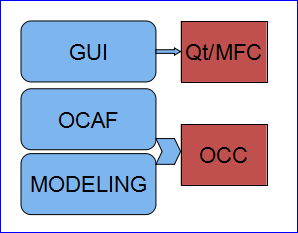
Figure 1.3 A application based on Qt and OpenCASCADE
You can use Qt for the GUI development, and for data management such as restore data from file or undo/redo support, you can choose OCAF, and for modeling algorithms, you can use OpenCASCADE.
You can also use the Model/View/Controller of Qt to manage the data and undo/redo mechnism, to accelarate the developing.
OpenCASCADE have provided many samples to show its functions, but there are a lots codes, it is a little complicated for the beginner. I write a simple program to try OpenCASCADE in a straightforward way. I hope the demo can help you to understand the usage of OpenCASCADE.
The demo is based on OpenCASCADE6.8.0 and Qt5.4. Because of there are many bug fixes in OpenCASCADE new version6.8.0, especially the visualization module. So I update the code for the previous demo Qt with OpenCASCADE and add something new:
http://www.cppblog.com/eryar/archive/2013/08/18/202617.aspx
2.View Operations
In occQt there are three operations to manipulate the view: pan, zoom and rotate, the following picture is the main window of occQt:
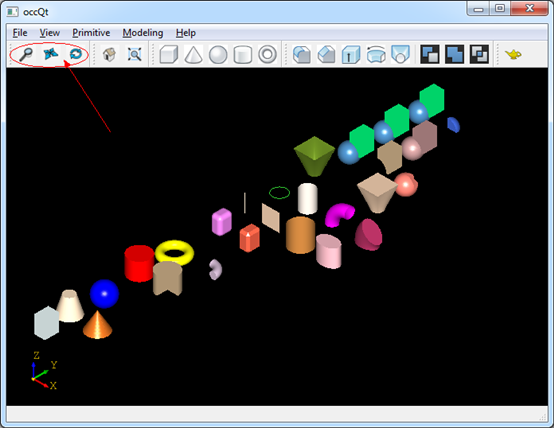
Figure 2.1 occQt GUI
The options is for the middle button of the mouse, you can dragged the middle button of the mouse to pan, zoom and rotate the view. And the mouse left button is used for the pick and multi-select operation, single click you can pick a shape; drag left button will select all the shapes in the rectangle.
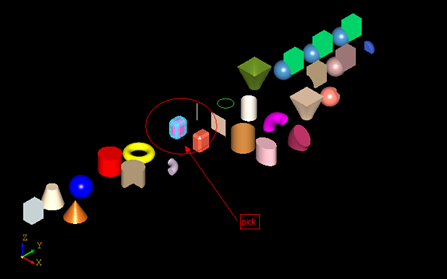
Figure 2.2 Click mouse left button to pick
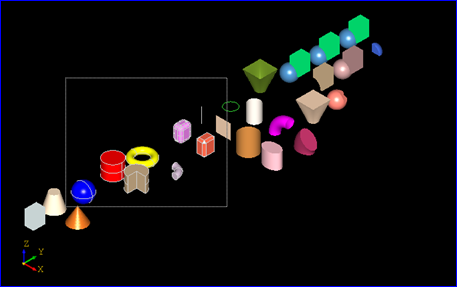
Figure 2.3 Drag mouse left button to multi-select
The selected shapes will be hilighted, but now do not provide any operations for the selected shapes.
And also provide the Reset and Fit All function for the view:
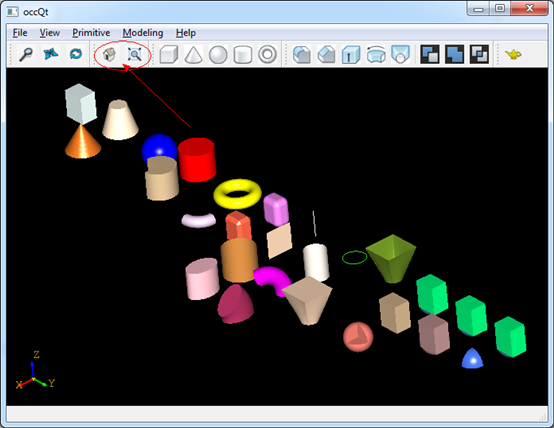
Figure 2.4 Reset and Fit all for the view
3.Make Primitives
OpenCASCADE provides simple API for the construction of primitives, such as box, cone, sphere, cylinder, and torus, .etc. You can make a primitive by a simple class in OpenCASCADE, the sample code as follows:
TopoDS_Shape aTopoCone = BRepPrimAPI_MakeCone(3.0, 0.0, 5.0);
TopoDS_Shape aTopoSphere = BRepPrimAPI_MakeSphere(3.0);
TopoDS_Shape aTopoCylinder = BRepPrimAPI_MakeCylinder(3.0, 5.0);
TopoDS_Shape aTopoTorus = BRepPrimAPI_MakeTorus(3.0, 1.0);
And the shapes in the viewer is in the following picture:
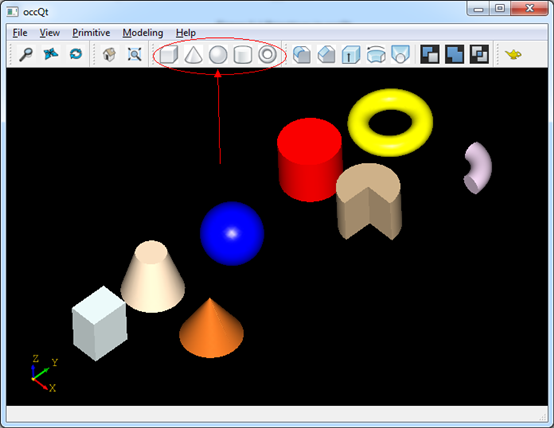
Figure 3.1 Primitives in occQt
4.Modeling Algorithms
Modeling
algorithms is the outstanding advantage of OpenCASCADE. But in occQt
just give a example for the usage, you can check the documents and
OpenCASCADE reference manual to have a look. The modeling algorithms in
the occQt are:
v Fillet;
v Chamfer;
v Extrude;
v Revol;
v loft.
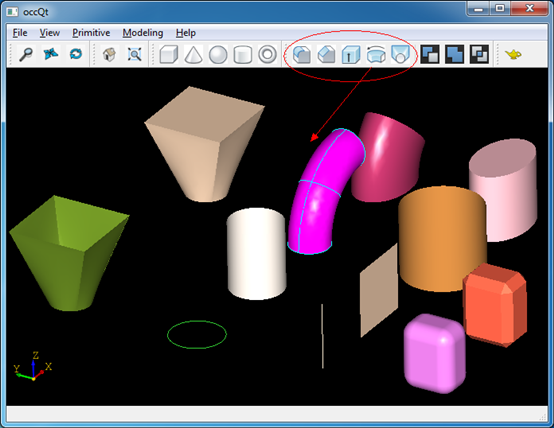
Figure 4.1 Modeling Algorithms in occQt
5.Boolean Operations
Boolean operations are used to create new shapes from the combinations of two shapes,

The class to perform this is simple to use, they are:
TopoDS_Shape aCommonShape = BRepAlgoAPI_Common(S1, S2);
TopoDS_Shape aCuttedShape = BRepAlgoAPI_Cut(S1, S2);
You can try this in occQt:
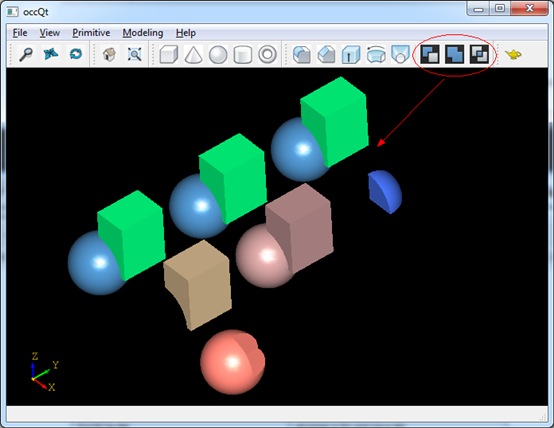
Figure 5.1 Boolean operations in occQt
6. Conclusion
From
the simple code demo, I hope it will help you to understand OpenCASCADE
easily. Thanks for OpenCASCADE and Qt the amazing work.
I put the code to GitHub: https://github.com/eryar/occQt/. You can download and have a try, then you can feedback or track the modification of occQt.
Enjoy!
PDF Version: A Simple OpenCASCADE Qt Deom-occQt
A Simple OpenCASCADE Qt Demo-occQt的更多相关文章
- 虹软人脸识别——官方 Qt Demo 移植到 Linux
一.前言 最近需要在 Linux 平台下开发一个人脸识别相关的应用,用到了虹软的人脸识别 SDK.之前在 Windows 平台用过,感觉不错,SDK 里面还带了 Demo 可以快速看到效果.打开 Li ...
- Qt Demo Http 解析网址 Openssl
今天练习了一下Qt 解析http协议,在Demo中使用到了Openssl 一上午的时间都是编译openssl,不过还是没有成功,很遗憾,这里整理了有关这个Demo的本件 网盘连接:见下方评论吧,长传太 ...
- 读Qt Demo——Basic Layouts Example
此例程主要展示用代码方式创建控件并用Layout管理类对其进行布局: 例程来自Qt5.2,如过是默认安装,代码位于:C:\Qt\Qt5.2.0\5.2.0\mingw48_32\examples\wi ...
- [QT][DEMO] QTableWidget 设置某一列禁止编辑
例程 : 又是好风景 : http://blog.csdn.net/qiao_yihan/article/details/46413345 关键点: 1.QTableWidgetItem 的 setF ...
- Use Qt in Debian for OpenCASCADE
Use Qt in Debian for OpenCASCADE eryar@163.com Recently several OpenCASCADE enthusiasts want to buil ...
- Qt的信号槽,一个老MFC的经验
最近在利用闲暇时间研究Qt,大概有3周了,看过了官网的white paper并浏览了一遍<C++ GUI Programming with Qt 4, 2nd Edition>.总的来说, ...
- qt cmake
写在前面的话:强烈建议优先阅读Qt官网文档对cmake的使用介绍——CMake Manual 前言我去年用clion写Qt的时候,找了很多教程,也没有什么让我觉得很满意的.后来自己摸索,构建了一个我自 ...
- Qt 环境下MAPX组件的编程
使用mapx打包文件可以方便的迅速开发,今天介绍一种不使用打包文件,直接使用mapx组件的编程方法. 就像之前介绍flash控件编程的方法,首先建立一个qt demo.基于那个的窗口都可以. 本den ...
- Qt在VS2010的安装与配置
1. 下载Qt的安装包和VS2010的Qt插件 2. 安装Qt SDK 点击下载安装包,一路回车即可,主要注意Qt的安装路径最好安装在全英文路径而且中间没有空格, 安装好后,可以运行开始菜单里面的Qt ...
随机推荐
- 弱省互测#1 t3
题意 给出一棵n个点的树,求包含1号点的第k小的连通块权值和.(\(n<=10^5\)) 分析 k小一般考虑堆... 题解 堆中关键字为\(s(x)+min(a)\),其中\(s(x)\)表示\ ...
- HDU 4801 Pocket Cube
题目链接 去年现场,虎哥1Y的,现在刷刷题,找找状态... 一共6种转法,把3个面放到顶部,左旋和右旋,感觉写的还不错....都写成常数了. #include <stdio.h> #inc ...
- bootstrap学习笔记【转】
bootstrap是由Twitter公司研发的一个基于HTML,CSS,JavaScript的开源框架,最重要的部分是它的响应式布局.(国内文档翻译官网:http://www.bootcss.com/ ...
- HTML5 audio与video标签实现视频播放,音频播放
随着互联网的飞速发展以及HTML5的应用,越来越多的项目中用到video,audio当常用标签. <audio> 标签属性 <audio src="song.mp3&quo ...
- python 安装
http://www.aichengxu.com/view/37456 http://blog.csdn.net/tiantiandjava/article/details/17242345 tar ...
- poj3629
//(队列)poj3629 /* #include <iostream> #include <queue> #include <algorithm> using n ...
- git超详细教程
GitHub操作总结 : 总结看不明白就看下面的详细讲解. GitHub操作流程 : 第一次提交 : 方案一 : 本地创建项目根目录, 然后与远程GitHub关联, 之后的操作一样; -- 初始化Gi ...
- 浅谈Js闭包现象
一.1.我们探究这个问题的时候如果按照正常的思维顺序,需要知道闭包是什么它是什么意思,但是这样做会让我们很困惑,了解这个问题我们需要知道它的来源,就是我们为什么要使用闭包,先不管它是什么意思! ...
- 安卓 自定义AlertDialog对话框(加载提示框)
AlertDialog有以下六种使用方法: 一.简单的AlertDialog(只显示一段简单的信息) 二.带按钮的AlertDialog(显示提示信息,让用户操作) 三.类似ListView的Aler ...
- LA
grmon -altjtag -u 公式rand()%(b-a),是求范围随机数的计算公式,%是做求余运算,正整数对n求余的范围肯定是在0~n-1之间,也就是rand()%(b-a)的范围是0~b-a ...