
课程四(Convolutional Neural Networks),第一周(Foundations of Convolutional Neural Networks) —— 3.Programming assignments:Convolutional Model: application
Convolutional Neural Networks: Application
Welcome to Course 4's second assignment! In this notebook, you will:
- Implement helper functions that you will use when implementing a TensorFlow model
- Implement a fully functioning ConvNet using TensorFlow (使用 TensorFlow 实现完全正常运行的 ConvNet)
After this assignment you will be able to:
- Build and train a ConvNet in TensorFlow for a classification problem
We assume here that you are already familiar with TensorFlow. If you are not, please refer the TensorFlow Tutorial of the third week of Course 2 ("Improving deep neural networks").
1.0 - TensorFlow model
In the previous assignment, you built helper functions using numpy to understand the mechanics behind convolutional neural networks. Most practical applications of deep learning today are built using programming frameworks, which have many built-in functions you can simply call.
As usual, we will start by loading in the packages.
【code】
import math

import numpy as np

import h5py

import matplotlib.pyplot as plt

import scipy

from PIL import Image

from scipy import ndimage

import tensorflow as tf

from tensorflow.python.framework import ops

from cnn_utils import *

%matplotlib inline

np.random.seed(1)
Run the next cell to load the "SIGNS" dataset you are going to use.
【code】
# Loading the data (signs)

X_train_orig, Y_train_orig, X_test_orig, Y_test_orig, classes = load_dataset()
As a reminder, the SIGNS dataset is a collection of 6 signs representing numbers from 0 to 5.

The next cell will show you an example of a labelled image in the dataset. Feel free to change the value of index below and re-run to see different examples.
【code】
# Example of a picture

index = 6

plt.imshow(X_train_orig[index])

print ("y = " + str(np.squeeze(Y_train_orig[:, index])))
【result】
y = 2
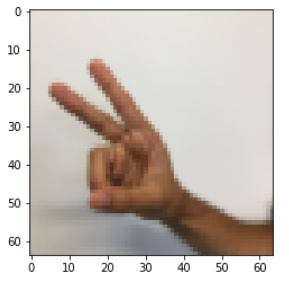
In Course 2, you had built a fully-connected network for this dataset. But since this is an image dataset, it is more natural to apply a ConvNet to it.
To get started, let's examine the shapes of your data.
【code】
X_train = X_train_orig/255.

X_test = X_test_orig/255.

Y_train = convert_to_one_hot(Y_train_orig, 6).T    #convert_to_one_hot(Y, C)函数参见课程二第三周的2、programming assignments: 1.4 Using One Hot Encodeings

Y_test = convert_to_one_hot(Y_test_orig, 6).T

print ("number of training examples = " + str(X_train.shape[0]))

print ("number of test examples = " + str(X_test.shape[0]))

print ("X_train shape: " + str(X_train.shape))

print ("Y_train shape: " + str(Y_train.shape))

print ("X_test shape: " + str(X_test.shape))

print ("Y_test shape: " + str(Y_test.shape))

conv_layers = {}
【result】
number of training examples = 1080

number of test examples = 120

X_train shape: (1080, 64, 64, 3)

Y_train shape: (1080, 6)

X_test shape: (120, 64, 64, 3)

Y_test shape: (120, 6)
1.1 - Create placeholders
TensorFlow requires that you create placeholders for the input data that will be fed into the model when running the session.
Exercise: Implement the function below to create placeholders for the input image X and the output Y. You should not define the number of training examples for the moment. To do so, you could use "None" as the batch size, it will give you the flexibility to choose it later. Hence X should be of dimension [None, n_H0, n_W0, n_C0] and Y should be of dimension [None, n_y]. Hint. (参见课程二第三周的2、programming assignments: 2.1 Create placeholders)
【code】
# GRADED FUNCTION: create_placeholders

def create_placeholders(n_H0, n_W0, n_C0, n_y):     #参见课程二第三周的2、programming assignments: 2.1 Create placeholders

    """

    Creates the placeholders for the tensorflow session.

    Arguments:

    n_H0 -- scalar, height of an input image

    n_W0 -- scalar, width of an input image

    n_C0 -- scalar, number of channels of the input

    n_y -- scalar, number of classes

    Returns:

    X -- placeholder for the data input, of shape [None, n_H0, n_W0, n_C0] and dtype "float"

    Y -- placeholder for the input labels, of shape [None, n_y] and dtype "float"

    """

    ### START CODE HERE ### (≈2 lines)

    X = tf.placeholder(dtype=tf.float32,shape=[None, n_H0, n_W0, n_C0], name = "Placeholder")

    Y =  tf.placeholder(dtype=tf.float32,shape=[None, n_y], name = "Placeholder_1")

    ### END CODE HERE ###

    return X, Y
X, Y = create_placeholders(64, 64, 3, 6)

print ("X = " + str(X))

print ("Y = " + str(Y))
【result】
X = Tensor("Placeholder:0", shape=(?, 64, 64, 3), dtype=float32)

Y = Tensor("Placeholder_1:0", shape=(?, 6), dtype=float32)
Expected Output:
X = Tensor("Placeholder:0", shape=(?, 64, 64, 3), dtype=float32)

Y = Tensor("Placeholder_1:0", shape=(?, 6), dtype=float32)
1.2 - Initialize parameters
You will initialize weights/filters W1W1 and W2W2 using tf.contrib.layers.xavier_initializer(seed = 0). You don't need to worry about bias variables as you will soon see that TensorFlow functions take care of the bias. Note also that you will only initialize the weights/filters for the conv2d functions. TensorFlow initializes the layers for the fully connected part automatically. We will talk more about that later in this assignment.
Exercise: Implement initialize_parameters(). The dimensions for each group of filters are provided below. Reminder - to initialize a parameter WW of shape [1,2,3,4] in Tensorflow, use:
W = tf.get_variable("W", [1,2,3,4], initializer = ...)
tf.reset_default_graph()  # ??

with tf.Session() as sess_test:

    parameters = initialize_parameters()

    init = tf.global_variables_initializer()

    sess_test.run(init)

    print("W1 = " + str(parameters["W1"].eval()[1,1,1]))   # ??

    print("W2 = " + str(parameters["W2"].eval()[1,1,1]))   # ??
【result】
W1 = [ 0.00131723  0.14176141 -0.04434952  0.09197326  0.14984085 -0.03514394

 -0.06847463  0.05245192]

W2 = [-0.08566415  0.17750949  0.11974221  0.16773748 -0.0830943  -0.08058

 -0.00577033 -0.14643836  0.24162132 -0.05857408 -0.19055021  0.1345228

 -0.22779644 -0.1601823  -0.16117483 -0.10286498]
Expected Output:
W1 =    [ 0.00131723 0.14176141 -0.04434952 0.09197326 0.14984085 -0.03514394

-0.06847463 0.05245192]

W2 =    [-0.08566415 0.17750949 0.11974221 0.16773748 -0.0830943 -0.08058

-0.00577033 -0.14643836 0.24162132 -0.05857408 -0.19055021 0.1345228

-0.22779644 -0.1601823 -0.16117483 -0.10286498]
1.2 - Forward propagation
In TensorFlow, there are built-in functions that carry out the convolution steps for you.
tf.nn.conv2d(X,W1, strides = [1,s,s,1], padding = 'SAME'): given an input X and a group of filters W1, this function convolves W1's filters on X. The third input ([1,s,s,1]) represents the strides for each dimension of the input (m, n_H_prev, n_W_prev, n_C_prev). You can read the full documentation here
tf.nn.max_pool(A, ksize = [1,f,f,1], strides = [1,s,s,1], padding = 'SAME'): given an input A, this function uses a window of size (f, f) and strides of size (s, s) to carry out max pooling over each window. You can read the full documentation here
tf.nn.relu(Z1): computes the elementwise ReLU of Z1 (which can be any shape). You can read the full documentation here.
tf.contrib.layers.flatten(P): given an input P, this function flattens each example into a 1D vector it while maintaining the batch-size. It returns a flattened tensor with shape [batch_size, k]. You can read the full documentation here.
tf.contrib.layers.fully_connected(F, num_outputs): given a the flattened input F, it returns the output computed using a fully connected layer. You can read the full documentation here.
In the last function above (tf.contrib.layers.fully_connected), the fully connected layer automatically initializes weights in the graph and keeps on training them as you train the model. Hence, you did not need to initialize those weights when initializing the parameters.
Exercise:
Implement the forward_propagation function below to build the following model: CONV2D -> RELU -> MAXPOOL -> CONV2D -> RELU -> MAXPOOL -> FLATTEN -> FULLYCONNECTED. You should use the functions above.
In detail, we will use the following parameters for all the steps:
 - Conv2D: stride 1, padding is "SAME"

 - ReLU

 - Max pool: Use an 8 by 8 filter size and an 8 by 8 stride, padding is "SAME"

 - Conv2D: stride 1, padding is "SAME"

 - ReLU

 - Max pool: Use a 4 by 4 filter size and a 4 by 4 stride, padding is "SAME"

 - Flatten the previous output.

 - FULLYCONNECTED (FC) layer: Apply a fully connected layer without an non-linear activation function. Do not call the softmax here. This will result in 6 neurons
                              in the output layer, which then get passed later to a softmax. In TensorFlow, the softmax and cost function are lumped together into
                              a single function, which you'll call in a different function when computing the cost.
【code】
# GRADED FUNCTION: forward_propagation

def forward_propagation(X, parameters):

    """

    Implements the forward propagation for the model:

    CONV2D -> RELU -> MAXPOOL -> CONV2D -> RELU -> MAXPOOL -> FLATTEN -> FULLYCONNECTED

    Arguments:

    X -- input dataset placeholder, of shape (input size, number of examples)   # X =[None, n_H0, n_W0, n_C0]

    parameters -- python dictionary containing your parameters "W1", "W2"

                  the shapes are given in initialize_parameters

    Returns:

    Z3 -- the output of the last LINEAR unit

    """

    # Retrieve the parameters from the dictionary "parameters"

    W1 = parameters['W1']

    W2 = parameters['W2']

    ### START CODE HERE ###

    # CONV2D: stride of 1, padding 'SAME'

    Z1 = tf.nn.conv2d(X,W1, strides = [1,1,1,1], padding = 'SAME')

    # RELU

    A1 = tf.nn.relu(Z1)

    # MAXPOOL: window 8x8, sride 8, padding 'SAME'

    P1 = tf.nn.max_pool(A1, ksize = [1,8,8,1], strides = [1,8,8,1], padding = 'SAME')

    # CONV2D: filters W2, stride 1, padding 'SAME'

    Z2 =  tf.nn.conv2d(P1,W2, strides = [1,1,1,1], padding = 'SAME')

    # RELU

    A2 = tf.nn.relu(Z2)

    # MAXPOOL: window 4x4, stride 4, padding 'SAME'

    P2 =  tf.nn.max_pool(A2, ksize = [1,4,4,1], strides = [1,4,4,1], padding = 'SAME')

    # FLATTEN

    P2 = tf.contrib.layers.flatten(P2)

    # FULLY-CONNECTED without non-linear activation function (not not call softmax).

    # 6 neurons in output layer. Hint: one of the arguments should be "activation_fn=None"

    Z3 = tf.contrib.layers.fully_connected(P2, 6,activation_fn=None)

    ### END CODE HERE ###

    return Z3
tf.reset_default_graph()

with tf.Session() as sess:

    np.random.seed(1)

    X, Y = create_placeholders(64, 64, 3, 6)

    parameters = initialize_parameters()

    Z3 = forward_propagation(X, parameters)

    init = tf.global_variables_initializer()

    sess.run(init)

    a = sess.run(Z3, {X: np.random.randn(2,64,64,3), Y: np.random.randn(2,6)})

    print("Z3 = " + str(a))

    # print(a.shape)  (2,6)
【result】
Z3 = [[-0.44670227 -1.57208765 -1.53049231 -2.31013036 -1.29104376  0.46852064]

      [-0.17601591 -1.57972014 -1.4737016  -2.61672091 -1.00810647  0.5747785 ]]
Expected Output:
Z3 =    [[-0.44670227 -1.57208765 -1.53049231 -2.31013036 -1.29104376 0.46852064]

         [-0.17601591 -1.57972014 -1.4737016  -2.61672091 -1.00810647 0.5747785 ]]
1.3 - Compute cost
Implement the compute cost function below. You might find these two functions helpful:
- tf.nn.softmax_cross_entropy_with_logits(logits = Z3, labels = Y): computes the softmax entropy loss. This function both computes the softmax activation function as well as the resulting loss. You can check the full documentation here.
- tf.reduce_mean: computes the mean of elements across dimensions of a tensor(计算张量的各个维度的元素的平均值). Use this to sum the losses over all the examples to get the overall cost. You can check the full documentation here.
Exercise: Compute the cost below using the function above.
【code】
# GRADED FUNCTION: compute_cost

def compute_cost(Z3, Y):

    """

    Computes the cost

    Arguments:

    Z3 -- output of forward propagation (output of the last LINEAR unit), of shape (6, number of examples) #此处有误,[batch_size, num_classes]

          应该为 of shape (number of examples,6)

    Y -- "true" labels vector placeholder, same shape as Z3

    Returns:

    cost - Tensor of the cost function

    """

    ### START CODE HERE ### (1 line of code)

    cost =tf.reduce_mean(tf.nn.softmax_cross_entropy_with_logits(logits = Z3, labels = Y))

    ### END CODE HERE ###

    return cost
tf.reset_default_graph()  # (1)tf.get_default_graph():返回返回当前线程的默认图。

                          #(2)tf.reset_default_graph():清除默认图的堆栈,并设置全局图为默认图。

with tf.Session() as sess:

    np.random.seed(1)   #使得运行结果不变

    X, Y = create_placeholders(64, 64, 3, 6)   #占位符

    parameters = initialize_parameters() # 初始化 W1,W2

    Z3 = forward_propagation(X, parameters) #前向传播

    cost = compute_cost(Z3, Y)

    init = tf.global_variables_initializer()

    sess.run(init)  # 初始化全局变量

    a = sess.run(cost, feed_dict={X: np.random.randn(4,64,64,3), Y: np.random.randn(4,6)})  #计算cost

    print("cost = " + str(a))
【result】
cost = 2.91034
Expected Output:
cost = 2.91034
1.4 Model
Finally you will merge the helper functions you implemented above to build a model. You will train it on the SIGNS dataset.
You have implemented random_mini_batches() in the Optimization programming assignment of course 2. Remember that this function returns a list of mini-batches.
# random_mini_batches() 2 - Mini-Batch Gradient descent 。
Exercise: Complete the function below.
The model below should:
- create placeholders
- initialize parameters
- forward propagate
- compute the cost
- create an optimizer
Finally you will create a session and run a for loop for num_epochs, get the mini-batches, and then for each mini-batch you will optimize the function. Hint for initializing the variables
【code】
# GRADED FUNCTION: model

def model(X_train, Y_train, X_test, Y_test, learning_rate = 0.009,

          num_epochs = 100, minibatch_size = 64, print_cost = True):

    """

    Implements a three-layer ConvNet in Tensorflow:

    CONV2D -> RELU -> MAXPOOL -> CONV2D -> RELU -> MAXPOOL -> FLATTEN -> FULLYCONNECTED

    Arguments:

    X_train -- training set, of shape (None, 64, 64, 3)

    Y_train -- test set, of shape (None, n_y = 6)

    X_test -- training set, of shape (None, 64, 64, 3)

    Y_test -- test set, of shape (None, n_y = 6)

    learning_rate -- learning rate of the optimization

    num_epochs -- number of epochs of the optimization loop

    minibatch_size -- size of a minibatch

    print_cost -- True to print the cost every 100 epochs

    Returns:

    train_accuracy -- real number, accuracy on the train set (X_train)

    test_accuracy -- real number, testing accuracy on the test set (X_test)

    parameters -- parameters learnt by the model. They can then be used to predict.

    """

    ops.reset_default_graph()                         # to be able to rerun the model without overwriting tf variables(能够在不覆盖 tf 变量的情况下重新运行模型)

    tf.set_random_seed(1)                             # to keep results consistent (tensorflow seed)

    seed = 3                                          # to keep results consistent (numpy seed)

    (m, n_H0, n_W0, n_C0) = X_train.shape

    n_y = Y_train.shape[1]

    costs = []                                        # To keep track of the cost

    # Create Placeholders of the correct shape

    ### START CODE HERE ### (1 line)

    X, Y = create_placeholders(n_H0, n_W0, n_C0, n_y)

    ### END CODE HERE ###

    # Initialize parameters

    ### START CODE HERE ### (1 line)

    parameters = initialize_parameters()

    ### END CODE HERE ###

    # Forward propagation: Build the forward propagation in the tensorflow graph

    ### START CODE HERE ### (1 line)

    Z3 = forward_propagation(X, parameters)

    ### END CODE HERE ###

    # Cost function: Add cost function to tensorflow graph

    ### START CODE HERE ### (1 line)

    cost =  compute_cost(Z3, Y)

    ### END CODE HERE ###

    # Backpropagation: Define the tensorflow optimizer. Use an AdamOptimizer that minimizes the cost.

    ### START CODE HERE ### (1 line)

    optimizer = tf.train.AdamOptimizer(learning_rate=learning_rate).minimize(cost)

    ### END CODE HERE ###

    # Initialize all the variables globally

    init = tf.global_variables_initializer()

    # Start the session to compute the tensorflow graph

    with tf.Session() as sess:

        # Run the initialization

        sess.run(init)

        # Do the training loop

        for epoch in range(num_epochs):

            minibatch_cost = 0.

            num_minibatches = int(m / minibatch_size) # number of minibatches of size minibatch_size in the train set

            seed = seed + 1

            minibatches = random_mini_batches(X_train, Y_train, minibatch_size, seed)

            for minibatch in minibatches:

                # Select a minibatch

                (minibatch_X, minibatch_Y) = minibatch

                # IMPORTANT: The line that runs the graph on a minibatch. (在 minibatch 上运行图的行。)

                # Run the session to execute the optimizer and the cost, the feedict should contain a minibatch for (X,Y).

                ### START CODE HERE ### (1 line)

                _ , temp_cost = sess.run([optimizer,cost],feed_dict={X:minibatch_X, Y: minibatch_Y})

                ### END CODE HERE ###

                minibatch_cost += temp_cost / num_minibatches

            # Print the cost every epoch

            if print_cost == True and epoch % 5 == 0:

                print ("Cost after epoch %i: %f" % (epoch, minibatch_cost))

            if print_cost == True and epoch % 1 == 0:

                costs.append(minibatch_cost)

        # plot the cost

        plt.plot(np.squeeze(costs))

        plt.ylabel('cost')

        plt.xlabel('iterations (per tens)')

        plt.title("Learning rate =" + str(learning_rate))

        plt.show()

        # Calculate the correct predictions

        predict_op = tf.argmax(Z3, 1)  # Z3.shape=(m,6), 此处取每一个最大预测值最大位置的索引

        correct_prediction = tf.equal(predict_op, tf.argmax(Y, 1)) #对比这两个矩阵或者向量的相等的元素,如果是相等的那就返回True,反正返回False

        # Calculate accuracy on the test set and the train set

        accuracy = tf.reduce_mean(tf.cast(correct_prediction, "float")) # accuracy 是一个tensor

        print(accuracy)

        train_accuracy = accuracy.eval({X: X_train, Y: Y_train})   # PalceHolder

        test_accuracy = accuracy.eval({X: X_test, Y: Y_test})  # .eval 执行计算图

        print("Train Accuracy:", train_accuracy)

        print("Test Accuracy:", test_accuracy)

        return train_accuracy, test_accuracy, parameters
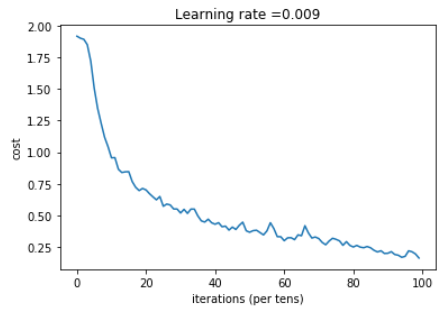
Run the following cell to train your model for 100 epochs. Check if your cost after epoch 0 and 5 matches our output. If not, stop the cell and go back to your code!
【code】
_, _, parameters = model(X_train, Y_train, X_test, Y_test)
【result】
Cost after epoch 0: 1.917929

Cost after epoch 5: 1.506757

Cost after epoch 10: 0.955359

Cost after epoch 15: 0.845802

Cost after epoch 20: 0.701174

Cost after epoch 25: 0.571977

Cost after epoch 30: 0.518435

Cost after epoch 35: 0.495806

Cost after epoch 40: 0.429827

Cost after epoch 45: 0.407291

Cost after epoch 50: 0.366394

Cost after epoch 55: 0.376922

Cost after epoch 60: 0.299491

Cost after epoch 65: 0.338870

Cost after epoch 70: 0.316400

Cost after epoch 75: 0.310413

Cost after epoch 80: 0.249549

Cost after epoch 85: 0.243457

Cost after epoch 90: 0.200031

Cost after epoch 95: 0.175452
Tensor("Mean_1:0", shape=(), dtype=float32)

Train Accuracy: 0.940741

Test Accuracy: 0.783333
Expected output: although it may not match perfectly, your expected output should be close to ours and your cost value should decrease.
Cost after epoch 0 =    1.917929

Cost after epoch 5 =    1.506757

Train Accuracy =    0.940741

Test Accuracy =    0.783333
Congratulations! You have finised the assignment and built a model that recognizes SIGN language with almost 80% accuracy on the test set. If you wish, feel free to play around with this dataset further. You can actually improve its accuracy by spending more time tuning the hyperparameters, or using regularization (as this model clearly has a high variance).
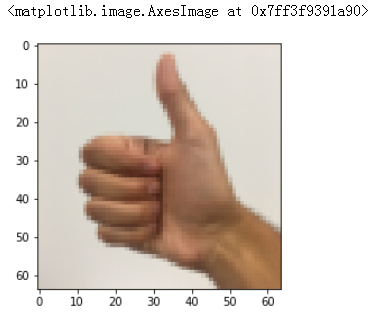
Once again, here's a thumbs up for your work! (再次, 为您的工作竖起大拇指!)
【code】
fname = "images/thumbs_up.jpg"

image = np.array(ndimage.imread(fname, flatten=False))

my_image = scipy.misc.imresize(image, size=(64,64))

plt.imshow(my_image)
【result】
课程四(Convolutional Neural Networks),第一周(Foundations of Convolutional Neural Networks) —— 3.Programming assignments:Convolutional Model: application的更多相关文章
- 课程五(Sequence Models),第一 周(Recurrent Neural Networks) —— 1.Programming assignments:Building a recurrent neural network - step by step
Building your Recurrent Neural Network - Step by Step Welcome to Course 5's first assignment! In thi ...
- 课程五(Sequence Models),第一 周(Recurrent Neural Networks) —— 3.Programming assignments:Jazz improvisation with LSTM
Improvise a Jazz Solo with an LSTM Network Welcome to your final programming assignment of this week ...
- 课程五(Sequence Models),第一 周(Recurrent Neural Networks) —— 2.Programming assignments:Dinosaur Island - Character-Level Language Modeling
Character level language model - Dinosaurus land Welcome to Dinosaurus Island! 65 million years ago, ...
- 课程五(Sequence Models),第一 周(Recurrent Neural Networks) —— 0.Practice questions:Recurrent Neural Networks
[解释] It is appropriate when every input should be matched to an output. [解释] in a language model we ...
- 课程四(Convolutional Neural Networks),第四 周(Special applications: Face recognition & Neural style transfer) —— 3.Programming assignments:Face Recognition for the Happy House
Face Recognition for the Happy House Welcome to the first assignment of week 4! Here you will build ...
- 吴恩达《深度学习》-第五门课 序列模型(Sequence Models)-第一周 循环序列模型(Recurrent Neural Networks) -课程笔记
第一周 循环序列模型(Recurrent Neural Networks) 1.1 为什么选择序列模型?(Why Sequence Models?) 1.2 数学符号(Notation) 这个输入数据 ...
- 吴恩达《深度学习》-第二门课 (Improving Deep Neural Networks:Hyperparameter tuning, Regularization and Optimization)-第一周:深度学习的实践层面 (Practical aspects of Deep Learning) -课程笔记
第一周:深度学习的实践层面 (Practical aspects of Deep Learning) 1.1 训练,验证,测试集(Train / Dev / Test sets) 创建新应用的过程中, ...
- 吴恩达《深度学习》-课后测验-第二门课 (Improving Deep Neural Networks:Hyperparameter tuning, Regularization and Optimization)-Week 1 - Practical aspects of deep learning(第一周测验 - 深度学习的实践)
Week 1 Quiz - Practical aspects of deep learning(第一周测验 - 深度学习的实践) \1. If you have 10,000,000 example ...
- 20172311『Java程序设计』课程 结对编程练习_四则运算第一周阶段总结
20172311『Java程序设计』课程 结对编程练习_四则运算第一周阶段总结 结对伙伴 学号 :20172307 姓名 :黄宇瑭 伙伴第一周博客地址: http://www.cnblogs.com/ ...
随机推荐
- 安装fftw到window(vs2010)及使用fftw库函数实现4096点fft变换计算
Windows下FFTW库的安装: 1. 从网站http://www.fftw.org/install/windows.html上下载最新的预编译文件: 32-bit version: fftw ...
- 网络文件系统NFS
NFS介绍 什么是NFS? NFS是Network File System的缩写,即网络文件系统.它的主要功能是通过网络(一般是局域网)让不同的主机系统之间可以共享文件或目录.NFS客户端(一般为应用 ...
- python--linux上如何执行shell命令
1.os.system(command) 参考链接:https://www.jb51.net/article/141877.htm
- [leetcode]339. Nested List Weight Sum嵌套列表加权和
Given a nested list of integers, return the sum of all integers in the list weighted by their depth. ...
- Linux之 Ngnix
前言: WEB框架 django 大而全, 功能特别多 form表单 , ORM, 中间件 笨重,臃肿 600/s flask 轻量级的,小而精, 它使用的都是第三方模块进行拼接起来的 4988/s ...
- Git-git push -u为何第二次不用指定-u?
1,如果当前分支只有一个追踪分支,那么主机名都可以省略,如:git push origin 将当前分支推送到origin主机的对应分支 2,$ git push 如果当前分支与多个主机存在追踪关系,那 ...
- Solidity合约间的调用 -Solidity通过合约转ERC20代币
Solidity通过合约转ERC20代币 ERC20代币并不能像Ether一样使用sendTo.transfer(amt)来转账,ERC20代币只能通过token中定义的transfer方法来转账 ...
- webapi postman 415 错误
https://blog.csdn.net/Intangible_moon/article/details/80183121 猜测:如果后台接口使用的是[fromBody]标签的话,需要使用raw方式
- 如何禁用Chrome / Firefox /IE浏览器的Cookie
Firefox: 点击菜单按钮并点击选项 按钮. 选择 隐私 面板. 将“Firefox 将会:”这一项设置为 使用自定义历史记录设置. 取消 接受来自站点的 Cookie 选项 即可禁用 Cooki ...
- windows powershell
今天用了一条命令: dism /online /add-package /packagepath:c:xxxx.cab