
zookeeper 动态管理nginx配置
假设我们有一个场景,所有服务器共享同一份配置文件,我们肯定不可能单独手动维护每台服务器,这时可以利用zookeeper的配置管理功能。
环境:python + nginx + zookeeper
目的:当zookeeper中的配置文件发生变化时nginx自动拉取最新配置文件并应用到本地,最终重启服务器:
一。搭建zookeeper集群:
步骤略,请参考:http://zookeeper.apache.org/doc/r3.4.13/zookeeperStarted.html
请确保zookeeper集群为健康状态:

二。安装nginx
yum install nginx -y
启动nginx: systemctl start nginx
三。编写python zookeeper 客户端:
目的:定期连接zookeeper集群,检测配置文件发生变化:
from kazoo.client import KazooClient

import time

zk=KazooClient(hosts='192.168.85.137:2181')

zk.start()

Version=None

while True:

    @zk.DataWatch("/nginx")

    def watch_node(data, stat):

        global Version

        if Version == None:

            Version=stat

        if Version != stat:

           Version = stat

           nginx_file=str(data,encoding='utf-8')

           print("配置已改变!!!!!")

           f=open('nginx.conf','w',encoding='utf-8')

           f.write(nginx_file)

           f.flush()

           f.close()

           import os

           Path=os.path.dirname(os.path.abspath(__file__))

           os.system('cp -f %s/nginx.conf /etc/nginx/nginx.conf && systemctl restart nginx.service'%Path)   #替换nginx配置文件,然后重启服务,注意,这这里只是写了一个大体框架,生产环境一定不要直接重启,可以写一些判断,至少应该先确保配置文件没有错误再重启nginx

        time.sleep()
测试:修改zookeeper中的nginx配置,看客户端是否能拉去配置文件:
from kazoo.client import KazooClient

import time

zk=KazooClient(hosts='192.168.85.137:2181')

zk.start()

nginx_config="""

user nginx;

worker_processes auto;

error_log /var/log/nginx/error.log;

pid /run/nginx.pid;

include /usr/share/nginx/modules/*.conf;

events {

    worker_connections 1024;

}

http {

    log_format  main  '$remote_addr - $remote_user [$time_local] "$request" '

                      '$status $body_bytes_sent "$http_referer" '

                      '"$http_user_agent" "$http_x_forwarded_for"';

    access_log  /var/log/nginx/access.log  main;

    sendfile            on;

    tcp_nopush          on;

    tcp_nodelay         on;

    keepalive_timeout   65;

    types_hash_max_size 2048;

    include             /etc/nginx/mime.types;

    default_type        application/octet-stream;

    include /etc/nginx/conf.d/*.conf;

    server {

        listen       5555 default_server;

        index index.php index.html;

        server_name  _;

        root         /usr/share/nginx/html;

        include /etc/nginx/default.d/*.conf;

location ~ \.php$ {

            fastcgi_pass   127.0.0.1:9000;

            fastcgi_index  index.php;

            #fastcgi_param  SCRIPT_FILENAME  /scripts$fastcgi_script_name;

            fastcgi_param SCRIPT_FILENAME $document_root$fastcgi_script_name;

            fastcgi_split_path_info ^(.+\.php)(/.+)$;

            fastcgi_param PATH_INFO $fastcgi_path_info;

            include        fastcgi_params;

        }

        error_page 404 /404.html;

            location = /40x.html {

        }

        error_page 500 502 503 504 /50x.html;

            location = /50x.html {

        }

    }

}

"""

zk.set('/nginx',bytes(nginx_config,encoding='utf-8'))
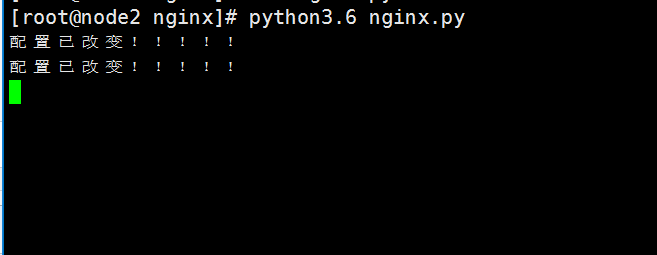

成功!!!
zookeeper 动态管理nginx配置的更多相关文章
- 使用etcd+confd管理nginx配置
1.前言 最近在项目中用nginx做反向代理,需要动态生成nginx的配置.大概流程是用户在页面上新增域名.http或https协议以及端口信息,后台会根据域名自动生成一个nginx的server配置 ...
- SpringCloud的Archaius - 动态管理属性配置
参考链接:http://www.th7.cn/Program/java/201608/919853.shtml 一.Archaius是什么? Archaius用于动态管理属性配置文件. 参考自Gett ...
- 新手学分布式-动态修改Nginx配置的一些想法
本人是分布式的新手,在实际工作中遇到了需要动态修改nginx的需求,因此写下实现过程中的想法.Nginx功能强大且灵活,所以这些权当抛砖引玉,希望可以得到大家的讨论和指点.(具体代码在 https:/ ...
- 关于linux下部署JavaWeb项目,nginx负责静态资源访问,tomcat负责处理动态请求的nginx配置
1.项目的运行环境 linux版本 [root@localhost ~]# cat /proc/version Linux version -.el6.x86_64 (mockbuild@x86-.b ...
- nginx配置静态资源与动态访问分离【转】
在前面的博客中<说说 NGINX 的配置及优化>的 2.5 小节里面,提到 location 模块是 nginx 中用的最多的,也是最重要的模块,负载均衡.反向代理.虚拟域名等都与它相关. ...
- nginx配置一、二级域名、多域名对应(api接口、前端网站、后台管理网站)
前提:安装好nginx,如果已经启动nginx,先停止,命令: ./usr/local/nginx/sbin/nginx -s stop 修改nginx配置 vi /usr/local/nginx/c ...
- Nginx配置详解
序言 Nginx是lgor Sysoev为俄罗斯访问量第二的rambler.ru站点设计开发的.从2004年发布至今,凭借开源的力量,已经接近成熟与完善. Nginx功能丰富,可作为HTTP服务器,也 ...
- nginx配置入门
谢谢作者的分享精神,原文地址:http://www.nginx.cn/591.html nginx配置入门 之前的nginx配置是对nginx配置文件的具体含义进行讲解,不过对于nginx的新手可能一 ...
- nginx配置学习文章
partOne 自我释义部分 我的是阿里云的ubuntu *******实际上感觉这里是基本配置,很用不到*********#定义其用户或用户组user www-data;#nginx的进程数,应当为 ...
随机推荐
- JMeter—逻辑控制器(六)
参考<全栈性能测试修炼宝典JMeter实战>第六章 JMeter 元件详解中第一节JMeter逻辑控制器 JMeter逻辑控制器可以对元件的执行逻辑进行控制,除仅一次控制器外,其他可以嵌套 ...
- python第十九天——感冒中
ConfigParser模块,hashlib模块,hmac模块: 创建配置文件: import configparser config = configparser.ConfigParser()#创建 ...
- 使用 Array2XML把数组转成XML格式,有相同的节点
最近开发一个项目,需要调用第三方的接口,第三方提供的数据是xml,我直接使用Array2XML把php数组转成XML格式. XML格式如: <root> <body> < ...
- Django知识补充
目录 一.文件上传 二.Models补充 三.Django总结 一.文件上传 1.通过form表单或者通过From类上传 views.py from django.shortcuts import r ...
- Java引用类型转换
java的引用类型转换分为两种: 向上类型转换,是小类型到大类型的转换 向下类型转换,是大类型到小类型的转换 现存在一个Animal动物类,猫子类和狗子类继承于Animal父类: 1 public c ...
- 使用golang求出A-Z的所有子集
参考链接:https://blog.csdn.net/K346K346/article/details/80436430 有一个集合由A-Z这26个字母组成,打印这个集合的所有子集,每个子集一行,写C ...
- 描述整体程序的 app
一个小程序主体部分由三个文件组成,必须放在项目的根目录,如下 app.js文件 App() 函数用来注册一个小程序.接受一个 object 参数,其指定小程序的生命周期函数等.object参数说明如下 ...
- GUI_键盘事件
import java.awt.Button; import java.awt.FlowLayout; import java.awt.Frame; import java.awt.TextField ...
- C# 响应微信发送的Token验证,文字、图文自动回复、请求客服对话.....
代码如下,有需要的可以参考: using System; using System.Collections.Generic; using System.Linq; using System.Web; ...
- php-kafka
1.环境依赖 The extension support both PHP 5 and PHP 7. The extension requires » librdkafka >= 0.8 for ...