
学习笔记-AngularJs(九)
到目前为止,我们所做的学习案例都是没有加任何动画效果的,对于以往来说,我们经常会去使用一些动画插件或是css框架(如:animate.css)来点缀我们的网页,这样显得生动,高大上,那么接下来我们可以学习一下,怎么在AngularJs下来实现叼酷炫的动画操作,主要使用的命令是ngAnimate。
与之前的ngResource,ngRoute一样,需要注入ngAnimate和引入ng-animate.js才可以使用此服务,想在你的angular应用程序使用ngAnimate来实现动画功能,前提条件是将ngAnimate包含到您的应用程序,动画是由使用CSS转换/动画或JavaScript回调来实现。angular本身各种核心ng指令将提供动画钩子,支持动画的的指令有ngRepeat, ngInclude, ngIf, ngSwitch,ngShow, ngHide, ngView and ngClass,当然自定义命令也是可以通过使用$animate服务来进行动画操作,其各个指令对动画支持情况如下表(忽略,http://t.cn/RUbL4rP):
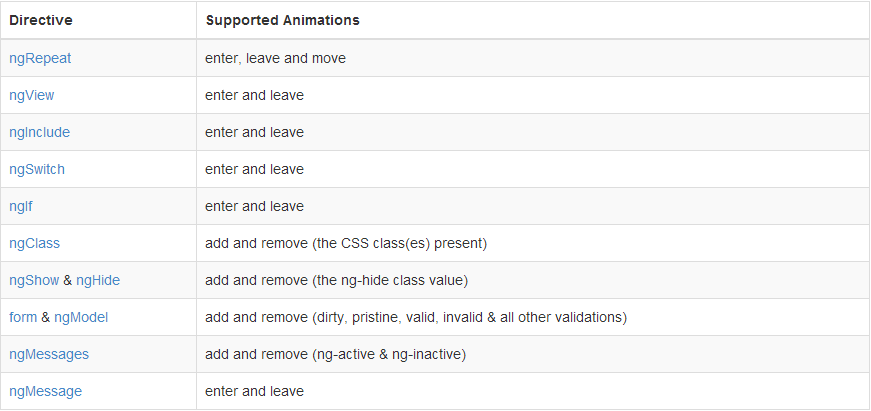
- ng-enter class 主要用于新添加的元素并渲染到页面中,添加后会添加class ng-enter-active
- ng-move class 主要用于当元素被移动时,移动后会添加class ng-move-active
- ng-leave class主要用于被删除时,删除后会添加class ng-leave-active
- ng-hide,ng-show class用于是否判断执行,对应的还会有几个css,ng-hide-add,ng-hide-add-active,ng-hide-remove,ng-hide-remove-active,会在使用ng-show或是ng-hide指令操作dom时动态添加的class
- 对于表单,在之前的学习笔记上也有通过不同验证的属性,而得到的class(如input无效则会加上class="ng-invalid"),从而来定义其显示样式
必须要明白:(1)父元素动画没执行完,子元素动画不执行,但是可以将此行为屏蔽掉,加上ng-animate-children
(2)在使用$http获取远程数据时,会自动延长动画时间,应用加载,动画不马上执行!
通过审查phonecat上面(http://angular.github.io/angular-phonecat/step-12/app/#/phones)的元素,观察其变化,不难看出,AngularJs可以通过ngAnimate模块在不同时间点给上不同的class,然后通过定义这些class的css,来实现动画操作!觉得还是需要举例子来学习,比较容易懂!主要分两部分来举例,CSS-defined Animations和JavaScript-defined Animations。
CSS-defined Animations
还记得之前的学习笔记-AngularJs(三)使用了filter对ng-repeat进行过滤吗?我们现在修改一下之前的代码,把它改成过滤检索歌曲,代码如下:
<!doctype html>
<html ng-app='animate-css'>

    <head>

        <meta charset="utf8"/>

        <script src="angular.min.js"></script>

        <script src="angular-animate.js"></script> //使用ngAnimate模块需要引入angular-animate.js

        <script>

            angular.module('animate-css', ['ngAnimate'])//注入ngAnimate,这样animate动画效果便自动应用在了项目中,于是就需要定义css改变样式

            .controller('songController', ['$scope', function($scope) {

                $scope.songs=['爱你一万年','开心的马骝','北京欢迎你','笑傲江湖' ,'练习','爱情买卖','七里香' ,'死了都要爱','北京爱情故事','星星点灯','星空','豆浆和油条','神话'];

            }]);

       </script>

        <style>
       /*上文已有提到,angular不同时间点会有不同的class,正是利用这些class来制作动画,必须了解ng-enter,ng-enter-active,ng-leave,ng-leave-active,ng-move,ng-move-active这些class的先后顺序*/

            li{list-style: none; }

            body{margin: 50px; background-color: #; color: #ccc; overflow: hidden;}

            h3{color: #fff;}

            .song-list.ng-enter,

            .song-list.ng-leave,

            .song-list.ng-move {

              -webkit-transition: .5s linear all;

              -moz-transition: .5s linear all;

              -o-transition: .5s linear all;

              transition: .5s linear all;

            }

            .song-list.ng-enter,

            .song-list.ng-move {

              opacity: ;

              height: ;

              overflow: hidden;

            }

            .song-list.ng-move.ng-move-active,

            .song-list.ng-enter.ng-enter-active {

              opacity: ;

              height: 120px;

            }

            .song-list.ng-leave {

              opacity: ;

              overflow: hidden;

            }

            .song-list.ng-leave.ng-leave-active {

              opacity: ;

              height: ;

              padding-top: ;

              padding-bottom: ;

            }

        </style>

    </head>

    <body>

        <div ng-controller="songController">

            <input type="text" ng-model="search">

            <button type="submit">Filter</button>

            <ul>

            <li class="song-list" ng-repeat="song in songs | filter:search">

            {{song}}

            </li>

            </ul>

        </div>

    </body>

</html>
JavaScript-defined Animations
如果你不想使用CSS3转换或CSS3动画,如果你想提供动画还不支持CSS的浏览器转换/动画,那么你可以使用JavaScript动画定义AngularJS模块内,也就是自定义动画,实现个性化的动画效果,先来看官网是如何去使用javascript动画定义的:
//!annotate="YourApp" Your AngularJS Module|Replace this or ngModule with the module that you used to define your application.

var ngModule = angular.module('YourApp', ['ngAnimate']);

ngModule.animation('.my-crazy-animation', function() {

  return {

    enter: function(element, done) {

      //run the animation here and call done when the animation is complete

      return function(cancelled) {

        //this (optional) function will be called when the animation

        //completes or when the animation is cancelled (the cancelled

        //flag will be set to true if cancelled).

      };

    },

    leave: function(element, done) { },

    move: function(element, done) { },

    //animation that can be triggered before the class is added

    beforeAddClass: function(element, className, done) { },

    //animation that can be triggered after the class is added

    addClass: function(element, className, done) { },

    //animation that can be triggered before the class is removed

    beforeRemoveClass: function(element, className, done) { },

    //animation that can be triggered after the class is removed

    removeClass: function(element, className, done) { }

  };

});
不难看出是可以不仅自己定义enter(添加元素)、move(移动元素)、leave(删除元素)等状态,而且还可以增加addClass、beforeRemoveClass、removeClass等监听事件。那么我们对上面过滤歌名的demo修改一下:
<!doctype html>

<html ng-app='animate-javascript'>

    <head>

        <meta charset="utf8"/>

        <script src="jquery.js"></script>

        <script src="angular.min.js"></script>

        <script src="angular-animate.js"></script>

        <script>

            var jav = angular.module('animate-javascript', ['ngAnimate']);

            jav.controller('songController', ['$scope', function($scope) {

                $scope.songs=['爱你一万年','开心的马骝','北京欢迎你','笑傲江湖' ,'练习','爱情买卖','七里香' ,'死了都要爱','北京爱情故事','星星点灯','星空','豆浆和油条','神话'];

            }]);

            jav.animation(".repeat-animation",function(){  //我们引入angular-animate.js和注入ngAnimate模块后,便可以使用.animation(element,function(){...})来定义动画,这里我们定义了一个class为.repeat-animation的的动画

                  return {

                    enter : function(element, done) { //对于动画行为的函数格式是function(element,done){...},这里的element指得是一个jquery对象(前提必须引入jquery.js),done是结束的回调函数

                      var width = element.width();

                      element.css({

                        position: 'relative',

                        left: -2,

                        opacity:

                      });

                      element.animate({

                        left: ,

                        opacity:

                      }, done);

                    },

                    leave : function(element, done) {

                      element.css({

                        position: 'relative',

                        left: ,

                        opacity:

                      });

                      element.animate({

                        left: -,

                        opacity:

                      }, done);

                    },

                    move : function(element, done) {

                      element.css({

                        left: "5px",

                        opacity: 0.2

                      });

                      element.animate({

                        left: "0px",

                        opacity:

                      }, done);

                    }

                  };

            })

        </script>

        <style>

            li{list-style: none; }

            body{margin: 50px; background-color: #; color: #ccc; overflow: hidden;}

            h3{color: #fff;}

        </style>

    </head>

    <body>

        <div ng-controller="songController">

            <input type="text" ng-model="search">

            <button type="submit">Filter</button>

            <ul>

            <li class="song-list repeat-animation" ng-repeat="song in songs | filter:search">

            {{song}}

            </li>

            </ul>

        </div>

    </body>

</html>
这是对ng-animate的一个大概的了解,其中还有许多遗漏的点(比如说$animate服务等),随后学到了,会补充上去,其他指令的自定义动画(通过css或是javascript)的代码demo更新到github上(地址:https://github.com/xiaobin5201314/AngularJS-Learning/tree/master/block-example/动画操作-12)!
学习笔记-AngularJs(九)的更多相关文章
- 简单的玩玩etimer <contiki学习笔记之九 补充>
这幅图片是对前面 <<contiki学习笔记之九>> 的一个补充说明. 简单的玩玩etimer <contiki学习笔记之九> 或许,自己正在掀开contiki ...
- VSTO学习笔记(九)浅谈Excel内容比较
原文:VSTO学习笔记(九)浅谈Excel内容比较 说起文件内容比较,或许我们首先想到的是UltraCompare这类专业比较的软件,其功能非常强大,能够对基于文本的文件内容作出快速.准确的比较,有详 ...
- Python学习笔记(九)
Python学习笔记(九): 装饰器(函数) 内置函数 1. 装饰器 1. 作用域 2. 高阶函数 3. 闭包 如果在一个内部函数里,对在外部作用域(但不是在全局作用域)的变量进行引用,那么内部函数就 ...
- 学习笔记-AngularJs(十)
前面一直在说自定义指令,但是却一直没有一次系统地去了解,现在需要我们一起来学习如何去使用自定义指令,去丰富html标签.属性,实现多元化.多功能的标签(或是属性).辣么,啥是指令?要了解指令,首先需要 ...
- 学习笔记-AngularJs(七)
在学习笔记-AngularJs(六)提及了事件处理器和过滤器以及它们的例子,而我们知道之前我是使用$http服务去获得我们需要的json数据,但是$http是比较底层的用法,有时候我们想把获取json ...
- 学习笔记-AngularJs(六)
在学习笔记-AngularJs(五),通过引入bootstrap.css进行改写整个样式,这时学习项目也变得好看多了,现在我们又需要目录再进行一次改变,如下图: 这样就符合之前讲的对学习目录进行布置了 ...
- 学习笔记-AngularJs(三)
学习笔记-AngularJs(二)写了个所有程序语言入门时都必须要写的Hello World,那么从现在开始做那个之前说过的互联网大佬介绍的学习例子,当然这里开始会慢慢按照之前说过的目录来搭建这个学习 ...
- 学习笔记-AngularJs(二)
在接下来学习angularjs中,我按照的就是之前 学习笔记-AngularJs(一)所讲的目录来搭建一个学习的项目,做一个互联网大佬人物简介的例子,当然也可以使用angualrjs上面提供的官方例子 ...
- python3.4学习笔记(十九) 同一台机器同时安装 python2.7 和 python3.4的解决方法
python3.4学习笔记(十九) 同一台机器同时安装 python2.7 和 python3.4的解决方法 同一台机器同时安装 python2.7 和 python3.4不会冲突.安装在不同目录,然 ...
随机推荐
- python 对反斜杠的处理问题
首先,"/"左倾斜是正斜杠,"\"右倾斜是反斜杠,可以记为:除号是正斜杠一般来说对于目录分隔符,Unix和Web用正斜杠/,Windows用反斜杠,但是现在Wi ...
- 实验隐藏参数"_allow_resetlogs_corruption"的使用
实验环境:OEL 5.7 + Oracle 10.2.0.5 Tips:该参数仅在特殊恢复场景下使用,需要在专业Oracle工程师指导下进行操作. 1.隐藏参数说明 2.故障场景再现 3.非常规恢复 ...
- 初识GitHub之GitHub issues
事实上,GitHub最重要的一个功能之一就是Issue(问题),有了Issue,极大地提高了用户的互动性,也同时推动了代码的发展,因为一人智短,众人拾柴火焰高. 在他人的仓库中,我们发现了需要的代码, ...
- 0006-20180422-自动化第七章-python基础学习笔记
内容回顾: - bytes - str 和bytes - int - str - list - tuple - 深拷贝和浅拷贝 今日内容: 数据类型 - bytes - int - str - boo ...
- mysql两条sql合并查询总数
select IFNULL(c.nodeCount,0) + IFNULL(c.phyCount,0) as totalCount from ( select count(*) nodeCount, ...
- Python文档记录
Beautiful Soup 4.2.0 文档 Python3网络爬虫开发实战 Python库-requests 文档 Selenium with Python中文翻译文档 http://www.te ...
- HashSet、LinkedHashSet、TreeSet 简明解释
HashSet:元素无序.比如存入a.e.c.d.b,输出d.e.b.c.a. LinkedHashSet:怎么存进去,怎么出来.比如存入a.e.c.d.b,输出a.e.c.d.b. TreeSet: ...
- JS(JavaScript)的初了解5(更新中···)
1.函数 关键词function 首先,我们先复习一下前面的知识: var 是JS的关键字,用于声明变量,声明在内存模块完成,定义(=)是在执行模块完成. var可以在内存模块提前(JS代码执行前)完 ...
- CSDN不登录阅读全文(最新更新
CSDN真的烦...然而没卵用 用stylus加两行css就行了: .article_content{height:auto!important} .hide-article-box{display: ...
- react开发初始配置和一些问题
1.npm run build之后,打开网页显示为空白的解决方案 初始使用的开发者应该都会使用create-react-app,初次尝试,启动没有问题,然后就测试一下build,结果发现本地文件ind ...