
http协议文件与数据上传、及上传图片io流错误
package com.smartdoer.utils;

import java.io.BufferedReader;

import java.io.ByteArrayOutputStream;

import java.io.DataInputStream;

import java.io.DataOutputStream;

import java.io.File;

import java.io.FileInputStream;

import java.io.FileOutputStream;

import java.io.InputStream;

import java.io.InputStreamReader;

import java.net.HttpURLConnection;

import java.net.SocketTimeoutException;

import java.net.URL;

import java.net.URLEncoder;

import java.util.ArrayList;

import java.util.HashMap;

import java.util.Iterator;

import java.util.List;

import java.util.Map;

import java.util.Set;

import org.springframework.web.multipart.MultipartFile;

public class HttpPostUtil {

    URL url;

    HttpURLConnection conn;

    String boundary = "--------";

    Map<String, String> textParams = new HashMap<String, String>();

    List<MultipartFile> fileparams = new ArrayList<MultipartFile>();

    List<File> fileList = new ArrayList<File>();

    List<String> urlList = new ArrayList<String>();

    DataOutputStream ds;

    public HttpPostUtil(String url) throws Exception {

        this.url = new URL(url);

    }

    //重新设置要请求的服务器地址,即上传文件的地址。

    public void setUrl(String url) throws Exception {

        this.url = new URL(url);

    }

    //增加一个普通字符串数据到form表单数据中

    public void addTextParameter(String name, String value) {

        textParams.put(name, value);

    }

    //增加一个文件到form表单数据中

    public void addFileParameter(MultipartFile value) {

        fileparams.add(value);

    }

    //增加一个file类型的文件到form表单中

    public void addFileList(File value){

        fileList.add(value);

    }

    public void addUrlList(String str){

        urlList.add(str);

    }

    // 清空所有已添加的form表单数据

    public void clearAllParameters() {

        textParams.clear();

        fileparams.clear();

    }

    // 发送数据到服务器,返回一个字节包含服务器的返回结果的数组

    public String send() throws Exception {

        StringBuffer result = new StringBuffer();

        initConnection();

        try {

            conn.connect();

        } catch (SocketTimeoutException e) {

            // something

            throw new RuntimeException();

        }

        ds = new DataOutputStream(conn.getOutputStream());

        writeFileParams();

        writeStringParams();

        writeFileList();

        writeUrlList();

        paramsEnd();

        BufferedReader in = new BufferedReader(new InputStreamReader(conn.getInputStream(),

        "utf-8"));

        String line = "";

        while ((line = in.readLine()) != null) {

            result.append(line).append("\n");

        }

        conn.disconnect();

        return result.toString();

    }

    //文件上传的connection的一些必须设置

    private void initConnection() throws Exception {

        conn = (HttpURLConnection) this.url.openConnection();

        conn.setDoOutput(true);

        conn.setUseCaches(false);

        conn.setConnectTimeout(10000); //连接超时为10秒

        conn.setRequestMethod("POST");

        conn.setRequestProperty("Charsert", "UTF-8");

        conn.setRequestProperty("Accept-Charset", "utf-8");

        conn.setRequestProperty("contentType", "utf-8");

        conn.setRequestProperty("Content-Type", "text/plain; charset=utf-8");

        conn.setRequestProperty("Content-Type",

                "multipart/form-data; boundary=" + boundary);

    }

    //普通字符串数据

    private void writeStringParams() throws Exception {

        Set<String> keySet = textParams.keySet();

        for (Iterator<String> it = keySet.iterator(); it.hasNext();) {

            String name = it.next();

            String value = textParams.get(name);

            ds.writeBytes("--" + boundary + "\r\n");

            ds.writeBytes("Content-Disposition: form-data; name=\"" + name + "\"\r\n");

            ds.writeBytes("\r\n");

            ds.writeBytes(encode(value) + "\r\n");

        }

    }

    //文件数据

    private void writeFileParams() throws Exception {

        String name = "upload";

        for (MultipartFile file : fileparams) {

            MultipartFile value = file;

            ds.writeBytes("--" + boundary + "\r\n");

            ds.writeBytes("Content-Disposition: form-data; name=\"" + name

                    + "\"; filename=\"" + encode(value.getOriginalFilename()) + "\"\r\n");

            ds.writeBytes("Content-Type: " + getContentType(value) + "\r\n");

            ds.writeBytes("\r\n");

            ds.write(getBytes(value));

            ds.writeBytes("\r\n");

        }

    }

  //文件数据 (file)

    private void writeFileList() throws Exception {

        String name = "upload";

        for (File file : fileList) {

            File value = file;

            ds.writeBytes("--" + boundary + "\r\n");

            ds.writeBytes("Content-Disposition: form-data; name=\"" + name

                    + "\"; filename=\"" + encode(value.getName()) + "\"\r\n");

            ds.writeBytes("Content-Type:  image \r\n");

            ds.writeBytes("\r\n");

            ds.write(getBytes(value));

            ds.writeBytes("\r\n");

        }

    }

  //文件数据 (url)

    private void writeUrlList() throws Exception {

        String name = "upload";

        for (String strUrl : urlList) {

            URL url = new URL(strUrl);

            HttpURLConnection conn = (HttpURLConnection) url.openConnection();

            DataInputStream input = new DataInputStream(conn.getInputStream());

            DataOutputStream output = new DataOutputStream(new FileOutputStream(strUrl.substring(strUrl.lastIndexOf("/") + 1).toUpperCase()));

            byte[] buffer = new byte[1024 * 8 * 1000];

            int count = 0;

            count = input.read(buffer);

//            while ((count = input.read(buffer)) > 0) {

//              output.write(buffer, 0, count);

//            }

            ds.writeBytes("--" + boundary + "\r\n");

            ds.writeBytes("Content-Disposition: form-data; name=\"" + name

                    + "\"; filename=\"" + encode(strUrl) + "\"\r\n");

            ds.writeBytes("Content-Type:  image \r\n");

            ds.writeBytes("\r\n");

            ds.write(buffer);

            ds.writeBytes("\r\n");

            output.close();

            input.close();

        }

    }

    //获取文件的上传类型,图片格式为image/png,image/jpg等。非图片为application/octet-stream

    private String getContentType(MultipartFile f) throws Exception {

//      return "application/octet-stream";  // 此行不再细分是否为图片,全部作为application/octet-stream 类型

//        ImageInputStream imagein = ImageIO.createImageInputStream(f);

//        if (imagein == null) {

//            return "application/octet-stream";

//        }

//        Iterator<ImageReader> it = ImageIO.getImageReaders(imagein);

//        if (!it.hasNext()) {

//            imagein.close();

//            return "application/octet-stream";

//        }

//        imagein.close();

//        return "image/" + it.next().getFormatName().toLowerCase();//将FormatName返回的值转换成小写,默认为大写

        return "image";

    }

    //把文件转换成字节数组

    private byte[] getBytes(MultipartFile f) throws Exception {

        InputStream is = f.getInputStream();

//        FileInputStream in = (FileInputStream)f.getInputStream();  修改,因图片太小,上传报错,直接使用inputstream即可。

        ByteArrayOutputStream out = new ByteArrayOutputStream();

        byte[] b = new byte[1024];

        int n;

        while ((n = is.read(b)) != -1) {

            out.write(b, 0, n);

        }

        is.close();

//        in.close();

        return out.toByteArray();

    }

  //把文件转换成字节数组

    private byte[] getBytes(File f) throws Exception {

        FileInputStream in = new FileInputStream(f);

        ByteArrayOutputStream out = new ByteArrayOutputStream();

        byte[] b = new byte[1024];

        int n;

        while ((n = in.read(b)) != -1) {

            out.write(b, 0, n);

        }

        in.close();

        return out.toByteArray();

    }

    //添加结尾数据

    private void paramsEnd() throws Exception {

        ds.writeBytes("--" + boundary + "--" + "\r\n");

        ds.writeBytes("\r\n");

    }

    // 对包含中文的字符串进行转码,此为UTF-8。服务器那边要进行一次解码

    private String encode(String value) throws Exception{

        return URLEncoder.encode(value, "UTF-8");

    }

    public static void main(String[] args) throws Exception {

        String postData = "{\"id\":\"212\",\"title\":\"测试1\",\"content\":\"测试1\",\"author\":\"测试1\",\"createtime\":\"2016-3-4 15:25:16\"}";

        String postUrl="http://localhost:81/qmcg/admin/interData/webSiteCase/outSideDataImp";

        HttpPostUtil u = new HttpPostUtil(postUrl);

//        u.addFileParameter(new MultipartFile("d:/pvm.jpg"));

//        u.addFileParameter(new MultipartFile("d:/cb6c15f6-a187-3026-8911-03eec0a95cc2.png"));

//        u.addTextParameter("gson", postData);

        u.addUrlList("http://127.0.0.1:81/pirImg/upload/Image/201608/20160826152343638.png");

        String result = u.send();

        System.out.println("result:"+result);

    }

}
开始时,上传图片正常,后来无意间发现有一些图片上传失败,报的错误为ByteArrayInputStream不能转化成FileInputStream,
后来发现,是因为图片太小的事,大图片没有问题,经过修改后是这样
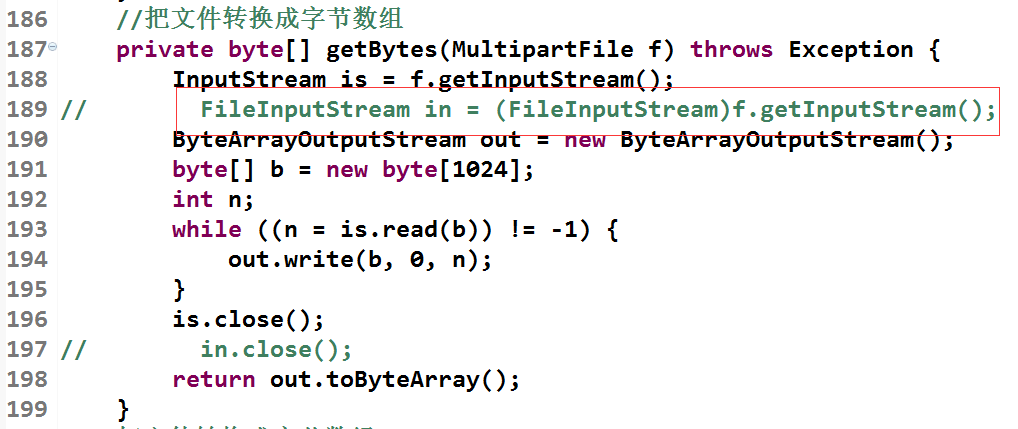
图片中红框内注释的为以前的代码。
http协议文件与数据上传、及上传图片io流错误的更多相关文章
- Linux本地数据上传到阿里云OSS
这篇文章主要是介绍如何将服务器本地的数据上传到阿里云OSS的指定bucket中,最重要的参考文档是数据迁移单机部署.我第一次上传数据到OSS上时,步骤要比前面的链接中介绍的要麻烦,ossimport工 ...
- [New Portal]Windows Azure Virtual Machine (14) 在本地制作数据文件VHD并上传至Azure(1)
<Windows Azure Platform 系列文章目录> 之前的内容里,我介绍了如何将本地的Server 2012中文版 VHD上传至Windows Azure,并创建基于该Serv ...
- 重新想象 Windows 8.1 Store Apps (89) - 通信的新特性: 下载数据, 上传数据, 上传文件
[源码下载] 重新想象 Windows 8.1 Store Apps (89) - 通信的新特性: 下载数据, 上传数据, 上传文件 作者:webabcd 介绍重新想象 Windows 8.1 Sto ...
- 【应用】:shell crontab定时生成oracle表的数据到txt文件,并上传到ftp
一.本人环境描述 1.oracle服务端装在win7 32位上,oracle版本为10.2.0.1.0 2.Linux为centos6.5 32位,安装在Oracle VM Vir ...
- [New Portal]Windows Azure Virtual Machine (15) 在本地制作数据文件VHD并上传至Azure(2)
<Windows Azure Platform 系列文章目录> 在上一章内容里,我们已经将包含有OFFICE2013 ISO安装文件的VHD上传至Azure Blob Storage中了. ...
- Java实现FTP文件与文件夹的上传和下载
Java实现FTP文件与文件夹的上传和下载 FTP 是File Transfer Protocol(文件传输协议)的英文简称,而中文简称为"文传协议".用于Internet上的控制 ...
- Java web开发——文件夹的上传和下载
我们平时经常做的是上传文件,上传文件夹与上传文件类似,但也有一些不同之处,这次做了上传文件夹就记录下以备后用. 这次项目的需求: 支持大文件的上传和续传,要求续传支持所有浏览器,包括ie6,ie7,i ...
- 需求-java web 能够实现整个文件夹的上传下载吗?
我们平时经常做的是上传文件,上传文件夹与上传文件类似,但也有一些不同之处,这次做了上传文件夹就记录下以备后用. 这次项目的需求: 支持大文件的上传和续传,要求续传支持所有浏览器,包括ie6,ie7,i ...
- C#工业物联网和集成系统解决方案的技术路线(数据源、数据采集、数据上传与接收、ActiveMQ、Mongodb、WebApi、手机App)
目 录 工业物联网和集成系统解决方案的技术路线... 1 前言... 1 第一章 系统架构... 3 1.1 硬件构架图... 3 1.2 ...
随机推荐
- idea快捷键使用
idea eclipse project workspace module ...
- 去掉iframe边框
css样式的border:none来去掉iframe的边框在IE下无效,需给iframe标签添加属性frameborder="no"<iframe frameborder=& ...
- Kubernetes 网络改进的三项实践分享
自研CNI IPAM插件 解决K8s功能问题 首先,在功能方面,Kubernetes 网络模型由于IP不固定,无法对IP资源进行精细管控,无法使用基于IP的监控和基于IP的安全策略,此外,一些IP发现 ...
- 主线程——main线程
定义一个普通的类: 引用这个类,执行main方法,main方法就是一个主线程: 线程:进程的执行单元,可以理解为栈内存中的所执行的方法(除了main方法之外都是线程中的run方法)地址开辟通往cpu的 ...
- Dart基础-泛型和库
https://blog.csdn.net/hekaiyou/article/details/46774727
- Python Gevent协程自动切换IO
Gevent Gevent 是一个第三方库,可以轻松通过gevent实现并发同步或异步编程,在gevent中用到的主要模式是Greenlet, 它是以C扩展模块形式接入Python的轻量级协程. Gr ...
- Shell 实践、常用脚本
(1)计算1-100的和. #!/bin/bash n= ` do n=$[$i+$n] done echo $n (2)输一个数字,然后计算出1到数字的和,要求如果输入数字小于1,则重新输入,知道输 ...
- Log4j配置记录
log4j的配置文件就是用来设置记录器的级别.存放器和布局的,它可接key=value格式的设置或xml格式的设置信息.通过配置,可以创建出Log4J的运行环境. 1.配置文件 log4j配置文件的基 ...
- 网站基础html javascript jquery
第二章HTML HBuilder的使用 边改边看模式 chrome浏览器看. HTML的基本格式 超文本标记语言 HyperText Markup Language HyperText 超文本 Mar ...
- Nginx教程---03.Nginx日志切割
Nginx的定时任务与自动切割 明确: 如果这个网站的访问量比较大,那么一天下来 nginx日志可能会特别的大,所以当出现这种情况呢,如果 把每天的日志都存在同一个日志文件里,会使你的日志文件大到让你 ...