
Windows10 + IntelliJ IDEA 2017.3.2 + wamp2e + Yii + PHPunit 搭建测试环境
一、环境
系统: windows10
WampServer: wampserver2.2e-php5.3.13-httpd2.2.22-mysql5.5.24-32b.exe
PHP: 7.1.15
Intellij IDEA 如何支持php请参考,IntellIJ IDEA 配置 Vue 支持。
二、PHPunit配置
1.下载PHPunit.phar:
Linux:
➜ wget -O phpunit https://phar.phpunit.de/phpunit-7.phar

➜ chmod +x phpunit

➜ ./phpunit --version
Window:
下载phpunit-7.phar到你所在的php.exe目录下, 并新建外包覆批处理脚本 phpunit.cmd 文件,内容如下:
@ECHO OFF

php %~dp0phpunit-.phar %*
对于 Cygwin 或 MingW32 (例如 TortoiseGit) shell 环境, 取而代之的是,把文件保存为 phpunit (没有 .phar 扩展名),然后用 chmod 775 phpunit 将其设为可执行。参考:安装 PHPUnit
设置环境变量:

执行: phpunit --version

PS: https://phpunit.de/getting-started/phpunit-7.html
三、新建测试项目
1.以Yii 项目为例,在protected目录下创建一个测试目录tests。在tests目录下创建bootstrap.php文件。
<?php

define('YII_ENV', 'test');

defined('YII_DEBUG') or define('YII_DEBUG', true);

require_once(__DIR__ . '/../../../yiisoft/yii2/Yii.php');

$config = require '../config/web.php';

(new Application($config));
bootstrap文件是用来加载测试用例的运行时用的,各个项目有各个项目的加载配置,按具体项目而定。
2.编写测试用例
<?php

use PHPUnit\Framework\TestCase;

class MyTest extends TestCase{

    public function testEmpty(){

        $stack = [];

        $this->assertEmpty($stack);

        return $stack;

    }

}
在测试用例中需要注意的是命名空间还是需要指定的。参考:编写 PHPUnit 测试。
三、配置PHPunit
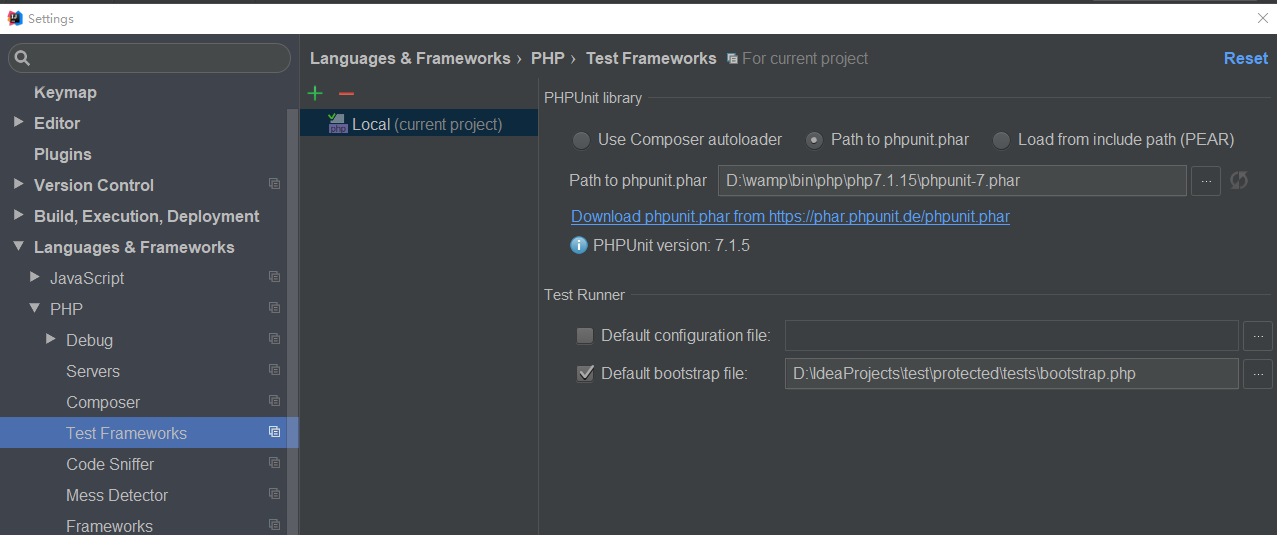
1. 勾选 Default bootstrap file ,并选择你上文新建的 bootstrap.php 文件。
2. 在你所在的 MyTest.php 文件 testEmpty 方法体中, 点击右键选择执行 。
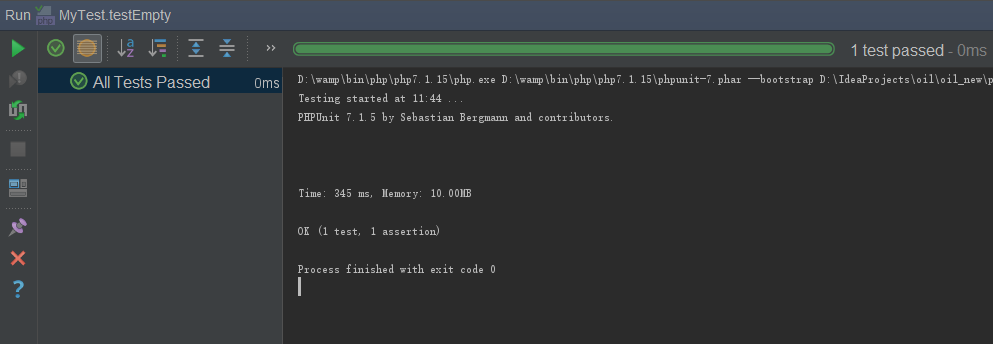
如果你想手动执行:
D:\IdeaProjects>phpunit --bootstrap D:\IdeaProjects\test\protected\tests\bootstrap.php MyTest D:\IdeaProjects\test\protected\tests\examples\MyTest.php

PHPUnit 7.1. by Sebastian Bergmann and contributors.

.                                                                    /  (%)

Time:  ms, Memory: .00MB

OK ( test,  assertion)
PS:
http://www.yii-china.com/post/detail/460.html
http://tangl163.iteye.com/blog/2288538
https://phpunit.readthedocs.io/zh_CN/latest/installation.html
https://phpunit.readthedocs.io/zh_CN/latest/index.html
https://phpunit.de/getting-started/phpunit-7.html
Windows10 + IntelliJ IDEA 2017.3.2 + wamp2e + Yii + PHPunit 搭建测试环境的更多相关文章
- Windows10 + IntelliJ IDEA 2017.3.2 + wamp2e + xdebug 调试 配置
一.环境 系统: windows10 WampServer: wampserver2.2e-php5.3.13-httpd2.2.22-mysql5.5.24-32b.exe IDE: Intel ...
- Intellij IDEA 2017 详细图文教程之概述
天天编码 , 版权所有丨本文标题:Intellij IDEA 2017 详细图文教程之概述 转载请保留页面地址:http://www.tiantianbianma.com/intellij-idea- ...
- IntelliJ IDEA 2017 注册方法
本文使用破解方式注册. JetbrainsCrack-2.6.2.jar适用于ideaIU-2017.2.之前版本,若下载的版本较新破解文件可能无法使用,破解时一闪而退. 其中JetbrainsCra ...
- intellij idea 2017和Jprofiler 10的集成 报错问题
本来想用Jprofiler来分析一下自己写的Java项目,以提高代码执行效率和自己的编码能力.结果,官网和网上很多帖子都写了点出session->IDE integrations->选择i ...
- IntelliJ IDEA 2017新工具
IntelliJ IDEA 2017 教程之概述 图文详解如何安装 Intellij IDEA 2017 深入剖析 IntelliJ IDEA 2017 的目录结构 图文详解如何配置 IntelliJ ...
- IntelliJ IDEA 2017.2.6 x64 配置 tomcat 启动 maven 项目
IntelliJ IDEA 2017.2.6 x64 配置 tomcat 启动 maven 项目 1.确认 IDEA 是否启用了 tomcat 插件 2.添加 tomcat 选择 tomcat 存放路 ...
- IntelliJ IDEA 2017.3.1安装步骤
https://www.jetbrains.com/idea/download/#section=windows 下载旗舰版 1.下载完成后,运行安装: 2.next: 3.选择你要安装的目录,nex ...
- IntelliJ IDEA 2017 永久注册方法
https://blog.csdn.net/weixin_39913200/article/details/80859897 在安装的idea下面的bin目录下面有2个文件 : 一个是idea64.e ...
- Idea for Mac 过期 IntelliJ IDEA 2017 完美注册方法(附idea for Mac破解方法)
Idea 不能使用了: 开始破解: (1)首先下载 jar包: https://download.csdn.net/download/engerla/10573069 放到位置: /Applicati ...
随机推荐
- 深入理解JVM(4)——对象内存的分配策略
一.Java所承担的自动内存管理主要是针对对象内存的分配和回收. 二.在Java虚拟机的五块内存空间中,程序计数器.Java虚拟机栈.本地方法栈内存的分配和回收都具有确定性,一般在编译阶段就能确定需要 ...
- H5C301
标题H5C301 1.html5 h5最新版本.所有主流浏览器都支持h5.但仅ie9及以上支持h5 改变了用户与文档的交互方式:多媒体 新增了其他的特性:语义,本地存储,网页多媒体 抛弃了不合理的标签 ...
- PowerBI发布到网页
如果网页当中需要嵌入PowerBI的报表,可以在PowerBI当中生成链接,然后网页或者博客当中插入这一段html代码. 以下是PowerBI生产网页链接的示例,并且在博客的最后也插入了PowerBI ...
- 咏南新BS开发框架
咏南新BS开发框架 咏南WEB框架支持负载均衡群集. 咏南WEB桌面框架演示:47.106.93.126:9999 咏南WEB手机框架本地:47.106.93.126:8077 咏南CS框架下载:ht ...
- JSON序列——保存修改数据
JSON序列——保存修改数据 procedure TForm1.Button6Click(Sender: TObject); begin var delta: TynJsonDelta := TynJ ...
- Springboot 之 多配置文件
六.Springboot 之 多配置文件 说明:在程序开发过程中可能会有这样的需求:开发和部署的配置信息可能会不同,以传统的方式就是在配置文件里面写好配置,在部署的时候再去修改这些配置,这样肯定会 ...
- Data type conversion in MongoDB
[问题] I have a collection called Document in MongoDB. Documents in this collection have a field calle ...
- NOIP初赛知识点大全-普及+提高组
NOIP初赛知识点大全-普及+提高组 https://mp.weixin.qq.com/s/vSXLDxmbBoFfZPzD8lrt3w
- C#模拟客户端发送数据示例
在给一些客户端做服务器端支持时,发现他们提交上来的数据大都不是http请求格式,因而使用Request.Form获取不到内容,今天用C#做下模拟,并演示下数据接收. 1.发送文本 1).客户端发送 ...
- .NET 同步与异步 之 线程安全的集合 (十一)
本随笔续接:.NET 同步与异步 之 警惕闭包(十) 无论之前说的锁.原子操作 还是 警惕闭包,都是为安全保驾护航,本篇随笔继续安全方面的主题:线程安全的集合. 先看一下命名空间:System.Col ...