
Windows10 + IntelliJ IDEA 2017.3.2 + wamp2e + Yii + PHPunit 搭建测试环境
一、环境
系统: windows10
WampServer: wampserver2.2e-php5.3.13-httpd2.2.22-mysql5.5.24-32b.exe
PHP: 7.1.15
Intellij IDEA 如何支持php请参考,IntellIJ IDEA 配置 Vue 支持。
二、PHPunit配置
1.下载PHPunit.phar:
Linux:
➜ wget -O phpunit https://phar.phpunit.de/phpunit-7.phar

➜ chmod +x phpunit

➜ ./phpunit --version
Window:
下载phpunit-7.phar到你所在的php.exe目录下, 并新建外包覆批处理脚本 phpunit.cmd 文件,内容如下:
@ECHO OFF

php %~dp0phpunit-.phar %*
对于 Cygwin 或 MingW32 (例如 TortoiseGit) shell 环境, 取而代之的是,把文件保存为 phpunit (没有 .phar 扩展名),然后用 chmod 775 phpunit 将其设为可执行。参考:安装 PHPUnit
设置环境变量:

执行: phpunit --version

PS: https://phpunit.de/getting-started/phpunit-7.html
三、新建测试项目
1.以Yii 项目为例,在protected目录下创建一个测试目录tests。在tests目录下创建bootstrap.php文件。
<?php

define('YII_ENV', 'test');

defined('YII_DEBUG') or define('YII_DEBUG', true);

require_once(__DIR__ . '/../../../yiisoft/yii2/Yii.php');

$config = require '../config/web.php';

(new Application($config));
bootstrap文件是用来加载测试用例的运行时用的,各个项目有各个项目的加载配置,按具体项目而定。
2.编写测试用例
<?php

use PHPUnit\Framework\TestCase;

class MyTest extends TestCase{

    public function testEmpty(){

        $stack = [];

        $this->assertEmpty($stack);

        return $stack;

    }

}
在测试用例中需要注意的是命名空间还是需要指定的。参考:编写 PHPUnit 测试。
三、配置PHPunit
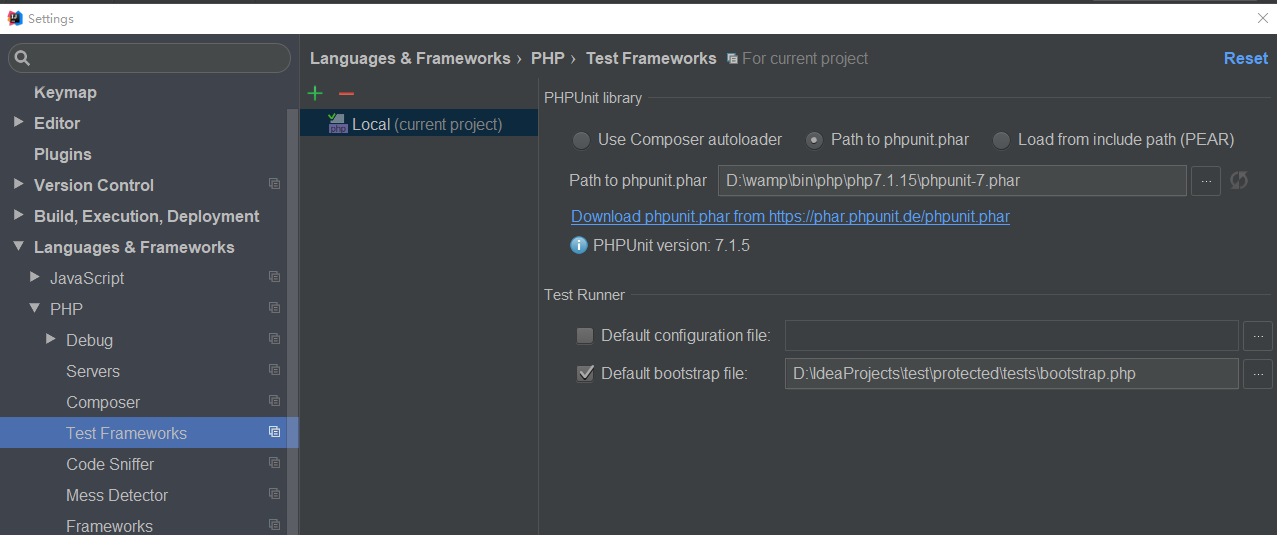
1. 勾选 Default bootstrap file ,并选择你上文新建的 bootstrap.php 文件。
2. 在你所在的 MyTest.php 文件 testEmpty 方法体中, 点击右键选择执行 。
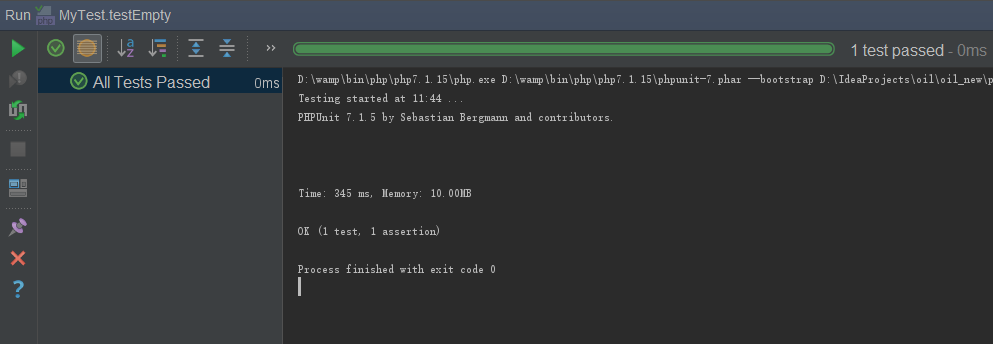
如果你想手动执行:
D:\IdeaProjects>phpunit --bootstrap D:\IdeaProjects\test\protected\tests\bootstrap.php MyTest D:\IdeaProjects\test\protected\tests\examples\MyTest.php

PHPUnit 7.1. by Sebastian Bergmann and contributors.

.                                                                    /  (%)

Time:  ms, Memory: .00MB

OK ( test,  assertion)
PS:
http://www.yii-china.com/post/detail/460.html
http://tangl163.iteye.com/blog/2288538
https://phpunit.readthedocs.io/zh_CN/latest/installation.html
https://phpunit.readthedocs.io/zh_CN/latest/index.html
https://phpunit.de/getting-started/phpunit-7.html
Windows10 + IntelliJ IDEA 2017.3.2 + wamp2e + Yii + PHPunit 搭建测试环境的更多相关文章
- Windows10 + IntelliJ IDEA 2017.3.2 + wamp2e + xdebug 调试 配置
一.环境 系统: windows10 WampServer: wampserver2.2e-php5.3.13-httpd2.2.22-mysql5.5.24-32b.exe IDE: Intel ...
- Intellij IDEA 2017 详细图文教程之概述
天天编码 , 版权所有丨本文标题:Intellij IDEA 2017 详细图文教程之概述 转载请保留页面地址:http://www.tiantianbianma.com/intellij-idea- ...
- IntelliJ IDEA 2017 注册方法
本文使用破解方式注册. JetbrainsCrack-2.6.2.jar适用于ideaIU-2017.2.之前版本,若下载的版本较新破解文件可能无法使用,破解时一闪而退. 其中JetbrainsCra ...
- intellij idea 2017和Jprofiler 10的集成 报错问题
本来想用Jprofiler来分析一下自己写的Java项目,以提高代码执行效率和自己的编码能力.结果,官网和网上很多帖子都写了点出session->IDE integrations->选择i ...
- IntelliJ IDEA 2017新工具
IntelliJ IDEA 2017 教程之概述 图文详解如何安装 Intellij IDEA 2017 深入剖析 IntelliJ IDEA 2017 的目录结构 图文详解如何配置 IntelliJ ...
- IntelliJ IDEA 2017.2.6 x64 配置 tomcat 启动 maven 项目
IntelliJ IDEA 2017.2.6 x64 配置 tomcat 启动 maven 项目 1.确认 IDEA 是否启用了 tomcat 插件 2.添加 tomcat 选择 tomcat 存放路 ...
- IntelliJ IDEA 2017.3.1安装步骤
https://www.jetbrains.com/idea/download/#section=windows 下载旗舰版 1.下载完成后,运行安装: 2.next: 3.选择你要安装的目录,nex ...
- IntelliJ IDEA 2017 永久注册方法
https://blog.csdn.net/weixin_39913200/article/details/80859897 在安装的idea下面的bin目录下面有2个文件 : 一个是idea64.e ...
- Idea for Mac 过期 IntelliJ IDEA 2017 完美注册方法(附idea for Mac破解方法)
Idea 不能使用了: 开始破解: (1)首先下载 jar包: https://download.csdn.net/download/engerla/10573069 放到位置: /Applicati ...
随机推荐
- UIAlertController简单使用
UIAlertView 在iOS2 的时候开始使用,在iOS9 的时候被摒弃 NS_CLASS_DEPRECATED_IOS(2_0, 9_0, "UIAlertView is depr ...
- Office 2016 for Mac 64位16.14.1(180613)安装包&激活
注意,本页面是属于Mac操作系统使用的Office,如需Windows版的Office请点击下面的传送门. Windows版Office:https://www.itpwd.com/12.html 激 ...
- SpringMVC整合FastJson:用"最快的json转换工具"替换SpringMVC的默认json转换
2017年11月23日 09:18:03 阅读数:306 一.环境说明 Windows 10 1709 Spring 4.3.12.RELEASE FastJson 1.2.40 IDEA 2017. ...
- 终于考完PMP
快到年底,上手了GO语言,搞定了广告后台,觉得年底前应该不忙; 我们的PM也报了PMP,可以一起报团学习,后来由于地理位置关系,我们项目组,三个人报了不同的班,也好,信息可以共享; 跟我们公司合作的培 ...
- [android警告]AndroidManifest.xml警告 Not targeting the latest versions of Android
警告:Not targeting the latest versions of Android; compatibility modes apply.Consider testing and upda ...
- EAS开发环境搭建.
一:EAS开发环境安装 解压EAS服务器安装包到E盘即可,内含BOS开发环境. 二:EAS客户端安装 EAS8.0.exe安装到D盘,这是客户端. 三:远程数据库 使用远程运维系统,登陆数据库.
- 终止java线程的2种方法
1.使用一个volatile的共享变量 2.使用interrupt方法 import java.util.concurrent.TimeUnit; /** * ThreadTest */ public ...
- 删除 nuget 文件夹内容
vs2017 ->工具->选项->NuGet 包管理器->清除所有NuGet缓存
- 【WCF】解析WCF服务的搭建
WCF是.NET提供的一种服务,可以将自己写的程序(完成特定功能,比如从数据库中读取数据操作等)分装成服务以后,发布到服务器上.然后会生成一个网址,客户端在编程的时候,可以引用这个服务,使用这个服务中 ...
- C#反射实现 C# 反射 判断类的延伸类型 使用代码生成工具Database2Sharp快速生成工作流模块控制器和视图代码 C# ADO.NET的SqlDataReader对象,判断是否包含指定字段 页面中添加锚点的几种方式 .net 简单实用Log4net(多个日志配置文件) C# 常用小点
C#反射实现 一.反射概念: 1.概念: 反射,通俗的讲就是我们在只知道一个对象的内部而不了解内部结构的情况下,通过反射这个技术可以使我们明确这个对象的内部实现. 在.NET中,反射是重要的机制, ...