
最新广商小助手 项目进展 OpenGL ES 3D在我项目中引用 代码太多只好选重要部分出来
package com.example.home; import java.io.IOException;
import java.io.InputStream;
import javax.microedition.khronos.egl.EGLConfig;
import javax.microedition.khronos.opengles.GL10;
import javax.microedition.khronos.opengles.GL11;
import android.content.Context;
import android.graphics.Bitmap;
import android.graphics.BitmapFactory;
import android.opengl.GLSurfaceView;
import android.opengl.GLU;
import android.opengl.GLUtils;
import android.view.MotionEvent;
import android.view.SurfaceHolder; public class MyGLView extends GLSurfaceView{
private final float TOUCH_SCALE_FACTOR = 180.0f/1000;//角度缩放比例
private SceneRenderer renderer;//场景渲染器
private float previousX;//上次的触控位置
private float previousY;
private float cameraX=0;//摄像机的位置
private float cameraY=0;
private float cameraZ=0;
private float targetX=0;//看点
private float targetY=0;
private float targetZ=-4;
private float sightDis=40;//摄像机和目标的距离
private float angdegElevation=45;//仰角
private float angdegAzimuth=90;//方位角
//关于灯光旋转的量
float angdegLight=0;//灯光旋转的角度
float angdegZ=45;//灯在xz面上的投影与z轴的夹角
float rLight=10;
LightRatateThread lightRatateThread;//旋转灯的线程
public MyGLView(Context context) {
super(context);
renderer=new SceneRenderer();//创建渲染器
this.setRenderer(renderer);//设置渲染器
this.setRenderMode(GLSurfaceView.RENDERMODE_CONTINUOUSLY);//设置渲染模式为主动渲染
}
//触摸事件回调方法
@Override
public boolean onTouchEvent(MotionEvent e) {
float y = e.getY();
float x = e.getX();
switch (e.getAction()) {
case MotionEvent.ACTION_MOVE:
float dy = y - previousY;//计算触控笔Y位移
float dx = x - previousX;//计算触控笔Y位移
angdegAzimuth += dx * TOUCH_SCALE_FACTOR;//设置沿y轴旋转角度
angdegElevation+= dy * TOUCH_SCALE_FACTOR;//设置沿x轴旋转角度
requestRender();//重绘画面
}
previousY = y;//记录触控笔位置
previousX = x;//记录触控笔位置
return true;
}
private class SceneRenderer implements GLSurfaceView.Renderer { Dadi dimian;//地面
longCube longcube;//左教学楼
longCube longcube2;//右教学楼
longCube northcube;//北教学楼
longCube southcube;//南教学楼
longCube westcube;//西教学楼
longCube eastcube;//东教学楼 longCube zoulang1;//左前走廊下
longCube zoulang2;//左后走廊下
longCube zoulang3;//右前走廊下
longCube zoulang4;//右后走廊下 longCube zoulang1_1;//左前走廊中
longCube zoulang2_1;//左后走廊中
longCube zoulang3_1;//右前走廊中
longCube zoulang4_1;//右后走廊中 Cylinder cylinder1;//1右圆柱
Cylinder cylinder1_1;//1左圆柱 Cylinder cylinder2;//2右圆柱
Cylinder cylinder2_1;//2左圆柱 Cylinder cylinder3;//3右圆柱
Cylinder cylinder3_1;//3左圆柱 Cylinder cylinder4;//4右圆柱
Cylinder cylinder4_1;//4左圆柱 sanlingzui louti;//梯台 Cylinder cylinderAA;//1号楼梯
Cylinder cylinderBB;//2号楼梯
Cylinder cylinderCC;//3号楼梯
Cylinder cylinderDD;//4号楼梯 longCube caocong1;//左草丛
longCube caocong2;//右草丛 longCube paifang;//牌坊 Cylinder p1;//牌坊1柱
Cylinder p2;//牌坊2柱 Cylinder p3;//牌坊3柱
Cylinder p4;//牌坊4柱 Ball tree1;//树
Ball tree2;//树 Cylinder gan1;//树干1
Cylinder gan2;//树干2
private int[] textureIds; private int topTexIdPlat;
private int sideTexIdPlat;
private int bottomTexIdPlat;
private int AAding;
private int ok;
private int kk;
private int[] huacong;
private int cylinderSideTexId;
private int loucheng;
private int[] face;
private int greenye;
private int shugan;
public SceneRenderer(){}
@Override
public void onDrawFrame(GL10 gl) {
gl.glClear(GL10.GL_COLOR_BUFFER_BIT | GL10.GL_DEPTH_BUFFER_BIT);//清除颜色与深度缓存
gl.glMatrixMode(GL10.GL_MODELVIEW);//设置当前矩阵为模式矩阵
gl.glLoadIdentity();//设置当前矩阵为单位矩阵
double angradElevation=Math.toRadians(angdegElevation);//仰角(弧度)
double angradAzimuth=Math.toRadians(angdegAzimuth);//方位角
cameraX=(float) (targetX+sightDis*Math.cos(angradElevation)*Math.cos(angradAzimuth));
cameraY=(float) (targetY+sightDis*Math.sin(angradElevation));
cameraZ=(float) (targetZ+sightDis*Math.cos(angradElevation)*Math.sin(angradAzimuth));
GLU.gluLookAt(//设置camera位置
gl,
cameraX, //人眼位置的X
cameraY, //人眼位置的Y
cameraZ, //人眼位置的Z
targetX, //人眼球看的点X
targetY, //人眼球看的点Y
targetZ, //人眼球看的点Z
0, //头的朝向
1,
0
);
//设置定位光
double angradLight=Math.toRadians(angdegLight);
double angradZ=Math.toRadians(angdegZ);
float[] positionParams={
(float) (-rLight*Math.cos(angradLight)*Math.sin(angradZ)),
(float) (rLight*Math.sin(angradLight)),
(float) (rLight*Math.cos(angradLight)*Math.cos(angradZ)),
1};//设置定位光
gl.glLightfv(GL10.GL_LIGHT0, GL10.GL_POSITION, positionParams,0);
gl.glTranslatef(0, 0f, -6f); //调整与原点的位置 左右 ,上下,前后
//地面
gl.glPushMatrix();
gl.glTranslatef(0,-dimian.h-2,0);
dimian.drawSelf(gl);
gl.glPopMatrix();
//左教学楼
gl.glPushMatrix();
gl.glTranslatef(-3f, longcube.b/2-2, -1.0f);
longcube.drawSelf(gl);
gl.glPopMatrix();
//右教学楼
gl.glPushMatrix();
gl.glTranslatef(3f, longcube2.b/2-2, -1.0f);
longcube2.drawSelf(gl);
gl.glPopMatrix();
//北教学楼
gl.glPushMatrix();
gl.glTranslatef(0f, northcube.b/2-2, -2.0f);
northcube.drawSelf(gl);
gl.glPopMatrix();
//南教学楼
gl.glPushMatrix();
gl.glTranslatef(0f, southcube.b/2-2, 0.0f);
southcube.drawSelf(gl);
gl.glPopMatrix();
//西教学楼
gl.glPushMatrix();
gl.glTranslatef(-1f, westcube.b/2-2, -1.0f);
westcube.drawSelf(gl);
gl.glPopMatrix();
//东教学楼
gl.glPushMatrix();
gl.glTranslatef(1f, eastcube.b/2-2, -1.0f);
eastcube.drawSelf(gl);
gl.glPopMatrix();
//调整与原点的位置 左右 ,上下,前后
//左前走廊下
gl.glPushMatrix();
gl.glTranslatef(-2f, zoulang1.b/2-2+0.2f, 0.0f);
zoulang1.drawSelf(gl);
gl.glPopMatrix();
//左后走廊下
gl.glPushMatrix();
gl.glTranslatef(-2f, zoulang2.b/2-2+0.2f, -2.0f);
zoulang2.drawSelf(gl);
gl.glPopMatrix();
//右前走廊下
gl.glPushMatrix();
gl.glTranslatef(2f, zoulang3.b/2-2+0.2f, 0.0f);
zoulang3.drawSelf(gl);
gl.glPopMatrix();
//右后走廊下
gl.glPushMatrix();
gl.glTranslatef(2f, zoulang4.b/2-2+0.2f, -2.0f);
zoulang4.drawSelf(gl);
gl.glPopMatrix();
//调整与原点的位置 左右 ,上下,前后
//左前走廊中
gl.glPushMatrix();
gl.glTranslatef(-2f, zoulang1.b/2-2+0.8f, 0.0f);
zoulang1_1.drawSelf(gl);
gl.glPopMatrix();
//左后走廊中
gl.glPushMatrix();
gl.glTranslatef(-2f, zoulang2.b/2-2+0.8f, -2.0f);
zoulang2_1.drawSelf(gl);
gl.glPopMatrix();
//右前走廊中
gl.glPushMatrix();
gl.glTranslatef(2f, zoulang3.b/2-2+0.8f, 0.0f);
zoulang3_1.drawSelf(gl);
gl.glPopMatrix();
//右后走廊中
gl.glPushMatrix();
gl.glTranslatef(2f, zoulang4.b/2-2+0.8f, -2.0f);
zoulang4_1.drawSelf(gl);
gl.glPopMatrix();
//调整与原点的位置 左右 ,上下,前后
//1右圆柱
gl.glPushMatrix();
gl.glTranslatef(-1.7f,zoulang1.b/2-2+0.2f, 0.2f);
cylinder1.drawSelf(gl);
gl.glPopMatrix(); //1左圆柱
gl.glPushMatrix();
gl.glTranslatef(-2.2f,zoulang1.b/2-2+0.2f, 0.2f);
cylinder1_1.drawSelf(gl);
gl.glPopMatrix(); //2右圆柱
gl.glPushMatrix();
gl.glTranslatef(-1.7f,zoulang2.b/2-2+0.2f, -2.0f);
cylinder2.drawSelf(gl);
gl.glPopMatrix(); //2左圆柱
gl.glPushMatrix();
gl.glTranslatef(-2.2f,zoulang2.b/2-2+0.2f,-2.0f);
cylinder2_1.drawSelf(gl);
gl.glPopMatrix(); //3右圆柱
gl.glPushMatrix();
gl.glTranslatef(1.7f,zoulang1.b/2-2+0.2f, 0.2f);
cylinder3.drawSelf(gl);
gl.glPopMatrix(); //3左圆柱
gl.glPushMatrix();
gl.glTranslatef(2.2f,zoulang1.b/2-2+0.2f, 0.2f);
cylinder3_1.drawSelf(gl);
gl.glPopMatrix(); //4右圆柱
gl.glPushMatrix();
gl.glTranslatef(1.7f,zoulang1.b/2-2+0.2f, -2.0f);
cylinder4.drawSelf(gl);
gl.glPopMatrix(); //4左圆柱
gl.glPushMatrix();
gl.glTranslatef(2.2f,zoulang1.b/2-2+0.2f, -2.0f);
cylinder4_1.drawSelf(gl);
gl.glPopMatrix(); //调整与原点的位置 左右 ,上下,前后
//楼梯
gl.glPushMatrix();
gl.glTranslatef(0,-dimian.h-2+0.5f,1.3f);
louti.drawSelf(gl);
gl.glPopMatrix(); //教学楼内部楼梯
//cylinderAA号圆柱
gl.glPushMatrix();
gl.glTranslatef(-3.6f,zoulang1.b/2-2, -2.0f);
cylinderAA.drawSelf(gl);
gl.glPopMatrix(); //cylinderBB号圆柱
gl.glPushMatrix();
gl.glTranslatef(-3.6f,zoulang1.b/2-2, 0f);
cylinderBB.drawSelf(gl);
gl.glPopMatrix(); //cylinderCC号圆柱
gl.glPushMatrix();
gl.glTranslatef(3.6f,zoulang1.b/2-2, -2.0f);
cylinderCC.drawSelf(gl);
gl.glPopMatrix(); //cylinderDD号圆柱
gl.glPushMatrix();
gl.glTranslatef(3.6f,zoulang1.b/2-2, 0f);
cylinderDD.drawSelf(gl);
gl.glPopMatrix();
//调整与原点的位置 左右 ,上下,前后
//左花丛
gl.glPushMatrix();
gl.glTranslatef(-1.2f, -dimian.h-2+0.8f, 1.2f);
caocong1.drawSelf(gl);
gl.glPopMatrix();
//右花丛
gl.glPushMatrix();
gl.glTranslatef(1.2f, -dimian.h-2+0.8f, 1.2f);
caocong2.drawSelf(gl);
gl.glPopMatrix();
//调整与原点的位置 左右 ,上下,前后
//牌坊
gl.glPushMatrix();
gl.glTranslatef(0f, 0.7f, 1.2f);
paifang.drawSelf(gl);
gl.glPopMatrix(); //p1柱
gl.glPushMatrix();
gl.glTranslatef(-2.7f,zoulang1.b/2-2f,1.2f );
p1.drawSelf(gl);
gl.glPopMatrix(); //p2柱
gl.glPushMatrix();
gl.glTranslatef(-2f,zoulang1.b/2-2f,1.2f );
p2.drawSelf(gl);
gl.glPopMatrix(); //p3柱
gl.glPushMatrix();
gl.glTranslatef(2f,zoulang1.b/2-2f,1.2f );
p3.drawSelf(gl);
gl.glPopMatrix(); //p4柱
gl.glPushMatrix();
gl.glTranslatef(2.7f,zoulang1.b/2-2f,1.2f );
p4.drawSelf(gl);
gl.glPopMatrix();
//调整与原点的位置 左右 ,上下,前后
//树
gl.glPushMatrix();
gl.glTranslatef(-1.5f,-0.6f, 2.5f);
tree1.drawSelf(gl);
gl.glPopMatrix(); //树
gl.glPushMatrix();
gl.glTranslatef(1.5f,-0.6f, 2.5f);
tree2.drawSelf(gl);
gl.glPopMatrix(); //树干1
gl.glPushMatrix();
gl.glTranslatef(-1.5f,zoulang1.b/2-2f,2.5f );
gan1.drawSelf(gl);
gl.glPopMatrix(); //树干2
gl.glPushMatrix();
gl.glTranslatef(1.5f,zoulang1.b/2-2f,2.5f );
gan2.drawSelf(gl);
gl.glPopMatrix();
}
@Override
public void onSurfaceChanged(GL10 gl, int width, int height) {
gl.glViewport(0, 0, width, height); //设置视窗大小及位置
gl.glMatrixMode(GL10.GL_PROJECTION);//设置当前矩阵为投影矩阵
gl.glLoadIdentity();//设置当前矩阵为单位矩阵
float ratio = (float) width / height;//计算透视投影的比例
gl.glFrustumf(-ratio, ratio, -1, 1, 6f, 100);//调用此方法计算产生透视投影矩阵 lightRatateThread=new LightRatateThread(MyGLView.this);//创建并开启线程
lightRatateThread.start();
}
@Override
public void onSurfaceCreated(GL10 gl, EGLConfig config) {
gl.glDisable(GL10.GL_DITHER);//关闭抗抖动
gl.glHint(GL10.GL_PERSPECTIVE_CORRECTION_HINT,GL10.GL_FASTEST);//设置特定Hint项目的模式
gl.glClearColor(0,0,0,0); //设置屏幕背景色黑色RGBA
gl.glEnable(GL10.GL_CULL_FACE);//设置为打开背面剪裁
gl.glEnable(GL10.GL_DEPTH_TEST); //启用深度测试 gl.glEnable(GL10.GL_LIGHTING); //允许光照
initGreenLight(gl);//初始化灯
initMaterial(gl);//初始化材质
//初始化纹理
textureIds=new int[]{
initTexture(gl,R.drawable.qiang),
initTexture(gl,R.drawable.qiang),
initTexture(gl,R.drawable.qiang),
initTexture(gl,R.drawable.qiang),
initTexture(gl,R.drawable.qiang),
initTexture(gl,R.drawable.qiang)
};
huacong=new int[]{
initTexture(gl,R.drawable.huacong),
initTexture(gl,R.drawable.qiang),
initTexture(gl,R.drawable.qiang),
initTexture(gl,R.drawable.qiang),
initTexture(gl,R.drawable.qiang),
initTexture(gl,R.drawable.huacong)
};
face=new int[]{
initTexture(gl,R.drawable.men),
initTexture(gl,R.drawable.qiang),
initTexture(gl,R.drawable.qiang),
initTexture(gl,R.drawable.qiang),
initTexture(gl,R.drawable.qiang),
initTexture(gl,R.drawable.qiang)
};
//纹理id初始化
AAding=initTexture(gl,R.drawable.qiang);
sideTexIdPlat=initTexture(gl,R.drawable.side);
bottomTexIdPlat=initTexture(gl,R.drawable.side);
topTexIdPlat=initTexture(gl,R.drawable.top);
loucheng=initTexture(gl,R.drawable.loucheng);
ok=initTexture(gl,R.drawable.fff);
kk=initTexture(gl,R.drawable.loutiche);
cylinderSideTexId=initTexture(gl,R.drawable.cylinder);
greenye=initTexture(gl,R.drawable.shuye);
shugan=initTexture(gl,R.drawable.shugan);
//创建各个几何体 dimian=new Dadi(//梯台
2f,
4,4,
4,4,
0.2f,
topTexIdPlat,bottomTexIdPlat,sideTexIdPlat,
2,2
);
//左右距 上下距 前后距
longcube=new longCube(0.8f,new float[]{0.8f,4.0f,3.0f},textureIds);//左教学楼
longcube2=new longCube(0.8f,new float[]{0.8f,4.0f,3.0f},textureIds);//右教学楼
northcube=new longCube(0.8f,new float[]{2.5f,3.0f,0.6f},textureIds);//北教学楼
southcube=new longCube(0.8f,new float[]{2.5f,3.0f,0.6f},face);//南教学楼
westcube=new longCube(0.8f,new float[]{0.6f,3.0f,1.6f},textureIds);//西教学楼
eastcube=new longCube(0.8f,new float[]{0.6f,3.0f,1.6f},textureIds);//东教学楼 zoulang1=new longCube(0.8f,new float[]{1.5f,0.1f,0.7f},textureIds);//左前走廊下
zoulang2=new longCube(0.8f,new float[]{1.5f,0.1f,0.7f},textureIds);//左后走廊下
zoulang3=new longCube(0.8f,new float[]{1.5f,0.1f,0.7f},textureIds);//右前走廊下
zoulang4=new longCube(0.8f,new float[]{1.5f,0.1f,0.7f},textureIds);//右后走廊下 zoulang1_1=new longCube(0.8f,new float[]{1.5f,0.1f,0.7f},textureIds);//左前走廊下
zoulang2_1=new longCube(0.8f,new float[]{1.5f,0.1f,0.7f},textureIds);//左后走廊下
zoulang3_1=new longCube(0.8f,new float[]{1.5f,0.1f,0.7f},textureIds);//右前走廊下
zoulang4_1=new longCube(0.8f,new float[]{1.5f,0.1f,0.7f},textureIds);//右后走廊下
//尺寸 半径 高
cylinder1=new Cylinder(0.8f,0.1f,0.5f,40,//1右圆柱
cylinderSideTexId,cylinderSideTexId,cylinderSideTexId);
cylinder1_1=new Cylinder(0.8f,0.1f,0.5f,40,//1左圆柱
cylinderSideTexId,cylinderSideTexId,cylinderSideTexId); cylinder2=new Cylinder(0.8f,0.1f,0.5f,40,//2右圆柱
cylinderSideTexId,cylinderSideTexId,cylinderSideTexId);
cylinder2_1=new Cylinder(0.8f,0.1f,0.5f,40,//2左圆柱
cylinderSideTexId,cylinderSideTexId,cylinderSideTexId); cylinder3=new Cylinder(0.8f,0.1f,0.5f,40,//3右圆柱
cylinderSideTexId,cylinderSideTexId,cylinderSideTexId);
cylinder3_1=new Cylinder(0.8f,0.1f,0.5f,40,//3左圆柱
cylinderSideTexId,cylinderSideTexId,cylinderSideTexId); cylinder4=new Cylinder(0.8f,0.1f,0.5f,40,//3右圆柱
cylinderSideTexId,cylinderSideTexId,cylinderSideTexId);
cylinder4_1=new Cylinder(0.8f,0.1f,0.5f,40,//3左圆柱
cylinderSideTexId,cylinderSideTexId,cylinderSideTexId);
//尺寸 底面 宽 长 顶面 宽 长 高度
louti=new sanlingzui(//梯台
0.8f,
2,2,
2,2,
0.5f,
kk,
ok,
2,2
);
//尺寸 半径 高
cylinderAA=new Cylinder(0.8f,0.3f,4f,40,//AA圆柱
AAding,AAding,loucheng);
cylinderBB=new Cylinder(0.8f,0.3f,4f,40,//AA圆柱
AAding,AAding,loucheng);
cylinderCC=new Cylinder(0.8f,0.3f,4f,40,//AA圆柱
AAding,AAding,loucheng);
cylinderDD=new Cylinder(0.8f,0.3f,4f,40,//AA圆柱
AAding,AAding,loucheng);
//左右距 上下距 前后距
caocong1=new longCube(0.8f,new float[]{0.4f,0.4f,1.6f},huacong);//左草丛
caocong2=new longCube(0.8f,new float[]{0.4f,0.4f,1.6f},huacong);//右花丛 paifang=new longCube(0.8f,new float[]{6f,0.4f,0.2f},textureIds);//牌坊
//尺寸 半径 高
p1=new Cylinder(0.8f,0.1f,2.3f,40,//p1柱
cylinderSideTexId,cylinderSideTexId,cylinderSideTexId);
p2=new Cylinder(0.8f,0.1f,2.3f,40,//p1柱
cylinderSideTexId,cylinderSideTexId,cylinderSideTexId);
p3=new Cylinder(0.8f,0.1f,2.3f,40,//p1柱
cylinderSideTexId,cylinderSideTexId,cylinderSideTexId);
p4=new Cylinder(0.8f,0.1f,2.3f,40,//p1柱
cylinderSideTexId,cylinderSideTexId,cylinderSideTexId);
//大小,半径
tree1=new Ball(0.8f,0.4f,30,30,greenye);//树
tree2=new Ball(0.8f,0.4f,30,30,greenye);//树
//尺寸 半径 高
gan1=new Cylinder(0.8f,0.04f,1f,40,//p1柱
shugan,shugan,shugan);
gan2=new Cylinder(0.8f,0.04f,1f,40,//p1柱
shugan,shugan,shugan);
}
}//SceneRenderer
//初始化纹理
public int initTexture(GL10 gl,int drawableId){
//生成纹理ID
int[] textures = new int[1];
gl.glGenTextures(1, textures, 0);//生成一个纹理id放在textures数组中的0位置
int currTextureId=textures[0]; //获取生成的纹理id
gl.glBindTexture(GL10.GL_TEXTURE_2D, currTextureId);//绑定该纹理id,后面的操作都是针对该id
//设置MIN_FILTER与MAG_FILTER为MIPMAP纹理过滤方式
gl.glTexParameterf(GL10.GL_TEXTURE_2D, GL10.GL_TEXTURE_MIN_FILTER,GL10.GL_LINEAR_MIPMAP_NEAREST);
gl.glTexParameterf(GL10.GL_TEXTURE_2D,GL10.GL_TEXTURE_MAG_FILTER, GL10.GL_LINEAR_MIPMAP_LINEAR);
//生成MIPMAP纹理
((GL11)gl).glTexParameterf(GL10.GL_TEXTURE_2D,GL11.GL_GENERATE_MIPMAP, GL10.GL_TRUE);
//设置纹理拉伸方式为REPEAT
gl.glTexParameterf(GL10.GL_TEXTURE_2D, GL10.GL_TEXTURE_WRAP_S,GL10.GL_REPEAT);
gl.glTexParameterf(GL10.GL_TEXTURE_2D, GL10.GL_TEXTURE_WRAP_T,GL10.GL_REPEAT);
InputStream is = this.getResources().openRawResource(drawableId);//获取图片资源的输入流
Bitmap bitmapTmp;
try{
bitmapTmp = BitmapFactory.decodeStream(is);//通过输入流生成位图
}
finally{
try {
is.close();//关闭流
}catch(IOException e){
e.printStackTrace();//打印异常
}
}
GLUtils.texImage2D(GL10.GL_TEXTURE_2D, 0, bitmapTmp, 0);//自动设置图片的格式和类型
bitmapTmp.recycle(); //回收图片资源
return currTextureId;
}
private void initGreenLight(GL10 gl){//初始化灯的方法
gl.glEnable(GL10.GL_LIGHT0);//打开0号灯
float[] ambientParams={0.6f,0.6f,0.6f,1.0f};//光参数 RGBA
gl.glLightfv(GL10.GL_LIGHT0, GL10.GL_AMBIENT, ambientParams,0); //环境光设置
float[] diffuseParams={1.0f,1.0f,1.0f,1.0f};//光参数 RGBA
gl.glLightfv(GL10.GL_LIGHT0, GL10.GL_DIFFUSE, diffuseParams,0); //散射光设置
float[] specularParams={1.0f,1.0f,1.0f,1.0f};//光参数 RGBA
gl.glLightfv(GL10.GL_LIGHT0, GL10.GL_SPECULAR, specularParams,0);//反射光设置
}
private void initMaterial(GL10 gl){//初始化材质的方法
float ambientMaterial[] = {0.4f, 0.4f, 0.4f, 1.0f};//环境光为白色材质
gl.glMaterialfv(GL10.GL_FRONT_AND_BACK, GL10.GL_AMBIENT, ambientMaterial,0);
float diffuseMaterial[] = {1.0f, 1.0f, 1.0f, 1.0f};
gl.glMaterialfv(GL10.GL_FRONT_AND_BACK, GL10.GL_DIFFUSE, diffuseMaterial,0);//散射光为白色材质
float specularMaterial[] = {1.0f, 1.0f, 1.0f, 1.0f};
gl.glMaterialfv(GL10.GL_FRONT_AND_BACK, GL10.GL_SPECULAR, specularMaterial,0);//高光材质为白色
float shininessMaterial[] = {1.5f}; //高光反射区域
gl.glMaterialfv(GL10.GL_FRONT_AND_BACK, GL10.GL_SHININESS, shininessMaterial,0);
}
@Override
public void surfaceDestroyed(SurfaceHolder holder) {
lightRatateThread.setFlag(false);
}
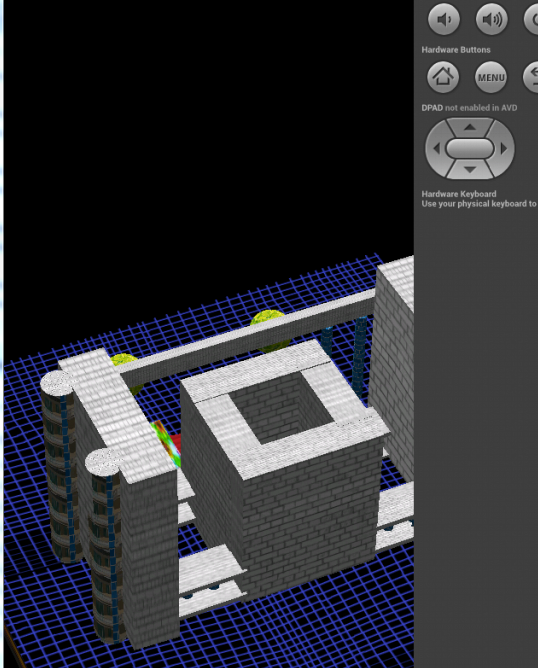
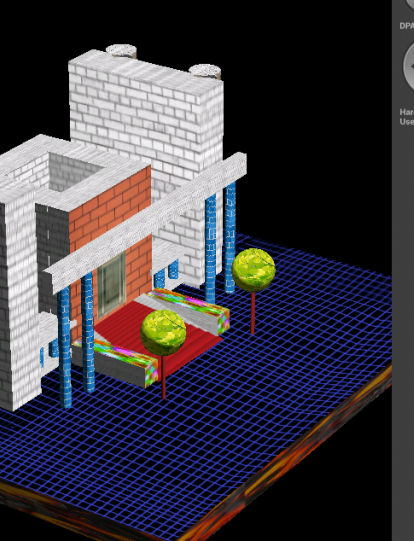
} 以上是我项目中最重要的3D代码 展示的是我们校 第一教学楼
最新广商小助手 项目进展 OpenGL ES 3D在我项目中引用 代码太多只好选重要部分出来的更多相关文章
- 大三上学期安卓一边学一边开始做一个自己觉得可以的项目 广商小助手App 加油
这项目构思好多 一个人一步一步来 一边做一边为后面应用铺设 广商小助手APP 设计出的软件登录场景 实现(算是可以) 界面大体出来了 界面点击方面也做了很多特效 上图其实点击各颜色后会出现各种图和反应 ...
- OpenGL ES SL 3.0规范中以前的attribute改成了in varying改成了out
OpenGL ES和OpenGL的图标 关于“OpenGL ES SL 3.0规范中以前的attribute改成了in varying改成了out”这个问题,做一阐述: 1.关键字的小修 ...
- OpenGL ES 3D空间中自定义显示空间
在Android中,我们所熟知的是在ES管线中,其在图元装配时,会进行图元组装与图元分配,这样就回剪裁出来视景体中的物体.但是如果我想在3D场景中规定一个区域,凡是在这个区域中的物体就能显示出来,非这 ...
- OpenGL ES 简单教程
什么是OpenGL ES? OpenGL ES (为OpenGL for Embedded System的缩写) 为适用于嵌入式系统的一个免费二维和三维图形库. 为桌面版本号OpenGL 的一个子集. ...
- 3D OpenGL ES
什么是OpenGL ES? OpenGL ES (为OpenGL for Embedded System的缩写) 为适用于嵌入式系统的一个免费二维和三维图形库. 为桌面版本OpenGL 的一个子集. ...
- 笔谈OpenGL ES(二)
昨晚回家也看了OpenGL ES 2.0 iOS教程的第一篇,对于其中涉及的一些基本知识罗列下,虽然自己做iOS开发一年多了,但是对于一些细节没有注意,真正的把自己当成“应用”工程师了 ,不仅要会用, ...
- OpenGL ES应用开发实践指南:iOS卷
<OpenGL ES应用开发实践指南:iOS卷> 基本信息 原书名:Learning OpenGL ES for iOS:A Hands-On Guide to Modern 3D Gra ...
- 短视频图像处理 OpenGL ES 实践
2017年,短视频正以其丰富的内容表现力和时间碎片化的特点,快速崛起,而短视频最具可玩性之处就在支持人脸识别的动态贴图和各种不同效果的美颜.滤镜等.那短视频动态贴纸.滤镜.美颜等功能究竟是如何实现的呢 ...
- Mali GPU OpenGL ES 应用性能优化--測试+定位+优化流程
1. 使用DS-5 Streamline定位瓶颈 DS-5 Streamline要求GPU驱动启用性能測试,在Mali GPU驱动中激活性能測试对性能影响微不足道. 1.1 DS-5 Streamli ...
随机推荐
- PJ初赛复习日记
PA姑娘的PJ初赛复习日记 by Pleiades_Antares PJ初赛考试马上就要开始了(今年应该是10.13吧?),作为蒟蒻的我们怎么能不复习呢? 众所周知,复习方法有很多很多种-- 比如 ( ...
- python第五十二课--自定义异常类
myexception.py ''' 实现自定义异常类: ''' class MyException(Exception): def __init__(self,msg): super().__ini ...
- day14 Python函数之可变长参数
函数参数 1.形参变量只有在被调用时才分配内存单元,在调用结束时,即刻释放所分配的内存单元.因此,形参只在函数内部有效.函数调用结束返回主调用函数后则不能再使用该形参变量 2.实参可以是常量.变量.表 ...
- 1896 互不侵犯 洛谷 luogu
题目描述 在N×N的棋盘里面放K个国王,使他们互不攻击,共有多少种摆放方案.国王能攻击到它上下左右,以及左上左下右上右下八个方向上附近的各一个格子,共8个格子. 注:数据有加强(2018/4/25) ...
- PAT A1129 Recommendation System (25 分)——set,结构体重载小于号
Recommendation system predicts the preference that a user would give to an item. Now you are asked t ...
- mac修改本机mysql的root密码
今天同事的MAC上的mysql的登陆密码忘记了,问我是否能解决,呵呵 我查了下 并做个记录 1. 在系统偏好设置中关闭 mysql : Stop MySQL Server 2.打开终端 进入 ...
- node.js 基础一 安装
1.下载 2.安装 3.查看版本 一 下载 下载地址:https://nodejs.org/zh-cn/download/ 二 安装 运行安装包:node-v8.9.2-x64.msi
- C++11 并发指南四(<future> 详解一 std::promise 介绍)
前面两讲<C++11 并发指南二(std::thread 详解)>,<C++11 并发指南三(std::mutex 详解)>分别介绍了 std::thread 和 std::m ...
- 5、数组&字符串&结构体&共用体&枚举
程序中内存从哪里来 三种内存来源:栈(stack).堆(heap).数据区(.date): 栈(stack) 运行自动分配.自动回收,不需要程序员手工干预: 栈内存可以反复使用: 栈反复使用后,程序不 ...
- 浅谈传感器常用Delta-SigmaADC
过采样ADC,或噪声整形ADC,也叫Delta-Sigma ADC.名字很多,基本上都由求差电路,积分求和电路组成调制器,后续由数字滤波器获得Nbit数字输出.不管怎样,数学上的除法能够让你理解这类A ...