
关于python中pika模块的问题
工作中经常用到rabbitmq,而用的语言主要是python,所以也就经常会用到python中的pika模块,但是这个模块的使用,也给我带了很多问题,这里整理一下关于这个模块我在使用过程的改变历程已经中间碰到一些问题
的解决方法
刚开写代码的小菜鸟
在最开始使用这个rabbitmq的时候,因为本身业务需求,我的程序既需要从rabbitmq消费消息,也需要给rabbitmq发布消息,代码的逻辑图为如下:
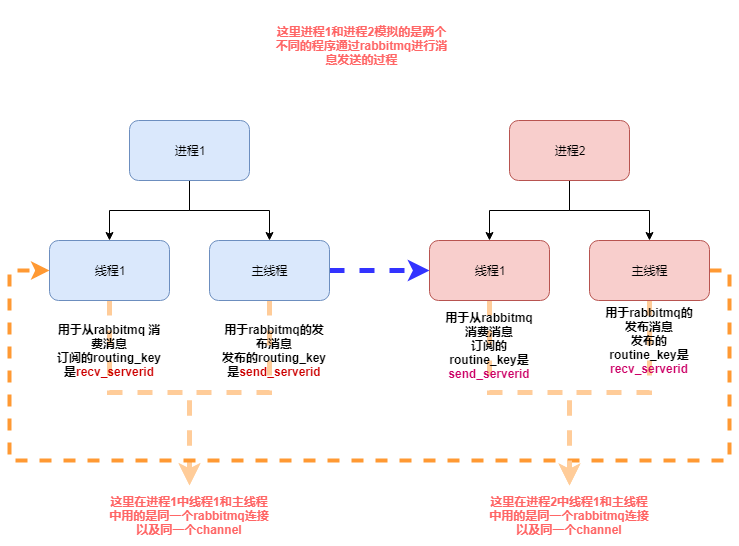
下面是我的模拟代码:
#! /usr/bin/env python3

# .-*- coding:utf-8 .-*-

import pika

import time

import threading

import os

import json

import datetime

from multiprocessing import Process

# rabbitmq 配置信息

MQ_CONFIG = {

    "host": "192.168.90.11",

    "port": 5672,

    "vhost": "/",

    "user": "guest",

    "passwd": "guest",

    "exchange": "ex_change",

    "serverid": "eslservice",

    "serverid2": "airservice"

}

class RabbitMQServer(object):

    _instance_lock = threading.Lock()

    def __init__(self, recv_serverid, send_serverid):

        # self.serverid = MQ_CONFIG.get("serverid")

        self.exchange = MQ_CONFIG.get("exchange")

        self.channel = None

        self.connection = None

        self.recv_serverid = recv_serverid

        self.send_serverid = send_serverid

    def reconnect(self):

        if self.connection and not self.connection.is_closed():

            self.connection.close()

        credentials = pika.PlainCredentials(MQ_CONFIG.get("user"), MQ_CONFIG.get("passwd"))

        parameters = pika.ConnectionParameters(MQ_CONFIG.get("host"), MQ_CONFIG.get("port"), MQ_CONFIG.get("vhost"),

                                               credentials)

        self.connection = pika.BlockingConnection(parameters)

        self.channel = self.connection.channel()

        self.channel.exchange_declare(exchange=self.exchange, exchange_type="direct")

        result = self.channel.queue_declare(queue="queue_{0}".format(self.recv_serverid), exclusive=True)

        queue_name = result.method.queue

        self.channel.queue_bind(exchange=self.exchange, queue=queue_name, routing_key=self.recv_serverid)

        self.channel.basic_consume(self.consumer_callback, queue=queue_name, no_ack=False)

    def consumer_callback(self, channel, method, properties, body):

        """

        消费消息

        :param channel:

        :param method:

        :param properties:

        :param body:

        :return:

        """

        channel.basic_ack(delivery_tag=method.delivery_tag)

        process_id = os.getpid()

        print("current process id is {0} body is {1}".format(process_id, body))

    def publish_message(self, to_serverid, message):

        """

        发布消息

        :param to_serverid:

        :param message:

        :return:

        """

        message = dict_to_json(message)

        self.channel.basic_publish(exchange=self.exchange, routing_key=to_serverid, body=message)

    def run(self):

        while True:

            self.channel.start_consuming()

    @classmethod

    def get_instance(cls, *args, **kwargs):

        """

        单例模式

        :return:

        """

        if not hasattr(cls, "_instance"):

            with cls._instance_lock:

                if not hasattr(cls, "_instance"):

                    cls._instance = cls(*args, **kwargs)

        return cls._instance

def process1(recv_serverid, send_serverid):

    """

    用于测试同时订阅和发布消息

    :return:

    """

    # 线程1 用于去 从rabbitmq消费消息

    rabbitmq_server = RabbitMQServer.get_instance(recv_serverid, send_serverid)

    rabbitmq_server.reconnect()

    recv_threading = threading.Thread(target=rabbitmq_server.run)

    recv_threading.start()

    i = 1

    while True:

        # 主线程去发布消息

        message = {"value": i}

        rabbitmq_server.publish_message(rabbitmq_server.send_serverid,message)

        i += 1

        time.sleep(0.01)

class CJsonEncoder(json.JSONEncoder):

    def default(self, obj):

        if isinstance(obj, datetime.datetime):

            return obj.strftime('%Y-%m-%d %H:%M:%S')

        elif isinstance(obj, datetime.date):

            return obj.strftime("%Y-%m-%d")

        else:

            return json.JSONEncoder.default(self, obj)

def dict_to_json(po):

    jsonstr = json.dumps(po, ensure_ascii=False, cls=CJsonEncoder)

    return jsonstr

def json_to_dict(jsonstr):

    if isinstance(jsonstr, bytes):

        jsonstr = jsonstr.decode("utf-8")

    d = json.loads(jsonstr)

    return d

if __name__ == '__main__':

    recv_serverid = MQ_CONFIG.get("serverid")

    send_serverid = MQ_CONFIG.get("serverid2")

    # 进程1 用于模拟模拟程序1

    p = Process(target=process1, args=(recv_serverid, send_serverid, ))

    p.start()

    # 主进程用于模拟程序2

    process1(send_serverid, recv_serverid)
上面是我的将我的实际代码更改的测试模块,其实就是模拟实际业务中,我的rabbitmq模块既有订阅消息,又有发布消息的时候,同时,订阅消息和发布消息用的同一个rabbitmq连接的同一个channel
但是这段代码运行之后基本没有运行多久就会看到如下错误信息:
Traceback (most recent call last):

  File "/app/python3/lib/python3.6/multiprocessing/process.py", line 258, in _bootstrap

    self.run()

  File "/app/python3/lib/python3.6/multiprocessing/process.py", line 93, in run

    self._target(*self._args, **self._kwargs)

  File "/app/py_code/\udce5\udc85\udcb3\udce4\udcba\udc8erabbitmq\udce9\udc97\udcae\udce9\udca2\udc98/low_rabbitmq.py", line 109, in process1

    rabbitmq_server.publish_message(rabbitmq_server.send_serverid,message)

  File "/app/py_code/\udce5\udc85\udcb3\udce4\udcba\udc8erabbitmq\udce9\udc97\udcae\udce9\udca2\udc98/low_rabbitmq.py", line 76, in publish_message

    self.channel.basic_publish(exchange=self.exchange, routing_key=to_serverid, body=message)

  File "/app/python3/lib/python3.6/site-packages/pika/adapters/blocking_connection.py", line 2120, in basic_publish

    mandatory, immediate)

  File "/app/python3/lib/python3.6/site-packages/pika/adapters/blocking_connection.py", line 2206, in publish

    immediate=immediate)

  File "/app/python3/lib/python3.6/site-packages/pika/channel.py", line 415, in basic_publish

    raise exceptions.ChannelClosed()

pika.exceptions.ChannelClosed

Traceback (most recent call last):

  File "/app/py_code/\udce5\udc85\udcb3\udce4\udcba\udc8erabbitmq\udce9\udc97\udcae\udce9\udca2\udc98/low_rabbitmq.py", line 144, in <module>

    process1(send_serverid, recv_serverid)

  File "/app/py_code/\udce5\udc85\udcb3\udce4\udcba\udc8erabbitmq\udce9\udc97\udcae\udce9\udca2\udc98/low_rabbitmq.py", line 109, in process1

    rabbitmq_server.publish_message(rabbitmq_server.send_serverid,message)

  File "/app/py_code/\udce5\udc85\udcb3\udce4\udcba\udc8erabbitmq\udce9\udc97\udcae\udce9\udca2\udc98/low_rabbitmq.py", line 76, in publish_message

    self.channel.basic_publish(exchange=self.exchange, routing_key=to_serverid, body=message)

  File "/app/python3/lib/python3.6/site-packages/pika/adapters/blocking_connection.py", line 2120, in basic_publish

    mandatory, immediate)

  File "/app/python3/lib/python3.6/site-packages/pika/adapters/blocking_connection.py", line 2206, in publish

    immediate=immediate)

  File "/app/python3/lib/python3.6/site-packages/pika/channel.py", line 415, in basic_publish

    raise exceptions.ChannelClosed()

pika.exceptions.ChannelClosed

Exception in thread Thread-1:

Traceback (most recent call last):

  File "/app/python3/lib/python3.6/threading.py", line 916, in _bootstrap_inner

    self.run()

  File "/app/python3/lib/python3.6/threading.py", line 864, in run

    self._target(*self._args, **self._kwargs)

  File "/app/py_code/\udce5\udc85\udcb3\udce4\udcba\udc8erabbitmq\udce9\udc97\udcae\udce9\udca2\udc98/low_rabbitmq.py", line 80, in run

    self.channel.start_consuming()

  File "/app/python3/lib/python3.6/site-packages/pika/adapters/blocking_connection.py", line 1822, in start_consuming

    self.connection.process_data_events(time_limit=None)

  File "/app/python3/lib/python3.6/site-packages/pika/adapters/blocking_connection.py", line 749, in process_data_events

    self._flush_output(common_terminator)

  File "/app/python3/lib/python3.6/site-packages/pika/adapters/blocking_connection.py", line 477, in _flush_output

    result.reason_text)

pika.exceptions.ConnectionClosed: (505, 'UNEXPECTED_FRAME - expected content header for class 60, got non content header frame instead')
而这个时候你查看rabbitmq服务的日志信息,你会看到两种情况的错误日志如下:
情况一:
=INFO REPORT==== 12-Oct-2018::18:32:37 ===

accepting AMQP connection <0.19439.2> (192.168.90.11:42942 -> 192.168.90.11:5672)

=INFO REPORT==== 12-Oct-2018::18:32:37 ===

accepting AMQP connection <0.19446.2> (192.168.90.11:42946 -> 192.168.90.11:5672)

=ERROR REPORT==== 12-Oct-2018::18:32:38 ===

AMQP connection <0.19446.2> (running), channel 1 - error:

{amqp_error,unexpected_frame,

            "expected content header for class 60, got non content header frame instead",

            'basic.publish'}

=INFO REPORT==== 12-Oct-2018::18:32:38 ===

closing AMQP connection <0.19446.2> (192.168.90.11:42946 -> 192.168.90.11:5672)

=ERROR REPORT==== 12-Oct-2018::18:33:59 ===

AMQP connection <0.19439.2> (running), channel 1 - error:

{amqp_error,unexpected_frame,

            "expected content header for class 60, got non content header frame instead",

            'basic.publish'}

=INFO REPORT==== 12-Oct-2018::18:33:59 ===

closing AMQP connection <0.19439.2> (192.168.90.11:42942 -> 192.168.90.11:5672)
情况二:
=INFO REPORT==== 12-Oct-2018::17:41:28 ===

accepting AMQP connection <0.19045.2> (192.168.90.11:33004 -> 192.168.90.11:5672)

=INFO REPORT==== 12-Oct-2018::17:41:28 ===

accepting AMQP connection <0.19052.2> (192.168.90.11:33008 -> 192.168.90.11:5672)

=ERROR REPORT==== 12-Oct-2018::17:41:29 ===

AMQP connection <0.19045.2> (running), channel 1 - error:

{amqp_error,unexpected_frame,

            "expected content body, got non content body frame instead",

            'basic.publish'}

=INFO REPORT==== 12-Oct-2018::17:41:29 ===

closing AMQP connection <0.19045.2> (192.168.90.11:33004 -> 192.168.90.11:5672)

=ERROR REPORT==== 12-Oct-2018::17:42:23 ===

AMQP connection <0.19052.2> (running), channel 1 - error:

{amqp_error,unexpected_frame,

            "expected method frame, got non method frame instead",none}

=INFO REPORT==== 12-Oct-2018::17:42:23 ===

closing AMQP connection <0.19052.2> (192.168.90.11:33008 -> 192.168.90.11:5672)
对于这种情况我查询了很多资料和文档,都没有找到一个很好的答案,查到关于这个问题的连接有:
https://stackoverflow.com/questions/49154404/pika-threaded-execution-gets-error-505-unexpected-frame
http://rabbitmq.1065348.n5.nabble.com/UNEXPECTED-FRAME-expected-content-header-for-class-60-got-non-content-header-frame-instead-td34981.html
这个问题其他人碰到的也不少,不过查了最后的解决办法基本都是创建两个rabbitmq连接,一个连接用于订阅消息,一个连接用于发布消息,这种情况的时候,就不会出现上述的问题
在这个解决方法之前,我测试了用同一个连接,不同的channel,让订阅消息用一个channel, 发布消息用另外一个channel,但是在测试过程依然会出现上述的错误。
有点写代码能力了
最后我也是选择了用两个连接的方法解决出现上述的问题,现在是一个测试代码例子:
#! /usr/bin/env python3

# .-*- coding:utf-8 .-*-

import pika

import threading

import json

import datetime

import os

from pika.exceptions import ChannelClosed

from pika.exceptions import ConnectionClosed

# rabbitmq 配置信息

MQ_CONFIG = {

    "host": "192.168.90.11",

    "port": 5672,

    "vhost": "/",

    "user": "guest",

    "passwd": "guest",

    "exchange": "ex_change",

    "serverid": "eslservice",

    "serverid2": "airservice"

}

class RabbitMQServer(object):

    _instance_lock = threading.Lock()

    def __init__(self):

        self.recv_serverid = ""

        self.send_serverid = ""

        self.exchange = MQ_CONFIG.get("exchange")

        self.connection = None

        self.channel = None

    def reconnect(self):

        if self.connection and not self.connection.is_closed:

            self.connection.close()

        credentials = pika.PlainCredentials(MQ_CONFIG.get("user"), MQ_CONFIG.get("passwd"))

        parameters = pika.ConnectionParameters(MQ_CONFIG.get("host"), MQ_CONFIG.get("port"), MQ_CONFIG.get("vhost"),

                                               credentials)

        self.connection = pika.BlockingConnection(parameters)

        self.channel = self.connection.channel()

        self.channel.exchange_declare(exchange=self.exchange, exchange_type="direct")

        if isinstance(self, RabbitComsumer):

            result = self.channel.queue_declare(queue="queue_{0}".format(self.recv_serverid), exclusive=True)

            queue_name = result.method.queue

            self.channel.queue_bind(exchange=self.exchange, queue=queue_name, routing_key=self.recv_serverid)

            self.channel.basic_consume(self.consumer_callback, queue=queue_name, no_ack=False)

class RabbitComsumer(RabbitMQServer):

    def __init__(self):

        super(RabbitComsumer, self).__init__()

    def consumer_callback(self, ch, method, properties, body):

        """

        :param ch:

        :param method:

        :param properties:

        :param body:

        :return:

        """

        ch.basic_ack(delivery_tag=method.delivery_tag)

        process_id = threading.current_thread()

        print("current process id is {0} body is {1}".format(process_id, body))

    def start_consumer(self):

        while True:

            self.reconnect()

            self.channel.start_consuming()

    @classmethod

    def run(cls, recv_serverid):

        consumer = cls()

        consumer.recv_serverid = recv_serverid

        consumer.start_consumer()

class RabbitPublisher(RabbitMQServer):

    def __init__(self):

        super(RabbitPublisher, self).__init__()

    def start_publish(self):

        self.reconnect()

        i = 1

        while True:

            message = {"value": i}

            message = dict_to_json(message)

            self.channel.basic_publish(exchange=self.exchange, routing_key=self.send_serverid, body=message)

            i += 1

    @classmethod

    def run(cls, send_serverid):

        publish = cls()

        publish.send_serverid = send_serverid

        publish.start_publish()

class CJsonEncoder(json.JSONEncoder):

    def default(self, obj):

        if isinstance(obj, datetime.datetime):

            return obj.strftime('%Y-%m-%d %H:%M:%S')

        elif isinstance(obj, datetime.date):

            return obj.strftime("%Y-%m-%d")

        else:

            return json.JSONEncoder.default(self, obj)

def dict_to_json(po):

    jsonstr = json.dumps(po, ensure_ascii=False, cls=CJsonEncoder)

    return jsonstr

def json_to_dict(jsonstr):

    if isinstance(jsonstr, bytes):

        jsonstr = jsonstr.decode("utf-8")

    d = json.loads(jsonstr)

    return d

if __name__ == '__main__':

    recv_serverid = MQ_CONFIG.get("serverid")

    send_serverid = MQ_CONFIG.get("serverid2")

    # 这里分别用两个线程去连接和发送

    threading.Thread(target=RabbitComsumer.run, args=(recv_serverid,)).start()

    threading.Thread(target=RabbitPublisher.run, args=(send_serverid,)).start()

    # 这里也是用两个连接去连接和发送,

    threading.Thread(target=RabbitComsumer.run, args=(send_serverid,)).start()

    RabbitPublisher.run(recv_serverid)
上面代码中我分别用了两个连接去订阅和发布消息,同时另外一对订阅发布也是用的两个连接来执行订阅和发布,这样当再次运行程序之后,就不会在出现之前的问题
关于断开重连
上面的代码虽然不会在出现之前的错误,但是这个程序非常脆弱,当rabbitmq服务重启或者断开之后,程序并不会有重连接的机制,所以我们需要为代码添加重连机制,这样即使rabbitmq服务重启了或者
rabbitmq出现异常我们的程序也能进行重连机制
#! /usr/bin/env python3

# .-*- coding:utf-8 .-*-

import pika

import threading

import json

import datetime

import time

from pika.exceptions import ChannelClosed

from pika.exceptions import ConnectionClosed

# rabbitmq 配置信息

MQ_CONFIG = {

    "host": "192.168.90.11",

    "port": 5672,

    "vhost": "/",

    "user": "guest",

    "passwd": "guest",

    "exchange": "ex_change",

    "serverid": "eslservice",

    "serverid2": "airservice"

}

class RabbitMQServer(object):

    _instance_lock = threading.Lock()

    def __init__(self):

        self.recv_serverid = ""

        self.send_serverid = ""

        self.exchange = MQ_CONFIG.get("exchange")

        self.connection = None

        self.channel = None

    def reconnect(self):

        try:

            if self.connection and not self.connection.is_closed:

                self.connection.close()

            credentials = pika.PlainCredentials(MQ_CONFIG.get("user"), MQ_CONFIG.get("passwd"))

            parameters = pika.ConnectionParameters(MQ_CONFIG.get("host"), MQ_CONFIG.get("port"), MQ_CONFIG.get("vhost"),

                                                   credentials)

            self.connection = pika.BlockingConnection(parameters)

            self.channel = self.connection.channel()

            self.channel.exchange_declare(exchange=self.exchange, exchange_type="direct")

            if isinstance(self, RabbitComsumer):

                result = self.channel.queue_declare(queue="queue_{0}".format(self.recv_serverid), exclusive=True)

                queue_name = result.method.queue

                self.channel.queue_bind(exchange=self.exchange, queue=queue_name, routing_key=self.recv_serverid)

                self.channel.basic_consume(self.consumer_callback, queue=queue_name, no_ack=False)

        except Exception as e:

            print(e)

class RabbitComsumer(RabbitMQServer):

    def __init__(self):

        super(RabbitComsumer, self).__init__()

    def consumer_callback(self, ch, method, properties, body):

        """

        :param ch:

        :param method:

        :param properties:

        :param body:

        :return:

        """

        ch.basic_ack(delivery_tag=method.delivery_tag)

        process_id = threading.current_thread()

        print("current process id is {0} body is {1}".format(process_id, body))

    def start_consumer(self):

        while True:

            try:

                self.reconnect()

                self.channel.start_consuming()

            except ConnectionClosed as e:

                self.reconnect()

                time.sleep(2)

            except ChannelClosed as e:

                self.reconnect()

                time.sleep(2)

            except Exception as e:

                self.reconnect()

                time.sleep(2)

    @classmethod

    def run(cls, recv_serverid):

        consumer = cls()

        consumer.recv_serverid = recv_serverid

        consumer.start_consumer()

class RabbitPublisher(RabbitMQServer):

    def __init__(self):

        super(RabbitPublisher, self).__init__()

    def start_publish(self):

        self.reconnect()

        i = 1

        while True:

            message = {"value": i}

            message = dict_to_json(message)

            try:

                self.channel.basic_publish(exchange=self.exchange, routing_key=self.send_serverid, body=message)

                i += 1

            except ConnectionClosed as e:

                self.reconnect()

                time.sleep(2)

            except ChannelClosed as e:

                self.reconnect()

                time.sleep(2)

            except Exception as e:

                self.reconnect()

                time.sleep(2)

    @classmethod

    def run(cls, send_serverid):

        publish = cls()

        publish.send_serverid = send_serverid

        publish.start_publish()

class CJsonEncoder(json.JSONEncoder):

    def default(self, obj):

        if isinstance(obj, datetime.datetime):

            return obj.strftime('%Y-%m-%d %H:%M:%S')

        elif isinstance(obj, datetime.date):

            return obj.strftime("%Y-%m-%d")

        else:

            return json.JSONEncoder.default(self, obj)

def dict_to_json(po):

    jsonstr = json.dumps(po, ensure_ascii=False, cls=CJsonEncoder)

    return jsonstr

def json_to_dict(jsonstr):

    if isinstance(jsonstr, bytes):

        jsonstr = jsonstr.decode("utf-8")

    d = json.loads(jsonstr)

    return d

if __name__ == '__main__':

    recv_serverid = MQ_CONFIG.get("serverid")

    send_serverid = MQ_CONFIG.get("serverid2")

    # 这里分别用两个线程去连接和发送

    threading.Thread(target=RabbitComsumer.run, args=(recv_serverid,)).start()

    threading.Thread(target=RabbitPublisher.run, args=(send_serverid,)).start()

    # 这里也是用两个连接去连接和发送,

    threading.Thread(target=RabbitComsumer.run, args=(send_serverid,)).start()

    RabbitPublisher.run(recv_serverid)
上面的代码运行运行之后即使rabbitmq的服务出问题了,但是当rabbitmq的服务好了之后,我们的程序依然可以重新进行连接,但是上述这种实现方式运行了一段时间之后,因为实际的发布消息的地方的消息是从其他线程或进程中获取的数据,这个时候你可能通过queue队列的方式实现,这个时候你的queue中如果长时间没有数据,在一定时间之后来了数据需要发布出去,这个时候你发现,你的程序会提示连接被rabbitmq 服务端给断开了,但是毕竟你设置了重连机制,当然也可以重连,但是这里想想为啥会出现这种情况,这个时候查看rabbitmq的日志你会发现出现了如下错误:
=ERROR REPORT==== 8-Oct-2018::15:34:19 ===

closing AMQP connection <0.30112.1> (192.168.90.11:54960 -> 192.168.90.11:5672):

{heartbeat_timeout,running}
这是我之前测试环境的日志截取的,可以看到是因为这个错误导致的,后来查看pika连接rabbitmq的连接参数中有这么一个参数
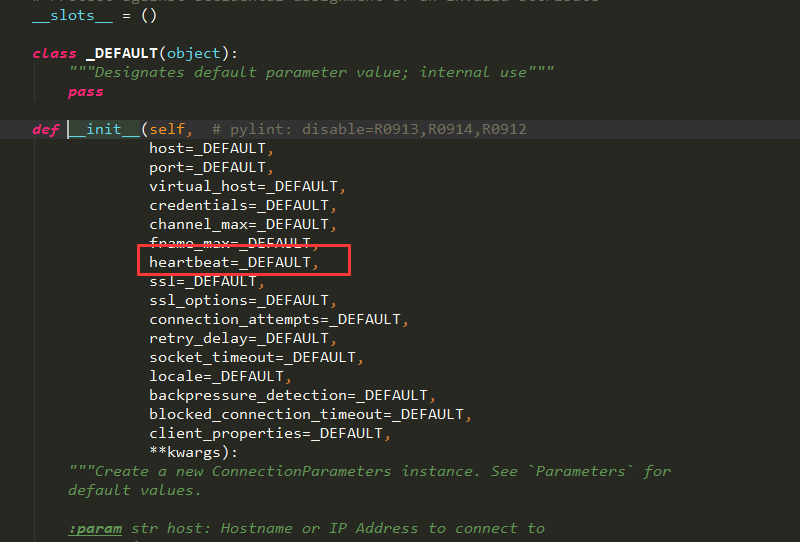
这个参数默认没有设置,那么这个heatbeat的心跳时间,默认是不设置的,如果不设置的话,就是根绝服务端设置的,因为这个心跳时间是和服务端进行协商的结果
当这个参数设置为0的时候则表示不发送心跳,服务端永远不会断开这个连接,所以这里我为了方便我给发布消息的线程的心跳设置为0,并且我这里,我整理通过抓包,看一下服务端和客户端的协商过程
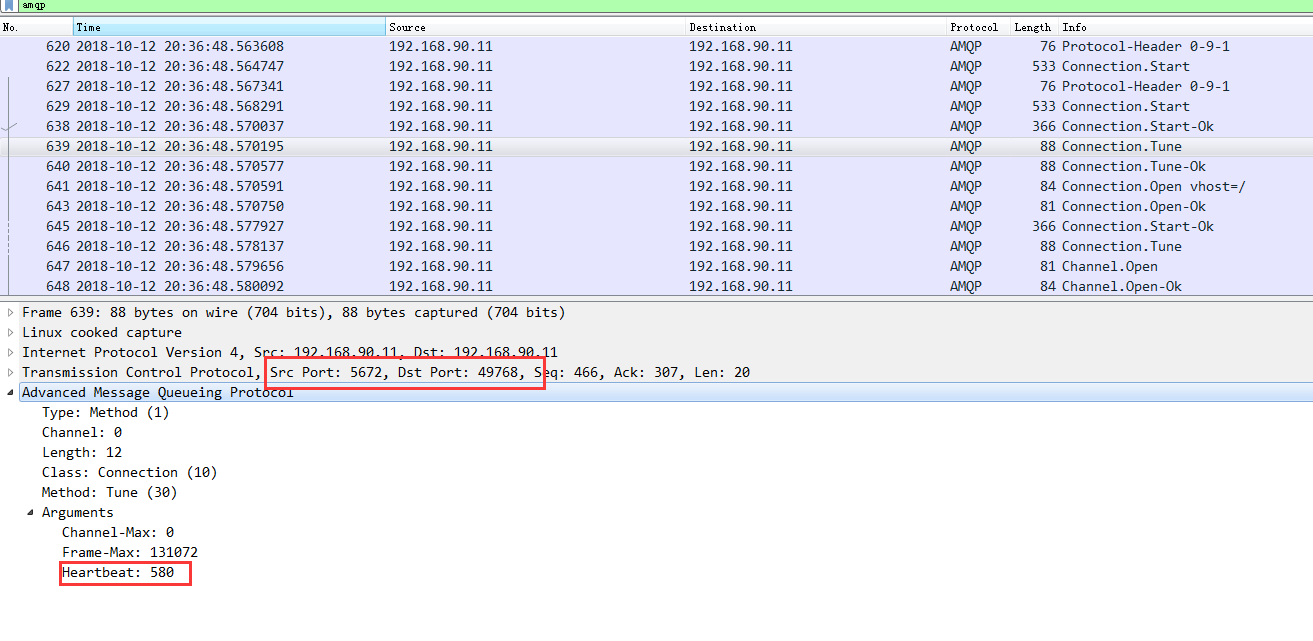
从抓包分析中可以看出服务端和客户端首先协商的是580秒,而客户端回复的是:
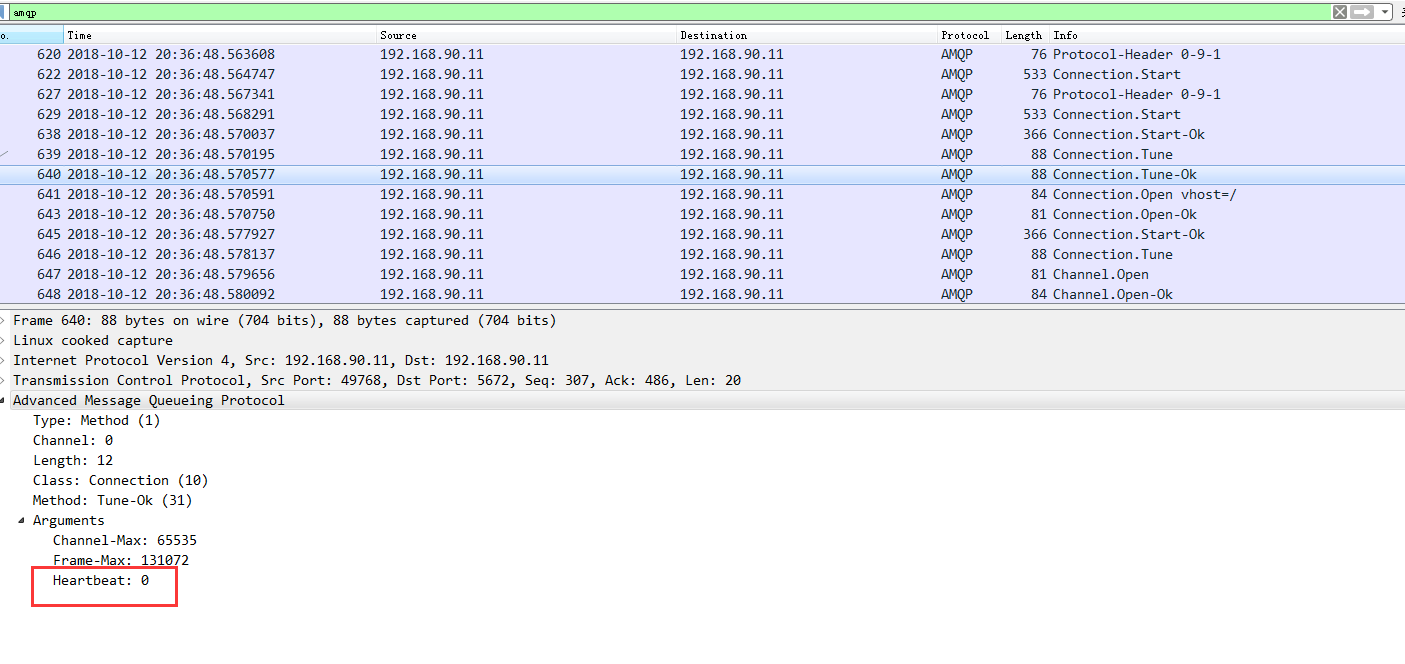
这样这个连接就永远不会断了,但是如果我们不设置heartbeat这个值,再次抓包我们会看到如下
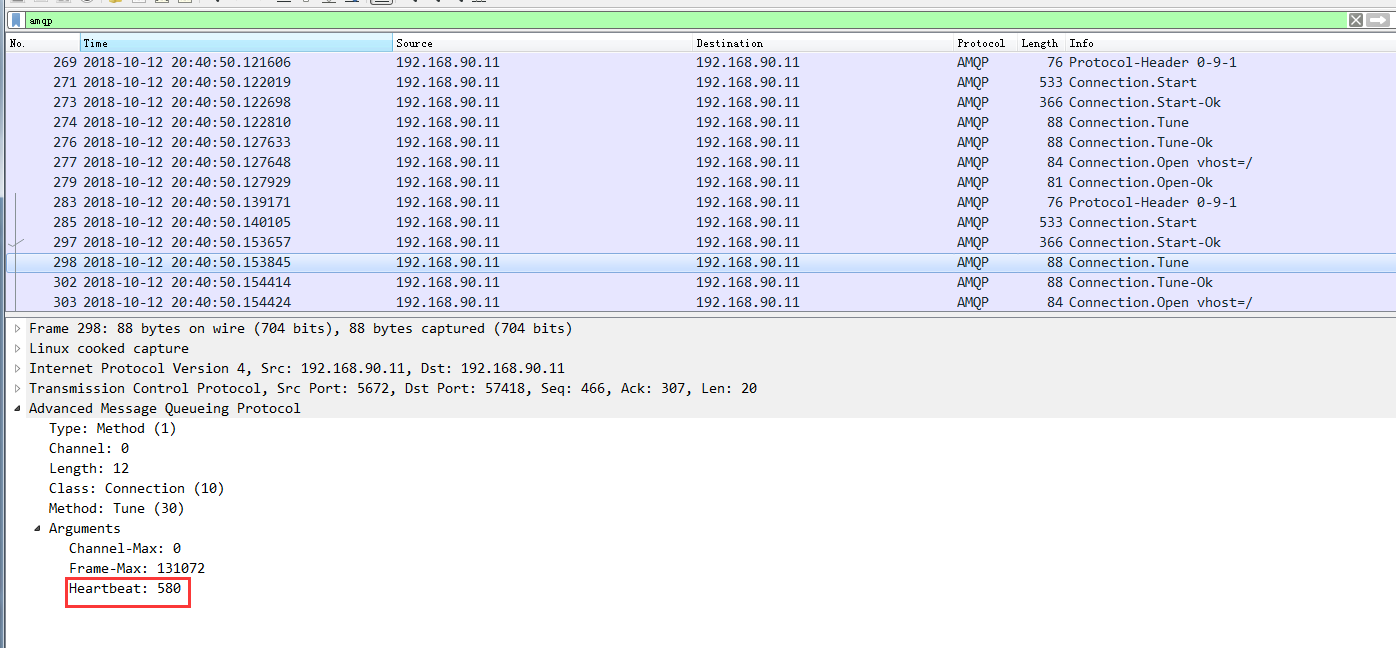

从上图我们可以删除最后服务端和客户端协商的结果就是580,这样当时间到了之后,如果没有数据往来,那么就会出现连接被服务端断开的情况了
特别注意
需要特别注意的是,经过我实际测试python的pika==0.11.2 版本及以下版本设置heartbeat的不生效的,只有0.12.0及以上版本设置才能生效
关于python中pika模块的问题的更多相关文章
- python的pika模块操作rabbitmq
上一篇博文rabbitmq的构架和原理,了解了rabbitmq的使用原理,接下来使用python的pika模块实现使用rabbitmq. 环境搭建 安装python,不会的请参考Linux安装配置py ...
- Python中optionParser模块的使用方法[转]
本文以实例形式较为详尽的讲述了Python中optionParser模块的使用方法,对于深入学习Python有很好的借鉴价值.分享给大家供大家参考之用.具体分析如下: 一般来说,Python中有两个内 ...
- python中threading模块详解(一)
python中threading模块详解(一) 来源 http://blog.chinaunix.net/uid-27571599-id-3484048.html threading提供了一个比thr ...
- 【转】关于python中re模块split方法的使用
注:最近在研究文本处理,需要用到正则切割文本,所以收索到了这篇文章,很有用,谢谢原作者. 原址:http://blog.sciencenet.cn/blog-314114-775285.html 关于 ...
- Python中的模块介绍和使用
在Python中有一个概念叫做模块(module),这个和C语言中的头文件以及Java中的包很类似,比如在Python中要调用sqrt函数,必须用import关键字引入math这个模块,下面就来了解一 ...
- python中导入模块的本质, 无法导入手写模块的解决办法
最近身边一些朋友发生在项目当中编写自己模块,导入的时候无法导入的问题. 下面我来分享一下关于python中导入模块的一些基本知识. 1 导入模块时寻找路径 在每一个运行的python程序当中,都维护了 ...
- Python中time模块详解
Python中time模块详解 在平常的代码中,我们常常需要与时间打交道.在Python中,与时间处理有关的模块就包括:time,datetime以及calendar.这篇文章,主要讲解time模块. ...
- Python中collections模块
目录 Python中collections模块 Counter defaultdict OrderedDict namedtuple deque ChainMap Python中collections ...
- Python中pathlib模块
Python中pathlib模块 Path.cwd():返回当前目录的路径 Path.home():返回当前用户的家目录 Path.stat():返回此路径信息 Path.touch():创建文件 P ...
随机推荐
- 解决Command "python setup.py egg_info" failed with error code 1 in /tmp/pip-install-f8IeEI/MYSQL-python/
Command "python setup.py egg_info" failed with error code 1 in /tmp/pip-install-f8IeEI/MYS ...
- VB 半透明窗体
Private Declare Function GetWindowLong Lib "user32" Alias "GetWindowLongA" (ByVa ...
- Xamarin Essentials教程打开文件
Xamarin Essentials教程打开文件 FileSystem类的OpenAppPackageFileAsync()方法可以用来打开App包中特定的文件,其语法形式如下: public sta ...
- babel那些事儿
从前,一提到新东西,我的反应就是兼容性好不好,如果不能满足产品经理的需求,就还是用保守的方式实现吧.毕竟前端开发是一件很灵活的事,怎么写都行,至于为何会用某种方法,一定是综合考虑兼容性,性能,用户体验 ...
- BZOJ.3351.[IOI2009]Regions(根号分治 差分)
BZOJ 表示非常爽2333 \(Description\) 给定一棵\(n\)个点的树,每个点有一个属性\(1\leq r_i\leq R\). \(Q\)次询问,每次询问给定\(r1,r2\),求 ...
- python基础一 ------简单队列用作历史记录
#需求:测试历史记录,一个猜字游戏,能在重新进入游戏时查看输入历史# #-*-coding:utf-8-*- from random import randint from collections i ...
- Mybatis的延迟加载和缓存
1. MyBatis中的延迟加载,也称为懒加载,是指在进行关联查询时,按照设置延迟加载规则推迟对关联对象的select查询.延迟加载可以有效的减少数据库压力. 注意:MyBatis的延迟加 ...
- [P3385]【模板】负环 (spfa / bellman-ford)
终于开始认真对待图论了 因为听说一直是提高组的,动得很少,直到现在机房打提高的氛围下,开始学一些皮毛的东西 模板题目链接 这是一道求负环的题目,照理来说大家都是用spfa来判断负环的 但是我觉得bel ...
- X-factor Chains [POJ3421] [素数]
Description 给定一个正整数X, 一个长度为m的X-因子链是由m+1个整数组成的.其中 1 = X0, X1, X2, …, Xm = X 满足Xi < Xi+1 且 Xi ...
- Java 状态模式
在阎宏博士的<JAVA与模式>一书中开头是这样描述状态(State)模式的:状态模式,又称状态对象模式(Pattern of Objects for States),状态模式是对象的行为模 ...