
python基础(5)-文件操作
文件(file)操作
创建文件
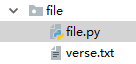
verse.txt:
床前明月光
疑是地上霜
open(path(文件路径),mode(模式:r/r+[读],w/w+[写],a/a+[追加])):返回文件句柄(对象)
verse_file = open('verse.txt','r',encoding="utf-8")
r/r+[读],w/w+[写],a/a+[追加]的区别
| mode | 可做操作 | 若文件不存在 | 是否覆盖 |
| r | 只读 | 报错 | - |
| r+ | 读写 | 报错 | 是 |
| w | 只写 | 创建 | 是 |
| w+ | 读写 | 创建 | 是 |
| a | 只写 | 创建 | 追加 |
| a+ | 读写 | 创建 | 追加 |
readlines():获取所有行,返回list
 verse_file = open('verse.txt','r',encoding="utf-8")
 print(verse_file.readlines())
 verse_file.close()
 #result:
     #['床前明月光\n', '疑是地上霜']
read():读取所有字符,返回string
 verse_file = open('verse.txt','r',encoding="utf-8")
 print(verse_file.read())
 verse_file.close()
 #result:
     # 床前明月光
     # 疑是地上霜
遍历文件最优法(懒加载)
verse_file = open('verse.txt','r',encoding="utf-8")
for row in verse_file:
    print(row.strip())
#result:
    # 床前明月光
    # 疑是地上霜
write():写入.当mode为'w'[写]时,会清空之前的内容再写入;当mode为'a'[追加]时,会在原来基础上继续追加写入
 verse_file = open('verse.txt','w',encoding="utf-8")
 input_str = '举头望明月\n低头思故乡'
 verse_file.write(input_str)
 verse_file.close()
 """
 verse.txt:
     举头望明月
     低头思故乡
 """
 verse_file = open('verse.txt','a',encoding="utf-8")
 input_str = '举头望明月\n低头思故乡'
 verse_file.write(input_str)
 verse_file.close()
 """
 verse.txt:
     床前明月光
     疑是地上霜举头望明月
     低头思故乡
 """
seek(position):定位光标位置
verse_file = open('verse.txt','r',encoding="utf-8")
verse_file.seek(6)#utf-8中一个中文字符占3个字节
print(verse_file.read())
verse_file.close()
"""
 verse.txt:
    明月光
    疑是地上霜
"""
tell():获取光标位置
 verse_file = open('verse.txt','r',encoding="utf-8")
 verse_file.seek(6)
 print(verse_file.tell());#result:6
练习
多级目录文件持久化增删改查
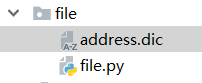
address.dic:
{}
file.py:
 file = open('address.dic', 'r', encoding='utf8')
 history_list = []
 address_dic = eval(file.read())
 while True:
     print('---当前地址---')
     for current in address_dic:
         print(current)
     choose = input('请选择---0:返回上一层,1:新增,2:删除,3:修改,4:查询,5:保存退出:')
     ':
         if history_list:
             address_dic = history_list.pop();
     ':
         insert_name = input('请输入新增项名称:')
         if insert_name in address_dic:
             print('新增失败!该名称项已存在!')
             continue;
         else:
             address_dic[insert_name] = {}
     ':
         delete_name = input('请输入删除项名称:')
         if delete_name not in address_dic:
             print('删除失败!该名称项不存在!')
             continue;
         else:
             del address_dic[delete_name];
     ':
         modify_name = input('请输入修改项名称:')
         if modify_name not in address_dic:
             print('修改失败!该名称项不存在!')
             continue;
         else:
             modify_to_name = input('请输入修改后的名称:')
             modify_value = address_dic[modify_name];
             address_dic[modify_to_name] = modify_value
             del address_dic[modify_name]
     ':
         select_name = input("请输入查询项名称:")
         if select_name not in address_dic:
             print('查询失败!该名称项不存在!')
             continue;
         else:
             history_list.append(address_dic)
             address_dic = address_dic[select_name]
             if not address_dic:
                 print('当前无地址')
     ':
         file = open('address.dic', 'w+', encoding='utf8')
         if history_list:
             file.write(str(history_list[0]))
         else:
             file.write(str(address_dic))
         file.close();
         break;
     else:
         print("输入错误")
运行结果:
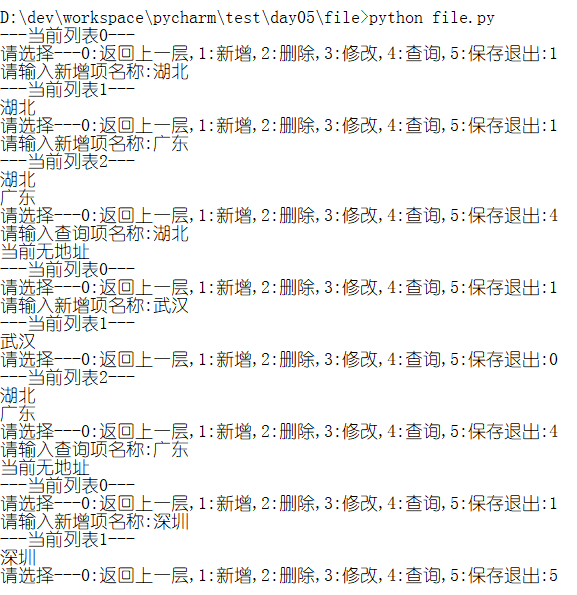
address.dic:
{'湖北': {'武汉': {}}, '广东': {'深圳': {}}}
扩展
eval(str):可将对应格式字符串转成相应类型对象.例:
 dic_str = "{'1':'a','2':'b'}"
 list_str = "['1','2','3']"
 dic = eval(dic_str)
 list = eval(list_str)
 print(dic,type(dic))
 print(list,type(list))
 #result:
     # {'1': 'a', '2': 'b'} <class 'dict'>
     # ['1', '2', '3'] <class 'list'>
with:类似C#中Using块,当前块执行完释放对象.下面两块代码等价.
 with open("test",'r') as file:
     file.read();
 file = open("test",'r')
 file.read()
 file.close()
编码与解码
推荐博客:https://www.cnblogs.com/OldJack/p/6658779.html
python基础(5)-文件操作的更多相关文章
- python基础篇(文件操作)
Python基础篇(文件操作) 一.初始文件操作 使用python来读写文件是非常简单的操作. 我们使用open()函数来打开一个文件, 获取到文件句柄. 然后通过文件句柄就可以进行各种各样的操作了. ...
- python基础之文件操作
对于文件操作中最简单的操作就是使用print函数将文件输出到屏幕中,但是这种操作并不能是文件保存到磁盘中去,如果下调用该数据还的重新输入等. 而在python中提供了必要的函数和方法进行默认情况下的文 ...
- Day3 Python基础学习——文件操作、函数
一.文件操作 1.对文件操作流程 打开文件,得到文件句柄并赋值给一个变量 通过文件句柄对文件进行操作 关闭文件 #打开文件,读写文件,关闭文件 http://www.cnblogs.com/linha ...
- python基础14_文件操作
文件操作,通常是打开,读,写,追加等.主要涉及 编码 的问题. #!/usr/bin/env python # coding:utf-8 ## open实际上是从OS请求,得到文件句柄 f = ope ...
- 【python基础】文件操作
文件操作目录 一 .文件操作 二 .打开文件的模式 三 .操作文件的方法 四 .文件内光标移动 五. 文件的修改 一.文件操作介绍 计算机系统分为:计算机硬件,操作系统,应用程序三部分. 我们用pyt ...
- python基础4文件操作
在磁盘上读取文件的 功能都是由操作系统来实现的,不允许普通的程序直接操作磁盘,所以读写文件就是请求操作系统打开一个文件对象(通常称为文件描述符),然后,通过操作系统提供的接口从这个文件对象中读取数据( ...
- Python基础 之 文件操作
文件操作 一.路径 文件绝对路径:d:\python.txt 文件相对路径:在IDEA左边的文件夹中 二.编码方式 utf-8 gbk... 三.操作方式 1.只读 r 和 rb 绝对路径的打开操作 ...
- Python基础--基本文件操作
全部的编程语言都一样,学完了一些自带的数据机构后,就要操作文件了. 文件操作才是实战中的王道. 所以,今天就来分享一下Python中关于文件的一些基本操作. open方法 文件模式 这个模式对于写入文 ...
- python基础(10):文件操作
1. 初识文件操作 使⽤python来读写⽂件是非常简单的操作.我们使⽤open()函数来打开⼀个⽂件,获取到⽂ 件句柄,然后通过⽂件句柄就可以进⾏各种各样的操作了,根据打开⽅式的不同能够执⾏的操 作 ...
- Python基础学习——文件操作、函数
一.文件操作 文件操作链接:http://www.cnblogs.com/linhaifeng/articles/5984922.html(更多内容见此链接) 一.对文件操作流程 打开文件,得到文件句 ...
随机推荐
- Visual Studio 2015 msvsmon.exe crashed when c++ debugging with x64
Completely uninstalling Astrill fixed the issue but this solution is not what I want. Astrill suppor ...
- 范型方法 & 范型参数 & 范型返回值
Java范型类 public class FanXingClassTest { public static void main(String args[]){ Test<Integer> ...
- [转]html5: postMessage解决跨域和跨页面通信的问题
[转]html5: postMessage解决跨域和跨页面通信的问题 平时做web开发的时候关于消息传递,除了客户端与服务器传值,还有几个经常会遇到的问题: 多窗口之间消息传递(newWin = wi ...
- Apple Watch S3 解锁 MacBook Pro 2015版失败的解决办法
我的MacBook Pro MF839由于只有128G的内存,所以就只能藏在我的抽屉底下,偶尔想体验一下xcode的时候再拿回来用下,想想都浪费 也不是不想换SSD,只是看了一下,价格太贵了,256G ...
- OSI 协议
- pointcut 切面表达式 切入点表达式
下面给出一些常见切入点表达式的例子. 任意公共方法的执行: execution(public * *(..)) 任何一个以“set”开始的方法的执行: execution(* set*(..)) Ac ...
- 【Excel】输出固定长文本
'******************************************************************************* ' 固定長形式テキストファイル書き出す ...
- 基于PHP给大家讲解防刷票的一些技巧
刷票行为,一直以来都是个难题,无法从根本上防止. 但是我们可以尽量减少刷票的伤害,比如:通过人为增加的逻辑限制. 基于 PHP,下面介绍防刷票的一些技巧: 1.使用CURL进行信息伪造 $ch = c ...
- [Benchmark] Codeflaws: A Programming Competition Benchmark for Evaluating Automated Program Repair Tools
Basic Information Publication: ICSE'17 Authors: Shin Hwei Tan, Jooyong Yi, Yulis, Sergey Mechtaev, A ...
- 二进制样式的字符串与byte数组互转函数示例
开发时用到的方法,记录下: /// <summary> /// 测试方法 /// </summary> private void TestFun() { Response.Wr ...