
利用echarts自定义环形图
一、代码
 app.title = '通讯盒各版本用户占比';

 option = {

      backgroundColor: '#0f0f31',

     title: {

         show:true,

         x:"left",

         text: '通讯盒各版本用户占比',

         textStyle:{

             fontSize:16

             ,fontWeight:'normal'

             ,color:'#72a1d2'

         },

         left:20,

         top:10,

         borderColor :'#10395c',

         borderWidth :2,

     },

     tooltip: {

         trigger: 'item',

         formatter: "{a} <br/>{b}: {c} ({d}%)"

     },

     series: [

         {

             name:'通讯盒各版本用户占比',

             type:'pie',

             radius:['10%','18%'],

             avoidLabelOverlap:false,

             color:['#32A8FF',' #02C800','#9f47fd'],

             formatter: '{b}: {d}',

             markLine :{

                 label  :{

                     show:true,

                     position :'outside'

                 },

             },

             labelLine:{

                 normal:{

                     length:14  ,

                     length2 :56,

                 }

             },

             label :{

                  formatter: [

                     '{d}%',

                     '{b}'

                 ].join('\n'),

                 verticalAlign :'bottom',

                 position:'outside',

                 //textShadowOffsetY :10,

                 align :'right',

                 color:'white',

                 height :36,

                  rich: {

                     a: {

                         verticalAlign:'bottom',

                         // 没有设置 `verticalAlign`,则 `verticalAlign` 为 bottom

                     }

                 }

             },

             data:[{value:68,name:'YBT1',label: {

                 normal: {

                    textStyle: {

                         color: '#508DFF'  // 改变标示文字的颜色

                    }

                 }

             },itemStyle:{

                 normal:{

                     color: new echarts.graphic.LinearGradient(1, 0, 0, 0, [{

                         //颜色渐变函数 前四个参数分别表示四个位置依次为左、下、右、上

                         offset: 0,

                         color: '#508DFF'

                     }, {

                         offset: 1,

                         color: '#26C5FE'

                     }])

                 }

             }},{value:18,name:'YBT2',label: {

                 normal: {

                    textStyle: {

                         color: '#63E587'  // 改变标示文字的颜色

                    }

                 }

             },itemStyle:{

                 normal:{

                     color: new echarts.graphic.LinearGradient(1, 0, 0, 0, [{

                         //颜色渐变函数 前四个参数分别表示四个位置依次为左、下、右、上

                         offset: 0,

                         color: '#63E587'

                     }, {

                         offset: 1,

                         color: '#5FE2E4'

                     }])

                 }

             }},{value:14,name:'YBT3',label: {

                 normal: {

                    textStyle: {

                         color: '#9f47fd'  // 改变标示文字的颜色

                    }

                 }

             },itemStyle:{

                 normal:{

                     color: new echarts.graphic.LinearGradient(1, 0, 0, 0, [{

                         //颜色渐变函数 前四个参数分别表示四个位置依次为左、下、右、上

                         offset: 0,

                         color: '#9f47fd'

                     }, {

                         offset: 1,

                         color: '#9f47fd'

                     }])

                 }

             }}]

         },{

             name:'',

             type:'pie',

             radius:['8%','10%'],

             avoidLabelOverlap:false,

             legendHoverLink :false,

             label:{

               show:false,

             },

             tooltip:{//禁止鼠标悬停显示提示框

                 show:false,

             },

             hoverAnimation:false ,//禁止鼠标悬停放大区域

             color:['#bcdbfa'],

             data:[{value:'100'}]

         }

     ]

 };
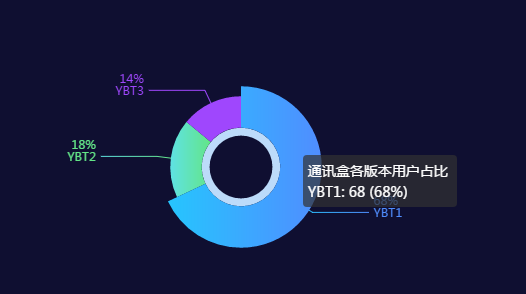
二、效果图
利用echarts自定义环形图的更多相关文章
- echarts实现环形图
前端框架使用的angular,使用echarts实现环形图 1. item.component.html <div id="box1" class="pie&quo ...
- echarts自定义折线图横坐标时间间隔踩坑总结
折线图需求:横坐标为时间,要求按一定间隔展示,鼠标移至折线上间隔时间内的数据也可展示 其实很简单的一个配置就可搞定,但在不熟悉echarts配置的情况下,就很懵逼 xAxis: { boundaryG ...
- Android中自定义环形图2
如图: 自定义属性,在values文件夹下创建 attrs.xml <?xml version="1.0" encoding="utf-8"?> & ...
- Android中自定义环形图
如图: 自定义view package com.riverlet.ringview; import android.animation.ObjectAnimator; import android.c ...
- echarts画环形图
alarmManage(){ let drawLine = echarts.init(document.getElementById('data-alarmManage-table-wrap')); ...
- Qt编写自定义控件41-自定义环形图
一.前言 自定义环形图控件类似于自定义饼状图控件,也是提供一个饼图区域展示占比,其实核心都是根据自动计算到的百分比绘制饼图区域.当前环形图控件模仿的是echart中的环形图控件,提供双层环形图,有一层 ...
- 修改echarts环形图的牵引线及文字位置
修改echarts环形图的牵引线及文字位置,下面代码及效果不仅如此,也包含了其它的效果哦.有问题可以留言. 根据echarts官方示例修改效果: 官方示例图: 修改效果图: 直接上代码:其它不多说. ...
- vue 结合 Echarts 实现半开环形图
Echarts 实现半开环形图 1.先看看实现的图 2.HTML部分 创建id 是 chart 的div标签. <div class="content-item"> & ...
- echarts白色实心环形图(空心饼图)的编写
// 数据接入机构统计let myDom = document.getElementById('myChart');let myWidth = myDom.offsetWidth - 5; // 获取 ...
随机推荐
- shell 文件操作
序 在linux平台下开发,我们经常会接触到一些任务性质的工作,而处理方式多样化.现积累各个案例. 从远程服务器拉取文件到本地服务器 scp work@cp01-xx-dev.com: ...
- JVM自动内存管理机制——Java内存区域(下)
一.虚拟机参数配置 在上一篇<Java自动内存管理机制——Java内存区域(上)>中介绍了有关的基础知识,这一篇主要是通过一些示例来了解有关虚拟机参数的配置. 1.Java堆参数设置 a) ...
- Javascript高级编程学习笔记(9)—— 执行环境
今天主要讲一下,JS底层的一些东西,这些东西不太好举例(应该是我水平不够) 望大家多多海涵,比心心 执行环境 执行环境(执行上下文,全文使用执行环境 )是JS中最为重要的一个概念,执行环境决定了,变量 ...
- 第31节:Java基础-类与对象
前言 Java基础-类与对象,方法的重载,构造方法的重载,static关键字,main()方法,this关键字,包,访问权限,类的继承,继承性,方法的重写,super变量. 方法的重载:成员方法的重载 ...
- LabVIEW(十四):VI属性
1.VI的属性在项目研究中是很常用的,但是会经常忽略VI的属性设置,建议在编程事常常运用这些属性的设置,这样就可以使你的程序更加完善,易懂性也会提高. 属性快捷键:Ctrl+I. 2.常规 (1).编 ...
- kubernetes集群搭建(1):环境准备
了解kubernets 本次搭建采用的是1个master节点,2个node节点,一个私有docker仓库 1.设置各节点ip信息 2.设置hostname(其它节点也需修改) vi /etc/sysc ...
- Dispatch Queue 内存结构
Dispatch 源代码版本是libdispatch-84.5.5  会根据这个结构来分析dispatch_queue 对应的代码实现 参考 GCD源码分析3 -- dispatch_queue篇 ...
- Spring Boot - Profile配置
Profile是什么 Profile我也找不出合适的中文来定义,简单来说,Profile就是Spring Boot可以对不同环境或者指令来读取不同的配置文件. Profile使用 假如有开发.测试.生 ...
- Linux学习笔记之二————Linux系统的文件和目录
一.Windows和Linux文件系统区别 1.在 windows 平台下,打开“计算机”,我们看到的是一个个的驱动器盘符: 每个驱动器都有自己的根目录结构,这样形成了多个树并列的情形,如图所示: ...
- 《深入分析Linux内核源代码》读书、私藏笔记大放送
秉承着"不懂操作系统原理的程序员不是合格的程序员"的至理名言,鄙人又是买陈莉君老师的“Linux教学视频”,又是研读其力作<深入分析Linux内核源代码>,先将总结笔记 ...