
用Python操纵MySQL
本例用Python操纵MySQL,从指定文件读取数据,并对数据进行处理,处理之后批量插入MySQL。
贴上代码:
# -*- coding: gbk -*-

import re

import MySQLdb

import time

def select(sqlselect):

    try:

        conn = MySQLdb.connect("localhost","test","","testdb" )

        cursor=conn.cursor()

        # 使用execute方法执行SQL语句

        cursor.execute(sqlselect)

        # 使用 fetchone() 方法获取一条数据。

        data = cursor.fetchone()

        #读取所有行

        data = cursor.fetchall()

        return data

    except Exception,e:

        print e

    #print "Data from mysql: %s %s %s %s" %(data[0],data[1],data[2],data[3])

    finally:

        # 关闭数据库连接

        conn.close()

def loadData(dataFile,rowlimts=0):

    #dataFile=r'E:\cabspottingdata\new_abboip.txt'

    cabid=dataFile[dataFile.index('_')+1:dataFile.index('.')]

    myFile=open(dataFile,'r',2048)#2048为缓冲大小

    newline=myFile.readline()

    records=[]

    splitter=re.compile('\\s')#以空白字符作为分隔符

    rows=0

    if rowlimts>0:

        while newline and rows<rowlimts:

            content=splitter.split(newline)

            record=[]

            record.append(float(content[0]))

            record.append(float(content[1]))

            record.append(int(content[2]))#int型也可插入到数据库的bit型字段

            dt=time.gmtime(int(content[3]))#将unix时间,如1213084687,转换成time类型

            dtStr=time.strftime('%Y-%m-%d %H:%M:%S',dt)#将time对象,格式化为"2008-06-10 07:58:07"型字符串

            record.append(dtStr)

            record.append(cabid)

            records.append(record)

            rows+=1

            newline=myFile.readline()

    else:

        while newline:

            content=splitter.split(newline)

            record=[]

            record.append(float(content[0]))

            record.append(float(content[1]))

            record.append(int(content[2]))

            dt=time.gmtime(int(content[3]))

            dtStr=time.strftime('%Y-%m-%d %H:%M:%S',dt)

            record.append(dtStr)

            record.append(cabid)

            records.append(record)

            newline=myFile.readline()

    myFile.close()

    return records

def insertItems(records):

    if len(records)>0:

        #注意,不论MySQL的表结构中,某个字段为何种类型,Python的SQL语句中都要用%s来表示格式

        sql="insert into geoinfo(latitude,longitude,occupancy,time,cabid)values(%s,%s,%s,%s,%s)"

        values=[]

        for record in records:

            values.append((record[0],record[1],record[2],record[3],record[4]))

        try:

            conn = MySQLdb.connect("localhost","test","","testdb" )

            _cursor=conn.cursor()

            #批量插入

            _cursor.executemany(sql,values)

            conn.commit()#Insert和update操作必须调用commit方法,操作才能生效

            return 0

        except Exception,e:

            raise e

            return -1

        finally:

            conn.close()

def insertItem(record):

        if record!=None:

            #注意,不论MySQL的表结构中,某个字段为何种类型,Python的SQL语句中都要用%s来表示格式

            sql="insert into geoinfo(latitude,longitude,occupancy,time,cabid)values(%s,%s,%s,%s,%s)"

            sql=sql%(record[0],record[1],record[2],record[3],record[4])

            try:

                conn = MySQLdb.connect("localhost","test","","testdb" )

                _cursor=conn.cursor()

                _cursor.execute(sql)

                conn.commit()

                return 0

            except Exception,e:

                raise e

                return -1

            finally:

                conn.close()

if __name__=='__main__':

    dataFile=r'E:\cabspottingdata\new_abboip.txt'

    records=loadData(dataFile)

    print 'inserting %d records'%len(records)

    insertItems(records)

    data=select("select objectid from geoinfo limit 0,10")#查询前10条

    print data

    print 'inserting completed.'
注意事项:
1)批量插入时,cursor.execute()放在for循环中的执行,其效率远不如cursor.executemany()方法。
2)不论MySQL的表结构当中,某个字段为何种类型,如float,int,bit,datetime型, Python的SQL语句中都要用%s来表示格式,否则对于非字符串类型的字段,插入式可能会报错。
例如,我在插入geoinfo表(结构如下,objectid字段为自增长)时,当插入语句写成 sql="insert into geoinfo(latitude,longitude,occupancy,time,cabid)values(%f,%f,%d,%s,%s)" 时会报错:
"float argument required, not str"
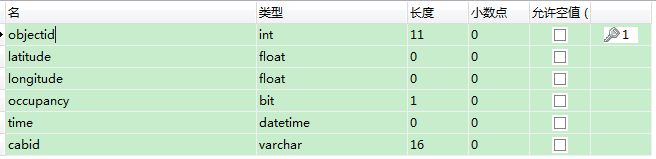
后来改成 sql="insert into geoinfo(latitude,longitude,occupancy,time,cabid)values(%s,%s,%s,%s,%s)" 就没错了。
另外,对于37.75134和-122.39488这样的小数型,若字段设计为float型时,插入时,MySQL会自动将其截断,并作四舍五入,
我以为是长度不够,于是改长度为50,插入时却被自动截断为整数,后改成double型才可以。
用Python操纵MySQL的更多相关文章
- python json及mysql——读取json文件存sql、数据库日期类型转换、终端操纵mysql及python codecs读取大文件问题
preface: 近期帮师兄处理json文件,须要读到数据库里面,以备其兴许从数据库读取数据.数据是关于yelp站点里面的: https://github.com/Yelp/dataset-examp ...
- 第二篇:操纵MySQL数据库(2) - 基于ORM思想的SQLAlchemy库
前言 本文讲解在Python语言中使用SQLAlchemy库操纵MySQL数据库的方法. 由于具体内容涉及较多,本文仅以插入及展示数据为例,更多内容请查阅有关文档. ORM ORM也即对象 - 关系映 ...
- 第一篇:操纵MySQL数据库(1) - 基于MySQLdb库
前言 本文讲解在Python语言中使用MySQLdb库操纵MySQL数据库的方法. 准备工作 1. 安装Python和MySQL2. 安装MySQLdb (exe下载地址:http://sourcef ...
- Python 3 mysql 库操作
Python 3 mysql 库操作 一.基础相关知识 MySQL数据库基本操作知识储备 数据库服务器:一台计算机(对内存要求比较高) 数据库管理系统:如mysql,是一个软件 数据库:oldboy_ ...
- python操作MySQL数据库的三个模块
python使用MySQL主要有两个模块,pymysql(MySQLdb)和SQLAchemy. pymysql(MySQLdb)为原生模块,直接执行sql语句,其中pymysql模块支持python ...
- 【初学python】使用python连接mysql数据查询结果并显示
因为测试工作经常需要与后台数据库进行数据比较和统计,所以采用python编写连接数据库脚本方便测试,提高工作效率,脚本如下(python连接mysql需要引入第三方库MySQLdb,百度下载安装) # ...
- Python(九) Python 操作 MySQL 之 pysql 与 SQLAchemy
本文针对 Python 操作 MySQL 主要使用的两种方式讲解: 原生模块 pymsql ORM框架 SQLAchemy 本章内容: pymsql 执行 sql 增\删\改\查 语句 pymsql ...
- 使用 python 管理 mysql 开发工具箱 - 1
Mysql 是一个比较优秀的开源的数据库,很多公司都在使用.作为运维人员,经常做着一些重复性的工作,比如创建数据库实例,数据库备份等,完全都可以使用 python 编写一个工具来实现. 一.模块 Co ...
- 练习:python 操作Mysql 实现登录验证 用户权限管理
python 操作Mysql 实现登录验证 用户权限管理
随机推荐
- AngularJS开发指南9:AngularJS作用域的详解
AngularJS作用域是一个指向应用模型的对象.它是表达式的执行环境.作用域有层次结构,这个层次和相应的DOM几乎是一样的.作用域能监控表达式和传递事件. 作用域的特点 作用域提供APIs($wat ...
- FZU5BOYS-Beta版本冲刺计划及安排
1.下一阶段需要改进完善的功能 话题模块(分类参考Citeulike论文网站),文章/计划的删除功能 2.下一阶段新增的功能 1)推荐模块(冷启动问题,拟爬取部分豆瓣数据,部分伪专家数据(我们团队), ...
- css左右侧自动填充宽度布局
<!doctype html> <html> <head> <meta charset="utf-8"> <title> ...
- Hibernate-一对多的关系维护
一对多 和多对一 一般是看需求来确定的,很多时候都是设置成双向的 举个最最普通的离子 :一个班级里面有多个学生 多个学生属于一个班级 从学生表来看 就是多对一的关系 从班级表来看就是一对多的关系 需求 ...
- urllib2.URLError: <urlopen error [Errno 10061] >
今天来运行以前的python脚本,结果报这个错:urllib2.URLError: <urlopen error [Errno 10061] > 原来是因为 解决方法:打开IE浏览器,依次 ...
- 51nod 1170 1770 数数字(动态规划)
解题思路:看到题后,直接想到分成两种情况: ①:a*b >9 这里又分成两种 1. n==1 a*b 直接是一个两位数 求得十位和个位(这里十位和个位不可能相等) 然后如果等于d 则结果=1 2 ...
- css3应用之自定义选中文字的背景颜色
在看很多的博客主题时候发现大多数都对选中文字的背景颜色做了相应的处理.其实这样是很符合用户体验的.因为有很多的人会用鼠标选择着一行一行的阅读.其中就包括本人... 浏览器中默认的选中的文字颜色为白色, ...
- Unity自动打包Apk
unity打包apk相对来说比较容易,相信出过的人都明白,出包过程,没有大的难度,一步一操作,一步一等待,繁琐耗时,不懂的人又代替不了.这时候需求就来了,如何简单的一键打包搞定,这个就稍微有点难度,当 ...
- Visual Studio Online Integrations-Collaboration
原文:http://www.v ...
- Java&.Net虚拟机精简(GreenJVM&GreenDotNet发布) .
精简JRE体积的小工具:http://blog.csdn.net/cping1982/archive/2008/09/02/2865198.aspx 项目地址:http://code.google.c ...