
[Xamarin] 關於發出Notification 的大小事 (转帖)
關於Anroid 的使用者來說,Notification 是一個非常會看到且用到的功能
他可以提醒使用者甚麼東西需要待處理,像是郵件或是會議的提醒等..
甚至有些APP ,直接使用Notification 來做記事像是 https://play.google.com/store/apps/details?id=bleetech.notificationnote
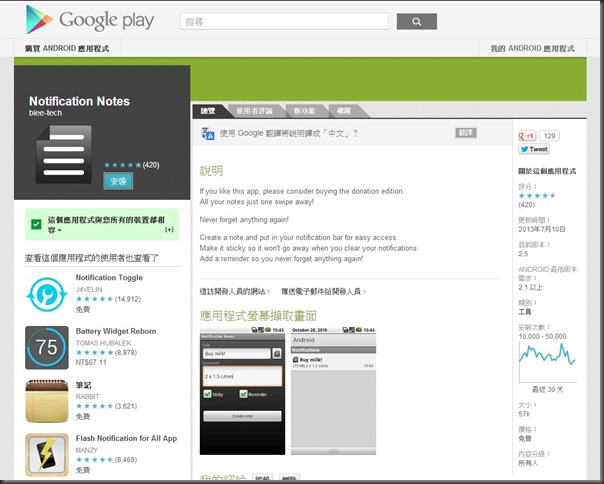
簡單且方便,這篇我們來談談如何來製作 Local Notification
首先我們來講解要實作的畫面
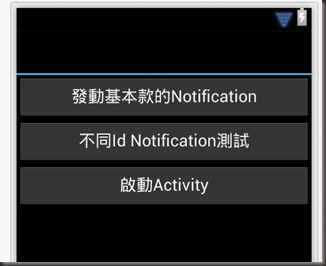
畫面上有三顆按鈕, 發動基本款的Notification(btn1) ,不同Id Notification(btn2),啟動Activity(btn3)
我們先來看第一個 簡單發動 Notification
//同一組id 的ˊ簡單 notification
var btn1 = FindViewById<Button>(Resource.Id.btn1);
btn1.Click += delegate
{
NotificationCompat.Builder builder = new NotificationCompat.Builder(this)
.SetContentTitle("當麻的測試通知同一組ID")
.SetSmallIcon(Resource.Drawable.Icon2)
.SetContentText("你點擊了" + count + "次");
var notificationManager = (NotificationManager)GetSystemService(Context.NotificationService);
//都用同一組id
notificationManager.Notify(0, builder.Build());
count++;
};
其中 notificationManager.Notify(, builder.Build());
這0 的部分就是你app 內部識別的ID 許多因為許多地方沒有說到,如果當這值相同的時候他並不會再多增加一個新的Noticication
而是會去覆蓋
結果:
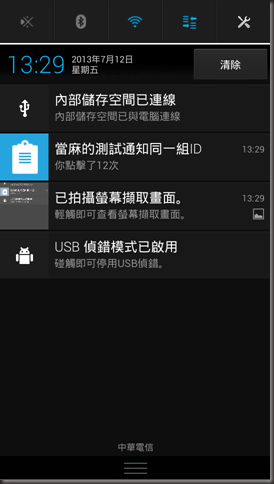
像圖中,我點了12次但是依然會是用同一個Notification 他並不會去累加上去..差異點在哪我們看第二個範例
不同Id Notification(btn2):
//不同id 的ˊ簡單 notification
var btn2 = FindViewById<Button>(Resource.Id.btn2);
btn2.Click += delegate
{
NotificationCompat.Builder builder = new NotificationCompat.Builder(this)
.SetContentTitle("當麻的測試通知不同ID")
.SetSmallIcon(Resource.Drawable.Icon2)
.SetContentText("你點擊了" + count + "次");
var notificationManager = (NotificationManager)GetSystemService(Context.NotificationService);
//都用不同id count 是累加的,所以每次點擊皆不同
notificationManager.Notify(count, builder.Build());
count++;
};
notificationManager.Notify(count, builder.Build()); 因為count每次被點都會加一次,所以造成每次Id 皆不同
結果:

所以每一次都會去增加一個新的Notification
但是目前案例,我們發現,點擊之後並不會有任何反應
接下來,
這案例是我送出一個 Notification ,並且使用者點擊後,會啟動一個我指定名字叫做 ActivityNotiCall 的 Activity
並且我透過PendingIntent 將一個 key 為 user 值為donma的資料意圖帶入到開啟後的 ActivityNotiCall
// 會啟動Activity 的 Notification
var btn3 = FindViewById<Button>(Resource.Id.btn3);
btn3.Click += delegate
{
//成立一個新的Intent
//並且在bundle 中帶資料
var resultIntent = new Intent(this, typeof(ActivityNotiCall));
var bundleData=new Bundle();
bundleData.PutString("user","donma");
resultIntent.PutExtras(bundleData);
TaskStackBuilder stackBuilder = TaskStackBuilder.Create(this);
stackBuilder.AddNextIntent(resultIntent);
//建立一個PendingIntent 使用者點擊後透過TaskStackBuilder 送至新的Activity
PendingIntent resultPendingIntent = stackBuilder.GetPendingIntent(0, (int)PendingIntentFlags.UpdateCurrent);
NotificationCompat.Builder builder = new NotificationCompat.Builder(this)
.SetContentTitle("當麻測試叫起Activity")
.SetSmallIcon(Resource.Drawable.Icon5)
.SetContentText("點我啟動")
//帶入 PendingIntent
.SetContentIntent(resultPendingIntent);
var notificationManager = (NotificationManager)GetSystemService(Context.NotificationService);
notificationManager.Notify(count, builder.Build());
count++;
};
ActivityNotiCall.cs :
using Android.App;
using Android.OS;
using Android.Widget;
namespace LocalNoti
{
[Activity(Label = "My Activity")]
public class ActivityNotiCall : Activity
{
protected override void OnCreate(Bundle bundle)
{
base.OnCreate(bundle);
SetContentView(Resource.Layout.LayoutNotiCall);
var txtView = (TextView)FindViewById(Resource.Id.textView1);
txtView.Text = this.Intent.GetStringExtra("user");
}
}
}
結果:
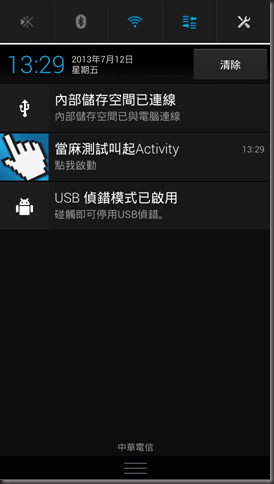
點擊後
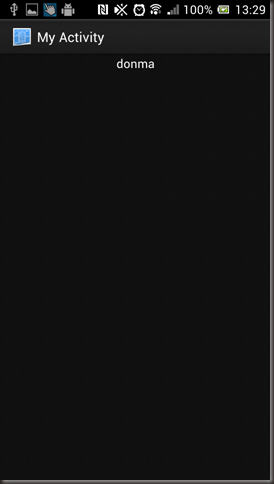
看範例都蠻好操控的,只是要多補充一點觀念,下面附上source code 還有參考連結
參考連結:
http://tw.myblog.yahoo.com/jw!IfekG5aZE0ewhGesjPZ30w--/article?mid=19&prev=20&next=18
http://developer.android.com/reference/android/app/PendingIntent.html
http://developer.android.com/reference/android/support/v4/app/TaskStackBuilder.html
[Xamarin] 關於發出Notification 的大小事 (转帖)的更多相关文章
- [Xamarin] 關於Internal Storage ,存取App內部使用資料 (转帖)
最近在開發App,會使用到必須要處理一些App所使用的資料,上網路查一下Android 得作法,包含我自己也實作了一下,可能是因為對Java || Android 不是很孰悉,常常錯在 java.la ...
- [Xamarin] 關於SQLite 的操作 (转帖)
我們聊一下常用的東西,SQLite,這東西很常用到,當再寫手機APP的時候,有時候會在Client 做 cache或是做一些資料的管理都很必須會用到,我們來看看今天的範例 建立SQL Lite 資料庫 ...
- 開博客了, 因為搞Delphi 開發的關於Delphi學習
開博客了, 因為搞Delphi 開發的關於Delphi學習,之前都是用本地TXT文件保存,發現在本地電腦保存非常不方面,而且只能在一台電腦上保存,不容易查看和修改內容.便於以後的記錄只用,以及經驗交流 ...
- 在laravel下關於blade模板的嘗試
Blade模板 關於模板繼承和分區段 @section和@yield的實驗 ①關於@section...@show嘗試 測試1 {{--appV2test.blade.php--}} <html ...
- 關於Validform 控件 值得注意的地方
Validform控件其實用起來挺方便的,直接百度就能找到官網,有直接的demo做參考.這些我就不提了,我所要說的是關於Validform控件的ajax的提交. Validform中有個參數ajaxP ...
- JDK1.6历史版本的下载(關於TLSv1.2)Oracle的官方文檔
[资源描述]:对于部分老项目 仍然采用的是JDK1.6 版本 但是打开官方 JDK 都是最新的 版本 想找 历史版本 不容易找到 [资源详情]:提供下载链接: http://www.oracle.co ...
- [Xamarin] 調用JSON.net 來解析JSON (转帖)
上一篇文章我們提到了透過WebClient從Facebook 拿到我的JSON資料 再來我們要怎麼解析JSON格示呢?在.net 中,我們很孰悉的JSON.net,沒錯,我們依然可以在Xamarin中 ...
- [Node.js] 關於 console.log 的格式化輸出
Node.js 當中的 console.log,除了基本字串的輸出之外,還可以利用 %s.%d.%j 格式化的輸出,就讓我們來看些例子吧! 一.範例1 (字串輸出):console.js consol ...
- Visual Studio 跨平台開發實戰(4) - Xamarin Android 基本控制項介紹 (转帖)
前言 不同於iOS, Xamarin 在Visual Studio中針對Android, 可以直接設計使用者介面. 在本篇教學文章中, 筆者會針對Android的專案目錄結構以及基本控制項進行介紹, ...
随机推荐
- js根据className获取元素封装
虽然有了getElementsByClassName,但是ie低版本不支持,所以我们需要单独定义一个getByClass function getByClass(className,parent){ ...
- NHibernate系列文章十二:Load/Get方法
摘要 NHibernate提供两个方法按主键值查找对象:Load/Get. 1. Load/Get方法的区别 Load: Load方法可以对查询进行优化. Load方法实际得到一proxy对象,并不立 ...
- vagrant系列教程(三):vagrant搭建的php7环境(转)
原文:http://blog.csdn.net/hel12he/article/details/51107236 前面已经把vagrant的基础知识已经基本过了一遍 了,相信只要按着教程来,你已经搭建 ...
- docker-compose安装使用
Docker Compose的工作原理 Docker Compose将所管理的容器分为三层,工程(project),服务(service)以及容器(contaienr).Docker Compose运 ...
- kafka使用
0: ./sbt update ./sbt package ./sbt assembly-package-dependency 1: 启动ZK: 通过kafka的命令启动:bin/zookeeper- ...
- Maven3路程(三)用Maven创建第一个web项目(1)
一.创建项目 1.Eclipse中用Maven创建项目 上图中Next 2.继续Next 3.选maven-archetype-webapp后,next 4.填写相应的信息,Packaged是默认创建 ...
- fastjson基本使用 (待大量完善)
参考: http://blog.csdn.net/wx_962464/article/details/37612861 maven库下载 fastjson基本使用 import java.util.A ...
- python第十三天
这几天在欺负docker兽,很是开心,但是没想到领导突然让我去殴打openstack兽,完全没有兴趣嘛,毕竟前一阵一直在吊打它,当然啦,对于愚蠢的人类而言openstack兽是十分强大的,不过对于北方 ...
- nginx反向代理编译异常
cc1: warnings being treated as errors /root/nginx_tcp_proxy_module/ngx_tcp.c: 在函数‘ngx_tcp_add_addrs’ ...
- 彻底了解android中的内部存储与外部存储
我们先来考虑这样一个问题: 打开手机设置,选择应用管理,选择任意一个App,然后你会看到两个按钮,一个是清除缓存,另一个是清除数据,那么当我们点击清除缓存的时候清除的是哪里的数据?当我们点击清除数据的 ...