
nginx中使用srcache_nginx模块构建缓存
nginx中可以将lua嵌,让nginx执行lua脚本,可以处理高并发,非阻塞的处理各种请求,openresty项目中可以使用nignx可以直接构建 srcache_nginx + redis 缓存,而不用通过动态语言来处理(QPS可以轻松的提高了)
看一下openresty中srcache-nginx-module的工作流
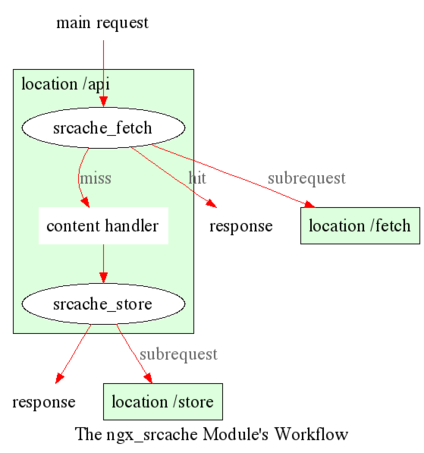
好了废话不多说
一、安装
pcre
cd /usr/local/src

wget -c ftp://ftp.csx.cam.ac.uk/pub/software/programming/pcre/pcre-8.38.tar.gz

tar zxf pcre-8.38.tar.gz
drizzle7
cd /usr/local/src/

wget http://openresty.org/download/drizzle7-2011.07.21.tar.gz

tar xzvf drizzle-2011.07.21.tar.gz

cd drizzle-2011.07.21/

./configure

make

make install

export LD_LIBRARY_PATH=/usr/local/lib:$LD_LIBRARY_PATH
JIT(Just-In-Time Compiler)
wget -c http://luajit.org/download/LuaJIT-2.0.2.tar.gz

tar xzvf LuaJIT-2.0.2.tar.gz

cd LuaJIT-2.0.2

make install PREFIX=/usr/local/luajit

echo "/usr/local/luajit/lib" > /etc/ld.so.conf.d/usr_local_luajit_lib.conf

ldconfig

export LUAJIT_LIB=/usr/local/luajit/lib

export LUAJIT_INC=/usr/local/luajit/include/luajit-2.0
nginx
cd /usr/local/src

wget -c http://nginx.org/download/nginx-1.9.9.tar.gz

git clone https://github.com/simpl/ngx_devel_kit.git

git clone https://github.com/openresty/set-misc-nginx-module.git

git clone https://github.com/openresty/memc-nginx-module.git

git clone https://github.com/openresty/echo-nginx-module.git

git clone https://github.com/openresty/lua-nginx-module.git

git clone https://github.com/openresty/srcache-nginx-module.git

git clone https://github.com/openresty/drizzle-nginx-module.git

git clone https://github.com/openresty/rds-json-nginx-module.git

wget http://people.freebsd.org/~osa/ngx_http_redis-0.3.7.tar.gz

tar zxf nginx-1.9.9.tar.gz

cd nginx-1.9.9

./configure \

--prefix=/usr/local/nginx-1.9.9 \

--add-module=../memc-nginx-module \

--add-module=../srcache-nginx-module \

--add-module=../ngx_devel_kit \

--add-module=../ngx_image_thumb \

--add-module=../redis2-nginx-module \

--add-module=../echo-nginx-module  \

--add-module=../lua-nginx-module \

--add-module=../set-misc-nginx-module \

--add-module=../ngx_http_redis-0.3.7 \

--with-pcre=../pcre-8.38 \

--with-pcre-jit

make && make install
redis
cd /usr/local

wget http://download.redis.io/releases/redis-3.0.6.tar.gz

tar zxf redis-3.0.6.tar.gz

cd redis-3.0.6

make

./src/redis-server
配置文件
daemonize yes

pidfile /var/run/redis-6379.pid

port 6379

bind 127.0.0.1

timeout 0

tcp-keepalive 0

loglevel notice

logfile stdout

databases 16

stop-writes-on-bgsave-error yes

rdbcompression yes

rdbchecksum yes

dbfilename dump.rdb

slave-serve-stale-data yes

slave-read-only yes

repl-disable-tcp-nodelay no

slave-priority 100

maxmemory 8096mb

maxmemory-policy volatile-ttl

appendonly no

appendfsync everysec

no-appendfsync-on-rewrite no

auto-aof-rewrite-percentage 100

auto-aof-rewrite-min-size 64mb

lua-time-limit 5000

slowlog-log-slower-than 10000

slowlog-max-len 128

hash-max-ziplist-entries 512

hash-max-ziplist-value 64

list-max-ziplist-entries 512

list-max-ziplist-value 64

set-max-intset-entries 512

zset-max-ziplist-entries 128

zset-max-ziplist-value 64

activerehashing yes

client-output-buffer-limit normal 0 0 0

client-output-buffer-limit slave 256mb 64mb 60

client-output-buffer-limit pubsub 32mb 8mb 60

hz 10

aof-rewrite-incremental-fsync yes
nginx的简单配置
user  www www;

worker_processes  auto;

error_log  logs/error.log  info;

pid        logs/nginx.pid;

events {

    use epoll;

    worker_connections  65536;

}

http {

    include       mime.types;

    default_type  application/octet-stream;

    charset  utf-8;

    log_format  main  '$remote_addr - $remote_user [$time_local] "$request" '

        '$status $body_bytes_sent "$http_referer" '

        '"$http_user_agent" "$http_x_forwarded_for"';

    log_format srcache_log '$remote_addr - $remote_user [$time_local] "$request" '

        '"$status" $body_bytes_sent $request_time $bytes_sent $request_length '

       '[$upstream_response_time] [$srcache_fetch_status] [$srcache_store_status] [$srcache_expire]';

    server_tokens off;

    keepalive_timeout           60 20;

    client_header_timeout       3m;

    client_body_timeout         3m;

    send_timeout                3m;

    client_header_buffer_size           16k;

    large_client_header_buffers         4 32k;

    server_names_hash_max_size          512;

    server_names_hash_bucket_size       64;

    sendfile        on;

    tcp_nopush      on;

    tcp_nodelay     on;

    gzip  on;

    gzip_min_length  1k;

    gzip_buffers     4 16k;

    gzip_http_version 1.0;

    gzip_comp_level 2;

    gzip_types       text/plain application/x-javascript text/css application/xml;

    gzip_vary on;

    upstream memcache {

        server 192.168.1.30:12000;

        keepalive 10;

    }

    upstream redis {

        server 127.0.0.1:6379;

        keepalive 20;

    }

    server

    {

        listen 90 default;

        server_name _;

        return 444;

    }

    include vhosts/*.conf;

}
二、srcache+memcache
server {

    listen       8099;

    server_name  192.168.1.30;

    root /data/www;

    index  index.php index.html index.htm;

    default_type text/plain;

    access_log  logs/host.access.log  main;

    location /hello{

        echo "This is a test";

    }

    location = /lua-version {

        content_by_lua '

            if jit then

                ngx.say(jit.version)

            else

                ngx.say(_VERSION)

                    end

           ';

    }

    location /memc {

        internal;

        memc_connect_timeout 100ms;

        memc_send_timeout 100ms;

        memc_read_timeout 100ms;

        set $memc_key $query_string;

        set $memc_exptime 300;

        memc_pass memcache;

    }

    location ~ \.php$ {

        charset        utf-8;

        default_type   text/html;

        set $key $uri$args;

        srcache_fetch GET /memc $key;

        srcache_store PUT /memc $key;

        add_header X-Cached-From $srcache_fetch_status;

        add_header X-Cached-Store $srcache_store_status;

        fastcgi_pass   127.0.0.1:9000;

        fastcgi_index  index.php;

        include        fastcgi_params;

        fastcgi_param  SCRIPT_FILENAME $document_root$fastcgi_script_name;

    }

    error_page   500 502 503 504  /50x.html;

    location = /50x.html {

        root   html;

    }

}
第一次访问的时候
Connection:keep-alive

Content-Encoding:gzip

Content-Type:text/html; charset=UTF-8

Date:Wed, 20 Jan 2016 16:32:32 GMT

Keep-Alive:timeout=20

Server:nginx

Transfer-Encoding:chunked

Vary:Accept-Encoding

X-Cached-From:MISS

X-Cached-Store:STORE
第二次访问
Connection:keep-alive

Content-Encoding:gzip

Content-Type:text/html; charset=UTF-8

Date:Wed, 20 Jan 2016 16:33:17 GMT

Keep-Alive:timeout=20

Server:nginx

Transfer-Encoding:chunked

Vary:Accept-Encoding

X-Cached-From:HIT

X-Cached-Store:BYPASS
可以自定义哪些需要访问
三、srcache+redis
redis配置测试
server {

    listen       9001;

    server_name  192.168.1.30;

    root /data/www;

    index  index.php index.html index.htm;

    default_type text/plain;

    access_log  logs/host.access.log  main;

    location /testx{

        echo '1';

    }

    location ~ .*\.php {

        srcache_store_private on;

        srcache_methods GET;

        srcache_response_cache_control off;

        set $key $uri;

        set_escape_uri $escaped_key $key;

        srcache_default_expire 172800;

        srcache_fetch GET /redis_get $key;

        srcache_store PUT /redis_set key=$escaped_key&exptime=$srcache_expire;

        add_header X-Cached-From $srcache_fetch_status;

        set_md5 $md5key $key;

        add_header X-md5-key $md5key;

        add_header X-Cached-Store $srcache_store_status;

        add_header X-Key $key;

        add_header X-Query_String $query_string;

        add_header X-expire $srcache_expire;

        add_header X-uri $uri;

        access_log logs/9001-access.log srcache_log;

        include fastcgi_params;

        fastcgi_pass  127.0.0.1:9000;

        fastcgi_index index.php;

        fastcgi_connect_timeout 60;

        fastcgi_send_timeout 180;

        fastcgi_read_timeout 180;

        fastcgi_buffer_size 128k;

        fastcgi_buffers 4 256k;

        fastcgi_busy_buffers_size 256k;

        fastcgi_temp_file_write_size 256k;

        fastcgi_intercept_errors on;

        fastcgi_param  SCRIPT_FILENAME  $document_root$fastcgi_script_name;

        fastcgi_split_path_info ^(.+\.php)(.*)$;

        fastcgi_param PATH_INFO $fastcgi_path_info;

    }

    location = /redis_get {

        internal;

        set_md5 $redis_key $args;

        redis_pass redis;

    }

    location =/show{

        echo $request_uri;

        echo $args;

    }

    location = /redis_set {

        internal;

        set_unescape_uri $exptime $arg_exptime;

        set_unescape_uri $key $arg_key;

        set_md5 $key;

        redis2_query set $key $echo_request_body;

        redis2_query expire $key $exptime;

        redis2_pass redis;

    }

    location = /one {

        set $value 'first';

        redis2_query set one $value;

        redis2_pass redis;

    }

    location = /get {

        set_unescape_uri $key $arg_key;  # this requires ngx_set_misc

        redis2_query get $key;

        redis2_pass redis;

    }

    error_page   500 502 503 504  /50x.html;

    location = /50x.html {

        root   html;

    }

}
可以查看日志缓存是否命中
四、lua
Nginx下Lua处理阶段与使用范围
init_by_lua            http

set_by_lua             server, server if, location, location if

rewrite_by_lua         http, server, location, location if

access_by_lua          http, server, location, location if

content_by_lua         location, location if

header_filter_by_lua   http, server, location, location if

body_filter_by_lua     http, server, location, location if

log_by_lua             http, server, location, location if

timer
lua代码
ngx.req.read_body()  -- explicitly read the req body

local data = ngx.req.get_body_data()

if data then

    ngx.say("body data:")

    ngx.print(data)

    return

end

-- body may get buffered in a temp file:

local file = ngx.req.get_body_file()

if file then

    ngx.say("body is in file ", file)

else

    ngx.say("no body found")

end

local res = ngx.location.capture("/foo/index.php")

if res then

   ngx.say("status: ", res.status)

   ngx.say("body:")

   ngx.print(res.body)

end
nginx中配置
location /lua_test {

        content_by_lua_file conf/lua_test.lua;

}
参考文章
https://github.com/openresty/lua-nginx-module
http://chenxiaoyu.org/2011/10/30/nginx-modules.html
http://www.ttlsa.com/nginx/nginx-lua-redis/
nginx中使用srcache_nginx模块构建缓存的更多相关文章
- 利用Nginx中的Upstream模块配置服务器负载均衡
1. 前言 nginx有一个最大的功能就是可以实现服务器的负载均衡,本篇博文就利用nginx中的upstream模块来配置一个简单的负载均衡.关于nginx的安装和配置文件可以查阅博文:windows ...
- nginx中使用perl模块
转载自:http://www.netingcn.com/nginx-perl.html 如果对于一个绝大部分内容是静态的网站,只有极少数的地方需要动态显示,碰巧你又了解一点perl知识,那么nginx ...
- angular中使用ngResource模块构建RESTful架构
ngResource模块是angular专门为RESTful架构而设计的一个模块,它提供了'$resource'模块,$resource模块是基于$http的一个封装.下面来看看它的详细用法 1.引入 ...
- srcache_nginx+redis构建缓存系统
http://www.ttlsa.com/nginx/construction-of-srcache_nginx_redis-caching-system/ http://blog.csdn.net/ ...
- 转:使用memc-nginx和srcache-nginx模块构建高效透明的缓存机制
原文地址:http://blog.codinglabs.org/articles/nginx-memc-and-srcache.html 为了提高性能,几乎所有互联网应用都有缓存机制,其中Memcac ...
- [转] 使用memc-nginx和srcache-nginx模块构建高效透明的缓存机制
为了提高性能,几乎所有互联网应用都有缓存机制,其中Memcache是使用非常广泛的一个分布式缓存系统.众所周知,LAMP是非常经典的Web架构方式,但是随着Nginx的 成熟,越来越多的系统开始转型为 ...
- 转:Nginx国人开发缩略图模块(ngx_image_thumb)
ngx_image_thumb是nginx中用来生成缩略图的模块,生存缩略图的方法很多,之前也写过一篇 <nginx生成缩略图配置>,在github上发现国人开发的一款模块,作者的文档写的 ...
- 霸气!Nginx 中缓存静态文件秘籍
导读 这篇教程说明你应该怎样配置 nginx.设置 HTTP 头部过期时间,用 Cache-Control 中的 max-age 标记为静态文件(比如图片. CSS 和 Javascript 文件)设 ...
- nginx中Geoip_module模块的使用
nginx中Geoip_module模块的使用 .安装模块,nginx也是通过yum安装 yum install nginx-module-geoip -y # 可以看到模块的链接库文件 [root@ ...
随机推荐
- 利用百度词典API和Volley网络库开发的android词典应用
关于百度词典API的说明,地址在这里:百度词典API介绍 关于android网络库Volley的介绍说明,地址在这里:Android网络通信库Volley 首先我们看下大体的界面布局!
- 基于HTML5的燃气3D培训仿真系统
最近上线了的基于HTML5的燃气3D培训仿真系统,以前的老系统是采用基于C++和OpenGL的OpenSceneGraph引擎设计的,OSG引擎性能和渲染效果各方面还是不错的,但因为这次新产品需求要求 ...
- 查找表或其他对象在某个Server上的存在
EXEC sp_MSforeachdb 'use ? ; IF EXISTS(SELECT top 1 1 FROM sys.syscomments WHERE text LIKE ''%test% ...
- ios基础之入门(一)
最近找到了一个可以接触ios开发的职位,可以系统的学习和练习了.先从最基本的开始: 一.获取控件的两种方式 1)第一种,也是经常使用的一种,通过IBOutlet方式.直接按住control键,将控件和 ...
- .net C# 对虚拟目录IIS的操作
一.查看虚拟目录是否存在 private bool IsExitesVirtualDir(string virtualdirname) { bool exited =false; Dire ...
- JAVA的网络编程基础概念
网络编程的目的就是指直接或间接地通过网络协议与其他计算机进行通讯.网络编程中有两个主要的问题,一个是如何准确的定位网络上一台或多台主机,另一个就是找到主机后如何可靠高效的进行数据传输.在TCP/IP协 ...
- 关于foreach中对集合执行Add或者Remove操作引发枚举值被修改异常
方法传入集合List<string> ids; 执行操作后再次循环引发异常 foreach (string id in ids) { ids.Add("a"); } 更 ...
- Jquery 前端模版
<div id="div_demo"></div><script id="demo" type="text/x-jque ...
- php生成静态文件
1,通用生成方法 //获取文件内容 $content=file_get_contents("http://www.google.com/" ); $id=110; $filenam ...
- PEM (Privacy Enhanced Mail) Encoding
PEM (Privacy Enhanced Mail) Encoding The moPEM (Privacy Enhanced Mail) Encoding The most commonly us ...