
CentOS下源码安装mplayer播放器
http://www.mplayerhq.hu/MPlayer/releases/
[root@ok MPlayer-1.2.1]# pwd

/root/MPlayer-1.2.1
http://www.mplayerhq.hu/MPlayer/releases/codecs/
[root@ok Desktop]# ls

all-20061022  all-20061022.tar.bz2
[root@ok Desktop]# mkdir /usr/local/lib/codec

[root@ok Desktop]# mv -f all-20061022/* /usr/local/lib/codecs/
[root@ok MPlayer-1.2.]# yum install *alsa*

#先装这个在安装MPlayer不然没声音
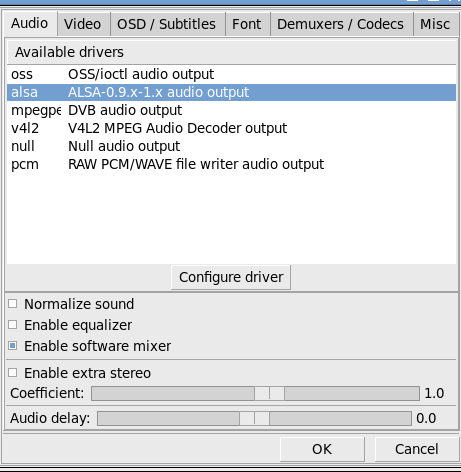
[root@ok MPlayer-1.2.1]# pwd

/root/MPlayer-1.2.1

[root@ok MPlayer-1.2.1]# ./configure --codecsdir=/usr/local/lib/codecs --enable-gui

make && make install

原地址:http://www.xitongzhijia.net/xtjc/20150228/39477.html

       http://www.centoscn.com/image-text/install/2014/0419/2815.html
卸载原有的播放器:
root 15481 1 0 22:39 ? 00:00:00 totem /home/iptables/15-企业实战案例1-部署企业上网网关实战讲解01_rec.mp4
[root@ok MPlayer-1.2.1]# which totem

/usr/bin/totem

[root@ok MPlayer-1.2.1]# rpm -qf /usr/bin/totem

totem-2.28.6-4.el6.x86_64

[root@ok MPlayer-1.2.1]# yum remove totem
-------------------------------------------
configure时报错:
Checking for yasm ...

Error: yasm not found, use --yasm='' if you really want to compile without
[root@ok Software]# git clone git://github.com/yasm/yasm.git

Initialized empty Git repository in /data/Software/yasm/.git/

remote: Counting objects: , done.

remote: Total  (delta ), reused  (delta ), pack-reused

Receiving objects: % (/), 27.20 MiB |  KiB/s, done.

Resolving deltas: % (/), done.
[root@ok yasm]# ./autogen.sh
[root@ok yasm]# ./configure
[root@ok yasm]# make && make install 再次编译成功!!
====================================
安装成功了,但学是报错如下图:
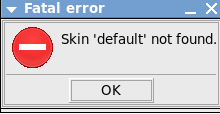
http://www.mplayerhq.hu/MPlayer/skins/ 下载
Blue-small-1.9.tar.bz2
[root@ok Software]# cp -rf Blue-small /usr/local/share/mplayer/skins/

[root@ok Software]# cd /usr/local/share/mplayer/skins/

[root@ok skins]# ls

Blue-small

[root@ok skins]# mv Blue-small/ default

[root@ok skins]# ls

default
问题解决!!
========================
如果没有声音:
[root@ok MPlayer-1.2.1]# yum install *alsa*
再重新装一下,问题解决!!!
===============================2016.11.12-安装问题=========================
[root@NB MPlayer-1.2.]# ./configure --codecsdir=/usr/local/lib/codec --enable-gui

Checking for ffmpeg/libavcodec/allcodecs.c ... found

Checking for ffmpeg/libavformat/allformats.c ... found

Checking for ffmpeg/libavfilter/allfilters.c ... found

Checking for working compiler ...

Error: Compiler is not functioning correctly. Check your installation and custom CFLAGS  .

Check "config.log" if you do not understand why it failed.
[root@NB MPlayer-1.2.]# tail config.log

============ Checking for working compiler ============

int main(void) { return ; }

cc    /tmp/mplayer-configure--/tmp.c      -o /tmp/mplayer-configure--/tmp

./configure: line : cc: command not found
[root@NB MPlayer-1.2.]# yum install gcc

是因为gcc没安装
又报错:
Error: The GUI requires X11.

Check "config.log" if you do not understand why it failed.
[root@NB MPlayer-1.2.]# yum install -y xorg-x11*

不过再 次configure 还是报错

Checking for GTK+ version ... no

Error: GTK+ version  devel packages were not found (required for GUI).

Check "config.log" if you do not understand why it failed.
[root@NB MPlayer-1.2.1]# tail config.
config.h    config.log
[root@NB MPlayer-1.2.1]# tail config.log
cc -Wundef -Wall -Wno-switch -Wno-parentheses -Wpointer-arith -Wredundant-decls -Werror=format-security -Wstrict-prototypes -Wmissing-prototypes -Wdisabled-optimization -Wno-pointer-sign -Wdeclaration-after-statement -std=gnu99 -Werror-implicit-function-declaration -D_POSIX_C_SOURCE=200112 -D_XOPEN_SOURCE=600 -D_ISOC99_SOURCE -I. -Iffmpeg -O4 -march=native -mtune=native -pipe -ffast-math -fomit-frame-pointer -fno-tree-vectorize /tmp/mplayer-configure-8753-17123/tmp.c  -fpie -DPIC -D_REENTRANT    -ffast-math -fpie -pie   -lrt   -lXext -lX11 -lpthread -lXxf86vm -lGL -ldl  -o /tmp/mplayer-configure-8753-17123/tmp -lXext -lm

Result is: yes
##########################################

============ Checking for GTK+ version ============
Result is: no
##########################################
[root@NB MPlayer-1.2.]# yum install gtk* -y
重新编译成功!!!这个是完美的(全屏问题解决)
Checking for yasm ...

Error: yasm not found, use --yasm='' if you really want to compile without

Check "config.log" if you do not understand why it failed.
Error: GTK+ version  devel packages were not found (required for GUI).

yum install gtk2-devel
CentOS下源码安装mplayer播放器的更多相关文章
- CentOS下源码安装Apache2.4+PHP5.4+MySQL5.5
一.准备(把所有的源文件放在‘/home/yuanjun’目录下) apr http://mirror.bjtu.edu.cn/apache/apr/apr-1.4.6.tar.gz apr-util ...
- CentOS下源码安装vsftpd-3.0.0,并设置指定用户访问指定目录(附带完整配置文件)
1.卸载系统已经存在的ftp服务器 因为是源码安装,所以不能通过rpm -qa的方式查看是否已经安装ftp服务器,可以通过find / | grep vsftp*方式查看系统中存在哪些与vsftpd相 ...
- 在 CentOS 下源码安装 Xen
http://www.vpsee.com/2010/04/install-xen-on-centos-from-source/ 在 CentOS 源码编译安装 Xen 的过程和在 Debian 上编译 ...
- Centos下源码安装git
1.centos下git版本太久了,才1.8几,而官方更新的还是很活跃的,于是我就想源码安装一个新版本. 2.首先到: https://github.com/git/git/releases 下载最新 ...
- CentOS下源码安装MySQL
一.创建mysql用户与组,相关目录 useradd mysql -s /sbin/nologin mkdir /usr/local/mysql chown -R mysql.mysql mkdir ...
- CentOS 下源码安装LAMP环境
一.简介 什么是LAMP LAMP是一种Web网络应用和开发环境,是Linux, Apache, MySQL, Php/Perl的缩写,每一个字母代表了一个组件,每个组件就其本身而言都是在它所代 ...
- ubuntu14.0 (arm平台)源码安装 VLC播放器
环境 ubuntu14.0 arm开发板 源 deb http://mirrors.ustc.edu.cn/ubuntu-ports/ trusty main multiverse restrict ...
- 在CentOS下源码安装 Xen并搭建Windows虚拟机
前言 首先要感谢xing的帮助,在他的指导之下才完成环境的搭建,本文档的部分内容来自他的文档.另外,还要感谢——互联网. 1. 环境介绍 Linux: CentOS 6.3 Xen: Xe ...
- centos 6x系统下源码安装mysql操作记录
在运维工作中经常部署各种运维环境,涉及mysql数据库的安装也是时常需要的.mysql数据库安装可以选择yum在线安装,但是这种安装的mysql一般是系统自带的,版本方面可能跟需求不太匹配.可以通过源 ...
随机推荐
- hashcode与字符串
问题1. 不同的字符串可能会有相同的HashCode吗? hashcode是用来判断两个字符串是否相等的依据,不同的字符串不可能有相同的hashcode,但不同的hashCode经过与长度的取余,就很 ...
- 设置button不同状态下的背景色,即把这个颜色变成图片设置成,背景图片
- (void)setBackgroundColor:(UIColor *)backgroundColor forState:(UIControlState)state { [self setBack ...
- Android SDK安装Android4.0“冰激淋三明治”(IceCreamSandwich)教程(转载)
昨天,Google举行了发布会,发布了Nexus Prime手机和Android4.0-IceCreamSandwich手机系统.作为Google旗下Android的最新版本手机系 统,Android ...
- java gc的工作原理、如何优化GC的性能、如何和GC进行有效的交互
java gc的工作原理.如何优化GC的性能.如何和GC进行有效的交互 一个优秀的Java 程序员必须了解GC 的工作原理.如何优化GC的性能.如何和GC进行有效的交互,因为有一些应用程序对性能要求较 ...
- [Asp.Net]状态管理(ViewState、Cookie)
简介 HTTP协议是无状态的.从客户端到服务器的连接可以在每个请求之后关闭.但是一般需要把一些客户端信息从一个页面传送给另一个页面. 无状态的根本原因是:浏览器和服务器使用Socket通信,服务器将请 ...
- git基础知识总结
1,clone git clone https://github.com/KoMiles/helloword helloword 2,pull git pull 3,commit git commit ...
- IP欺骗使用
一.为什么要设置IP欺骗 1. 当某个IP的访问过于频繁,或者访问量过大时,服务器会拒绝访问请求,这时候通过IP欺骗可以增加访问频率和访问量,以达到压力测试的效果. 2. 某些服务器配置了负载均衡,使 ...
- Memcached的配置和使用
1.下载windows版本,64位下载地址: http://s3.amazonaws.com/downloads.northscale.com/memcached-win64-1.4.4-14.zip ...
- HLG1744组合数学问题与lucas定理运用
The figure below shows Pascal's Triangle: Baby H divides Pascal's Triangle into some Diagonals, like ...
- HLG2035广搜
Diablo Time Limit: 1000 MS Memory Limit: 65536 K Total Submit: 42(21 users) Total Accepted: 23(20 us ...