
通过PowerShell发送TCP请求
很多时候我们需要通过Socket发送特定的TCP请求给服务器的特定端口来实现探测服务器的指定端口所开启的服务。很多语言都有相应的方法实现上述需求,当然,PowerShell也不例外,比如我们要发送一个简单的http请求到指定的web服务器:
GET / HTTP/1.1
Host:cn.bing.com
这里我们想请求微软必应的中文首页,如果需要通过PowerShell向cn.bing.com服务器发送get请求,就需要创建一个System.Net.Sockets.TcpClient对象,向指定的服务器和端口发送请求。
具体代码如下:
        =====文件名:Send-TcpRequest.ps1=====

########################################

# Send-TcpRequest.ps1

## Send a TCP request to a remote computer, and return the response.

## If you do not supply input to this script (via either the pipeline, or the

## -InputObject parameter,) the script operates in interactive mode.

##

## Example:

##

## $http = @"

## GET / HTTP/1.1

## Host:cn.bing.com

## `n`n

## "@

##

## $http | .\Send-TcpRequest cn.bing.com  80

########################################

param(

        [string] $remoteHost = "localhost",

        [int] $port = 80,

        [switch] $UseSSL,

        [string] $inputObject,

        [int] $commandDelay = 100

     )

[string] $output = ""

## Store the input into an array that we can scan over. If there was no input,

## then we will be in interactive mode.

$currentInput = $inputObject

if(-not $currentInput)

{

    $SCRIPT:currentInput = @($input)

}

$scriptedMode = [bool] $currentInput

function Main

{

    ## Open the socket, and connect to the computer on the specified port

    if(-not $scriptedMode)

    {

        write-host "Connecting to $remoteHost on port $port"

    }

    trap { Write-Error "Could not connect to remote computer: $_"; exit }

    $socket = new-object System.Net.Sockets.TcpClient($remoteHost, $port)

    if(-not $scriptedMode)

    {

        write-host "Connected. Press ^D followed by [ENTER] to exit.`n"

    }

    $stream = $socket.GetStream()

    if($UseSSL)

    {

        $sslStream = New-Object System.Net.Security.SslStream $stream,$false

        $sslStream.AuthenticateAsClient($remoteHost)

        $stream = $sslStream

    }

    $writer = new-object System.IO.StreamWriter $stream

    while($true)

    {

        ## Receive the output that has buffered so far

        $SCRIPT:output += GetOutput

        ## If we're in scripted mode, send the commands,

        ## receive the output, and exit.

        if($scriptedMode)

        {

            foreach($line in $currentInput)

            {

                $writer.WriteLine($line)

                $writer.Flush()

                Start-Sleep -m $commandDelay

                $SCRIPT:output += GetOutput

            }

            break

        }

        ## If we're in interactive mode, write the buffered

        ## output, and respond to input.

        else

        {

            if($output)

            {

                foreach($line in $output.Split("`n"))

                {

                    write-host $line

                }

                $SCRIPT:output = ""

            }

            ## Read the user's command, quitting if they hit ^D

            $command = read-host

            if($command -eq ([char] 4)) { break; }

            ## Otherwise, Write their command to the remote host

            $writer.WriteLine($command)

            $writer.Flush()

        }

    }

    ## Close the streams

    $writer.Close()

    $stream.Close()

    ## If we're in scripted mode, return the output

    if($scriptedMode)

    {

        $output

    }

}

## Read output from a remote host

function GetOutput

{

    ## Create a buffer to receive the response

    $buffer = new-object System.Byte[] 1024

    $encoding = new-object System.Text.AsciiEncoding

    $outputBuffer = ""

    $foundMore = $false

    ## Read all the data available from the stream, writing it to the

    ## output buffer when done.

    do

    {

        ## Allow data to buffer for a bit

        start-sleep -m 1000

        ## Read what data is available

        $foundmore = $false

        $stream.ReadTimeout = 1000

        do

        {

            try

            {

                $read = $stream.Read($buffer, 0, 1024)

                if($read -gt 0)

                {

                    $foundmore = $true

                    $outputBuffer += ($encoding.GetString($buffer, 0, $read))

                }

            } catch { $foundMore = $false; $read = 0 }

        } while($read -gt 0)

    } while($foundmore)

    $outputBuffer

}

. Main
该脚本使用方法如下:
$http = @"
GET / HTTP/1.1
Host:cn.bing.com
`n`n
"@
$http | .\Send-TcpRequest cn.bing.com 80
执行效果如图所示:
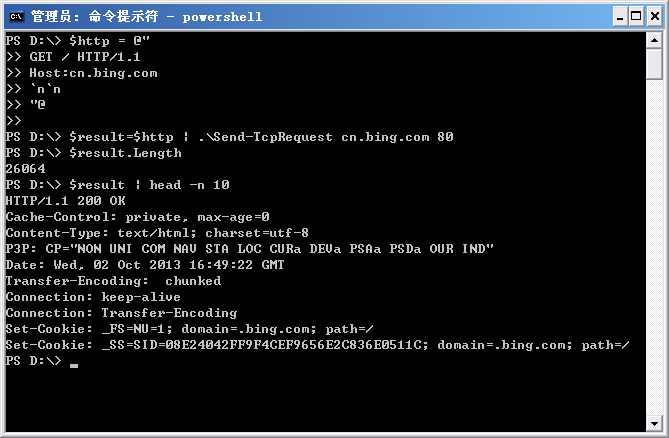
需要说明的是,由于页面返回的内容太长了,这里至少是将返回的内容缓存在一个变量里,并只输出了变量的头10行。
有了这个脚本,我们就可以向指定的web服务器发送特定的请求,来实现模拟登陆和操作的功能了。
作者: 付海军
出处:http://fuhj02.cnblogs.com
版权:本文版权归作者和博客园共有
转载:欢迎转载,为了保存作者的创作热情,请按要求【转载】,谢谢
要求:未经作者同意,必须保留此段声明;必须在文章中给出原文连接且保证内容完整!否则必究法律责任!
个人网站: http://www.fuhaijun.com/
通过PowerShell发送TCP请求的更多相关文章
- jmeter测试TCP服务器/模拟发送TCP请求
jmeter测试TCP服务器,使用TCP采样器模拟发送TCP请求. TCP采样器:打开一个到指定服务器的TCP / IP连接,然后发送指定文本并等待响应. jmeter模拟发送TCP请求的方法: 1. ...
- jmeter ---测试TCP服务器/模拟发送TCP请求
jmeter测试TCP服务器/模拟发送TCP请求 jmeter测试TCP服务器,使用TCP采样器模拟发送TCP请求. TCP采样器:打开一个到指定服务器的TCP / IP连接,然后发送指定文本并等待响 ...
- jmeter测试TCP服务器/模拟发送TCP请求 设置16进制发送(转)
转载留存:http://blog.sina.com.cn/s/blog_46d0362d0102v8ii.html 性能测试需要模拟多种场景,经常受制于资源限制,没办法建立贴近实际部署环境的场景.因而 ...
- PowerShell收发TCP消息包
PowerShell收发TCP消息包 https://www.cnblogs.com/fuhj02/archive/2012/10/16/2725609.html 在上篇文章中,我们在PSNet包中创 ...
- go tcp发送网络请求
//发送http请求 package main import ( "fmt" "net" "io" ) func main () { //使 ...
- Android系列之网络(一)----使用HttpClient发送HTTP请求(通过get方法获取数据)
[声明] 欢迎转载,但请保留文章原始出处→_→ 生命壹号:http://www.cnblogs.com/smyhvae/ 文章来源:http://www.cnblogs.com/smyhvae/p/4 ...
- shell脚本一条命令直接发送http请求(xjl456852原创)
我们知道nc命令是一个网络工具.可以连接tcp/udp.也能模拟发送http请求. 现在介绍通过shell脚本,一条命令直接发送http请求. 命令如下,可以对下面的地址等信息自行修改: #!/bin ...
- (一)----使用HttpClient发送HTTP请求(通过get方法获取数据)
(一)----使用HttpClient发送HTTP请求(通过get方法获取数据) 一.HTTP协议初探: HTTP(Hypertext Transfer Protocol)中文 “超文本传输协议”,是 ...
- 【ESP8266】发送HTTP请求
一.ESP8266简介 ESP8266 是深圳安信可科技有限公司开发的基于乐鑫ESP8266的超低功耗的UART-WIFI模块的模组,可以方便进行二次元开发,接入云端服务,实现手机3/4G全球随时随地 ...
随机推荐
- 【Python自动化运维之路Day7】
1. configparser模块 import configparser config = configparser.ConfigParser() #先把config应用一下configparser ...
- Topshelf入门
简介 Topshelf允许我们快速的开发.调试和部署windows服务. 官方网站 使用方法 第一步:安装 Install-Package Topshelf Install-Package Topsh ...
- Windows 8.1 开发过程中遇到的小问题(2)
又是在Windows 8.1 的分享功能,再次出现错误: A COM call (IID: ***, method index: *) to an ASTA (thread *) was blocke ...
- 一句话在网页右上角加一个精致下拉框:forkme on github
随着我国科技水平不断发展,玩Github的童鞋越来越多了,按照惯例,开源项目会有一个示例网站,而网站的右上角,通常会有一个forkme on github,这说明你可以去Github查看.下载项目源码 ...
- spring mvc ajax 400解决
The request sent by the client was syntactically incorrect. ajax发起请求时报400错误.请求代码如下: var reportId=($( ...
- [BTS] Can't update the assembly.
Error Message In BizTalk =================================== Failed to add resources to application. ...
- iOS YSMine 通用设置
概述 我们在开发的过程中,经常需要重复的写个人中心设置的代码,很多情况下,我们都是通过if(indexPath.row)来判断操作以及要跳转的页面,这样的情况是非常不友好的,尤其是当我们需要调整显示顺 ...
- 02_Hello World!
hello word ? 学习任何语言,我们都喜欢在屏幕上直接输出一点什么,作为最简单基本的案例.很多人习惯输出 hello world ,世界你好.感觉很有情况的样子——然而很多人都只停留在这个阶段 ...
- paip.sqlite 管理最好的工具 SQLite Expert 最佳实践总结
paip.sqlite 管理最好的工具 SQLite Expert 最佳实践总结 一般的管理工具斗可以...就是要是sqlite没正常地关闭哈,有shm跟wal文件..例如ff的place.sqlit ...
- Paip.声明式编程以及DSL 总结
Paip.声明式编程以及DSL 总结 1.1 声明式编程DSL 1.2 声明式语言) 1.3 声明式编程框架AOP实现 1.4 应用场合 1.5 ...