
64位的Sql Server使用OPENROWSET导入xlsx格式的excel数据的时候报错(转载)
In the old times while all the CPUs were 32bit, we were happily using JET OLEDB Provider reaching Excel or MDB files for long time without any issues.
After we started using x64 CPUs and x64 Windows machines, we noticed that JET OLEDB Provider is not working. The reason for this was x64 Windows operating systems were not containing x64 bit JET OLEDB Provider but they had 32bit JET OLEDB Provider. We needed to recompile our applications as 32bit by changing the "Target CPU" as x86 in our Visual Studio Projects (remember that default "Target CPU" fro a Visual Studio Project is "Any CPU"), or using a 32bit application pool for a web application just to be able host our app in a 32bit w3wp.exe.
Now we have a new guy in the town. Let me introduce it : "Microsoft ACE OLEDB Provider". It's "ProgID" (in terms of COM/OLEDB) is "Microsoft.ACE.OLEDB.12". It does not come within the OS, you should install this manually by downloading it from here . The name of the download is "Microsoft Access Database Engine 2010 Redistributable" as this 64bit ACE OLEDB Provider is the result of our Office 2010. It has been around in the scene with Office 2007 but it was available as 32bit only.
With the Office 2010, we have 64bit ACE OLEDB Provider which is good news
Here are some cases with the details how to use this new OLEDB Provider :
CASE 1: Retrieving data from an Excel file in SQL Server
Please follow the steps below :
•1) Download our 64bit version (AccessDatabaseEngine_X64.exe) of our "Microsoft Access Database Engine 2010 Redistributable" from the URL below :
http://www.microsoft.com/downloads/details.aspx?familyid=C06B8369-60DD-4B64-A44B-84B371EDE16D&displaylang=en&WT.mc_id=soc-n-[TR]-loc-[Services]-[farukc]
•2) Install AccessDatabaseEngine_X64.exe on your SQL Server machine
•3) Open a new "Query Window" in SQL Server Management Studio (SSMS) after connecting to your SQL Server Engine and issue the T-SQL commands below :
USE [master]

GO

sp_configure 'show advanced options', 1

GO

RECONFIGURE WITH OverRide

GO

sp_configure 'Ad Hoc Distributed Queries', 1

GO

RECONFIGURE WITH OverRide

GO

EXEC master.dbo.sp_MSset_oledb_prop N'Microsoft.ACE.OLEDB.12.0' , N'AllowInProcess' , 1

GO

EXEC master.dbo.sp_MSset_oledb_prop N'Microsoft.ACE.OLEDB.12.0' , N'DynamicParameters' , 1

GO
•4) Now try executing the query below :
select * FROM OPENROWSET('Microsoft.ACE.OLEDB.12.0', 'Excel 12.0;Database=C:\temp\test.xlsx', [Sheet1$])
Yuppe I got the data from XLSX
CASE 2: Retrieving data from an Excel file in a .NET app
•1) Download our 64bit version (AccessDatabaseEngine_X64.exe) of our "Microsoft Access Database Engine 2010 Redistributable" from the URL below :
http://www.microsoft.com/downloads/details.aspx?familyid=C06B8369-60DD-4B64-A44B-84B371EDE16D&displaylang=en
•2) Install AccessDatabaseEngine_X64.exe on your x64 machine (Likely that it will be your web server which will be hosting your ASP.NET app in a 64bit app pool or the server that you will run your .NET Windows Service as 64bit etc.)
•3) Use the System.Data.OleDBConnection with the connection string below :
OleDbConnection conn = new OleDbConnection("Provider=Microsoft.ACE.OLEDB.12.0;Data Source=c:\\temp\\test.xls;Extended Properties=\"Excel 12.0;HDR=YES;\"");
P.S. 1 : If you are going to deploy this app to a machine without ACE OLEDB Provider, don't forget that you should install "Microsoft Access Database Engine 2010 Redistributable" to the target machine.
P.S. 2 : If you have Office 2010 32bit is installed on the machine you cannot install "Microsoft Access Database Engine 2010 Redistributable" 64bit .(意思就是一台机器上要么装32位的AccessDatabaseEngine驱动,要么装64位的AccessDatabaseEngine驱动,不能两个都装,如果要装64位的AccessDatabaseEngine驱动,先要在控制面板的程序中删除32位的Microsoft Access database engine 2010)
P.S. 3 : 如果你安装了64位的AccessDatabaseEngine_X64.exe驱动后,有可能会导致SSMS的导入向导导入2007-2010的Excel失败,因为SSMS是一个32位的程序没法使用64位的AccessDatabaseEngine_X64.exe驱动,从操作系统控制面板的程序中卸载Microsoft Access database engine 2010后,安装32位的AccessDatabaseEngine.exe驱动即可,这样SSMS的导入向导就可以导入2007-2010的Excel文件了,但这又会导致前面介绍的OPENROWSET语句没法使用AccessDatabaseEngine驱动从而报错,所以鱼和熊掌不可兼得,请自行衡量
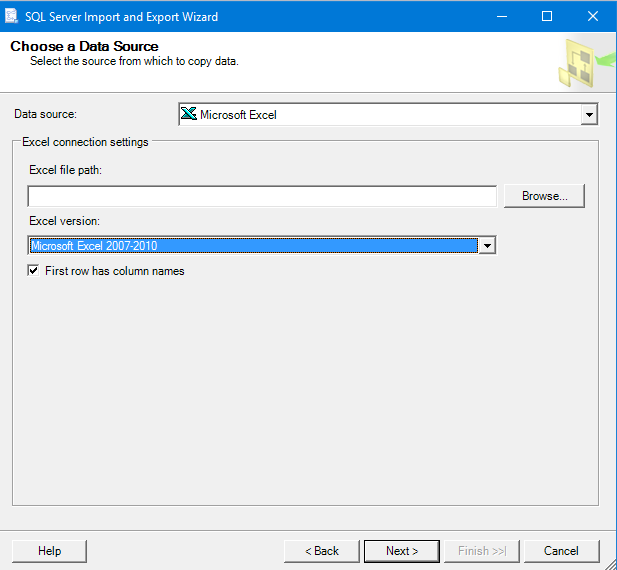
P.S. 4 : AccessDatabaseEngine驱动是有语言之分的,本文前面提供的下载链接是英文版的AccessDatabaseEngine驱动,注意如果你的windows操作系统是中文的你需要安装中文的AccessDatabaseEngine驱动,如果你的windows操作系统是英文的,应该安装英文的AccessDatabaseEngine驱动,下载不一致语言的AccessDatabaseEngine驱动,可能会导致你安装失败,这一点请注意。下面的是中文版AccessDatabaseEngine驱动的下载链接:
https://www.microsoft.com/zh-cn/download/details.aspx?id=13255
64位的Sql Server使用OPENROWSET导入xlsx格式的excel数据的时候报错(转载)的更多相关文章
- Win7 64位下sql server链接oracle的方法
继上一次mysql同步sql server后,这一次需要将Oracle同步到sql server上来,方案相似,只是在sql server链接oracle的时候费了很多时间. 一.测试环境 本方案实现 ...
- win7(64位)Sql server 用T-sql读取本地数据文件dbf的数据文件
原文地址:https://www.cnblogs.com/cl1006/p/9924066.html 第一步启用Ad Hoc Distributed Queries 在SQLserver执行以下的语 ...
- RHEL 6.4 64bit kettle5.01导入xlsx格式的excel时报错
环境:RHEL 6.4 64bit : kettle5.01:xlsx格式的excel 创建的job,在spoon里面运行都没有问题(Linux和windows) 在windows的命令行运行也没有问 ...
- SQL Server 使用OPENROWSET访问ORACLE遇到的各种坑总结
在SQL Server中使用OPENROWSET访问ORACLE数据库时,你可能会遇到各种坑,下面一一梳理一下你会遇到的一些坑. 1:数据库没有开启"Ad Hoc Distributed Q ...
- SQL Server安装完成后3个需要立即修改的配置选项(转载)
你用安装向导安装了全新的SQL Server,最后你点击了完成按钮.哇噢~~~现在我们可以把我们的服务器进入生产了!抱歉,那并不是真的,因为你的全新SQL Server默认配置是错误的. 是的,你没看 ...
- sql server 2008 64位连接sql 2000服务器的时候出现
来源 https://blog.csdn.net/loeley/article/details/7095741 sql server 2008 64位连接sql 2000服务器的时候出现以下提示: 链 ...
- [转]SQL SERVER中openrowset与opendatasource的区别
本文转自:http://blog.sina.com.cn/s/blog_6399df820102vyy8.html SQL SERVER中openrowset与opendatasource的区别: o ...
- sql server中NULL导入decimal字段时报错
sql server中NULL导入decimal字段时报错 在导入CSV文件时,如果decimal字段为null值,导致文本文件入库时失败. 错误现象 构造例子 新建一张表,包含decimal字段. ...
- sql server单表导入、导出
sql server单表导入.导出(通过CSV文件) 导出:直接打开查询分析器查询要导出表的信息(select * from 表),得到的结果全选,右键另存为 xxx.csv文件 (得到该表的所有 ...
随机推荐
- Silverlight中使用MVVM(2)-(提高)
在第一篇文章中的示例中,我们已经简单的了解了应用MVVM模式的流程,我的本意是你已经了解了一点MVVM的概念,然后又没有一个较好的例子学习,可以跟着我一起学习MVVM模式,所以这个部分,都是没有理论知 ...
- Memcache for Windows
要求 必备知识 熟悉基本编程环境搭建. 运行环境 windows 7(64位); memcached-1.2.6 下载地址 环境下载 什么是MemCache memcache是一套分布式的高速缓存系统 ...
- j2ee高级开发技术课程第七周
来源:https://baike.baidu.com/item/JSON/2462549?fr=aladdin JSON(JavaScript Object Notation, JS 对象标记) 是一 ...
- postgresql 清空数据表数据
在 mysql中,只需要执行: TRUNCATE table_name; 即可,数据会情况,而且自增id也会变回0: 但在 postgresql 则稍有不同,因为 postgresql 的自增id是通 ...
- 面试:C++二叉树遍历(递归/非递归)
#include <vector> #include <stack> #include <queue> using namespace std; struct Tr ...
- Entity Framework 6.x - Code First 默认创建数据库的位置
在集成DbContext的派生类中的构造函数里,如果没有指定配置文件中的数据库连接字符串的name,默认就是: Data Source=(localdb)\MSSQLLocalDB;Initial C ...
- INTEST/EXTEST SCAN 的学习
intest scan的一些基本知识.INTEST scan指的是对IP 内部的scan cell的扫描测试,针对IP内部的flip-flop进行shift/capture的操作.和INTEST SC ...
- java RMI原理详解
java本身提供了一种RPC框架——RMI(即Remote Method Invoke 远程方法调用),在编写一个接口需要作为远程调用时,都需要继承了Remote,Remote 接口用于标识其方法可以 ...
- [转]Microsoft SQL SERVER 2008 R2 REPORT SERVICE 匿名登录
本文转自:https://www.cnblogs.com/Zouzhe/p/5736070.html SQL SERVER 2008 R2 是微软目前最新的数据库版本,在之前的SQL SERVER 2 ...
- log4j2配置文件log4j2.xml详解(转载)
此博文转载自阿豪聊干货:https://www.cnblogs.com/hafiz/p/6170702.html 一.背景 最近由于项目的需要,我们把log4j 1.x的版本全部迁移成log4j 2. ...