
SSM_CRUD新手练习(4)修改生成的mapper.xml映射文件
我们为什么要修改呢,这是因为我们查询的时候,我们有时候需要连表查询,例如我们需要查询出员工表的信息(emp_id,emp_name...)与此同时,我们还想查询出该员工所在的部门(dept_name)。此时,生成mapper文件查询的只是表中已有的字段。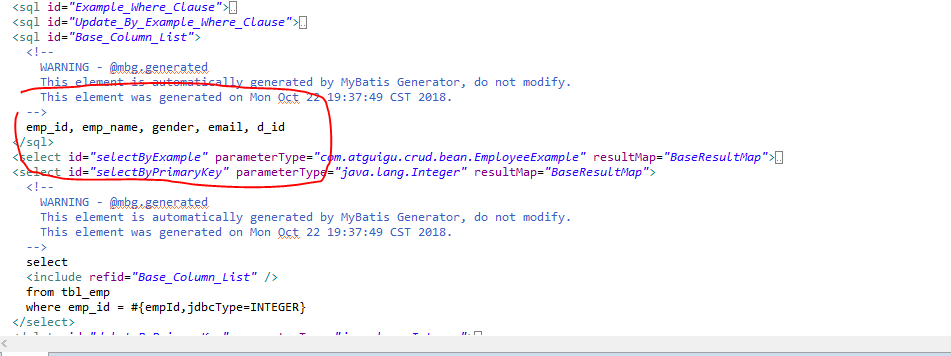
所以我们可以在EmployeeMapper.xml中添加两个方法,
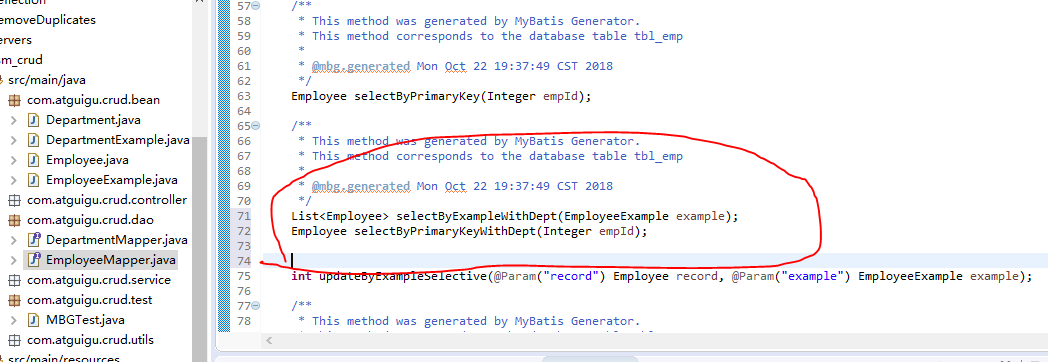
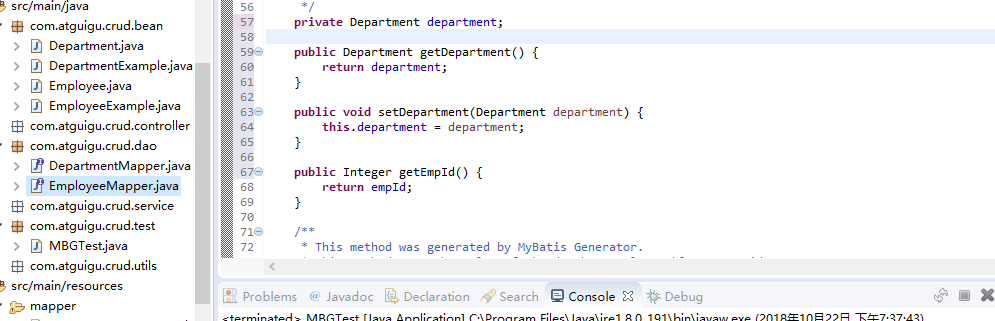
同时我们还要为Employee.java添加一个Department属性,别忘记增加setter和getter。
最后我们需要修改EmployeeMapper.xml文件,增加两个连表查询语句:
<?xml version="1.0" encoding="UTF-8"?>

<!DOCTYPE mapper PUBLIC "-//mybatis.org//DTD Mapper 3.0//EN" "http://mybatis.org/dtd/mybatis-3-mapper.dtd">

<mapper namespace="com.atguigu.crud.dao.EmployeeMapper">

  <resultMap id="BaseResultMap" type="com.atguigu.crud.bean.Employee">

    <!--

      WARNING - @mbg.generated

      This element is automatically generated by MyBatis Generator, do not modify.

      This element was generated on Thu Oct 18 13:46:16 CST 2018.

    -->

    <id column="emp_id" jdbcType="INTEGER" property="empId" />

    <result column="emp_name" jdbcType="VARCHAR" property="empName" />

    <result column="gender" jdbcType="CHAR" property="gender" />

    <result column="email" jdbcType="VARCHAR" property="email" />

    <result column="d_id" jdbcType="INTEGER" property="dId" />

  </resultMap>

  <resultMap type="com.atguigu.crud.bean.Employee" id="WithDeptResultMap">

  <id column="emp_id" jdbcType="INTEGER" property="empId" />

    <result column="emp_name" jdbcType="VARCHAR" property="empName" />

    <result column="gender" jdbcType="CHAR" property="gender" />

    <result column="email" jdbcType="VARCHAR" property="email" />

    <result column="d_id" jdbcType="INTEGER" property="dId" />

    <association property="department" javaType="com.atguigu.crud.bean.Department">

         <id column="dept_id" property="deptId"/>

        <result column="dept_name" property="deptName"/>

    </association>

  </resultMap>

  <sql id="Example_Where_Clause">

    <!--

      WARNING - @mbg.generated

      This element is automatically generated by MyBatis Generator, do not modify.

      This element was generated on Thu Oct 18 13:46:16 CST 2018.

    -->

    <where>

      <foreach collection="oredCriteria" item="criteria" separator="or">

        <if test="criteria.valid">

          <trim prefix="(" prefixOverrides="and" suffix=")">

            <foreach collection="criteria.criteria" item="criterion">

              <choose>

                <when test="criterion.noValue">

                  and ${criterion.condition}

                </when>

                <when test="criterion.singleValue">

                  and ${criterion.condition} #{criterion.value}

                </when>

                <when test="criterion.betweenValue">

                  and ${criterion.condition} #{criterion.value} and #{criterion.secondValue}

                </when>

                <when test="criterion.listValue">

                  and ${criterion.condition}

                  <foreach close=")" collection="criterion.value" item="listItem" open="(" separator=",">

                    #{listItem}

                  </foreach>

                </when>

              </choose>

            </foreach>

          </trim>

        </if>

      </foreach>

    </where>

  </sql>

  <sql id="Update_By_Example_Where_Clause">

    <!--

      WARNING - @mbg.generated

      This element is automatically generated by MyBatis Generator, do not modify.

      This element was generated on Thu Oct 18 13:46:16 CST 2018.

    -->

    <where>

      <foreach collection="example.oredCriteria" item="criteria" separator="or">

        <if test="criteria.valid">

          <trim prefix="(" prefixOverrides="and" suffix=")">

            <foreach collection="criteria.criteria" item="criterion">

              <choose>

                <when test="criterion.noValue">

                  and ${criterion.condition}

                </when>

                <when test="criterion.singleValue">

                  and ${criterion.condition} #{criterion.value}

                </when>

                <when test="criterion.betweenValue">

                  and ${criterion.condition} #{criterion.value} and #{criterion.secondValue}

                </when>

                <when test="criterion.listValue">

                  and ${criterion.condition}

                  <foreach close=")" collection="criterion.value" item="listItem" open="(" separator=",">

                    #{listItem}

                  </foreach>

                </when>

              </choose>

            </foreach>

          </trim>

        </if>

      </foreach>

    </where>

  </sql>

  <sql id="Base_Column_List">

    <!--

      WARNING - @mbg.generated

      This element is automatically generated by MyBatis Generator, do not modify.

      This element was generated on Thu Oct 18 13:46:16 CST 2018.

    -->

    emp_id, emp_name, gender, email, d_id

  </sql>

  <sql id="WithDept_Column_List">

  e.emp_id, e.emp_name, e.gender, e.email, e.d_id,d.dept_id,d.dept_name

  </sql>

<!-- 带部门的两个查询 -->

  <select id="selectByExampleWithDept" resultMap="WithDeptResultMap">

 select

    <if test="distinct">

      distinct

    </if>

    <include refid="WithDept_Column_List" />

    from tbl_emp e left join tbl_dept d on e.d_id=d.dept_id

    <if test="_parameter != null">

      <include refid="Example_Where_Clause" />

    </if>

    <if test="orderByClause != null">

      order by ${orderByClause}

    </if>

</select>

<!-- 带部门的主键查询 -->

  <select id="selectByPrimaryKeyWithDept" resultMap="WithDeptResultMap">

    select

    <include refid="WithDept_Column_List" />

    from tbl_emp e  left join tbl_dept d on e.d_id=d.dept_id where emp_id = #{empId,jdbcType=INTEGER}

</select>

  <select id="selectByExample" parameterType="com.atguigu.crud.bean.EmployeeExample" resultMap="BaseResultMap">

    <!--

      WARNING - @mbg.generated

      This element is automatically generated by MyBatis Generator, do not modify.

      This element was generated on Thu Oct 18 13:46:16 CST 2018.

    -->

    select

    <if test="distinct">

      distinct

    </if>

    <include refid="Base_Column_List" />

    from tbl_emp

    <if test="_parameter != null">

      <include refid="Example_Where_Clause" />

    </if>

    <if test="orderByClause != null">

      order by ${orderByClause}

    </if>

  </select>

  <select id="selectByPrimaryKey" parameterType="java.lang.Integer" resultMap="BaseResultMap">

    <!--

      WARNING - @mbg.generated

      This element is automatically generated by MyBatis Generator, do not modify.

      This element was generated on Thu Oct 18 13:46:16 CST 2018.

    -->

    select

    <include refid="Base_Column_List" />

    from tbl_emp

    where emp_id = #{empId,jdbcType=INTEGER}

  </select>

  <delete id="deleteByPrimaryKey" parameterType="java.lang.Integer">

    <!--

      WARNING - @mbg.generated

      This element is automatically generated by MyBatis Generator, do not modify.

      This element was generated on Thu Oct 18 13:46:16 CST 2018.

    -->

    delete from tbl_emp

    where emp_id = #{empId,jdbcType=INTEGER}

  </delete>

  <delete id="deleteByExample" parameterType="com.atguigu.crud.bean.EmployeeExample">

    <!--

      WARNING - @mbg.generated

      This element is automatically generated by MyBatis Generator, do not modify.

      This element was generated on Thu Oct 18 13:46:16 CST 2018.

    -->

    delete from tbl_emp

    <if test="_parameter != null">

      <include refid="Example_Where_Clause" />

    </if>

  </delete>

  <insert id="insert" parameterType="com.atguigu.crud.bean.Employee">

    <!--

      WARNING - @mbg.generated

      This element is automatically generated by MyBatis Generator, do not modify.

      This element was generated on Thu Oct 18 13:46:16 CST 2018.

    -->

    insert into tbl_emp (emp_id, emp_name, gender,

      email, d_id)

    values (#{empId,jdbcType=INTEGER}, #{empName,jdbcType=VARCHAR}, #{gender,jdbcType=CHAR},

      #{email,jdbcType=VARCHAR}, #{dId,jdbcType=INTEGER})

  </insert>

  <insert id="insertSelective" parameterType="com.atguigu.crud.bean.Employee">

    <!--

      WARNING - @mbg.generated

      This element is automatically generated by MyBatis Generator, do not modify.

      This element was generated on Thu Oct 18 13:46:16 CST 2018.

    -->

    insert into tbl_emp

    <trim prefix="(" suffix=")" suffixOverrides=",">

      <if test="empId != null">

        emp_id,

      </if>

      <if test="empName != null">

        emp_name,

      </if>

      <if test="gender != null">

        gender,

      </if>

      <if test="email != null">

        email,

      </if>

      <if test="dId != null">

        d_id,

      </if>

    </trim>

    <trim prefix="values (" suffix=")" suffixOverrides=",">

      <if test="empId != null">

        #{empId,jdbcType=INTEGER},

      </if>

      <if test="empName != null">

        #{empName,jdbcType=VARCHAR},

      </if>

      <if test="gender != null">

        #{gender,jdbcType=CHAR},

      </if>

      <if test="email != null">

        #{email,jdbcType=VARCHAR},

      </if>

      <if test="dId != null">

        #{dId,jdbcType=INTEGER},

      </if>

    </trim>

  </insert>

  <select id="countByExample" parameterType="com.atguigu.crud.bean.EmployeeExample" resultType="java.lang.Long">

    <!--

      WARNING - @mbg.generated

      This element is automatically generated by MyBatis Generator, do not modify.

      This element was generated on Thu Oct 18 13:46:16 CST 2018.

    -->

    select count(*) from tbl_emp

    <if test="_parameter != null">

      <include refid="Example_Where_Clause" />

    </if>

  </select>

  <update id="updateByExampleSelective" parameterType="map">

    <!--

      WARNING - @mbg.generated

      This element is automatically generated by MyBatis Generator, do not modify.

      This element was generated on Thu Oct 18 13:46:16 CST 2018.

    -->

    update tbl_emp

    <set>

      <if test="record.empId != null">

        emp_id = #{record.empId,jdbcType=INTEGER},

      </if>

      <if test="record.empName != null">

        emp_name = #{record.empName,jdbcType=VARCHAR},

      </if>

      <if test="record.gender != null">

        gender = #{record.gender,jdbcType=CHAR},

      </if>

      <if test="record.email != null">

        email = #{record.email,jdbcType=VARCHAR},

      </if>

      <if test="record.dId != null">

        d_id = #{record.dId,jdbcType=INTEGER},

      </if>

    </set>

    <if test="_parameter != null">

      <include refid="Update_By_Example_Where_Clause" />

    </if>

  </update>

  <update id="updateByExample" parameterType="map">

    <!--

      WARNING - @mbg.generated

      This element is automatically generated by MyBatis Generator, do not modify.

      This element was generated on Thu Oct 18 13:46:16 CST 2018.

    -->

    update tbl_emp

    set emp_id = #{record.empId,jdbcType=INTEGER},

      emp_name = #{record.empName,jdbcType=VARCHAR},

      gender = #{record.gender,jdbcType=CHAR},

      email = #{record.email,jdbcType=VARCHAR},

      d_id = #{record.dId,jdbcType=INTEGER}

    <if test="_parameter != null">

      <include refid="Update_By_Example_Where_Clause" />

    </if>

  </update>

  <update id="updateByPrimaryKeySelective" parameterType="com.atguigu.crud.bean.Employee">

    <!--

      WARNING - @mbg.generated

      This element is automatically generated by MyBatis Generator, do not modify.

      This element was generated on Thu Oct 18 13:46:16 CST 2018.

    -->

    update tbl_emp

    <set>

      <if test="empName != null">

        emp_name = #{empName,jdbcType=VARCHAR},

      </if>

      <if test="gender != null">

        gender = #{gender,jdbcType=CHAR},

      </if>

      <if test="email != null">

        email = #{email,jdbcType=VARCHAR},

      </if>

      <if test="dId != null">

        d_id = #{dId,jdbcType=INTEGER},

      </if>

    </set>

    where emp_id = #{empId,jdbcType=INTEGER}

  </update>

  <update id="updateByPrimaryKey" parameterType="com.atguigu.crud.bean.Employee">

    <!--

      WARNING - @mbg.generated

      This element is automatically generated by MyBatis Generator, do not modify.

      This element was generated on Thu Oct 18 13:46:16 CST 2018.

    -->

    update tbl_emp

    set emp_name = #{empName,jdbcType=VARCHAR},

      gender = #{gender,jdbcType=CHAR},

      email = #{email,jdbcType=VARCHAR},

      d_id = #{dId,jdbcType=INTEGER}

    where emp_id = #{empId,jdbcType=INTEGER}

  </update>

</mapper>
现在,我们就能查询出带部门信息的员工表了。
SSM_CRUD新手练习(4)修改生成的mapper.xml映射文件的更多相关文章
- Mybatis学习--Mapper.xml映射文件
简介 Mapper.xml映射文件中定义了操作数据库的sql,每个sql是一个statement,映射文件是mybatis的核心. 映射文件中有很多属性,常用的就是parameterType(输入类型 ...
- Mybatis中的Mapper.xml映射文件sql查询接收多个参数
我们都知道,在Mybatis中的Mapper.xml映射文件可以定制动态SQL,在dao层定义的接口中定义的参数传到xml文件中之后,在查询之前mybatis会对其进行动态解析,通常使用#{}接收 ...
- Mapper.xml映射文件
查询订单关联查询用户: 使用resultType,ordersCustom可以通过继承orders获得其属性,再添加我们需要的用户字段. 使用resultMap,orders表中通过封装user对象来 ...
- MyBatis 逆向工程——根据数据表自动生成model、xml映射文件、mapper接口
MyBatis Generator(MBG)的使用 MBG可以根据数据表生成对应的model.xml映射文件.mapper接口,只是简单的生成,还需要根据需求修改. 1.下载jar包 https:// ...
- MyBatis - 3.Mapper XML映射文件
SQL 映射文件有很少的几个顶级元素(按照它们应该被定义的顺序): cache – 给定命名空间的缓存配置. cache-ref – 其他命名空间缓存配置的引用. resultMap – 是最复杂也是 ...
- mybatis Mapper XML 映射文件
传送门:mybatis官方文档 Mapper XML 文件详解 一. 数据查询语句 1. select <select id="selectPerson" parameter ...
- MyBatis学习存档(3)——mapper.xml映射文件
MyBatis 真正的强大在于映射语句,专注于SQL,功能强大,SQL映射的配置却是相当简单 所以我们来看看映射文件的具体结构 一.xml节点结构 mapper为根节点 - namespace命名空间 ...
- 在mapper.xml映射文件中添加中文注释报错
问题描述: 在写mapper.xml文件时,想给操作数据库语句添加一些中文注释,添加后运行报如下错误: 思考 可能是写了中文注释,编译器在解析xml文件时,未能成功转码,从而导致乱码.但是文件开头也采 ...
- 整合mybaties 逆向生成 pojo mapper.xml
第一步:配置properties 第二步:放入generatorConfig.xml文件 在总目录下 这个是生成工具 第三步:放入工具类,自动生成用的, pom里面要加入6个依赖 第四步:运行u ...
随机推荐
- json等序列化模块 异常处理
今日学习内容如下: 1.序列化模块 什么叫序列化——将原本的字典.列表等内容转换成一个字符串的过程就叫做序列化. 比如,我们在python代码中计算的一个数据需要给另外一段程序使用,那我们怎么给? 现 ...
- 前端面试问题js汇总
1.javascript的typeof返回哪些数据类型 Object number function boolean underfind 2,数组方法pop() push() unshift()shi ...
- spring boot 整合 RabbitMq (注解)
1.增加rabbitmq的依赖包 <!-- ampq 依赖包 --> <dependency> <groupId>org.springframework.boot& ...
- Ant.OutputIsUnreadableCode
Ant在Mac OS X终端中的输出乱码的问题 1. 问题: 在用Ant脚本进行构建Android App时,在编译失败时,Ant 输出有乱码. 2. 环境: Mac OS X, 简体中文版.在Ter ...
- Linux使用touch批量修改文件/文件夹时间戳
Linux下touch是一个非常有用的命令. touch语法结构如下: touch [-acfm][-d <日期时间>][-r <参考文件或目录>][-t <日期时间 ...
- 简单理解RNA-seq
简单理解RNA-seq 刘小泽 已关注 2018.10.17 23:51* 字数 1518 阅读 46评论 0喜欢 3 今天就当一个小故事看吧,看了statQuest,感觉讲的很棒,于是分享给大家原版 ...
- fastcgi协议解析(nginx)
请求NGINX ->[ {(post data) +> (NGX_HTTP_FASTCGI_STDIN)} * N +> {(environment variables) +> ...
- 带token的get和post方法
GET和POST传值失败,多半是传输的字符串和URL的事 public static string ExcuteGetToken(string serviceUrl, string ReqInfo, ...
- 三大框架中各种xml的存放位置
web.xml中classpath:和classpath*: 有什么区别? classpath:只会到你的class路径中查找找文件; classpath*:不仅包含class路径,还包括jar ...
- Spark的Rpct模块的学习
Spark的Rpct模块的学习 Spark的Rpc模块是1.x重构出来可,以前的代码中大量使用了akka的类,为了把akka从项目的依赖中移除,所有添加了该模块.先看下该模块的几个主要的类 使用E ...