
Jdbc Url 设置allowMultiQueries为true和false时底层处理机制研究
一个mysql jdbc待解之谜 关于jdbc url参数 allowMultiQueries
如下的一个普通JDBC示例:
String user ="root";

String password = "root";

String url = "jdbc:mysql://localhost:3306";

Connection conn = java.sql.DriverManager.getConnection(url , user, password);

Statement stmt = conn.createStatement();

String sql = "select 'hello';select 'world'";

stmt.execute(sql);
执行时会报错:
com.mysql.jdbc.exceptions.jdbc4.MySQLSyntaxErrorException: You have an error in your SQL syntax; check the manual that corresponds to your MySQL server version for the right syntax to use near 'select 'world'' at line 1

	at sun.reflect.NativeConstructorAccessorImpl.newInstance0(Native Method)

	at sun.reflect.NativeConstructorAccessorImpl.newInstance(NativeConstructorAccessorImpl.java:57)
若一个sql中通过分号分割(或包含)了多个独立sql的话,如:
select 'hello';select 'world'默认就会报上述错误,当若显式设置allowMultiQueries为true的话,就可以正常执行不会报错.如下所示:
String url = "jdbc:mysql://localhost:3306?allowMultiQueries=true";官方文档解释:
allowMultiQueries

Allow the use of ';' to delimit multiple queries during one statement (true/false), defaults to 'false', and does not affect the addBatch() and executeBatch() methods, which instead rely on rewriteBatchStatements.

Default: false

Since version: 3.1.1
想要看看当该参数设置为true和false时,源码中到底哪里有不同.经过断点调试发现了在下面代码处会有不同的结果:
   //所属类和方法:void java.net.SocketOutputStream.socketWrite(byte[] b, int off, int len) throws IOException

   socketWrite0(fd, b, off, len);

   bytesWritten = len;
当设置为true时,执行完socketWrite0方法后查询query log,会看到这样的输出:
   23 Query	select 'hello';

   23 Query	select 'world'
当设置为false时,执行完socketWrite0后.查询query log没有任何输出.
但奇怪的是它们的参数都一样,为什么一个有输出一个就没有呢?如下所示:
设置为true参数信息

设置为false时的参数信息:

补充: 即使当allowMultiQueries为false时,服务端也收到了查询请求,只不过没有在query log中输出而已.
如下抓包工具(Wireshark)所示:

又经过进一步调试,发现如下几处代码可能比较关键,如下所示:
/**

*

* 所属: void com.mysql.jdbc.MysqlIO.proceedHandshakeWithPluggableAuthentication(String user, String

* password, String database, Buffer challenge) throws SQLException

*/

// We allow the user to configure whether

// or not they want to support multiple queries

// (by default, this is disabled).

if (this.connection.getAllowMultiQueries()) { //1701行

	this.clientParam |= CLIENT_MULTI_STATEMENTS;

}

last_sent = new Buffer(packLength);

last_sent.writeLong(this.clientParam); //1876行
执行完上述语句后,对应的query log为:
150507 21:23:16 19 Connect root@localhost on似乎是在这一交互过程中通知了服务器端客户端允许一次查询多条语句.通过抓包工具(wireshark)可以看到在创建连接过程中更多的交互信息,如下所示:

但在调试过程中又遇到了一个新问题,若在上述代码处加上了断点,就会出现如下异常:
Caused by: java.io.EOFException: Can not read response from server. Expected to read 4 bytes, read 0 bytes before connection was unexpectedly lost.

	at com.mysql.jdbc.MysqlIO.readFully(MysqlIO.java:3161)

	at com.mysql.jdbc.MysqlIO.reuseAndReadPacket(MysqlIO.java:3615)

	... 43 more
尚未找到该问题原因(如在何处设置的超时时间).但是实验发现,在创建连接过程中不能有debug调试(即不能有暂停),否则就会有fin包(不知这是Mysql的协议还是TCP的协议?).如下所示:

关于fin包的描述见wiki

但在成功建立连接后进行断点调试没有问题.
补充: 通过telnet来模拟上述现象.
# telnet 127.0.0.1 3306

Trying 127.0.0.1...

Connected to 127.0.0.1.

Escape character is '^]'.

J

5.6.17 <4/-7j1S-  � 18fwG:-nh=66mysql_native_passwordConnection closed by foreign host.
对应的抓包信息:

因未能及时输入密码,导致服务端发出FIN包中断了连接.
或者也可以通过如下Java代码来模拟此现象:
Socket socket = new  Socket("127.0.0.1",3306);

System.in.read();
此时看到的抓包信息如下所示:

补充:
1. 如何查看query log:
mysql> show variables like 'general_log%';

+------------------+--------------------------------------------------------------------+

| Variable_name    | Value                                                              |

+------------------+--------------------------------------------------------------------+

| general_log      | OFF                                                                 |

| general_log_file | /opt/mysql/server-5.6/data/zhuguowei-Presario-CQ43-Notebook-PC.log |

+------------------+--------------------------------------------------------------------+

mysql> set global general_log = 'on' ;

#开启另一终端

tail -f /opt/mysql/server-5.6/data/zhuguowei-Presario-CQ43-Notebook-PC.log
2. 关于使用抓包工具(Wireshark)
参考文档:
http://www.maketecheasier.com/using-wireshark-ubuntu/
http://floss.zoomquiet.io/data/20120511105248/index.html
注意:
本地调试的话Interface(网卡)选择any(或lo), 过滤条件如下所示:

其他问题:
1. 为什么在mysql交互终端中执行的命令不能被Wireshark捕捉到?
需要显式指定-h参数 如
mysql -u root -p -h 127.0.0.1注意若为-h localhost的话,仍不能被Wireshark捕捉到,不知两者有什么区别?通过StackOverFlow中提问得到解答.
On Unix, MySQL programs treat the host name localhost specially, in a way that is likely different from what you expect compared to other network-based programs. For connections to localhost, MySQL programs attempt to connect to the local server by using a Unix socket file. This occurs even if a --port or -P option is given to specify a port number. To ensure that the client makes a TCP/IP connection to the local server, use --host or -h to specify a host name value of 127.0.0.1, or the IP address or name of the local server. You can also specify the connection protocol explicitly, even for localhost, by using the --protocol=TCP option.摘自: https://dev.mysql.com/doc/refman/5.0/en/connecting.html
2. 在mysql交互终端中是否默认设置了allowMultiQueries=true, 能有办法将其改为false吗?
确实默认设置了allowMultiQueries=true, 如下所示:
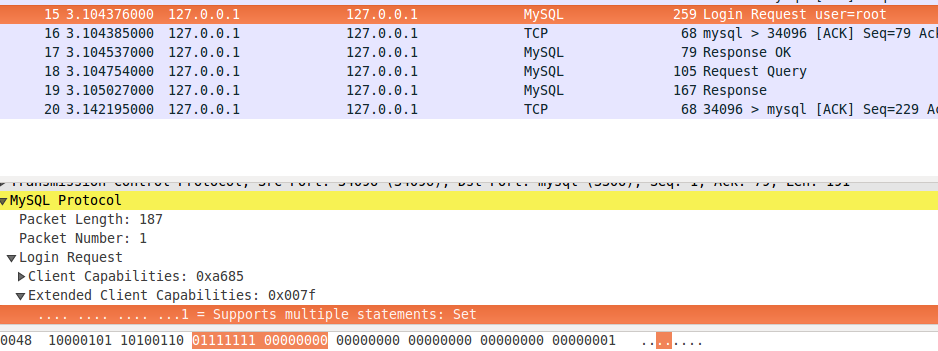
上图是通过Wireshark抓取终端mysql登录时(mysql -u root -p -h 127.0.0.1)抓取的包.
似乎没有修改的办法.
3. 如何在telent 127.0.0.1 3306后输入密码? 或者如何设置使得不用输入密码,试过使用--skip-grant-tables 启动mysql服务,但不起作用.
Jdbc Url 设置allowMultiQueries为true和false时底层处理机制研究的更多相关文章
- JDBC的URL设置allowMultiQueries的原因
如下的一个普通JDBC示例: String user ="root";String password = "root";String url = "j ...
- easyui-combobox的option选项为true与false时的问题
如题,我们使用easyui-combobox,当我们的选择项为true与false时,即选择是否,后台返回一个boolean类型的变量,那么这时候,通过form表单进行反显会出现这样的问题:表单里ea ...
- mysql的jdbc.url携带allowMultiQueries=true参数的作用及其原理
如下配置 jdbc.url=jdbc:mysql://127.0.0.1:3306/chubb_2?autoReconnect=true&useUnicode=true&charact ...
- motto - question - bodyParser.urlencoded 中设置 extended 为 true 和 false 有什么区别吗?
本文搜索关键字:motto node nodejs js javascript body-parser bodyparser urlencoded x-www-form-urlencoded exte ...
- C#/.NET 中启动进程时所使用的 UseShellExecute 设置为 true 和 false 分别代表什么意思?
原文:C#/.NET 中启动进程时所使用的 UseShellExecute 设置为 true 和 false 分别代表什么意思? 在 .NET 中创建进程时,可以传入 ProcessStartInfo ...
- Mysql JDBC Url参数说明useUnicode=true&characterEncoding=UTF-8
MySQL的 JDBC URL 格式 for Connector/J 如下例: jdbc:mysql://[host][,failoverhost...][:port]/[database] » [ ...
- [android] setOnTouchEvent 设置返回值为true 和 false的区别
今天在做自定义的可选文本的 TextView 类时,用到了 View 类的 setOnTouchListener(OnTouchListener l)事件监听,在构造 OnTouchListener ...
- MySQL JDBC URL参数(转)
MySQL的 JDBC URL格式: jdbc:mysql://[host][,failoverhost...][:port]/[database] » [?propertyName1][=prope ...
- com.mysql.cj.jdbc.Driver 新特性jdbc.url连接供参考
com.mysql.cj.jdbc.Driver 是 mysql-connector-java 6及以上版本中的参数详解: jdbc.url=jdbc:mysql://localhost:3306/t ...
随机推荐
- Ng第十六课:推荐系统(Recommender Systems)
16.1 问题形式化 16.2 基于内容的推荐系统 16.3 协同过滤 16.4 协同过滤算法 16.5 矢量化:低秩矩阵分解 16.6 推行工作上的细节:均值归一化 16.1 问题形式 ...
- What's New In Python 3.X
As Python updating to python 3.6, its performance is better than Python 2.x, which is good news to e ...
- GPT分区在IBM服务器上安装linux不能引导的解决方法
提示: Your boot partition is on a disk using the GPT partitioning Scheme but this machines cannot boot ...
- Eclipse怎么全局搜索和替换(整个项目)
我们用Eclipse编程,有时候需要将整个项目的某个字符串替换成其他的.那么我们该怎么操作呢?请接着往下看! 一,我们首先打开Eclipse,单击要替换字符串的项目 二,按下组合键:ctrl + H, ...
- NoSQL世界的几个重要理论
和所有事物一样,NoSQL的兴起也是由许多理论支撑作为前提的,正是由下面一些理论的支撑,NoSQL的方向才能如此明朗. 1.CAP理论 CAP理论无疑是导致技术趋势由关系数据库系统向NoSQL系统转变 ...
- bootstrap1相关学习文档
<em>Bootstrap 框架</em> //倾斜 4.对齐 //设置文 ...
- [FAILED]Marking disk "DATA02" as an ASM disk
执行删除asm磁盘时报错! [root@rac1 grid]# /etc/init.d/oracleasm deletedisk DATA01 /dev/sdc1 Marking disk " ...
- 木马入侵查杀 linux
目 录: 一.问题现象: 二.问题排查: 1.netstat 排查: 2.top查看: 3.lsof -c 命令排查: 4.确定中木马了. 三.木马查杀: 木马1,清除: 木马2,清除: 四.后续处 ...
- mysql 唯一索引UNIQUE使用方法详解
创建唯一索引的目的不是为了提高访问速度,而只是为了避免数据出现重复.唯一索引可以有多个但索引列的值必须唯一,索引列的值允许有空值.如果能确定某个数据列将只包含彼此各不相同的值,在为这个数据列创建索引的 ...
- ios 百度地图,火星坐标,地球坐标互转
1 2 3 4 5 6 7 8 9 10 11 12 13 14 15 16 17 18 19 20 21 22 23 24 25 26 27 28 29 30 31 32 33 34 35 36 3 ...