
How to update jQuery Mobile in Dreamweaver CS6
来源:http://wpguru.co.uk/2013/01/how-to-update-jquery-mobile-in-dreamweaver-cs6/
Since the release of Adobe’s Dreamweaver CS6 the jQuery and jQuery Mobile libraries have been updated. This means that when you create a new Mobile Starter page, you’ll get outdated libraries by default.
With a bit of hacking we can change this to the most current version though. Let me show you how it worked for me – many thanks to Greg’s article on how to do this in Dreamweaver CS5.5.
Why would I want to upgrade?
jQuery mobile was great even in beta, and it was great in its release of Dreamweaver CS6 (which shipped with version 1.0). Many visual effects have been improved, the page transition effects look a lot smoother, and god knows how many other improvements there have been over the last 6 months.
It’s a strength of Dreamweaver to be able to adapt to such change – keep an eye out for future releases of the libraries, it’s a fast paced world out there.
Let’s get started
Dreamweaver CS6 stores its libraries in a folder called Third Party Source Code which on a Mac you’ll find under
/Applications/Adobe Dreamweaver CS6/Configuration/Third Party Source Code
Notice the folder called jquery-mobile. I suggest you leave it there and copy the new libraries into a new folder in the same location. I’ll call mine jquery-mobile-1.2.0 (the current version at the time of writing). Grab the latest minified version from
- http://jquerymobile.com/download/ (choose the ZIP file)
You’ll also need a new copy of jQuery because jQuery Mobile relies on the jQuery library. Grab it from here:
BEWARE: the latest stable jQuery release is often not compatible with the latest jQuery Mobile release! At the time of writing, the latest jQuery is 1.9.0 – but the version that’s COMPATIBLE with jQuery Mobile 1.2.0 is jQuery 1.8.2.
I know this is confusing… that’s why I thought I’d take some notes. Here’s a list of files that I have in place now:
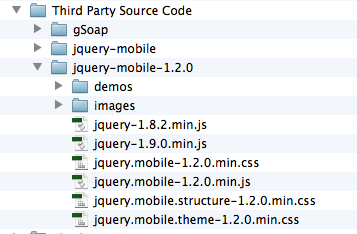
Amending the Dreamweaver Page Templates
Once you’ve got a copy of all fresh libraries in the right location you need to amend the Mobile Starter templates Dreamweaver provides. Those are in
/Applications/Adobe Dreamweaver CS6/Configuration/BuiltIn
There are three templates here in a folder called Mobile Starters, two for pages including local libraries, and one with links to the CDN versions:
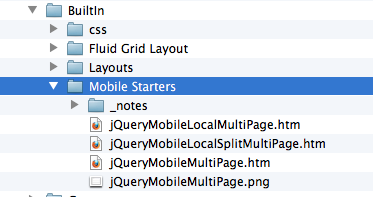
Open the two local files and amend the links so that they point to your new libraries. You can do the same with the CDN template of course.
Once they’re saved, you can create a new Mobile Starter page just as before and make use of all the updated jQuery Mobile goodness.
Yikes – now all my jQuery Icons are gone ;-(
Yes that is unfortunate. The reason for this is that Dreamweaver used to have them in the same directory as jQuery Mobile was living – however jQuery Mobile now has data icons in a separate folder called images (see above). So jQuery expects those images to be in a folder called “images”, but Dreamweaver CS6 copies them into the jquery-mobile folder (without a subfolder).
Since I really don’t know how to teach Dreamweaver how to do this, the easiest thing is to just manually create an images folder and move the files across. Then all is good again with the world.
Happy hacking!
How to update jQuery Mobile in Dreamweaver CS6的更多相关文章
- 安装Adobe Dreamweaver CS6 免序列号 官方破解版
Adobe Dreamweaver CS6 免序列号 官方破解版 Adobe Dreamweaver CS6是世界顶级软件厂商Adobe推出的一套可视化的网页开发工具,Dreamweaver CS6最 ...
- (二)Jquery Mobile介绍以及Jquery Mobile页面与对话框
Jquery Mobile介绍以及Jquery Mobile页面与对话框 一. Adobe Dreamweaver CS6 环境 最新版本的cs6会支持JM的使用,有自动提示功能,很强大.安装说明地 ...
- 02.Jquery Mobile介绍以及Jquery Mobile页面与对话框
一.为什么要学Jquery Mobile JqueryMobile 是jquery的移动版本,懂基本的jquery知识,会简单的html+css就可以完成很多复杂的功能,还有就是这个框架在企业中用 ...
- 小强的HTML5移动开发之路(22)—— Adobe DreamWeaver CS6安装与破解
首先说明一下,这里介绍Adobe DreamWeaver CS6的安装与破解是为了后面的jQuery Mobile框架使用做好准备. 一.首先去Adobe官网下载:http://www.adobe.c ...
- 在DW 5.5+PhoneGap+Jquery Mobile下搭建移动开发环境
移动设备应用开发有多难,只要学会HTML5+Javascript就可以.用Dreamweaver5.5+PhoneGap+Jquery Mobile搭建移动开发环境,轻轻松松开发你自己的应用.让你用普 ...
- jQuery Mobile和Sencha Touch哪个更适合你?
纯粹的总结一下移动web开发框架,移动web开发框架有jQuery Mobile .Sencha Touch等等,他们都来源于web开发,是成熟的框架,jQuery Mobile出自于jQuery家族 ...
- Dreamweaver cs6安装破解
Dreamweaver 是前端开发的必备软件.目前最新版本为CS6,与CS5相比多了对HTML5.CSS3.jquery的关联支持,可以更方便的在Dreamweaver中编写前端代码. 安装准备: 1 ...
- 关于DreamWeaver CS6.0 + PhoneGap 之移动开发环境搭建
原博客地址为:http://blog.csdn.net/alovebtoc/article/details/9315437 HTML5已经逆袭了移动开发,近期有幸布置PhoneGap的环境搭载,其实 ...
- Dreamweaver cs6中文版完整安装步骤:
Dreamweaver cs6中文版完整安装步骤: http://www.cr173.com/soft/72633.html 1.首先我们需要下载Dreamweaver cs6官方中文原版安装程序,下 ...
随机推荐
- 【译】Asp.Net Identity与Owin,到底谁是谁?
送给正在学习Asp.Net Identity的你 :-) 原文出自 trailmax 的博客AspNet Identity and Owin. Who is who. Recently I have ...
- win7下PHP+MySQL+CoreSeek中文检索引擎配置
1.Windows下的coreseek安装测试 (64位win7旗舰版) 官方参考:http://www.coreseek.cn/products-install/install_on_windows ...
- 2010 NEERC Western subregional
2010 NEERC Western subregional Problem A. Area and Circumference 题目描述:给定平面上的\(n\)个矩形,求出面积与周长比的最大值. s ...
- python 双层函数调用顺序
读大神代码,见到大神封装的接口很多都是采用双层函数形式. def 外层函数(外层参数) def 内层函数(内层参数) 函数体 return 值 return 内层函数 类似这样的形式,使用 外层函数( ...
- Android 常用动画之RotateAnimation
前两天接到任务做一个UI,有用到动画,于是抽空看了下Android动画相关知识. Android Animation共有四大类型,分别是 Alpha 透明度动画 Scale 大小伸 ...
- Grafana 短信报警
一.分析 需求 Grafana支持短信渠道报警 要求 使用开发提供的短信API接口 请求url: http://192.168.1.1:8088/alerting/sendSms?mobile=手机号 ...
- chunk writer 中需要对抛错的交易进行回滚,同时又要在其他表中记录是哪一笔交易记录失败
首先根据我有限的知识判断,回滚之后进行写表,该写表动作只能使用listener来进行. 考虑使用的listener有:ItemWriteListener StepExecutionListen ...
- java 线程池(ExecutorService与Spring配置threadPoolTaskExecutor)
一.java ExecutorService实现 创建ExecutorService变量private ExecutorService executor = null 2.执行对应任务时,首先生成线程 ...
- luogu P4779 【模板】单源最短路径(标准版)
线段树优化dij 哈哈哈哈哈哈哈哈哈哈哈哈哈哈哈哈 我可能是个智障 // luogu-judger-enable-o2 #pragma GCC diagnostic error "-std= ...
- BZOJ2160: 拉拉队排练
Description 艾利斯顿商学院篮球队要参加一年一度的市篮球比赛了.拉拉队是篮球比赛的一个看点,好的拉拉队往往能帮助球队增加士气,赢得最终的比赛.所以作为拉拉队队长的楚雨荨同学知道,帮助篮球队训 ...