
[Asp.net core 2.0]Ueditor 图片上传
摘要
在项目中要用到富文本编辑器,包含上传图片,插入视频等功能。但ueditor只有.net版本,没有支持core。那么上传等接口就需要自己实现了。
一个例子
首先去百度ueditor官网下载简化版的ueditor。并引入到项目中
如图:
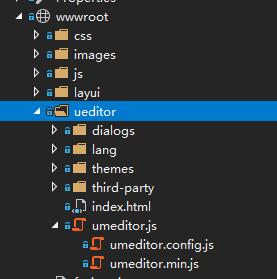
页面引用以下几个文件:
<link href="~/ueditor/themes/default/css/umeditor.css" type="text/css" rel="stylesheet" />

<script src="~/ueditor/third-party/jquery.min.js"></script>

<script src="~/ueditor/umeditor.config.js" charset="utf-8"></script>

<script src="~/ueditor/umeditor.js" charset="utf-8"></script>

<script src="~/ueditor/lang/zh-cn/zh-cn.js"></script>
修改ueditor配置文件:
  //为编辑器实例添加一个路径,这个不能被注释

        UMEDITOR_HOME_URL: URL

        //图片上传配置区

        , imageUrl: "../fileupload/UeditorUpload"             //图片上传提交地址

        , imagePath: URL + "net/"                     //图片修正地址,引用了fixedImagePath,如有特殊需求,可自行配置

        , imageFieldName: "upfile"                   //图片数据的key,若此处修改,需要在后台对应文件修改对应参数

        //工具栏上的所有的功能按钮和下拉框,可以在new编辑器的实例时选择自己需要的从新定义

        , toolbar: [

            'source | undo redo | bold italic underline strikethrough | superscript subscript | forecolor backcolor | removeformat |',

            'insertorderedlist insertunorderedlist | selectall cleardoc paragraph | fontfamily fontsize',

            '| justifyleft justifycenter justifyright justifyjustify |',

            'link unlink | image video |',

            'horizontal print preview fullscreen'

        ]
添加接收文件控制器,并提供接口
using System;

using System.Collections;

using System.Collections.Generic;

using System.IO;

using System.Linq;

using System.Threading.Tasks;

using Microsoft.AspNetCore.Hosting;

using Microsoft.AspNetCore.Http;

using Microsoft.AspNetCore.Mvc;

namespace FireFly.Admin.Controllers

{

    public class FileUploadController : Controller

    {

        private IHostingEnvironment hostingEnv;

        public FileUploadController(IHostingEnvironment env)

        {

            hostingEnv = env;

        }

        public async Task<IActionResult> UeditorUpload()

        {

            var files = Request.Form.Files;

            string callback = Request.Query["callback"];

            string editorId = Request.Query["editorid"];

            if (files != null && files.Count > )

            {

                var file = files[];

                string contentPath = hostingEnv.WebRootPath;

                string fileDir = Path.Combine(contentPath, "upload");

                if (!Directory.Exists(fileDir))

                {

                    Directory.CreateDirectory(fileDir);

                }

                string fileExt = Path.GetExtension(file.FileName);

                string newFileName = DateTime.Now.ToString("yyyyMMddHHmmssfff") + fileExt;

                string filePath = Path.Combine(fileDir, newFileName);

                using (FileStream fs = new FileStream(filePath, FileMode.Create))

                {

                    await file.CopyToAsync(fs);

                }

                var fileInfo = getUploadInfo("../../upload/" + newFileName, file.FileName,

                    Path.GetFileName(filePath), file.Length, fileExt);

                string json = BuildJson(fileInfo);

                Response.ContentType = "text/html";

                if (callback != null)

                {

                    await Response.WriteAsync(String.Format("<script>{0}(JSON.parse(\"{1}\"));</script>", callback, json));

                }

                else

                {

                    await Response.WriteAsync(json);

                }

                return View();

            }

            return NoContent();

        }

        private string BuildJson(Hashtable info)

        {

            List<string> fields = new List<string>();

            string[] keys = new string[] { "originalName", "name", "url", "size", "state", "type" };

            for (int i = ; i < keys.Length; i++)

            {

                fields.Add(String.Format("\"{0}\": \"{1}\"", keys[i], info[keys[i]]));

            }

            return "{" + String.Join(",", fields) + "}";

        }

        /**

       * 获取上传信息

       * @return Hashtable

       */

        private Hashtable getUploadInfo(string URL, string originalName, string name, long size, string type, string state = "SUCCESS")

        {

            Hashtable infoList = new Hashtable();

            infoList.Add("state", state);

            infoList.Add("url", URL);

            infoList.Add("originalName", originalName);

            infoList.Add("name", Path.GetFileName(URL));

            infoList.Add("size", size);

            infoList.Add("type", Path.GetExtension(originalName));

            return infoList;

        }

    }

}
测试

总结
这里简单实现了ueditor在asp.net core 2.0 web应用中的使用,需要实现的只是文件的上传接口。
[Asp.net core 2.0]Ueditor 图片上传的更多相关文章
- 在ASP.NET MVC下实现单个图片上传, 客户端服务端双重限制图片大小和格式, 服务端裁剪图片
在"MVC文件图片ajax上传轻量级解决方案,使用客户端JSAjaxFileUploader插件01-单文件上传"一文中,使用JSAjaxFileUploader这款插件实现了单文 ...
- ueditor图片上传插件的使用
在项目里使用到ueditor图片上传插件,以前图片上传都是直接使用js代码直接上传图片,比较麻烦,而且效率也比较低,而ueditor这款插件完美的解决了这个问题,这个是百度开发的一款富文本编辑器,在这 ...
- ueditor图片上传配置
ueditor图片上传配置文件为ueditor/php/config.json /* 上传图片配置项 */ "imageActionName": "uploadimage ...
- asp.net ueditor 图片上传路径问题解决
最近练习做一个新闻系统,其中不能少了添加新闻和修改新闻的功能 ,而且还要添加图片.添加文字样式, 所以不得不使用富文本编辑器,在kindeditor和ueditor中,选择了目前还在持续更新的百度产品 ...
- Asp.Net Mvc 使用WebUploader 多图片上传
来博客园有一个月了,哈哈.在这里学到了很多东西.今天也来试着分享一下学到的东西.希望能和大家做朋友共同进步. 最近由于项目需要上传多张图片,对于我这只菜鸟来说,以前上传图片都是直接拖得控件啊,而且还是 ...
- springboot+UEditor图片上传
springboot+UEDitor百度编辑器整合图片上记录于此 1.下载ueditor插件包,解压到static/ueditor目录下 2.在你所需实现编辑器的页面引用三个JS文件 1) uedi ...
- ASP.NET工作笔记之一:图片上传预览及无刷新上传
转自:http://www.cnblogs.com/sibiyellow/archive/2012/04/27/jqueryformjs.html 最近项目里面涉及到无刷新上传图片的功能,其实也就是上 ...
- 百度UEditor图片上传或文件上传路径自定义
最近在项目中使用到百度UEditor的图片以及文件上传功能,但在上传的时候路径总是按照预设规则来自动生成,不方便一些特殊文件的维护.于是开始查看文档和源代码,其实操作还是比较简单的,具体如下: 1.百 ...
- CKEditor5 + vue2.0 自定义图片上传、highlight、字体等用法
因业务需求,要在 vue2.0 的项目里使用富文本编辑器,经过调研多个编辑器,CKEditor5 支持 vue,遂采用.因 CKEditor5 文档比较少,此处记录下引用和一些基本用法. CKEdit ...
随机推荐
- 有用的linux命令集锦
http://blog.csdn.net/hackerain/article/details/7946193 1. 查看内存使用情况 free -m 2. 查看系统版本信息 sudo lsb_rele ...
- python3之模块psutil系统性能信息
psutil是个跨平台库,能够轻松实现获取系统运行的进程和系统利用率,包括CPU.内存.磁盘.网络等信息. 它主要应用于信息监控,分析和限制系统资源及进程的管理.它实现了同等命令命令行工具提供的功能, ...
- PHP中冒号、endif、endwhile、endfor使用介绍
我们经常在wordpress一类博客程序的模板里面看到很多奇怪的PHP语法,比如: 复制代码代码如下: <?php if(empty($GET_['a'])): ?> <font c ...
- 通过anaconda进行python多版本控制
---恢复内容开始--- linux与windows通用. 1. 假设电脑上已经转好anaconda3. (anaconda 默认装好了python3.jupyter.spyter) 2. 现在需求是 ...
- hdu 2065(泰勒展式)
比赛的时候遇到这种题,只能怪自己高数学得不好,看着别人秒.... 由4种字母组成,A和C只能出现偶数次. 构造指数级生成函数:(1+x/1!+x^2/2!+x^3/3!……)^2*(1+x^2/2!+ ...
- selenium 操作文本框(textarea输入)
selenium 对文本框的输入操作一般有两种形式,传统的是直接通过定位元素通过sendKeys()方法直接在文本框中输入信息.但有时候我们可以通过id 的方式将其进行定位,但却不能通过sendKey ...
- Tomcat启动默认访问项目
一般有两种可以实现:推荐使用这一种.更灵活 一般项目的编译项目都在Tomcat的webapps下,项目的访问路径一般为:http://localhost:8080/项目虚拟路径.但是Tomcat的默认 ...
- vue组件库(一):前期准备工作
前言 将近期项目内自行开发一个vue组件,做个总结,记录下自己的思维过程~~~ 正文 接到这个任务后,还是要做些准备工作的. 主要内容如下: 1.优化下所在团队前端开发流程 服务器搭建gitlab,采 ...
- 上传文件异常问题 | 413 Request Entity Too Large
开发中遇到这样的问题:一个上传文件的功能,内网测试都正常了,但是发布到外网就无法上传大点的(大于1MB)文件,更奇怪的是,后台还没有任何的异常信息. 于是就用Http抓包工具(HttpDetect)看 ...
- ERP渠道管理添加验证和查询(二十二)
添加联系人的后台代码: protected void btnSubmit_Click(object sender, EventArgs e) { BioErpCrmManageChannel chan ...