
iml文件
iml是 intellij idea的工程配置文件,里面是当前projec的一些配置信息
====
android studio svn 汉化
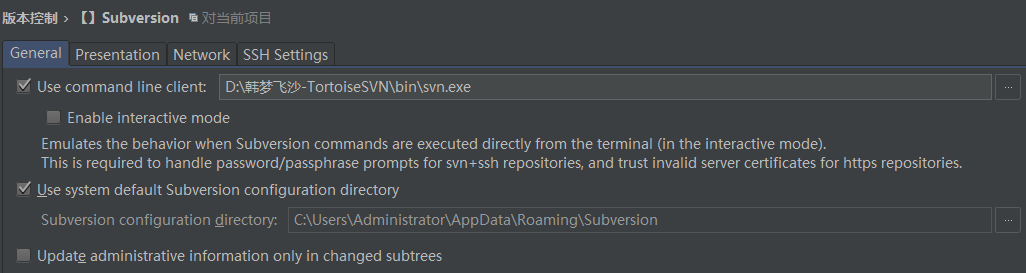
常规。 描述。网络。安全的shell 壳。
用命令行客户端:
启动 交互 模式
模拟行为 当 子版本 命令 是 被直接执行 从 终端。(在互动模式中)
这要求运用 密码/密码句 提示 为 svn+安全壳 仓库。 信任无效服务器证书 为 https 仓库。
用系统默认的子版本配置目录
子版本 配置目录
更新 管理 信息 只在 改变的子树 中
=====

清除 身份 缓存 。 删除所有存储的证件 为 http ,svn 和 svn+ssh 协议。
=====
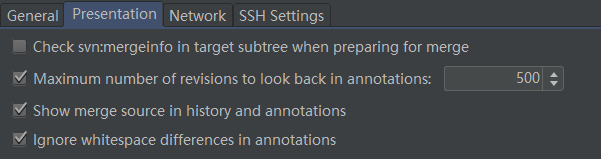
描述
检查svn:合并信息 在 目标 子树 当准备 合并事。
在注解中 回看 修订版本的最大数量 :
显示合并源 在历史 和 注解 中
忽略 空白 不同 在 注解中。
====
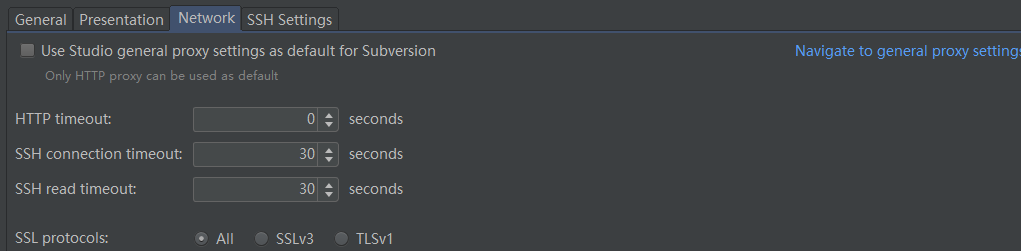
网络
用 工作室 常规 代理 设置 作为 默认 为 子版本
只有 http 代理 能够 被用作 默认。
http 超时:
ssh 连接 超时
ssh 读取 超时
ssl 加密套接字协议层 的协议: 所有。 ssl v3。TLS v1.
导航到常规代理设置。
====

编辑网络选项 。 编辑 服务器 svn 运行时 配置 文件。
====
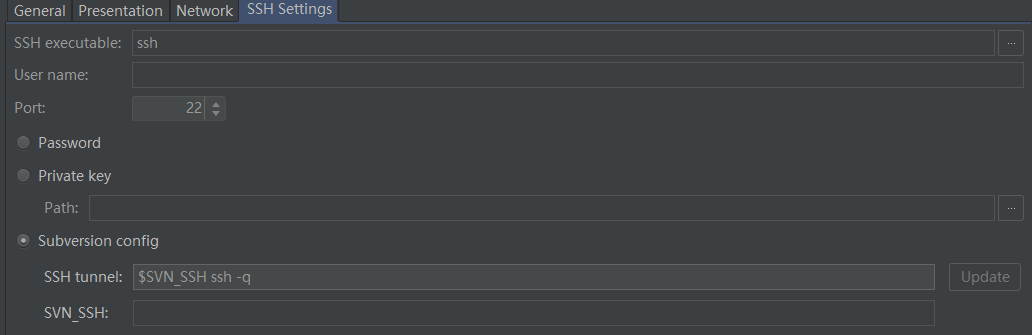
安全壳 执行:
用户名 : 端口: 密码。 私钥。 路径。 svn配置。 安全壳 隧道 : svn_SSH:
====
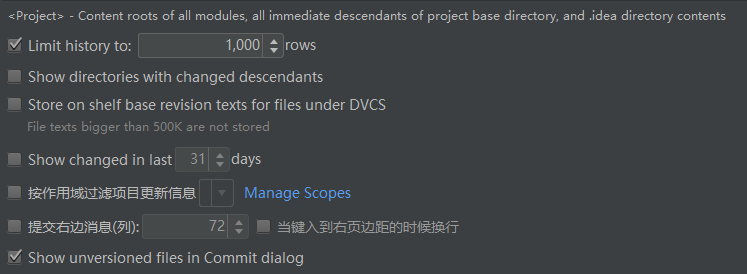
工程 = 内容 根 所有 模块, 所有 直接 后代子节点 项目的 基础 目录, 和 .idea目录内容。
限制 历史 到 1000 行。
显示 目录 有 改变的 子节点。
存储 在 自己 基础 修订版本 文本 为 文件 在 dvcs下
文件文本 比500k 大的 不 存储。
显示没有版本的文件 在 提交 对话框。
======
android studio 提交 svn 忽略
- Android Studio SVN配置忽略文件
1.用Android Studio创建一个项目,会在根目录和Module目录下自动生成.gitignore文件,貌似是Git的配置文件,和SVN没有关系。
2.
打开Setting-Version Control-Ignored Files,添加忽略文件,我所知道的忽略文件如下:
1、.idea文件夹
2、.gradle文件夹
3、所有的build文件夹
4、所有的.iml文件
5、local.properties文件。

3.注意一点,配置忽略文件必须在Share到SVN之前进行,如果在Commit后配置,貌似就不起作用了。
4.当分享者配置了忽略文件并Share Project到SVN后,其他人Check下来就不需要配置了,Commit的时候会自动忽略那些文件。但文件名显示为红色,这时配置下忽略文件就恢复正常了。
Check下来的Project:
配置忽略文件后:


=======
导入 简介 文件 。
日蚀,月蚀 安卓 项目导入摘要
ECLIPSE ANDROID PROJECT IMPORT SUMMARY
======================================
清单  合并的:
Manifest Merging:
-----------------
你的项目用库 提供 清单,你的日食项目 不能 明显地 打开 清单 合并。
在安卓 gradle  项目中,清单 是 一直 合并(也就是说 内容来自你的库的清单 将被合并到 应用 清单。
如果你已经手动复制内容从库清单到你的应用清单,你可能需要移除这些 为你的应用 去 正确构建。

Your project uses libraries that provide manifests, and your Eclipse
project did not explicitly turn on manifest merging. In Android Gradle
projects, manifests are always merged (meaning that contents from your
libraries' manifests will be merged into the app manifest. If you had
manually copied contents from library manifests into your app manifest
you may need to remove these for the app to build correctly.

忽略 文件:
Ignored Files:
--------------
下面文件 是 没有 复制到 新的 gradle 项目中,你应该 评估 是否 这些 仍然 需要在你的项目中,如果这样 手动移动他们:
The following files were *not* copied into the new Gradle project; you
should evaluate whether these are still needed in your project and if
so manually move them:

* .DS_Store
* GFStudent.iml
* GFStudent1.iml
* proguard-project.txt

替代jar 用依赖。
Replaced Jars with Dependencies:
--------------------------------
The importer recognized the following .jar files as third party
libraries and replaced them with Gradle dependencies instead. This has
the advantage that more explicit version information is known, and the
libraries can be updated automatically. However, it is possible that
the .jar file in your project was of an older version than the
dependency we picked, which could render the project not compileable.
You can disable the jar replacement in the import wizard and try again:

android-support-v4.jar => com.android.support:support-v4:19.+
gson-2.2.1.jar => com.google.code.gson:gson:2.2.1
guava-r09.jar => com.google.guava:guava:18.0

可能 丢失的 依赖:
Potentially Missing Dependency:
-------------------------------
When we replaced the following .jar files with a Gradle dependency, we
inferred the dependency version number from the filename. This
specific version may not actually be available from the repository.
If you get a build error stating that the dependency is missing, edit
the version number to for example "+" to pick up the latest version
instead. (This may require you to update your code if the library APIs
have changed.)

gson-2.2.1.jar => version 2.2.1 in com.google.code.gson:gson:2.2.1

移动文件:
Moved Files:
------------
安卓 gradle项目 用一个不同结构 相对于 adt 日食项目。 这是项目如何重构的:
Android Gradle projects use a different directory structure than ADT
Eclipse projects. Here's how the projects were restructured:

* AndroidManifest.xml => gfstudent/src/main/AndroidManifest.xml
* assets/ => gfstudent/src/main/assets/
* res/ => gfstudent/src/main/res/
* src/ => gfstudent/src/main/java/
* src/.DS_Store => gfstudent/src/main/resources/.DS_Store
* src/com/.DS_Store => gfstudent/src/main/resources/com/.DS_Store
* src/com/gf/education/gfstudent/recommand/dao/DataV1Mapper.xml => gfstudent/src/main/resources/com/gf/education/gfstudent/recommand/dao/DataV1Mapper.xml

Next Steps:
-----------
You can now build the project. The Gradle project needs network
connectivity to download dependencies.

Bugs:
-----
If for some reason your project does not build, and you determine that
it is due to a bug or limitation of the Eclipse to Gradle importer,
please file a bug at http://b.android.com with category
Component-Tools.

(This import summary is for your information only, and can be deleted
after import once you are satisfied with the results.)
======
svn 右键菜单  汉化  说明
分享目录 。 创建外部。 忽略。提交目录。编辑属性。设置属性。撤销。解决文本冲突。标记解决。清除。显示当前修订版本。
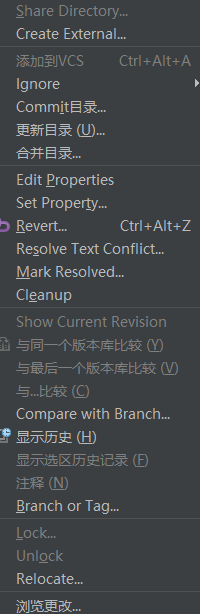
比较用分支。 分支或者 标签。 锁。解锁。迁移。
====
svn 提交 界面 汉化 说明
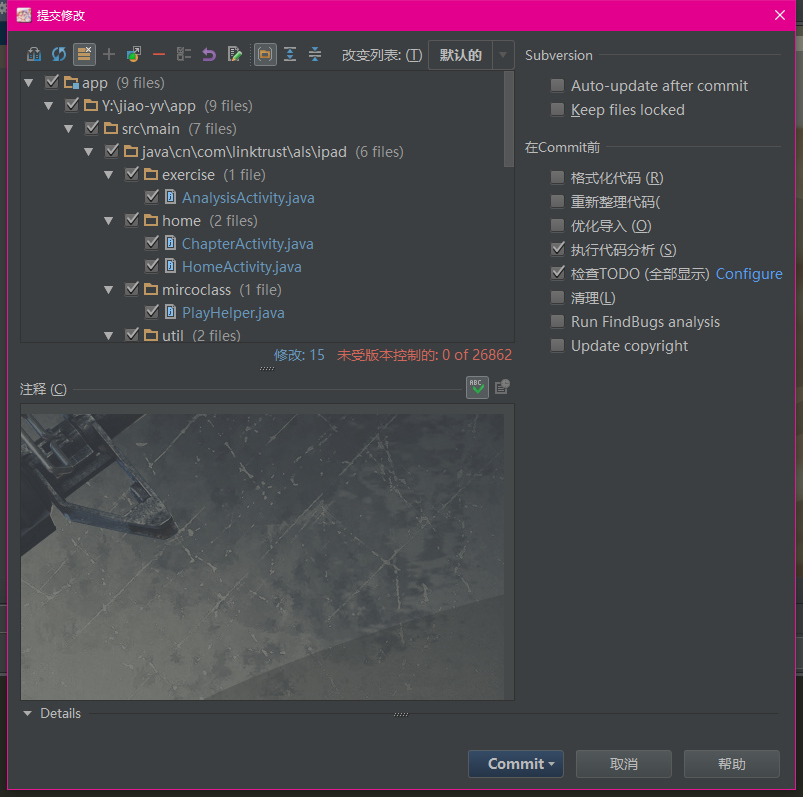
====
iml文件的更多相关文章
- IDEA中的.iml文件和.idea文件夹
.iml文件 iml文件是IntelliJ IDEA自动创建的模块文件,用于Java应用开发,存储一些模块开发相关的信息,比如一个Java组件,插件组件,Maven组件等等,还可能存储一些模块路径信息 ...
- git操作忽略.iml文件
git操作忽略.iml文件** 参考:https://blog.csdn.net/m0_38001814/article/details/87354584 因为.iml文件的修改导致代码pull失败 ...
- idea中隐藏.iml文件
在创建父子工程或者聚合工程时产生的大量 .iml 文件,有时会对我们的操作产生干扰,所以,一般情况下,我们都将其隐藏掉,步骤如下: File——>settings——>Editor——&g ...
- IntelliJ IDEA + Maven iml文件中依赖项的需求是什么?
在Maven中,项目的依赖关系在pom.xml文件中指定.在IntelliJ IDEA中,即使对于Maven项目,相同的信息也存储在iml文件中.在两个地方有相同的信息需要什么? 当导入Maven项目 ...
- idea中iml文件的问题
idea中iml文件的问题 iml文件是idea组织工程的文件, 里面记录了各种记录模块, 文件夹以及依赖的信息, 显示如下: <?xml version="1.0" enc ...
- .iml文件恢复
基于maven的java工程 执行 mvn idea:module可恢复.iml文件
- IntelliJ的.iml文件及相关的Class Not Found 问题
.iml 文件是IntelliJ IDEA 自动创建的模块文件,用于Java应用开发,存储一些模块开发相关的信息,比如一个Java组件, 插件组件,Maven组件等等, 还可能会存储一些模块路径信息, ...
- IDEA中的.iml文件和.idea文件夹作用和意义
感谢原文作者:LZHHuo 原文链接:https://blog.csdn.net/weixin_41699562/article/details/99552780 .iml文件 idea 对modul ...
- 【核心】project(idea文件)、module(iml文件)到SSM集成、热部署、Tomcat启动、MAVEN依赖冲突
http://wiki.jikexueyuan.com/project/intellij-idea-tutorial/project-composition-introduce.html 在 Inte ...
随机推荐
- JDK环境变量的配置1
JDK环境变量的配置 ... 1.安装完JDK后配置环境变量 计算机→属性→高级系统设置→高级→环境变量 2.系统变量→新建 JAVA_HOME 变量 .变量值填写jdk的安装目录(我的安装目录 ...
- Hadoop源码阅读-HDFS-day1
HDFS声明及构造函数 @InterfaceAudience.Private @InterfaceStability.Evolving public class Hdfs extends Abstra ...
- 「MYSQL」MYSQL中的int(11)到底代表什么意思?
一.前言 在工作中经常要与mysql打交道,但是对mysql的各个字段类型一直都是一知半解,因此写本文总结记录一番. 二.简介 对于int类型的一些基础知识其实上图已经说的很明白了,在这里想讨论下常用 ...
- 解决MySQL新增用户无法登陆问题
1. 新增用户 grant all on *.* to '库名'@'%' identified by '库名'; 2. 刷新授权表 flush privileges; 3. 删除空用户 use mys ...
- JDK1.8源码hashMap
一.概念 允许key为null,value为null:线程不安全:不保证映射的顺序:迭代 collection 视图所需的时间与 HashMap 实例的“容量”(桶的数量)及其大小(键-值映射关系数) ...
- CentOS安装SVN客户端(rpm)
http://mirrors.163.com/centos/6/os/x86_64/Packages/ 1.检查是已经安装了svn: rpm -qa subversion subversion-1.7 ...
- 使用OpenSSL自建CA + Nginx配置HTTPS
Ubuntu 16.04(ECS),OpenSSL 1.0.2g 1 Mar 2016,Nginx 1.10.3 (Ubuntu), 浏览器:Chrome 67,Firefox 61,Edge 40 ...
- day25作业
1.阻塞 2.就绪 3.阻塞 4.Runnable 5.join() 6.synchronized 7.notify()和notifyAll() 8.Object 1.A 2.D ...
- linux下安装redis及其中遇到的问题的解决方法
1.将下载好的压缩包放到/usr/local目录下# tar xzf redis-3.0.2.tar.gz # cd redis-3.0.2 # make 提示错误 make: cc: Command ...
- 【转】使用TCP协议连续传输大量数据时,是否会丢包,应如何避免?
使用TCP协议连续传输大量数据时,是否会丢包,应如何避免? 比如发送文件.记得有人提过可能会发生什么堆栈溢出.怎样避免呢?是不是可以收到数据后发送确认包,收到确认包后再继续发送.或是发送方发送了一些数 ...