
用开源项目cropper实现对图片中任意部分进行裁剪
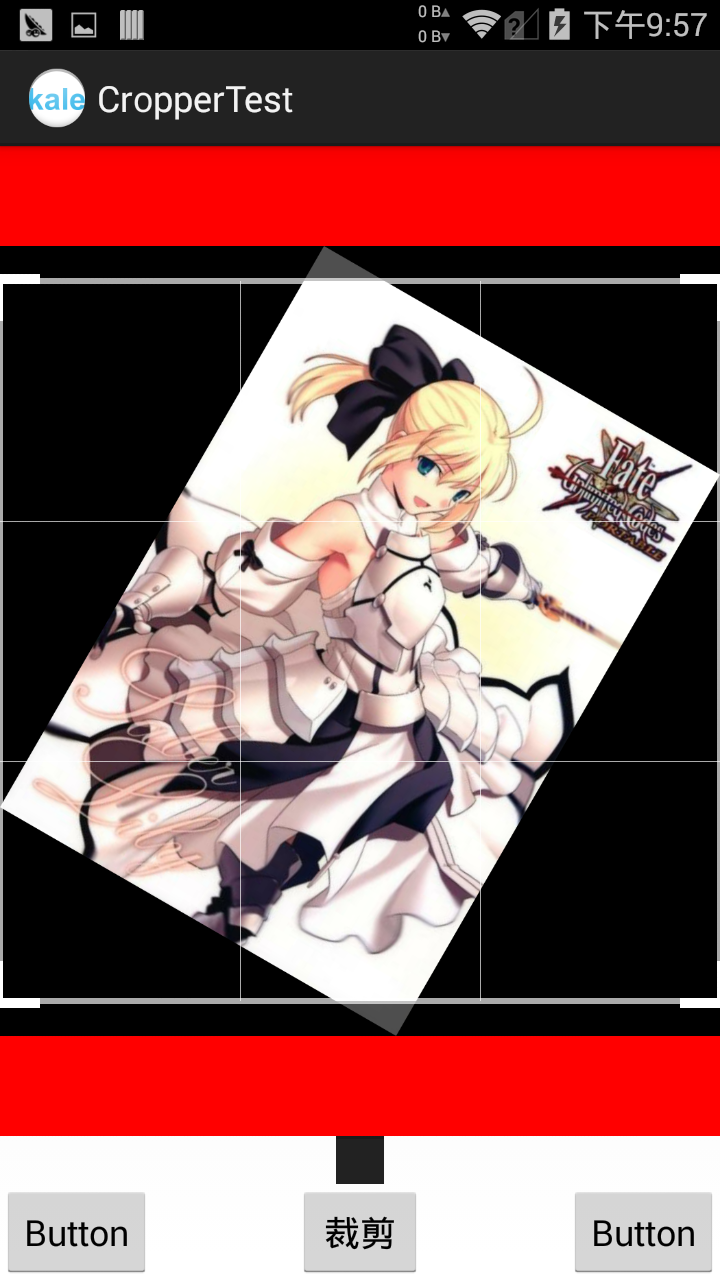 红色区域为截图控件的区域。
开源项目地址:https://github.com/edmodo/cropper
croper这个开源项目可以对一个图片进行任意区域的街区,并且可以设置图片的旋转角度。但它忽视了小图片的存在,如果要截图的图片过于小,那么显示效果是极其不好的。于是我写了个图片拉伸的方法来解决这个问题,当然也可以再它的源码中进行修改。我尝试过在源码中修改,但发现它多方法都是针对的大图来做的,修改起来十分困难。所以姑且偷懒先把小图片拉伸后在进行显示。
使用的步骤很简单:
1.在布局文件定义这个控件
2.在代码中找到他,并进行下设置(可选)
3.使用截图的方法
布局文件(里面的imageview用于显示截取好的图片,button是用来截图的按钮)
<RelativeLayout xmlns:android="http://schemas.android.com/apk/res/android"

    xmlns:tools="http://schemas.android.com/tools"

    android:layout_width="match_parent"

    android:layout_height="match_parent"

    tools:context="${relativePackage}.${activityClass}" >

    <com.edmodo.cropper.CropImageView

        xmlns:custom="http://schemas.android.com/apk/res-auto"

        android:id="@+id/CropImageView"

        android:layout_width="match_parent"

        android:layout_height="match_parent"

        android:layout_above="@+id/imageView"

        android:layout_centerHorizontal="true"

        android:background="#ff0000"/>

        <ImageView

            android:id="@+id/imageView"

            android:layout_width="wrap_content"

            android:layout_height="wrap_content"

            android:layout_above="@+id/button1"

            android:layout_centerHorizontal="true"

            android:src="@drawable/abc_ab_bottom_solid_dark_holo" />

    <Button

        android:id="@+id/button1"

        android:layout_width="wrap_content"

        android:layout_height="wrap_content"

        android:layout_alignParentBottom="true"

        android:layout_centerHorizontal="true"

        android:text="裁剪" />

</RelativeLayout>
MainActivity
package com.kale.croppertest;

import android.app.Activity;

import android.content.Context;

import android.graphics.Bitmap;

import android.graphics.BitmapFactory;

import android.graphics.Matrix;

import android.os.Bundle;

import android.view.View;

import android.view.View.OnClickListener;

import android.view.WindowManager;

import android.widget.Button;

import android.widget.ImageView;

import com.edmodo.cropper.CropImageView;

public class MainActivity extends Activity {

    CropImageView cImageView;

    @Override

    protected void onCreate(Bundle savedInstanceState) {

        super.onCreate(savedInstanceState);

        setContentView(R.layout.activity_main);

        cImageView = (CropImageView) findViewById(R.id.CropImageView);

        cImageView.setImageBitmap(getBitmap(R.drawable.right));//为了兼容小图片,必须在代码中加载图片

        cImageView.rotateImage(30);//设定图片的旋转角度

        cImageView.setFixedAspectRatio(true);//设置允许按比例截图,如果不设置就是默认的任意大小截图

        cImageView.setAspectRatio(1, 1);//设置比例为一比一

        cImageView.setGuidelines(CropImageView.ON);//设置显示网格的时机,默认为on_touch

        Button btn = (Button)findViewById(R.id.button1);

        btn.setOnClickListener(new OnClickListener() {

            @Override

            public void onClick(View v) {

                // TODO 自动生成的方法存根

                Bitmap bitmap = cImageView.getCroppedImage();//得到裁剪好的图片

                ImageView croppedImageView = (ImageView) findViewById(R.id.imageView);

                croppedImageView.setImageBitmap(bitmap);//设置到imageview中

            }

        });

    }

    /**

     * @param resId

     * @return 如果图片太小,那么就拉伸

     */

    public Bitmap getBitmap(int resId) {

        WindowManager wm = (WindowManager) getBaseContext().getSystemService(Context.WINDOW_SERVICE);

        int width = wm.getDefaultDisplay().getWidth();

        Bitmap bitmap=BitmapFactory.decodeResource(getResources(), resId);

        float scaleWidth = 1,scaleHeight = 1;

        if(bitmap.getWidth() < width) {

            scaleWidth = width / bitmap.getWidth();

            scaleHeight = scaleWidth;

        }

        Matrix matrix = new Matrix();

        matrix.postScale(scaleWidth, scaleHeight);

        bitmap = Bitmap.createBitmap(bitmap, 0, 0, bitmap.getWidth(),bitmap.getHeight()

                , matrix, true);

        return bitmap;

    }

}
源码下载:http://download.csdn.net/detail/shark0017/7732283
用开源项目cropper实现对图片中任意部分进行裁剪的更多相关文章
- Android 开源项目
StickerCamera 一个完整的开源项目.贴纸标签相机(类似nice,in),拍照,裁剪,贴贴纸打标签功能. MD-BiliBili 基于 Material Design 的 BiliBili ...
- Android 开源项目分类汇总(转)
Android 开源项目分类汇总(转) ## 第一部分 个性化控件(View)主要介绍那些不错个性化的 View,包括 ListView.ActionBar.Menu.ViewPager.Galler ...
- Android 开源项目分类汇总
Android 开源项目分类汇总 Android 开源项目第一篇——个性化控件(View)篇 包括ListView.ActionBar.Menu.ViewPager.Gallery.GridView ...
- Android常用酷炫控件(开源项目)github地址汇总
转载一个很牛逼的控件收集帖... 第一部分 个性化控件(View) 主要介绍那些不错个性化的 View,包括 ListView.ActionBar.Menu.ViewPager.Gallery.Gri ...
- GitHub上优秀的开源项目(转载)
转载出处:https://github.com/Trinea/android-open-project 第一部分 个性化控件(View) 主要介绍那些不错个性化的 View,包括 ListView.A ...
- Android 常用炫酷控件(开源项目)git地址汇总
第一部分 个性化控件(View) 主要介绍那些不错个性化的 View,包括 ListView.ActionBar.Menu.ViewPager.Gallery.GridView.ImageView.P ...
- Android开源项目分类汇总
目前包括: Android开源项目第一篇——个性化控件(View)篇 包括ListView.ActionBar.Menu.ViewPager.Gallery.GridView.ImageView. ...
- Android开源项目(二)
第二部分 工具库 主要包括那些不错的开发库,包括依赖注入框架.图片缓存.网络相关.数据库ORM建模.Android公共库.Android 高版本向低版本兼容.多媒体相关及其他. 一.依赖注入DI 通过 ...
- GitHub上史上最全的Android开源项目分类汇总 (转)
GitHub上史上最全的Android开源项目分类汇总 标签: github android 开源 | 发表时间:2014-11-23 23:00 | 作者:u013149325 分享到: 出处:ht ...
随机推荐
- Ubuntu出现apt-get: Package has no installation candidate问题
今天在安装 vim 的时候出现了 Package 'vim' has no installation candidate的问题 解决方法如下:# apt-get update# apt-get upg ...
- linux上jenkins连接windows并执行exe文件
1.如果要通过ssh的方式来连接windows的话,首先需要在windows上安装freesshd来配置启动.配置ssh(win10上自带了openssh可以进行安装使用,但我机器装不上) 1.1.下 ...
- Mybatis通过注解方式实现批量插入数据库
原文地址:http://f0rb.iteye.com/blog/1207384 MyBatis中通过xml文件配置数据库批量操作的文章很多,比如这篇http://www.cnblogs.com/xcc ...
- webpack4.x打包配置
很长时间没有进行webpack打包配置了,想起来都快有些忘记了,这个东西不是经常用到,只有在新建个项目的时候用到,不用官方模板,自己去动手配置的时候,有时候觉得还是有点难度.今天就想着自己动手进行配置 ...
- 面向对象设计原则 里氏替换原则(Liskov Substitution Principle)
里氏替换原则(Liskov Substitution Principle LSP)面向对象设计的基本原则之一. 里氏替换原则中说,任何基类可以出现的地方,子类一定可以出现. LSP是继承复用的基石,只 ...
- 安装 intelliJ idea 。 快速学会kotlin
用户界面主题 - 默认插件-功能插件 调整 idea 到你的任务 idea 有 许多 工具 可用 通过 默认. 你能够设置 你需要的. 跳过 剩下的 设置默认 . 回到 用户界面主题. 下一步:功能插 ...
- SlickOne 敏捷开发框架介绍(二) -- 多用户/多租户/SAAS软件基础框架实现
前言:在应用于集团版客户或SAAS平台服务的业务系统中,流程管理系统需要支持多用户组织模型.其中包括角色数据.流程定义数据和流程实例数据的多用户标识绑定.本文旨在全面描述如何基于SlickOne敏捷开 ...
- Jmeter关于上传图片接口
最近接到的一个新的项目,老规矩,开发组开发完接口需要进行接口的测试,其他的很简单,根据限制条件逻辑等设计数据,用浏览器或者工具进行验证就OK. 其中有一个接口涉及到图片的上传,以前没有用过,通过查找资 ...
- MikroTik RouterOS虚拟机/实体机安装方法
一.设置光驱 二.安装RouerOS 按a全选,按i安装,q退出,空格可以选取或取消选取.这里是选择你要安装的组件. 是否要保存原有配置:是否要提交.一路y. 安装好之后按回车重启:之后为这个界面,安 ...
- Java 线程第三版 第四章 Thread Notification 读书笔记
一.等待与通知 public final void wait() throws InterruptedException 等待条件的发生. public final void wait(lo ...