
安装HANA Rules Framework(HRF)
1. 收集文档
1.1 SAP HANA Rules Framework by the SAP HANA Academy link
1.2 HANA Rules Framework (HRF) blog of blogs link
1.3 SAP HANA Rules Frameworklink
1.4 2455694 - SAP HANA Rules Framework 1.0 SPS 11 Release Note
| SAP HRF Version | SAP HANA Releases | SAP HANA Studio Releases |
| SAP HRF 1.0 SP11 Patch 0 to Patch 4 | SPS 12 rev 122.08, 122.09, 122.10 | 2.3.19, 2.3.22 |
| SAP HANA 2.0 SPS00 Database Revision 002 (2.00.002.00) | 2.3.19 | |
| SAP HRF 1.0 SP11 Patch 5 to Patch 9 | SPS 12 rev. 122.14, 122.15, 122.16, 122.17, 122.19, 122.21, 122.23, 122.25 |
2.3.31, 2.3.32, 2.3.34, 2.3.38, 2.3.39, 2.3.42, 2.3.44 |
|
SAP HANA 2.0 SPS02 Database Revision 23, 24, 24.01, 24.02,24.03, 24.05, 24.06, 24.07, 24.08, 24.09, 24.10 |
2.3.31, 2.3.33, 2.3.36, 2.3.37, 2.3.40, 2.3.41, 2.3.43, 2.3.45 | |
|
SAP HANA 2.0 SPS03 Database Revision 30, 31, 32, 33, 34, 35, 36, 37, 37.02 |
2.3.35, 2.3.39, 2.3.41, 2.3.42, 2.3.43, 2.3.45 | |
|
SAP HANA 2.0 SPS04 Database Revision 40, 41 |
2.3.43, 2.3.44 |
2. 下载软件
- Go to the SAP Software Download Center at https://support.sap.com/swdc
 .
. - Choose Software Downloads.
- Choose the Support Packages and Patches tab.
- Choose By Category SAP In-Memory (SAP HANA) SAP HANA Add-ons SAP HANA RULES FRAMEWORK SAP HANA RULES FRAMEWORK 1.0 Comprised Software Component Versions HANA RULES FRAMEWORK 1.0.
- Ensure that the following are selected:
- # OS INDEPENDENT
- SAP HANA DATABASE
- Download the relevant file, depending on the type of installation that you are performing:
3. Deploying the SAP HANA Rules Framework Software Component
3.1 Prerequisites
You have reviewed the software and hardware requirements and the release note for this release.
- You have installed the SAP HANA client.
For more information, see the SAP HANA Client Installation and Update Guide at http://help.sap.com/hana_platform.
- You have an SAP HANA database user.
- The SAP HANA sap.hana.xs.lm.roles::Administrator user role is assigned to your SAP HANA database user.
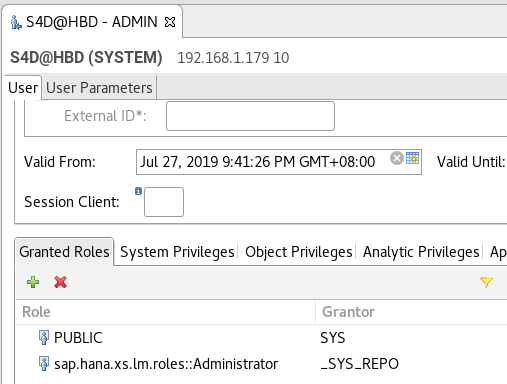
- You have downloaded the HRF software component from the SAP Support Portal.
3.2 Procedure
- Start a command line client and navigate to the directory in which hdbalm is located.
By default, hdbalm is located in the c:\Program Files\sap\hdbclient directory on Microsoft Windows and /usr/SAP/hdbclient(/usr/sap/S4D/hdbclient/) directory on Linux.
- Set the following environment variables:
Variable Description HDBALM_USER Name of your SAP HANA database user. HDBALM_PASSWD Password of your SAP HANA database user. HDBALM_HOST Full domain name of the SAP HANA XS engine. HDBALM_PORT Port number of the SAP HANA XS engine. The default port is 80+<instance number>.
Windows:
set HDBALM_USER=ADMIN

set HDBALM_PASSWD=******

set HDBALM_HOST=s4hanahost

set HDBALM_PORT=8010
set HTTP_PROXY=
set HTTPS_PROXY=
Linux:
export HDBALM_USER=ADMIN

export HDBALM_PASSWD=******

export HDBALM_HOST=s4hanahost

export HDBALM_PORT=8010
export HTTP_PROXY=
export HTTPS_PROXY=
3.3 Execute the hdbalm installation command with the required options, command options, or parameters to deploy the software component of SAP HANA rules framework.
ExampleC:\Program Files\SAP\hdbclient_101>hdbalm.bat -v install C:\TEMP\HCORULEFW05P_3.ZIP
/usr/sap/S4D/hdbclient/hdbalm -v install /hana/sapcd/HCORULEFW11P_9-20011528.ZIP

报错:
hbdadm@s4hana:/usr/sap/HBD/HDB10> /usr/sap/S4D/hdbclient/hdbalm -v install /hana/sapcd/HCORULEFW11P_9-20011528.ZIP
DEBUG:root:Request: GET /sap/hana/xs/lm/xsts/ping.xsjs
DEBUG:root:Opening http://boschs4hana:8010/sap/hana/xs/lm/xsts/ping.xsjs?HDBALM_VERSION=1.1.11
Http error: Forbidden
DEBUG:root:Finished with return code 1
解决过程:
Can you please set parameter webdispatcher.ini [profile] wdisp/system_auto_configuration to true?
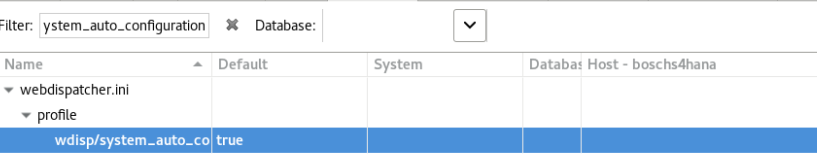
Can you please run this statement from both, the SYSTEMDB and the tenant?
select * from m_inifile_contents where file_name = 'xsengine.ini' and section = 'public_urls';
Also, please run this other statement from the SYSTEMDB:
select key, value, layer_name from sys.m_inifile_contents where file_name = 'webdispatcher.ini' and section = 'profile' and key like 'wdisp/system%';
And run this one from the tenant only:
select * from "_SYS_XS"."RUNTIME_CONFIGURATION";
So I will be expecting 4 result sets in total. Please export the results in .csv format (you can right-click the result set in the Studio and select "Export Result...") and attach them to the incident.
4. Setting Up a Technical User
Procedure
- In SAP HANA studio, create a technical user with the name: HRF_TECH_USER
CREATE USER HRF_TECH_USER PASSWORD <password> NO FORCE_FIRST_PASSWORD_CHANGE;

ALTER USER HRF_TECH_USER DISABLE PASSWORD LIFETIME;
2. If you are consuming rule services via REST, XSJS Lib function call, or the SAP HRF web application, the HRF_TECH_USER must be granted the following:
execute and/or select privileges on the application runtime schema
select privilege on the schema where the data is located
3.As a result of the new user authorization mechanism provided in SAP HANA Rules Framework 1.0 SPS 07, when upgrading from SAP HANA Rules Framework 1.0 SPS 06 or before to this release, you must update the existing permissions of business users that perform editing tasks (create, update, or delete) to the various HRF resources (rules, rule services, vocabularies, and rule templates) so that they include the necessary privileges that permit the required CUD operations.
5.Configuring SAP HANA Rules Framework
Procedure
- Ensure that the sap.hrf.role.model::HrfAdmin role is assigned to your SAP HANA user in SAP HANA studio.
- In the navigation tree of the new system, go to Security Users.
- Right-click the user name in the navigation tree, and then select Open.
- In the Granted Roles tab, click
 (Add).
 - Search for the role sap.hrf.role.model::HrfAdmin and click OK.
- Click File Save.
2.Open a REST client in your application for interacting with HTTP APIs, for e.g., Postman. Enter the following request in the REST client to run the configuration script.
|
URL |
Enter the following URL in the REST client request: http://<full_domain_name>:80<instance_number>/sap/hrf/service/configurationhttp://boschs4hana:8010/sap/hrf/service/configuration |
|
Method |
Enter the following method in the REST client request: POST |
|
Authorization |
(Basic Authentication) Enter the user credentials of SAP HANA user to whom the sap.hrf.role.model::HrfAdmin role was assigned in Step 1. |
|
Body (Type: application/json) |
Enter the following request body in the REST client request: {
The following table provides more information about these parameters. |
安装HANA Rules Framework(HRF)的更多相关文章
- Windows 8 下离线安装。net Framework 3.5
Windows 8 下安装.net Framework 3.5 1)可以将直接双击ISO (或放入光盘/U盘)(安装文件在F盘) 2)使用管理员权限运行命令行程序 3)dism.exe /online ...
- 使用本地光盘安装Microsoft .NET Framework 3.5 for Win8/WinServer2012
如何使用本地源安装Microsoft .NET Framework 3.5 作为SQL Server 2012的 必要组件,校验组件过程有个小BUG,即使没有安装也通过,但会卡在安装环节(enabli ...
- Windows查看电脑上安装的.Net Framework版本的五种方法(转)
1.查看安装文件判断Framwork版本号 打开资源管理器,比如我的电脑,再地址栏输入%systemroot%\Microsoft.NET\Framework后单击“转到”或者按回车. 在新文件夹中查 ...
- [RF] 安装好Robot Framework之后怎样让启动的界面后面不带命令行窗口,且图片以机器人显示
安装好Robot Framework之后,通过 C:\Python27\Scripts\ride.py 启动时会带上一个命令行窗口: 怎样让启动的界面后面不带这个命令行窗口,且图片以机器人显示? 方法 ...
- win7无法安装Microsoft .NET Framework 4.5\4.0
在安装一些软件的时候,要求安装环境下必须首先安装有Microsoft .NET Framework 4.5\4.0,可是下载了安装包却怎么也安装不了,安装到一定进度就失败了,反复安装重启,都没有成功, ...
- .NET/C# 检测电脑上安装的 .NET Framework 的版本
原文:.NET/C# 检测电脑上安装的 .NET Framework 的版本 如果你希望知道某台计算机上安装了哪些版本的 .NET Framework,那么正好本文可以帮助你解决问题. 本文内容 如何 ...
- 如何:确定已安装的 .NET Framework 版本
用户可在他们的计算机上安装和运行 .NET Framework 的多个版本. 当你开发或部署应用时,你可能需要知道用户的计算机上安装了哪些 .NET Framework 版本. .NET Framew ...
- Win 7无法安装Microsoft .NET Framework 4.6.2
造冰箱的大熊猫@cnblogs 2018/9/6 在Windows 7 64位计算机上安装某个软件时,安装程序提示需先安装Microsoft .NET Framework 4.6.2.本来以为小事一桩 ...
- 安装SQL Server 2008反复提示需要安装MICROSOFT NET FRAMEWORK 3 5 SP1的一个
在安装过.net framework 4的系统中,安装sql server 2008的安装前提之一MICROSOFT .NET FRAMEWORK 3.5 SP1时,可能已经安装并重启了,还是提示安 ...
随机推荐
- Qt QLabel加载图片
QLabel加载图片 //在对应的控件中显示图片 void qm_img::DisplayImg(cv::Mat imgParam, QLabel *labelParam) { if (!imgPar ...
- Spring cloud微服务安全实战-5-8实现基于session的SSO(认证服务器的session有效期)
认证服务器 session的有效期. 也就是认证服务器上的session的有效期 生成环境下,认证服务器一定是一个集群.集群.那么session一定是要在所有的服务器之间进行共享的.最简单的方式是用S ...
- Spring cloud微服务安全实战-5-1单点登录基本架
基于微服务架构,前后端分离实现SSO 前后端分离到底是个什么样的架构. 中间不是用Nginx而是用Node JS. node.js在服务端的页面渲染,这样搜索引擎爬虫 来爬的时候 爬的就是html页面 ...
- 【Leetcode_easy】997. Find the Town Judge
problem 997. Find the Town Judge solution: class Solution { public: int findJudge(int N, vector<v ...
- composer 添加贝宝PayPal
composer require "paypal/rest-api-sdk-php:1.7.2"
- 使用Jedis出现Connection refused的解决方案
1.修改redis.conf配置文件中的 bind 127.0.0.1 为本机外网IP: 2. cluster-enabled yes 设置是否集群操作,如果是的话开启 yes,否的话 设置n ...
- Linux题库练习
转一个Linux的题库供自己学习使用(滑稽) 转自:http://www.linuxdiyf.com/view_202485.html 选择题1 在终端下输入mount -a命令的作用是:CA 强制进 ...
- Qt跨平台原理
Qt跨平台原理: 和java一样,针对每一种OS平台,QT都有一套对应的底层类库,而接口是完全一致的. 因此只要是在QT库上开发的程序,放在任何一种平台下都可以编译运行(前提条件是:程序中没有使用某O ...
- ucore 源码剖析
lab1 源码剖析 从实模式到保护模式 初始化ds,es和ss等段寄存器为0 使能A20门,其中seta20.1写数据到0x64端口,表示要写数据给8042芯片的Output Port;seta20. ...
- Spring中声明式事务的注解@Transactional的参数的总结(REQUIRED和REQUIRES_NEW的与主方法的回滚问题)
一.事务的传播行为1.介绍 当事务方法被另一个事务方法调用时,必须指定事务应该如何传播.例如:方法可能继续在现有事务中运行,也可能开启一个新事务,并在自己的事务中运行.2.属性 事务的传播行为可以由传 ...