
创建安全的 Netty 程序
1.使用 SSL/TLS 创建安全的 Netty 程序
SSL 和 TLS 是众所周知的标准和分层的协议,它们可以确保数据时私有的
Netty提供了SSLHandler对网络数据进行加密
使用Https
public class SslChannelInitialzer extends ChannelInitializer<Channel>{

    private final SSLContext context;

    private final boolean client;

    private final boolean startTls;

    public SslChannelInitialzer(SSLContext context, boolean client, boolean startTls) {

        this.context = context;

        this.client = client;

        this.startTls = startTls;

    }

    @Override

    protected void initChannel(Channel ch) throws Exception {

        SSLEngine engine = context.createSSLEngine();

        engine.setUseClientMode(client);

        ch.pipeline().addFirst("ssl", new SslHandler(engine, startTls));

    }

}
2.使用 Netty 创建 HTTP/HTTPS 程序
public class HttpDecoderEncodeIntializer extends ChannelInitializer<Channel>{

    private final boolean client;

    public HttpDecoderEncodeIntializer(boolean client) {

        this.client = client;

    }

    @Override

    protected void initChannel(Channel ch) throws Exception {

        ChannelPipeline pipeline = ch.pipeline();

        if (client) {

            pipeline.addLast("decoder", new HttpResponseDecoder());

            pipeline.addLast("", new HttpRequestEncoder());
       pipeline.addLast("decompressor", new HttpContentDecompressor()); //添加解压缩 Handler

        } else {

            pipeline.addLast("decoder", new HttpRequestEncoder());

            pipeline.addLast("encoder", new HttpResponseDecoder());

        }

    }

}
如果你需要在 ChannelPipeline 中有一个解码器和编码器,还分别有一个在客户端和服务器简单的编解码器:HttpClientCodec 和 HttpServerCodec
pipeline.addLast("aggegator", new HttpObjectAggregator(512 * 1024)); 聚合消息
WebSocket
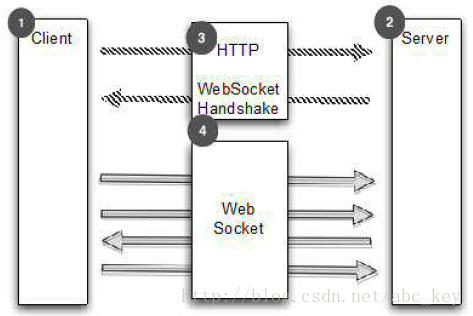
WebSocketServerProtocolHandler
处理空闲连接和超时
- IdleStateHandler,当一个通道没有进行读写或运行了一段时间后出发IdleStateEvent
- ReadTimeoutHandler,在指定时间内没有接收到任何数据将抛出ReadTimeoutException
- WriteTimeoutHandler,在指定时间内有写入数据将抛出WriteTimeoutException、
最常用的是IdleStateHandler,下面代码显示了如何使用IdleStateHandler,如果60秒内没有接收数据或发送数据,操作将失败,连接将关闭
public class IdleStateHandlerInitializer extends ChannelInitializer<Channel> {

    @Override

    protected void initChannel(Channel ch) throws Exception {

        ChannelPipeline pipeline = ch.pipeline();

        pipeline.addLast(new IdleStateHandler(0, 0, 60, TimeUnit.SECONDS));

        pipeline.addLast(new HeartbeatHandler());

    }

    public static final class HeartbeatHandler extends ChannelInboundHandlerAdapter {

        private static final ByteBuf HEARTBEAT_SEQUENCE = Unpooled.unreleasableBuffer(Unpooled.copiedBuffer(

                "HEARTBEAT", CharsetUtil.UTF_8));

        @Override

        public void userEventTriggered(ChannelHandlerContext ctx, Object evt) throws Exception {

            if (evt instanceof IdleStateEvent) {

                ctx.writeAndFlush(HEARTBEAT_SEQUENCE.duplicate()).addListener(ChannelFutureListener.CLOSE_ON_FAILURE);

            } else {

                super.userEventTriggered(ctx, evt);

            }

        }

    }

}
分隔符协议 解决粘包问题
使用LineBasedFrameDecoder提取"\r\n"分隔帧
/**

 * 处理换行分隔符消息

 *

 */

public class LineBasedHandlerInitializer extends ChannelInitializer<Channel> {

    @Override

    protected void initChannel(Channel ch) throws Exception {

        ch.pipeline().addLast(new LineBasedFrameDecoder(65 * 1204), new FrameHandler());

    }

    public static final class FrameHandler extends SimpleChannelInboundHandler<ByteBuf> {

        @Override

        protected void channelRead0(ChannelHandlerContext ctx, ByteBuf msg) throws Exception {

            // do something with the frame

        }

    }

}
如果框架的东西除了换行符还有别的分隔符,可以使用DelimiterBasedFrameDecoder,只需要将分隔符传递到构造方法中。如果想实现自己的以分隔符为基础的协议,这些解码器是有用的。
例如,现在有个协议,它只处理命令,这些命令由名称和参数形成,名称和参数由一个空格分隔
public class CmdHandlerInitializer extends ChannelInitializer<Channel> {

    @Override

    protected void initChannel(Channel ch) throws Exception {

        ch.pipeline().addLast(new CmdDecoder(65 * 1024), new CmdHandler());

    }

    public static final class Cmd {

        private final ByteBuf name;

        private final ByteBuf args;

        public Cmd(ByteBuf name, ByteBuf args) {

            this.name = name;

            this.args = args;

        }

        public ByteBuf getName() {

            return name;

        }

        public ByteBuf getArgs() {

            return args;

        }

    }

    public static final class CmdDecoder extends LineBasedFrameDecoder {

        public CmdDecoder(int maxLength) {

            super(maxLength);

        }

        @Override

        protected Object decode(ChannelHandlerContext ctx, ByteBuf buffer) throws Exception {

            ByteBuf frame = (ByteBuf) super.decode(ctx, buffer);

            if (frame == null) {

                return null;

            }

            int index = frame.indexOf(frame.readerIndex(), frame.writerIndex(), (byte) ' ');

            return new Cmd(frame.slice(frame.readerIndex(), index), frame.slice(index + 1, frame.writerIndex()));

        }

    }

    public static final class CmdHandler extends SimpleChannelInboundHandler<Cmd> {

        @Override

        protected void channelRead0(ChannelHandlerContext ctx, Cmd msg) throws Exception {

            // do something with the command

        }

    }

}
- FixedLengthFrameDecoder
- LengthFieldBasedFrameDecoder
ch.pipeline().addLast(new LengthFieldBasedFrameDecoder(65*1024, 0, 8))
读取大文件
@Override

    public void channelRead(ChannelHandlerContext ctx, Object msg) throws Exception {

        File file = new File("test.txt");

        FileInputStream fis = new FileInputStream(file);

        FileRegion region = new DefaultFileRegion(fis.getChannel(), 0, file.length());

        Channel channel = ctx.channel();

        channel.writeAndFlush(region).addListener(new ChannelFutureListener() {

            @Override

            public void operationComplete(ChannelFuture future) throws Exception {

                if(!future.isSuccess()){

                    Throwable cause = future.cause();

                    // do something

                }

            }

        });

    }
public class ChunkedWriteHandlerInitializer extends ChannelInitializer<Channel> {

    private final File file;

    public ChunkedWriteHandlerInitializer(File file) {

        this.file = file;

    }

    @Override

    protected void initChannel(Channel ch) throws Exception {

        ch.pipeline().addLast(new ChunkedWriteHandler())

            .addLast(new WriteStreamHandler());

    }

    public final class WriteStreamHandler extends ChannelInboundHandlerAdapter {

        @Override

        public void channelActive(ChannelHandlerContext ctx) throws Exception {

            super.channelActive(ctx);

            ctx.writeAndFlush(new ChunkedStream(new FileInputStream(file)));

        }

    }

}
通过JBoss编组序列化
使用ProtoBuf序列化
/**

 * 使用protobuf序列化数据,进行编码解码

 * 注意:使用protobuf需要protobuf-java-2.5.0.jar

 * @author Administrator

 *

 */

public class ProtoBufInitializer extends ChannelInitializer<Channel> {

    private final MessageLite lite;

    public ProtoBufInitializer(MessageLite lite) {

        this.lite = lite;

    }

    @Override

    protected void initChannel(Channel ch) throws Exception {

        ch.pipeline().addLast(new ProtobufVarint32FrameDecoder())

            .addLast(new ProtobufEncoder())

            .addLast(new ProtobufDecoder(lite))

            .addLast(new ObjectHandler());

    }

    public final class ObjectHandler extends SimpleChannelInboundHandler<Serializable> {

        @Override

        protected void channelRead0(ChannelHandlerContext ctx, Serializable msg) throws Exception {

            // do something

        }

    }

}
也可以自己实现,参照RPC
Bootstrap 当需要引导客户端或一些无连接协议时
- group(...),设置EventLoopGroup,EventLoopGroup用来处理所有通道的IO事件
- channel(...),设置通道类型
- channelFactory(...),使用ChannelFactory来设置通道类型
- localAddress(...),设置本地地址,也可以通过bind(...)或connect(...)
- option(ChannelOption<T>, T),设置通道选项,若使用null,则删除上一个设置的ChannelOption
- attr(AttributeKey<T>, T),设置属性到Channel,若值为null,则指定键的属性被删除
- handler(ChannelHandler),设置ChannelHandler用于处理请求事件
- clone(),深度复制Bootstrap,Bootstrap的配置相同
- remoteAddress(...),设置连接地址
- connect(...),连接远程通道
- bind(...),创建一个新的Channel并绑
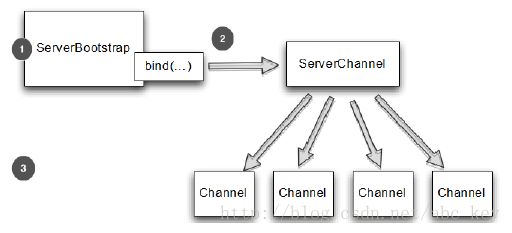
ServerBootstrap 引导服务器
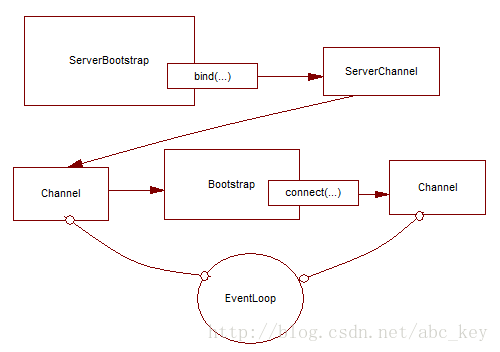
从Channel引导客户端
有时候需要从另一个Channel引导客户端,例如写一个代理或需要从其他系统检索数据。从其他系统获取数据时比较常见的,有很多Netty应用程序必须要和企业现有的系统集成,如Netty程序与内部系统进行身份验证,查询数据库等
可以不用再创建新的引导
public class BootstrapingFromChannel {

    public static void main(String[] args) throws Exception {

        EventLoopGroup bossGroup = new NioEventLoopGroup(1);

        EventLoopGroup workerGroup = new NioEventLoopGroup();

        ServerBootstrap b = new ServerBootstrap();

        b.group(bossGroup, workerGroup).channel(NioServerSocketChannel.class)

                .childHandler(new SimpleChannelInboundHandler<ByteBuf>() {

                    ChannelFuture connectFuture;

                    @Override

                    public void channelActive(ChannelHandlerContext ctx) throws Exception {

                        Bootstrap b = new Bootstrap();

                        b.channel(NioSocketChannel.class).handler(

                                new SimpleChannelInboundHandler<ByteBuf>() {

                                    @Override

                                    protected void channelRead0(ChannelHandlerContext ctx,

                                            ByteBuf msg) throws Exception {

                                        System.out.println("Received data");

                                        msg.clear();

                                    }

                                });

                        b.group(ctx.channel().eventLoop());

                        connectFuture = b.connect(new InetSocketAddress("127.0.0.1", 2048));

                    }

                    @Override

                    protected void channelRead0(ChannelHandlerContext ctx, ByteBuf msg)

                            throws Exception {

                        if (connectFuture.isDone()) {

                            // do something with the data

                        }

                    }

                });

        ChannelFuture f = b.bind(2048);

        f.addListener(new ChannelFutureListener() {

            @Override

            public void operationComplete(ChannelFuture future) throws Exception {

                if (future.isSuccess()) {

                    System.out.println("Server bound");

                } else {

                    System.err.println("bound fail");

                    future.cause().printStackTrace();

                }

            }

        });

    }

}
服务端和客户端在同一环境下
使用通道选项和属性
使用ChannelOption和属性可以让事情变得很简单,例如Netty WebSocket服务器根据用户自动路由消息,通过使用属性,应用程序能在通道存储用户ID以确定消息应该发送到哪里。应用程序可以通过使用一个通道选项进一步自动化,给定时间内没有收到消息将自动断开连接
    public static void main(String[] args) {

        //创建属性键对象

        final AttributeKey<Integer> id = AttributeKey.valueOf("ID");

        //客户端引导对象

        Bootstrap b = new Bootstrap();

        //设置EventLoop,设置通道类型

        b.group(new NioEventLoopGroup()).channel(NioSocketChannel.class)

        //设置ChannelHandler

            .handler(new SimpleChannelInboundHandler<ByteBuf>() {

                @Override

                public void channelRegistered(ChannelHandlerContext ctx) throws Exception {

                    //通道注册后执行,获取属性值

                    Integer idValue = ctx.channel().attr(id).get();

                    System.out.println(idValue);

                    //do something with the idValue

                }

                @Override

                protected void messageReceived(ChannelHandlerContext ctx, ByteBuf msg) throws Exception {

                    System.out.println("Reveived data");

                    msg.clear();

                }

            });

        //设置通道选项,在通道注册后或被创建后设置

        b.option(ChannelOption.SO_KEEPALIVE, true).option(ChannelOption.CONNECT_TIMEOUT_MILLIS, 5000);

        //设置通道属性

        b.attr(id, 123456);

        ChannelFuture f = b.connect("www.manning.com",80);

        f.syncUninterruptibly();

    }
创建安全的 Netty 程序的更多相关文章
- Netty In Action中国版 - 第二章:第一Netty程序
本章介绍 获得Netty4最新的版本号 设置执行环境,以构建和执行netty程序 创建一个基于Netty的server和client 拦截和处理异常 编制和执行Nettyserver和client 本 ...
- Netty(1):第一个netty程序
为什么选择Netty netty是业界最流行的NIO框架之一,它的健壮型,功能,性能,可定制性和可扩展性都是首屈一指的,Hadoop的RPC框架Avro就使用了netty作为底层的通信框架,此外net ...
- ASP.NET MVC 5 03 - 安装MVC5并创建第一个应用程序
不知不觉 又逢年底, 穷的钞票 所剩无几. 朋友圈里 各种装逼, 抹抹眼泪 MVC 继续走起.. 本系列纯属学习笔记,如果哪里有错误或遗漏的地方,希望大家高调指出,当然,我肯定不会低调改正的.(开个小 ...
- Visual Studio中创建混合移动应用程序解决方案Xamarin Portable Razor
在Visual Studio中创建混合移动应用程序的一个解决方案是使用Xamarin Portable Razor工具,这是ASP.NET MVC API针对移动设备的一个轻量级实现.Xamarin编 ...
- C#创建服务及使用程序自动安装服务,.NET创建一个即是可执行程序又是Windows服务的exe
不得不说,.NET中安装服务很麻烦,即要创建Service,又要创建ServiceInstall,最后还要弄一堆命令来安装和卸载. 今天给大家提供一种方式,直接使用我们的程序来安装/卸载服务,并且可以 ...
- [转]C#创建服务及使用程序自动安装服务,.NET创建一个即是可执行程序又是Windows服务的exe
写在前面 原文地址:C#创建服务及使用程序自动安装服务,.NET创建一个即是可执行程序又是Windows服务的exe 这篇文章躺在我的收藏夹中有很长一段时间了,今天闲着没事,就自己动手实践了一下.感觉 ...
- 如何创建 C# 控制台应用程序
[转] 如何:创建 C# 控制台应用程序 本主题旨在生成最简单形式的 C# 程序(控制台应用程序)熟悉 Visual Studio 2008 开发环境.由于控制台应用程序是在命令行执行其所有的输入和输 ...
- 创建C#串口通信程序详解
在.NET平台下创建C#串口通信程序,.NET 2.0提供了串口通信的功能,其命名空间是System.IO.Ports.这个新的框架不但可以访问计算机上的串口,还可以和串口设备进行通信.我们将使用标准 ...
- Windows Azure入门教学系列 (一): 创建第一个WebRole程序
原文 Windows Azure入门教学系列 (一): 创建第一个WebRole程序 在第一篇教学中,我们将学习如何在Visual Studio 2008 SP1中创建一个WebRole程序(C#语言 ...
随机推荐
- Appium获取toast消息
Android获取toast,需要在参数里设置automationName:Uiautomator2 设置设备的信息 desired_caps = { 'platformName': 'Android ...
- MONGODB 数据库回复备份
1.导出工具:mongoexport 1.概念: mongoDB中的mongoexport工具可以把一个collection导出成JSON格式或CSV格式的文件.可以通过参数指 ...
- EGL Driver message (Critical) eglInitialize: No available renderers.
使用Python的selenium库进行自动化巡检.并将相对应的数据保存 环境: Windows Embedded Standard Python 2.7.16 selenium 3.141.0 [0 ...
- spring boot定时任务
介绍 该demo是基于注解(@Scheduled)以及多线程执行的定时任务. 步骤 启用异步执行 springboot实现异步调用 入口类添加启动注解 @EnableScheduling @Enabl ...
- C 习题
1,日本某地发生命案,警察通过排查确定4个人中一个人为凶手,一下为4个人的供词, A:不是我 B:是C C:是D D:C说谎 解决方式: #include<stdio.h> int mai ...
- Android:cmake开发指南
一.静态库与动态库构建 (.so)共享库,shared object:节省空间,在运行时去连接,如果执行机器上没有这些库文件就不能执行. (.a)静态库,archive:静态库和程序化为一体,不会分开 ...
- C#中用委托实现C++的回调函数
C++中抓图回调函数 void (CALLBACK* DisplayCBFun)(long nPort,char * pBuf,long nSize,long nWidth,long nHeight, ...
- 用python画函数图像
import matplotlib.pyplot as plt import numpy as np x = np.linspace(0, 1, 50) # 从0到1,等分50分 y = 210*(x ...
- java-对象的区别
1.JavaBean 是一种JAVA语言写成的可重用组件.为写成JavaBean,类必须是具体的和公共的,并且具有无参数的构造器.JavaBean 通过提供符合一致性设计模式的公共方法将内部域暴露成员 ...
- HDU 1159 最长公共子序列
Common Subsequence Time Limit: 2000/1000 MS (Java/Others) Memory Limit: 65536/32768 K (Java/Other ...