在给客户做运维服务期间,发现了一个奇怪的现象:备份系统(第三方国产)告警日志显示,每天晚上备份服务器的客户端在3点左右离线然后上线,再离线再上线,每晚两次,很是诡异。

联系了厂家技术支持,前后花了两天时间也没给出个答案,一会让我测试网络是否连接正常,一会让我重启客户端服务试试,最终不了了之,很不专业,体验极差。

我通过长ping生成日志,发现在3点左右网络是正常的,没有出现丢包现象。
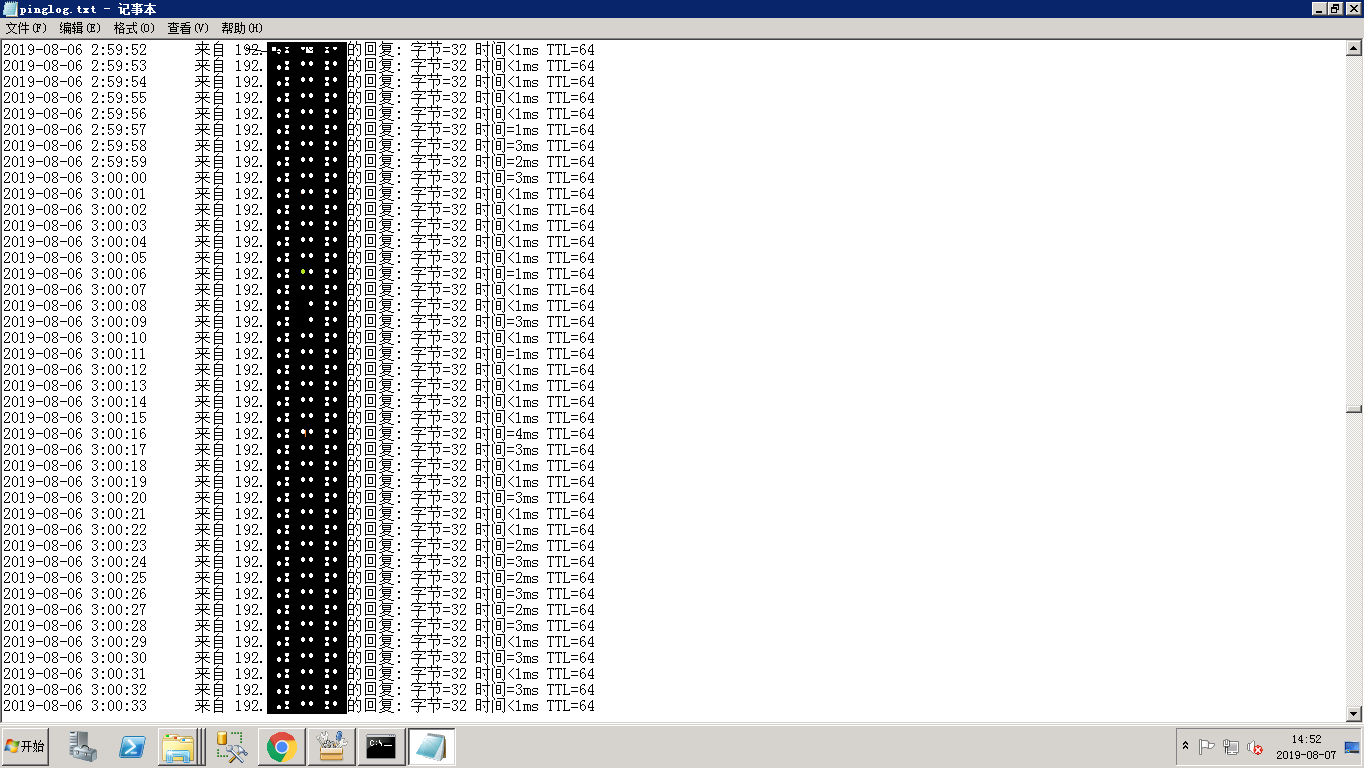
思索着既然网络没有问题,查看系统日志在3点左右没任何异常日志,就猜测是不是端口异常,如何实时监听要做备份的客户端跟备份服务器制定端口连接情况?网上搜索了很久找到了TCPing这个工具,很好用。做个记录,也分享给大家。

Windows版本下载地址:https://elifulkerson.com/projects/tcping.php

参数如下:

NAME
tcping - simulate "ping" over tcp by establishing a connection to network hosts.
Measures the time for your system to [SYN], receive the target's [SYN][ACK] and send [ACK]. Note that the travel time for
the last ACK is not included - only the time it takes to be put on the wire a tthe sending end. SYNOPSIS
tcping [-tdsvf46] [-i interval] [-n times] [-w interval] [-b n] [-r times][-j depth] [--tee filename] [-f] destination [port] DESCRIPTION
tcping measures the time it takes to perform a TCP 3-way handshake (SYN, SYN/ACK, ACK) between itself and a remote host.
The travel time of the outgoing final ACK is not included, only the (minimal) amount of time it has taken to drop it on
the wire at the near end. This allows the travel time of the (SYN, SYN/ACK) to approximate the travel time of the
ICMP (request, response) equivalent. OPTIONS
-4 Prefer using IPv4 -6 Prefer using IPv6 -t ping continuously until stopped via control-c -n count
send _count_ pings and then stop. Default 4. -i interval
Wait _interval_ seconds between pings. Default 1. Decimals permitted. -w interval
Wait _interval_ seconds for a response. Default 2. Decimals permitted. -d include date and time on every output line -f Force sending at least one byte in addition to making the connection. -g count
Give up after _count_ failed pings. -b type
Enable audible beeps.
'-b 1' will beep "on down". If a host was up, but now its not, beep.
'-b 2' will beep "on up". If a host was down, but now its up, beep.
'-b 3' will beep "on change". If a host was one way, but now its the other, beep.
'-b 4' will beep "always". -c only show output on a changed state -r count
Every _count_ pings, we will perform a new DNS lookup for the host in case it changed. -s Exit immediately upon a success. -v Print version and exit. -j Calculate jitter. Jitter is defined as the difference between the last response time and the historical average. -js depth
Calculate jitter, as with -j but with an optional _depth_ argument specified. If _depth_ is specified tcping will
use the prior _depth_ values to calculate a rolling average. --tee _filename_
Duplicate output to the _filename_ specified. Windows can still not be depended upon to have a useful command line
environment. Don't tease me, *nix guys. --append
When using --tee, append to rather than overwrite the output file. --file
Treat the "destination" option as a filename. That file becomes a source of destinations, looped through on a
line by line basis. Some options don't work in this mode and statistics will not be kept. destination
A DNS name, an IP address, or (in "http" mode) a URL.
Do not specify the protocol ("http://") in "http" mode. Also do not specify server port via ":port" syntax.
For instance: "tcping http://www.elifulkerson.com:8080/index.html" would fail
Use the style: "tcping www.elifulkerson.com/index.html 8080" instead. port
A numeric TCP port, 1-65535. If not specified, defaults to 80. --header
include a header with the command line arguments and timestamp. Header is implied if using --tee. HTTP MODE OPTIONS
-h Use "http" mode. In http mode we will attempt to GET the specified document and return additional values including
the document's size, http response code, kbit/s.
-u In "http" mode, include the target URL on each output line. --post Use POST instead of GET in http mode.
--head Use HEAD instead of GET in http mode.
--get Shorthand to invoke "http" mode for consistency's sake. --proxy-server _proxyserver_
Connect to _proxyserver_ to request the url rather than the server indicated in the url itself.
--proxy-port _port_
Specify the numeric TCP port of the proxy server. Defaults to 3128.
--proxy-credentials username:password
Specify a username:password pair which is sent as a 'Proxy-Authorization: Basic' header. RETURN VALUE
tcping returns 0 if all pings are successful, 1 if zero pings are successful and 2 for mixed outcome. BUGS/REQUESTS
Please report bugs and feature requests to the author via contact information on http://www.elifulkerson.com AVAILABILITY
tcping is available at http://www.elifulkerson.com/projects/tcping.php
翻译如下:

描述
在本地主机和远程主机之间,tcping可以测试出执行TCP三次握手所需的时间(SYN,SYN / ACK,ACK)。最终ACK传送时间不包括在内,只有最少的时间才能将其丢弃在近端的电线。

概要
# tcping [-tdsvf46] [-i interval] [-n times] [-w interval] [-b n] [-r times][-j depth] [--tee filename] [-f] destination [port]

选项
-4,优先使用IPv4

-6,优先使用IPv6

-h,使用http模式

-t,让命令持续运行,直到使用ctrl + c指令退出

-n 数字,发送命令的次数,默认4次

-i 数字,发送ping命令的时间间隔,默认1s,可以为小数

-w 数字,等待响应的时间间隔,默认2s,可以为小数

-d,使输出的每一行显示时间和日期

-f,强制ping命令至少发送一个比特(byte)

-g 数字,失败指定次就放弃(注意默认是80端口,若其他端口没开也算失败)

-b 数字,开启蜂鸣器,参数4会一直响铃

-c,只显示改变的信息(ping时间很短一般不会改变)

-r 数字,每发送指定个数据包,就重新查找主机一次(通过DNS或路由查找)

-s,ping通就立即退出

-u,与-h命令连用,每一行输出目标的url

-v,显示版本信息

-j,使用默认的方法,求ping的均值减小波动,网络有一定的不稳定性时,用此参数可以减小波动

-js 数字,用指定个实例求平均值减小波动,使用这个参数,系统会tcping 指定次,然后求出平均值作为一次结果显示,减小波动

–tee file_path,将结果输出到指定位置,tcping –tee /data/test.txt192.168.0.100,会把ping的结果保存在/data下的test文件中

–file,从文件中获得ping的来源;在/data下新建一个test.txt文件,并输入要tcping的所有ip或域名,一行一个,然后执行命令tcping –file /data/test.txt,就会依次tcping文件中指定的地址

destination,可以是DNS地址、IP地址、URL(需要使用-h,http模式)。使用http模式时,不要加https//或:port,例如:tcping http://www.elifulkerson.com:8080/index.html就会失败,使用tcping www.elifulkerson.com/index.html 8080就会成功

port 数字,指定tcp端口(1-65535),如果不指定,默认是80

–header,在头部显示时间和日期,与–tee显示的格式差不多

–block,tcping不通的等待时间,默认是20秒(很长)。–block可以把-w参数冲突掉 ,例如tcping --block www.baiu.com网址不正确,显然tcpping不通,默认会等待20s 。 tcping -w 0.5 –block www.baiu.com还是会等20s,而不是0.5s,因为–block选项会把-w选项冲突掉。

HTTP模式选项
–post,在http模式中,使用post方法

–head,在http模式中,使用head方法

–get Shorthand to invoke “http” mode for consistency’s sake.

–proxy-server,指定代理服务

–proxy-port,指定代理服务端口

–proxy-credentials username:password,使用代理的安全验证,需要输入用户名和密码

返回值
如果所有的pings是成功的,返回0;如果所有ping都失败,返回1;混合结果,返回2

测试:tcping 200.209.200.15 21

我主要用的功能是长ping和输出存档:tcping.exe -t -d --tee d:/tcpping.log 192.168.**.** 9952

自动保存到D盘目录。

实时监控服务器某个端口状态TCPing的更多相关文章

  1. zabbix自定义脚本监控服务器端口状态

    zabbix可以通过客户端的[net.tcp.port[<ip>,port]]该item监控项来判断本地/远程服务器TCP端口是否正常,不过当时没有想起来,就用了自定义脚本去写的,很久没有 ...

  2. 【转载】CentsOS系统inotify实时监控服务器文件(夹)定制事件处理程序

    原始博文和参考博文 1.CentsOS系统inotify实时监控服务器文件 2.Linux中让进程在后台运行的方法 3.linux inotify 监控文件系统事件 非常好 方法一 说明: 服务器系统 ...

  3. Zabbix如何实现批量监控端口状态

    引言 ------------------------------------------------------------------------------------------------- ...

  4. shell脚本监控httpd服务80端口状态

    监控httpd服务端口状态,根据端口判断服务器是否启动,如果没有启动则脚本自动拉起服务,如果服务正在运行则退出脚本程序:如果换成别的服务端口也可以,但是脚本程序需要做调整. #!/bin/bash # ...

  5. 案例六:shell脚本监控httpd服务80端口状态

    这里是举例监控httpd服务端口状态,根据端口判断服务器是否启动,如果没有启动则脚本自动拉起服务,如果服务正在运行则退出脚本程序:如果换成别的服务端口也可以,但是脚本程序需要做调整. #!/bin/b ...

  6. 交换机的端口状态是UP,但是查询该端口下的MAC地址为空

    (电脑已关机)电脑与交换机直连的端口状态 还是 UP ,但是 查询该端口下的 MAC地址为空. 初步怀疑原因: Wake-on-LAN(电脑关机,网卡还在工作) Wake-On-LAN简称WOL,是一 ...

  7. nmap端口状态解析

    nmap端口状态解析 状态 说明 open 应用程序在该端口接收 TCP 连接或者 UDP 报文 closed 关闭的端口对于nmap也是可访问的, 它接收nmap探测报文并作出响应.但没有应用程序在 ...

  8. 在Linux下用netstat查看网络状态、端口状态

    在Linux下用netstat查看网络状态.端口状态 在linux一般使用netstat 来查看系统端口使用情况步. netstat命令是一个监控TCP/IP网络的非常有用的工具,它可以显示路由表.实 ...

  9. PIC16SCM设置不同IO功耗端口状态的影响

    最近做的PIC低功耗微控制器,因此,要设置不同的IO端口状态有关电源的情况测试,在系列万用表的方法来测量电流,供应链管理IO港是在地狱,无头整个系统驱动器.的是PIC16F690单片机. 思路例如以下 ...

随机推荐

  1. 参数类型 (Mapper.java)常用

    UserBaseInfo selectByMobile(@Param("mobile")String mobile,@Param("isDeleted")Int ...

  2. windows下注册表脚本编写

    Reg文件就是我今天所说的注册表脚本文件,双击可将其中的数据写入注册表.利用注册表脚本文件可以对注册表进行关于键值的任何操作,而且还不受注册表被禁用的限制.     我们平常对注册表的修改大体上可以分 ...

  3. Spring基础环境搭建所需要的jar包

    红色标明的jar包.是spring框架开发的基础jar包. 必要jar包. spring-core-4.1.6.RELEASE.jar 框架核心jar包. spring-beans-4.1.6.REL ...

  4. 蜗牛圈圈-时尚智能的运动计时App

    Duang! 各类运动爱好者的福音来啦! 蜗牛圈圈-最智能的圈速计时助手 扫描二维码下载体验 [产品简介] -蜗牛圈圈是一款专业的圈速计时工具,帮助您获得整个运动过程中的各项数据,保存记录,分享激情. ...

  5. MySQL的概述和基础(学习整理)

    1. 数据库基本概念 数据库(DataBase,DB)是用来存储和管理数据的仓库.与其他种类存储和管理数据的方式有所不同的是,数据库是兼持久化存储数据.便捷存储管理数据.使用统一的方式操作数据库几个特 ...

  6. Maven Web项目出现org.eclipse.jdt.internal.compiler.classfmt.ClassFormatException错误

    1. 问题描述 初学Maven,新建了一个基于Web骨架的Web项目,jar 包也导好了,作用域也设置正确了,Tomcat也正常运行了,可是就是说编译错误. 2. 问题原因 虽然我配置了Tomcat ...

  7. mysql CONCAT函数

    有时候我们需要使用coacat函数拼接一些字段的生成一个字符串,比如:select concat(field1,field2,field3)  from xxx: 这时候我们就会的到一个这些字段的值拼 ...

  8. js中判断对象类型的几种方法

    我们知道,JavaScript中检测对象类型的运算符有:typeof.instanceof,还有对象的constructor属性: 1) typeof 运算符 typeof 是一元运算符,返回结果是一 ...

  9. 关于IC电源管脚去耦电容

    原文地址:https://mp.weixin.qq.com/s/0dAyTpAcQWXlYULqCeKgFA 每个集成电路(IC)都必须使用电容将各电源引脚连接到器件上的地,原因有二:防止噪声影响其本 ...

  10. C之数组

    1. 数组的地址就是数组里元素的首地址 2. 数组其实就是一块连续的内存空间 3. 每个元素所占大小取决于数组的类型 4. 所有指针变量在内存中的长度是一样的