
OpenCV图像平移
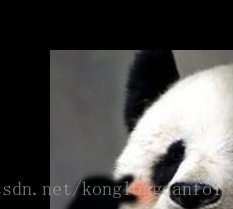
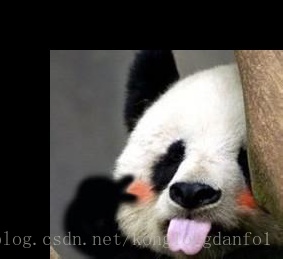
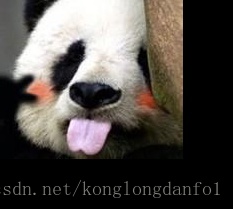
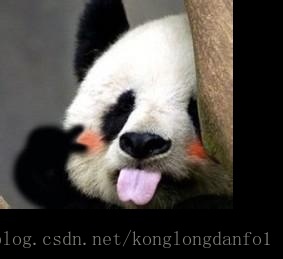
图像平移是将图像的所有像素坐标进行水平或垂直方向移动,也就是所有像素按照给定的偏移量在水平方向上沿x轴、垂直方向上沿y轴移动。这种操作分为两种,一种是图像大小不改变,这样最后原图像中会有一部分不在图像中。还有一种就是图像大小改变。这样可以保全原图像的内容。其公式如下:
x\\
y\\
1
\end{bmatrix} \
=
\begin{bmatrix}
1 & 0 & dx \\
0 & 1 &dy \\
0 & 0 & 1
\end{bmatrix} \
\begin{bmatrix}
x0\\
y0\\
1
\end{bmatrix} \
\]
从实现角度讲,其实就是拷贝原图像中的一部分到新图像中,用OpenCV实现代码如下:
Mat imgTranslate(Mat &matSrc, int xOffset, int yOffset, bool bScale)

{

	// 判断是否改变图像大小,并设定被复制ROI

	int nRows = matSrc.rows;

	int nCols = matSrc.cols;

	int nRowsRet = 0;

	int nColsRet = 0;

	Rect rectSrc;

	Rect rectRet;

	if (bScale)

	{

		nRowsRet = nRows + abs(yOffset);

		nColsRet = nCols + abs(xOffset);

		rectSrc.x = 0;

		rectSrc.y = 0;

		rectSrc.width = nCols;

		rectSrc.height = nRows;

	}

	else

	{

		nRowsRet = matSrc.rows;

		nColsRet = matSrc.cols;

		if (xOffset >= 0)

		{

			rectSrc.x = 0;

		}

		else

		{

			rectSrc.x = abs(xOffset);

		}

		if (yOffset >= 0)

		{

			rectSrc.y = 0;

		}

		else

		{

			rectSrc.y = abs(yOffset);

		}

		rectSrc.width = nCols - abs(xOffset);

		rectSrc.height = nRows - abs(yOffset);

	}

	// 修正输出的ROI

	if (xOffset >= 0)

	{

		rectRet.x = xOffset;

	}

	else

	{

		rectRet.x = 0;

	}

	if (yOffset >= 0)

	{

		rectRet.y = yOffset;

	}

	else

	{

		rectRet.y = 0;

	}

	rectRet.width = rectSrc.width;

	rectRet.height = rectSrc.height;

	// 复制图像

	Mat matRet(nRowsRet, nColsRet, matSrc.type(), Scalar(0));

	matSrc(rectSrc).copyTo(matRet(rectRet));

	return matRet;

}

... prompt'''
调用代码如下:
#include "opencv2/core/core.hpp"

#include "opencv2/imgproc/imgproc.hpp"

#include "opencv2/highgui/highgui.hpp"

#include <iostream>

#include <string>

using namespace cv;

int main()

{

	std::string strPath = "D:\\我的文档\\My Pictures\\OpenCV\\";

	Mat matSrc = imread(strPath + "熊猫.jpg");

	// 判断是否真确读取数据

	if (matSrc.empty())

		return 1;

	// 平移图像

	Mat matScale_0 = imgTranslate(matSrc, 50, 50, false);

	Mat matScale_1 = imgTranslate(matSrc, -50, -50, false);

	Mat matScale_2= imgTranslate(matSrc, 50, 50, true);

	Mat matScale_3 = imgTranslate(matSrc, -50, -50, true);

	// 保存图像

	imwrite(strPath + "0.jpg", matScale_0);

	imwrite(strPath + "1.jpg", matScale_1);

	imwrite(strPath + "2.jpg", matScale_2);

	imwrite(strPath + "3.jpg", matScale_3);

	// 显示图像

	imshow("src", matSrc);

	imshow("ret_0", matScale_0);

	imshow("ret_1", matScale_1);

	imshow("ret_2", matScale_2);

	imshow("ret_3", matScale_3);

	waitKey();

	return 0;

}
运行效果如下:
不改变图像大小
改变图像大小
OpenCV图像平移的更多相关文章
- OpenCV计算机视觉学习(11)——图像空间几何变换(图像缩放,图像旋转,图像翻转,图像平移,仿射变换,镜像变换)
如果需要处理的原图及代码,请移步小编的GitHub地址 传送门:请点击我 如果点击有误:https://github.com/LeBron-Jian/ComputerVisionPractice 图像 ...
- OpenCV图像金字塔:高斯金字塔、拉普拉斯金字塔与图片尺寸缩放
这篇已经写得很好,真心给作者点个赞.题目都是直接转过来的,直接去看吧. Reference Link : http://blog.csdn.net/poem_qianmo/article/detail ...
- 【OpenCV新手教程之十三】OpenCV图像金字塔:高斯金字塔、拉普拉斯金字塔与图片尺寸缩放
本系列文章由@浅墨_毛星云 出品,转载请注明出处. 文章链接:http://blog.csdn.net/poem_qianmo/article/details/26157633 作者:毛星云(浅墨) ...
- Opencv 图像叠加 添加水印
Opencv 图像叠加 添加水印 C++: void Mat::copyTo(OutputArray m) const C++: void Mat::copyTo(OutputArray m, Inp ...
- opencv图像读取-imread
前言 图像的读取和保存一定要注意imread函数的各个参数及其意义,尽量不要使用默认参数,否则就像数据格式出现错误(here)一样,很难查找错误原因的: re: 1.opencv图像的读取与保存; 完
- 学习 opencv---(12)OpenCV 图像金字塔:高斯金字塔,拉普拉斯金字塔与图片尺寸缩放
在这篇文章里,我们一起学习下 图像金字塔 的一些基本概念,如何使用OpenCV函数pyrUp和pyrDown 对图像进行向上和向下采样,以及了解专门用于缩放图像尺寸的resize函数的用法.此博文一共 ...
- [OpenCV Qt教程] 在Qt图形界面中显示OpenCV图像的OpenGL Widget(第二部分)
本文译自:http://www.robot-home.it/blog/en/software/tutorial-opencv-qt-opengl-widget-per-visualizzare-imm ...
- [OpenCV Qt教程] 在Qt图形界面中显示OpenCV图像的OpenGL Widget (第一部分)
本文译自:http://www.robot-home.it/blog/en/software/tutorial-opencv-qt-opengl-widget-per-visualizzare-imm ...
- 关于OpenCV图像操作的默认参数问题
本系列文章由 @yhl_leo 出品,转载请注明出处. 文章链接: http://blog.csdn.net/yhl_leo/article/details/51559490 在使用OpenCV以及其 ...
随机推荐
- GenericJDBCException: could not execute statement 错误解决
"message":"could not execute statement; nested exception is org.hibernate.exception.G ...
- c#使用 NServiceKit.Redis 封装 RedisHelper
在说StackExchange.Redis 的时候说了,因为我们的项目一直.net4.0不升级,没有办法,我说的不算,哈哈,又查了StackExchange.Redis在.net4.0使用麻烦,所以选 ...
- python中的pyc和pyo文件和__pyc__文件夹
一.命令生成 pyc 文件 *.py:源码文件,由 Python 程序解释. *.pyc:源码经编译后生成的二进制字节码(Bytecode)文件. *.pyo:优化编译后的程序,也是二进制字节码文件. ...
- MyEclipse6.5的速度性能优化大提速(转)
MyEclipse是Eclipse的插件,也是一款功能强大的J2EE集成开发环境,支持代码编写.配置.测试以及除错.现在看一下MyEclipse6.5版本的速度性能优化大提速.优化MyEclipse6 ...
- 洛谷P2796 Facer的程序
洛谷题目链接 动态规划 我们看题目后知道这是一棵无根树,要求出有多少子树 我们设$f[u][1]$表示选了当前节点$u$的方案数 相反的$f[u][0]$则为不选中$u$ 那么考虑状态转移如下: f[ ...
- js实现OSS上传图片,STS临时授权访问OSS
1. 引入aliyun-oss-sdk.min.js <script type="text/javascript" src="/static/js/common/a ...
- Python数据抓取(3) —抓取标题、时间及链接
本次分享,jacky将跟大家分享如何将第一财经文章中的标题.时间以及链接抓取出来 (一)观察元素抓取位置 网页的原始码很复杂,我们必须找到特殊的元素做抽取,怎么找到特殊的元素呢?使用开发者工具检视每篇 ...
- loj6519 魔力环
解题思路 考虑顺时针旋转 \(i\) 步得到的结果,根据Burnside引理,有 \[ Ans=\frac{\sum\limits_{i=0}^{n-1}C(i)}{n} \] \(C(i)\) 为旋 ...
- python中with语句的使用
引言 with 语句是从 Python 2.5 开始引入的一种与异常处理相关的功能(2.5 版本中要通过 from __future__ import with_statement 导入后才可以使用) ...
- python获取最大值
python2 中获取int最大值 import sys print sys.maxint 但是在python3中,报错: AttributeError: module 'sys' has no at ...