
(四)网格(dataGrid)
一、普通网格
- 前端index.jsp
<%@ page language="java" contentType="text/html; charset=UTF-8"

    pageEncoding="UTF-8"%>

<!DOCTYPE html >

<html>

<%

    String path = request.getContextPath();

%>

<head>

<meta http-equiv="Content-Type" content="text/html; charset=UTF-8">

<title>Insert title here</title>

<link rel="stylesheet" type="text/css"

    href="<%=path%>/script/easyUI-1.4/themes/bootstrap/easyui.css">

<link rel="stylesheet" type="text/css"

    href="<%=path%>/script/easyUI-1.4/themes/icon.css">

<script type="text/javascript"

    src="<%=path%>/script/easyUI-1.4/jquery-1.8.3.min.js"></script>

<script type="text/javascript"

    src="<%=path%>/script/easyUI-1.4/jquery.easyui.min.js"></script>

<script type="text/javascript"

    src="<%=path%>/script/easyUI-1.4/locale/easyui-lang-zh_CN.js"></script>

</head>

<script type="text/javascript">

    jQuery(function() {

        $('#dg').datagrid({

            url:"<%=path%>/servlet/getDataGrid",

            method : "POST",

            //定义网格的标题

            title : "普通网格",

            width : 450,

            columns : [ [

            //定义列,这里有三列,每一列的都是一个对象,title为列标题,field为字段的名称

            {

                title : "第一列列名",

                field : "id",

                width : 150

            }, {

                title : "第二列列名",

                field : "userName",

                width : 150

            }, {

                title : "第三列列名",

                field : "passWord",

                width : 150

            } ] ]

        });

    });

</script>

<body>

    <pre>

    1.普通的网格

    <table id="dg"></table>

</pre>

</body>

</html>
- 后台从数据库中获取数据并封装为json格式的字符串响应回前台。
package servlet;

import java.io.IOException;

import java.io.PrintWriter;

import java.sql.Connection;

import java.sql.ResultSet;

import java.sql.Statement;

import java.util.ArrayList;

import java.util.HashMap;

import java.util.List;

import java.util.Map;

import javax.servlet.ServletException;

import javax.servlet.annotation.WebServlet;

import javax.servlet.http.HttpServlet;

import javax.servlet.http.HttpServletRequest;

import javax.servlet.http.HttpServletResponse;

import com.google.gson.Gson;

import util.DBUtil;

/**

 * Servlet implementation class GetDataGridServlet

 */

@WebServlet("/servlet/getDataGrid")

public class GetDataGridServlet extends HttpServlet {

    private static final long serialVersionUID = 1L;

    /**

     * @see HttpServlet#doGet(HttpServletRequest request, HttpServletResponse

     *      response)

     */

    protected void doGet(HttpServletRequest request, HttpServletResponse response)

            throws ServletException, IOException {

        this.doPost(request, response);

    }

    /**

     * @see HttpServlet#doPost(HttpServletRequest request, HttpServletResponse

     *      response)

     */

    protected void doPost(HttpServletRequest request, HttpServletResponse response)

            throws ServletException, IOException {

        request.setCharacterEncoding("UTF-8");

        response.setCharacterEncoding("UTF-8");

        response.setContentType("text/html");

        PrintWriter out = response.getWriter();

        Connection conn = null;

        Statement stat = null;

        ResultSet rs = null;

        String sql = "";

        try {

            conn = DBUtil.getConn();

            sql = "select * from users";

            stat = conn.createStatement();

            rs = stat.executeQuery(sql);

            List<Map<String, String>> gridDataList = new ArrayList<Map<String, String>>();

            Map<String,Object> gridDataMap=new HashMap<String,Object>();

            Map<String, String> columnMap = null;

            while (rs.next()) {

                String id = (String.valueOf(rs.getInt("id")));

                String userName = rs.getString("userName");

                String passWord = rs.getString("passWord");

                columnMap = new HashMap<String, String>();

                columnMap.put("id", id);

                columnMap.put("userName", userName);

                columnMap.put("passWord", passWord);

                gridDataList.add(columnMap);

            }

            gridDataMap.put("total", gridDataList.size());

            gridDataMap.put("rows", gridDataList);

            Gson gson=new Gson();

            String str_gridData=gson.toJson(gridDataMap);

            System.out.println(str_gridData);

            out.print(str_gridData);

        } catch (Exception e) {

            e.printStackTrace();

        }

        out.flush();

        out.close();

    }

}
结果:

二、分页+排序网格
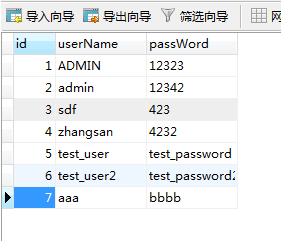
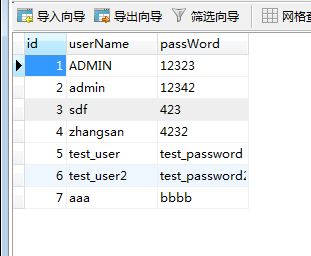
- 数据库:
- 前台
<%@ page language="java" contentType="text/html; charset=UTF-8"

    pageEncoding="UTF-8"%>

<!DOCTYPE html >

<html>

<%

    String path = request.getContextPath();

%>

<head>

<meta http-equiv="Content-Type" content="text/html; charset=UTF-8">

<title>Insert title here</title>

<link rel="stylesheet" type="text/css"

    href="<%=path%>/script/easyUI-1.4/themes/bootstrap/easyui.css">

<link rel="stylesheet" type="text/css"

    href="<%=path%>/script/easyUI-1.4/themes/icon.css">

<script type="text/javascript"

    src="<%=path%>/script/easyUI-1.4/jquery-1.8.3.min.js"></script>

<script type="text/javascript"

    src="<%=path%>/script/easyUI-1.4/jquery.easyui.min.js"></script>

<script type="text/javascript"

    src="<%=path%>/script/easyUI-1.4/locale/easyui-lang-zh_CN.js"></script>

</head>

<script type="text/javascript">

    jQuery(function() {

        $('#dg').datagrid({

            url:"<%=path%>/servlet/getDataGrid",

            //开启分页

            pagination:"true",

            //设置分页工具栏位置

            pagePosition:"bottom",

            //设置分页间隔

            pageList:[4,8,16],

            pageSize:4,

            width:240,

            //是否从服务器对数据进行排序

            remoteSort:true,

            //定义网格的标题

            title : "普通网格",

            fitColumns:true,

            columns : [ [

            //定义列,这里有三列,每一列的都是一个对象,title为列标题,field为字段的名称

            {

                title : "",

                field : "ck",

                checkbox:true

            },{

                title : "用户id",

                field : "id",

                //允许列使用排序,与表格中的remoteSort属性配合使用

                //如果sortable:true,remoteSort也为true,则对表格中的所有数据排序

                //如果sortable:true,remoteSort也为false,则对表格中的所有数据排序

                sortable:true

            }, {

                title : "用户名",

                field : "userName"

            }, {

                title : "密码",

                field : "passWord",

                formatter: function(value,row,index){

                    if (value.length<=6){

                        return "<font color='red'>密码长度小于6位</font>";

                    } else {

                        return value;

                    }

                }

            } ] ]

        });

    });

</script>

<body>

    <pre>

    1.分页+排序网格

    <table id="dg"></table>

</pre>

</body>

</html>
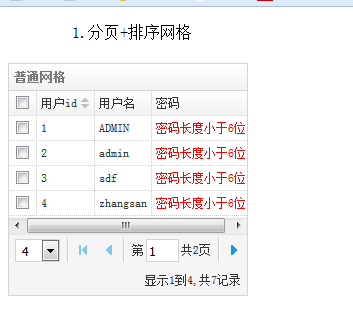
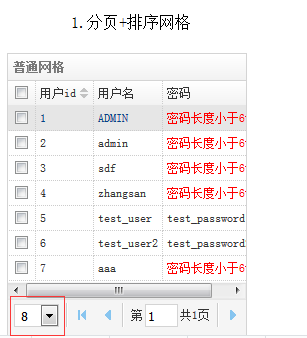
pagination:"true" 开启分页功能。pageList:[4,8,16],表示用户可以选择显示4 8 16条记录,pageSize:4 表示一次显示4条记录
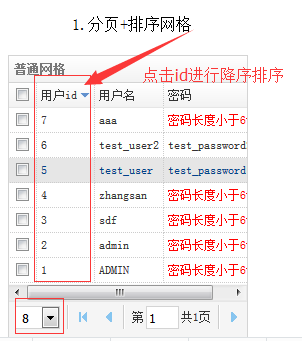
列属性sortable 和表格属性remoteSort 配合使用。如果sortable:true,remoteSort也为true,则对表格中的所有数据排序。如果sortable:true,remoteSort也为false,则对表格中的所有数据排序
- 后台
package servlet;

import java.io.IOException;

import java.io.PrintWriter;

import java.sql.Connection;

import java.sql.ResultSet;

import java.sql.Statement;

import java.util.ArrayList;

import java.util.HashMap;

import java.util.List;

import java.util.Map;

import javax.management.Query;

import javax.servlet.ServletException;

import javax.servlet.annotation.WebServlet;

import javax.servlet.http.HttpServlet;

import javax.servlet.http.HttpServletRequest;

import javax.servlet.http.HttpServletResponse;

import org.apache.commons.dbutils.QueryRunner;

import org.apache.commons.dbutils.handlers.BeanListHandler;

import com.google.gson.Gson;

import com.mysql.cj.api.xdevapi.Result;

import bean.User;

import util.DBUtil;

/**

 * Servlet implementation class GetDataGridServlet

 */

@WebServlet("/servlet/getDataGrid")

public class GetDataGridServlet extends HttpServlet {

    private static final long serialVersionUID = 1L;

    /**

     * @see HttpServlet#doGet(HttpServletRequest request, HttpServletResponse

     *      response)

     */

    protected void doGet(HttpServletRequest request, HttpServletResponse response)

            throws ServletException, IOException {

        this.doPost(request, response);

    }

    /**

     * @see HttpServlet#doPost(HttpServletRequest request, HttpServletResponse

     *      response)

     */

    protected void doPost(HttpServletRequest request, HttpServletResponse response)

            throws ServletException, IOException {

        request.setCharacterEncoding("UTF-8");

        response.setCharacterEncoding("UTF-8");

        response.setContentType("text/html");

        PrintWriter out = response.getWriter();

        Connection conn = null;

        String sql = "";

        // 查询记录总数量的sql语句

        String countSQL = "select count(*) from users";

        try {

            conn = DBUtil.getConn();

            QueryRunner queryRunner=new QueryRunner();

            // 设置分页属性,page和rows是从前台传过来的参数,page指第几页,rows表示该页显示几条数据

            int page=Integer.valueOf(request.getParameter("page"));

            int rows=Integer.valueOf(request.getParameter("rows"));

            int startIndexx=0;

            if(page==1){

                 startIndexx = 0;

            }else{

                startIndexx=0+(page-1)*rows;

            }

            int endIndex = rows;

            // 查询记录总数量

            int count = getCount(countSQL);

            sql = "select * from users limit " + startIndexx + " , " + endIndex + "";

            List<User> userList=queryRunner.query(conn, sql, new BeanListHandler<>(User.class));

            List<Map<String, String>> gridDataList = new ArrayList<Map<String, String>>();

            Map<String, Object> gridDataMap = new HashMap<String, Object>();

            Map<String, String> columnMap = null;

            for(User user:userList){

                String id = (String.valueOf(user.getId()));

                String userName = user.getUserName();

                String passWord = user.getPassWord();

                columnMap = new HashMap<String, String>();

                columnMap.put("id", id);

                columnMap.put("userName", userName);

                columnMap.put("passWord", passWord);

                gridDataList.add(columnMap);

            }

            gridDataMap.put("total", count);

            gridDataMap.put("rows", gridDataList);

            Gson gson = new Gson();

            String str_gridData = gson.toJson(gridDataMap);

            System.out.println(str_gridData);

            out.print(str_gridData);

        } catch (Exception e) {

            e.printStackTrace();

        }

        out.flush();

        out.close();

    }

    /**

     * 根据sql查询数据库中的总记录数量

     *

     * @param countSQL

     * @return

     */

    private int getCount(String countSQL) {

        int res = 0;

        Connection conn = null;

        Statement stat = null;

        ResultSet rs = null;

        try {

            conn = DBUtil.getConn();

            stat = conn.createStatement();

            rs = stat.executeQuery(countSQL);

            while (rs.next()) {

                res = rs.getInt("count(*)");

            }

        } catch (Exception e) {

            e.printStackTrace();

        } finally {

            try {

                conn.close();

                rs.close();

                stat.close();

            } catch (Exception e2) {

                e2.printStackTrace();

            }

        }

        return res;

    }

}
结果:
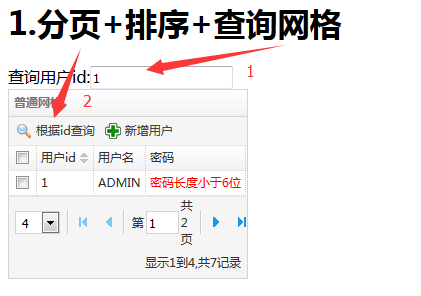
三、分页+排序+查询网格
- 前台
<%@ page language="java" contentType="text/html; charset=UTF-8"

    pageEncoding="UTF-8"%>

<!DOCTYPE html >

<html>

<%

    String path = request.getContextPath();

%>

<head>

<meta http-equiv="Content-Type" content="text/html; charset=UTF-8">

<title>Insert title here</title>

<link rel="stylesheet" type="text/css"

    href="<%=path%>/script/easyUI-1.4/themes/bootstrap/easyui.css">

<link rel="stylesheet" type="text/css"

    href="<%=path%>/script/easyUI-1.4/themes/icon.css">

<script type="text/javascript"

    src="<%=path%>/script/easyUI-1.4/jquery-1.8.3.min.js"></script>

<script type="text/javascript"

    src="<%=path%>/script/easyUI-1.4/jquery.easyui.min.js"></script>

<script type="text/javascript"

    src="<%=path%>/script/easyUI-1.4/locale/easyui-lang-zh_CN.js"></script>

</head>

<script type="text/javascript">

    jQuery(function() {

        var tools=[

            {id:"search",text:"根据id查询",iconCls:"icon-search",handler:function(){

                var search_id=$("#search_id").val();

                $('#dg').datagrid({

                    //queryParams方法在请求远程数据的时候发送额外的参数,参数一定要是json格式的对象,而表单序列化后是数组对象。需要将数组对象转为json格式的对象

                    queryParams: {

                        "search_id":search_id

                    }

                });

            }},

            {id:"add",text:"新增用户",iconCls:"icon-add"}

        ];

        $('#dg').datagrid({

            url:"<%=path%>/servlet/getDataGrid",

            //开启分页

            pagination : "true",

            //设置分页工具栏位置

            pagePosition : "bottom",

            //设置分页间隔

            pageList : [ 4, 8, 16 ],

            pageSize : 4,

            width : 240,

            //是否从服务器对数据进行排序

            remoteSort : true,

            //定义顶部工具栏的DataGrid面板

            toolbar : tools,

            //定义网格的标题

            title : "普通网格",

            fitColumns : true,

            columns : [ [

            //定义列,这里有三列,每一列的都是一个对象,title为列标题,field为字段的名称

            {

                title : "",

                field : "ck",

                checkbox : true

            }, {

                title : "用户id",

                field : "id",

                //允许列使用排序,与表格中的remoteSort属性配合使用

                //如果sortable:true,remoteSort也为true,则对表格中的所有数据排序

                //如果sortable:true,remoteSort也为false,则对表格中的所有数据排序

                sortable : true

            }, {

                title : "用户名",

                field : "userName"

            }, {

                title : "密码",

                field : "passWord",

                formatter : function(value, row, index) {

                    if (value.length <= 6) {

                        return "<font color='red'>密码长度小于6位</font>";

                    } else {

                        return value;

                    }

                }

            } ] ]

        });

    });

</script>

<body>

    <h1>1.分页+排序+查询网格</h1>

    <form id="form">

        查询用户id:<input type="text" name="search_id" id="search_id">

    </form>

    <table id="dg"></table>

</body>

</html>
- 后台
package servlet;

import java.io.IOException;

import java.io.PrintWriter;

import java.sql.Connection;

import java.sql.ResultSet;

import java.sql.Statement;

import java.util.ArrayList;

import java.util.HashMap;

import java.util.List;

import java.util.Map;

import javax.management.Query;

import javax.servlet.ServletException;

import javax.servlet.annotation.WebServlet;

import javax.servlet.http.HttpServlet;

import javax.servlet.http.HttpServletRequest;

import javax.servlet.http.HttpServletResponse;

import javax.swing.plaf.synth.SynthSeparatorUI;

import org.apache.commons.dbutils.QueryRunner;

import org.apache.commons.dbutils.handlers.BeanListHandler;

import com.google.gson.Gson;

import com.mysql.cj.api.xdevapi.Result;

import bean.User;

import util.DBUtil;

/**

 * Servlet implementation class GetDataGridServlet

 */

@WebServlet("/servlet/getDataGrid")

public class GetDataGridServlet extends HttpServlet {

    private static final long serialVersionUID = 1L;

    /**

     * @see HttpServlet#doGet(HttpServletRequest request, HttpServletResponse

     *      response)

     */

    protected void doGet(HttpServletRequest request, HttpServletResponse response)

            throws ServletException, IOException {

        this.doPost(request, response);

    }

    /**

     * @see HttpServlet#doPost(HttpServletRequest request, HttpServletResponse

     *      response)

     */

    protected void doPost(HttpServletRequest request, HttpServletResponse response)

            throws ServletException, IOException {

        request.setCharacterEncoding("UTF-8");

        response.setCharacterEncoding("UTF-8");

        response.setContentType("text/html");

        //获取查询条件

        String searchId=request.getParameter("search_id");

        PrintWriter out = response.getWriter();

        Connection conn = null;

        String sql = "select * from users where 1=1";

        // 查询记录总数量的sql语句

        String countSQL = "select count(*) from users";

        //

        try {

            conn = DBUtil.getConn();

            QueryRunner queryRunner=new QueryRunner();

            // 设置分页属性,page和rows是从前台传过来的参数,page指第几页,rows表示该页显示几条数据

            int page=Integer.valueOf(request.getParameter("page"));

            int rows=Integer.valueOf(request.getParameter("rows"));

            //如果需要排序,则前台会传需要排序的列名sort和排序方式order。

            String sortName=request.getParameter("sort");

            String sortType=request.getParameter("order");

            int startIndexx=0;

            if(page==1){

                 startIndexx = 0;

            }else{

                startIndexx=0+(page-1)*rows;

            }

            int endIndex = rows;

            // 查询记录总数量

            int count = getCount(countSQL);

            /**

             * 有查询条件时的sql语句

             */

            if(searchId!=null){

                sql=sql+" and id= "+searchId+"";

            }

            if(sortName!=null && sortType!=null){

                //说明需要排序

                sql = sql+" order by "+sortName+" "+sortType+"  limit " + startIndexx + " , " + endIndex + "   ";

            }else{

                //不需要排序

                sql = sql+" limit " + startIndexx + " , " + endIndex + "   ";

            }

            System.out.println(sql);

            List<User> userList=queryRunner.query(conn, sql, new BeanListHandler<>(User.class));

            List<Map<String, String>> gridDataList = new ArrayList<Map<String, String>>();

            Map<String, Object> gridDataMap = new HashMap<String, Object>();

            Map<String, String> columnMap = null;

            for(User user:userList){

                String id = (String.valueOf(user.getId()));

                String userName = user.getUserName();

                String passWord = user.getPassWord();

                columnMap = new HashMap<String, String>();

                columnMap.put("id", id);

                columnMap.put("userName", userName);

                columnMap.put("passWord", passWord);

                gridDataList.add(columnMap);

            }

            gridDataMap.put("total", count);

            gridDataMap.put("rows", gridDataList);

            Gson gson = new Gson();

            String str_gridData = gson.toJson(gridDataMap);

            System.out.println(str_gridData);

            out.print(str_gridData);

        } catch (Exception e) {

            e.printStackTrace();

        }

        out.flush();

        out.close();

    }

    /**

     * 根据sql查询数据库中的总记录数量

     *

     * @param countSQL

     * @return

     */

    private int getCount(String countSQL) {

        int res = 0;

        Connection conn = null;

        Statement stat = null;

        ResultSet rs = null;

        try {

            conn = DBUtil.getConn();

            stat = conn.createStatement();

            rs = stat.executeQuery(countSQL);

            while (rs.next()) {

                res = rs.getInt("count(*)");

            }

        } catch (Exception e) {

            e.printStackTrace();

        } finally {

            try {

                conn.close();

                rs.close();

                stat.close();

            } catch (Exception e2) {

                e2.printStackTrace();

            }

        }

        return res;

    }

}
结果:

(四)网格(dataGrid)的更多相关文章
- EasyUI学习笔记(四)—— datagrid的使用
一.传统的HTML表格 之前我们做表格的时候是这样写的: <table > <thead> <tr> <th>编号</th> <th& ...
- 【我们一起写框架】MVVM的WPF框架(四)—DataGrid
前言 这个框架写到这里,应该有很多同学发现,框架很多地方的细节,其实是违背了MVVM的设计逻辑的. 没错,它的确是违背了. 但为什么明知道违背设计逻辑,还要这样编写框架呢? 那是因为,我们编写的是框架 ...
- 【jQuery EasyUI系列】创建CRUD数据网格
在上一篇中我们使用对话框组件创建了CRUD应用创建和编辑用户信息.本篇我们来创建一个CRUD数据网格DataGrid 步骤1,在HTML标签中定义数据网格(DataGrid) <table id ...
- easyui之datagrid的使用
http://www.cnblogs.com/ruanmou001/p/3840954.html 一.神马是easyui jQuery EasyUI是一组基于jQuery的UI插件集合,而jQuery ...
- 雷林鹏分享:jQuery EasyUI 数据网格 - 设置冻结列
jQuery EasyUI 数据网格 - 设置冻结列 本实例演示如何冻结一些列,当用户在网格上移动水平滚动条时,冻结列不能滚动到视图的外部. 为了冻结列,您需要定义 frozenColumns 属性. ...
- 雷林鹏分享:jQuery EasyUI 数据网格 - 创建复杂工具栏
jQuery EasyUI 数据网格 - 创建复杂工具栏 数据网格(datagrid)的工具栏(toolbar)可以包含按钮及其他组件. 您可以通个一个已存在的 DIV 标签来简单地定义工具栏布局,该 ...
- 雷林鹏分享:jQuery EasyUI 数据网格 - 动态改变列
jQuery EasyUI 数据网格 - 动态改变列 数据网格(DataGrid)列可以使用 'columns' 属性简单地定义.如果您想动态地改变列,那根本没有问题.为了改变列,您可以重新调用dat ...
- 雷林鹏分享:jQuery EasyUI 数据网格 - 格式化列
jQuery EasyUI 数据网格 - 格式化列 以下实例格式化在 easyui DataGrid 里的列数据,并使用自定义列的 formatter,如果价格小于 20 就将文本变为红色. 为了格式 ...
- 雷林鹏分享:jQuery EasyUI 数据网格 - 设置排序
jQuery EasyUI 数据网格 - 设置排序 本实例演示如何通过点击列表头来排序数据网格(DataGrid). 数据网格(DataGrid)的所有列可以通过点击列表头来排序.您可以定义哪列可以排 ...
- 雷林鹏分享:jQuery EasyUI 数据网格 - 创建列组合
jQuery EasyUI 数据网格 - 创建列组合 easyui 的数据网格(DataGrid)可以创建列组合,如下所示: 在本实例中,我们使用平面数据来填充数据网格(DataGrid)的数据,并把 ...
随机推荐
- Windows使用Latex
目录 安装Texlive 安装TeXstudio 编写简单的文章 教程 安装Texlive 到清华大学开源软件镜像站下载Texlive2019.iso文件 下载之后,如果有光驱就装载,没有的话就解压. ...
- SDK/JDK,Shell/Shell脚本,Apache/APR ,MTK
SDK 软件开发工具包(SoftwareDevelopmentKit) API(Application Programming Interface,应用编程接口)其实就是操作系统留给应用程序的一个调用 ...
- Linux 连接memcache 拒绝连接,防火墙关闭,selinux disabled 仍然不行,最后在外站找到原因,为服务器添加memcache访问权限
最后啊,不行,直接装memcached https://www.runoob.com/memcached/memcached-install.html 附上连接:https://www.presta ...
- 用户登录之asp.net cookie的写入、读取与操作
页面前面: <div id="login" runat="server"> <span class="log_title" ...
- SQL-W3School-总结:SQL 快速参考
ylbtech-SQL-W3School-总结:SQL 快速参考 1.返回顶部 1. 来自 W3School 的 SQL 快速参考.可以打印它,以备日常使用. SQL 语句 语句 语法 AND / O ...
- attrib命令能用批处理实现文件夹批量显示吗?
attrib H:\* -s -h -a -r /s /d 加上/s /d参数就行了.(H表示你的U盘盘符)
- Windows 10、Ubuntu 18.04 双系统 双硬盘 安装经验总结
首先说明,我假设读者懂得分区.安装系统,所以不再深入讨论具体操作. 如果需要手把手教程,建议先参考其它Windows中加装Linux的相关文章. 网上其它文章.教程的常见问题是,各家机器配置不一样,安 ...
- 123456---com.twoapp.xiaoxiaofeixingyuan---小小飞行员
com.twoapp.xiaoxiaofeixingyuan---小小飞行员
- react 打印页面怎么实现?
2017-11-10 react 打印页面怎么实现?
- iOS-UITextField和UITextView隐藏键盘
UITextField和UITextView隐藏键盘 71 views, IOS DEV, by admin. self._textField.returnKeyType=UIReturnKeyDon ...