
mydumper,myloader原理及实战
mydumper 特性
(1)多线程备份(和mysqlpump的多线程不同,mysqlpump多线程备份的粒度是表,mydumper多线程备份的粒度是行,这对于备份大表特别有用)
(2)因为是多线程逻辑备份,备份后会生成多个备份文件
(3)备份时对 MyISAM 表施加 FTWRL (FLUSH TABLES WITH READ LOCK), 会阻塞 DML 语句
(4)保证备份数据的一致性
(5)支持文件压缩
(6)支持导出binlog
(7)支持多线程恢复
(8)支持以守护进程模式工作,定时快照和连续二进制日志
(9)支持将备份文件切块
mydumper-0.9.1.tar.gz
yum install glib2-devel mysql-devel zlib-devel pcre-devel openssl-devel cmake
cd mydumper-0.9.1
cmake .
make
make install
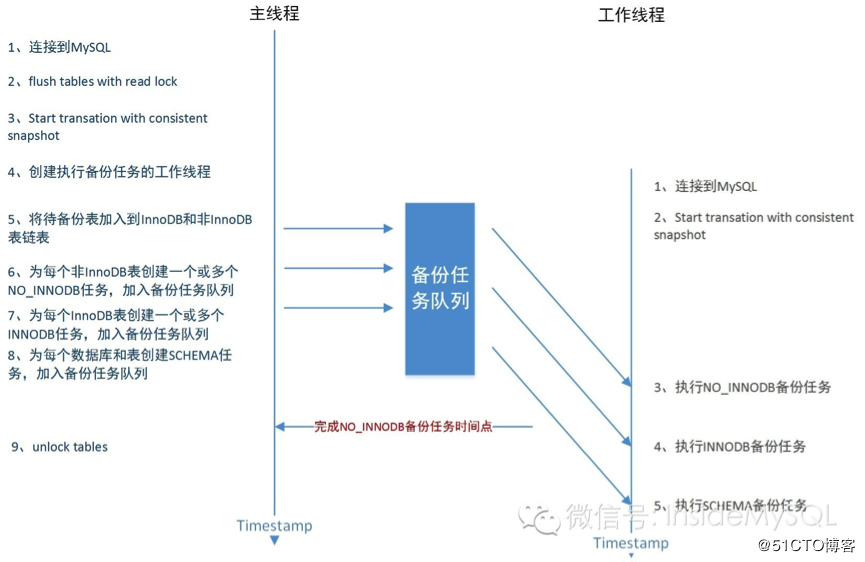
mydumper主要流程概括:
0、连接目标数据库
1、通过show processlist来判断是否有长查询,根据参数long-query-guard和kill-long-queries决定退出或杀掉长查询
2、主线程,针对MyISAM引擎表,FLUSH TABLES WITH READ LOCK, 施加全局只读锁,以阻止DML语句写入,保证数据的一致性
3、主线程,针对InnoDB引擎表,开启事务,start transaction,读取当前时间点的二进制日志文件名和日志写入的位置并记录在metadata文件中,以供即使点恢复使用
4、创建worker子线程,N个(线程数可以指定,默认是4)dump线程 START TRANSACTION WITH CONSISTENT SNAPSHOT; 开启读一致的事务
5、确定候选表,根据类别分别插入innodb_table,non_innodb_table以及table_schemas链表(表结构)
6、将候选表通过g_async_queue_push加入任务队列(队列最后元素是thread shutdown),由worker子线程从队列中读取表信息并执行数据导出
7、dump non-InnoDB tables, 首先导出非事务引擎的表
8、主线程 UNLOCK TABLES 非 事务引擎备份完后,释放全局只读锁
9、dump InnoDB tables, 基于 事务导出InnoDB表
10、事务结束
11、等待worker退出
1、主线程 FLUSH TABLES WITH READ LOCK (全局锁)
2、Dump线程 START TRANSACTION WITH CONSISTENT SNAPSHOT;
3、LL Dump线程 LOCK TABLES non-InnoDB (线程内部锁)
4、主线程UNLOCK TABLES
5、LL Dump线程 dump non-InnoDB tables
6、LL DUmp线程 UNLOCK non-InnoDB
7、Dump线程 dump InnoDB tables
备份文件相关信息:
1、所有的备份文件在一个目录中,未指定时为当前目录,且自动生成备份日志时间文件夹,如export-20150703-145806
2、如果是在从库进行备份,还会记录备份时同步至主库的二进制日志文件及写入位置
3、每个表有两个备份文件:database.table-schema.sql表结构文件,database.table.sql表数据文件
4、如果对表文件分片,将生成多个备份数据文件,可以指定行数或指定大小分片
Usage:
mydumper [OPTION...] multi-threaded MySQL dumping
-?, --help Show help options
-B, --database Database to dump
-T, --tables-list Comma delimited table list to dump (does not exclude regex option)
-o, --outputdir Directory to output files to
-s, --statement-size Attempted size of INSERT statement in bytes, default 1000000
-r, --rows Try to split tables into chunks of this many rows. This option turns off --chunk-filesize
-F, --chunk-filesize Split tables into chunks of this output file size. This value is in MB
-c, --compress Compress output files
-e, --build-empty-files Build dump files even if no data available from table
-x, --regex Regular expression for 'db.table' matching
-i, --ignore-engines Comma delimited list of storage engines to ignore
-m, --no-schemas Do not dump table schemas with the data
-d, --no-data Do not dump table data
-G, --triggers Dump triggers
-E, --events Dump events
-R, --routines Dump stored procedures and functions
-k, --no-locks Do not execute the temporary shared read lock. WARNING: This will cause inconsistent backups
--less-locking Minimize locking time on InnoDB tables.
-l, --long-query-guard Set long query timer in seconds, default 60
-K, --kill-long-queries Kill long running queries (instead of aborting)
-D, --daemon Enable daemon mode
-I, --snapshot-interval Interval between each dump snapshot (in minutes), requires --daemon, default 60
-L, --logfile Log file name to use, by default stdout is used
--tz-utc SET TIME_ZONE='+00:00' at top of dump to allow dumping of TIMESTAMP data when a server has data in different time zones or data is being moved between servers with different time zones, defaults to on use --skip-tz-utc to disable.
--skip-tz-utc
--use-savepoints Use savepoints to reduce metadata locking issues, needs SUPER privilege
--success-on-1146 Not increment error count and Warning instead of Critical in case of table doesn't exist
--lock-all-tables Use LOCK TABLE for all, instead of FTWRL
-U, --updated-since Use Update_time to dump only tables updated in the last U days
--trx-consistency-only Transactional consistency only
-h, --host The host to connect to
-u, --user Username with privileges to run the dump
-p, --password User password
-P, --port TCP/IP port to connect to
-S, --socket UNIX domain socket file to use for connection
-t, --threads Number of threads to use, default 4
-C, --compress-protocol Use compression on the MySQL connection
-V, --version Show the program version and exit
-v, --verbose Verbosity of output, 0 = silent, 1 = errors, 2 = warnings, 3 = info, default 2
Usage:
myloader [OPTION...] multi-threaded MySQL loader
-?, --help Show help options
-d, --directory Directory of the dump to import
-q, --queries-per-transaction Number of queries per transaction, default 1000
-o, --overwrite-tables Drop tables if they already exist
-B, --database An alternative database to restore into
-s, --source-db Database to restore
-e, --enable-binlog Enable binary logging of the restore data
-h, --host The host to connect to
-u, --user Username with privileges to run the dump
-p, --password User password
-P, --port TCP/IP port to connect to
-S, --socket UNIX domain socket file to use for connection
-t, --threads Number of threads to use, default 4
-C, --compress-protocol Use compression on the MySQL connection
-V, --version Show the program version and exit
-v, --verbose Verbosity of output, 0 = silent, 1 = errors, 2 = warnings, 3 = info, default 2
mydumper -u dba_user -p msds007 -h 192.168.1.101 -P 3306 -B mytest -c -o /tmp/backup/01
mydumper -u root -p msds007 -h 192.168.1.101 -P 3306 -o /tmp/backup/02
备份 test.wx_edu_homework 表,且不备份表结构,备份至 /tmp/backup/03 文件夹
mydumper -u root -p msds007 -h 127.0.0.1 -P 3306 -B test -T wx_edu_homework -m -o /tmp/backup/03
myloader -u dba_user -p msds007 -h 192.168.1.101 -P 3306 -e -o -d /tmp/backup/01
-e参数会把恢复数据时的SQL写进binlog
打开general log执行
mydumper -u root -p msds007 -h 192.168.1.101 -P 3306 -o /tmp/backup/02
myloader -u dba_user -p msds007 -h 192.168.1.101 -P 3306 -e -o -d /tmp/backup/01
看general log的详细信息
原理图
mydumper,myloader原理及实战的更多相关文章
- myloader原理0
开源MySQL多线程逻辑导入工具myloader原理与改进 在上一篇中,介绍了多线程备份工具mydumper的实现及网易对其所做的优化,本篇聊聊与mydumper配合使用的myloader工具. my ...
- MYSQL mydumper & myloader
第三方逻辑备份工具myduper和myloader | xiaoyu的数据库小窝-技术交流http://www.dbaxiaoyu.com/archives/1643 myloader原理0 - ze ...
- mydumper/myloader使用详解
mydumper安装:http://www.cnblogs.com/lizhi221/p/7010174.html mydumper原理:http://www.cnblogs.com/lizhi2 ...
- jQuery源码:从原理到实战
jQuery源码:从原理到实战 jQuery选择器对象 $(".my-class"); document.querySelectorAll*".my-class" ...
- Keepalived原理与实战精讲--VRRP协议
. 前言 VRRP(Virtual Router Redundancy Protocol)协议是用于实现路由器冗余的协议,最新协议在RFC3768中定义,原来的定义RFC2338被废除,新协议相对还简 ...
- Spark MLlib特征处理:OneHotEncoder OneHot编码 ---原理及实战
http://m.blog.csdn.net/wangpei1949/article/details/53140372 Spark MLlib特征处理:OneHotEncoder OneHot编码 - ...
- Istio 流量治理功能原理与实战
一.负载均衡算法原理与实战 负载均衡算法(load balancing algorithm),定义了几种基本的流量分发方式,在Istio中共有4种标准负载均衡算法. •Round_Robin: 轮询算 ...
- Oracle特殊恢复原理与实战(DSI系列)
1.深入浅出Oracle(DSI系列Ⅰ) 2.Oracle特殊恢复原理与实战(DSI系列Ⅱ) 3.Oracle SQL Tuning(DSI系列Ⅲ)即将开设 4.Oracle DB Performan ...
- Java并发编程原理与实战五:创建线程的多种方式
一.继承Thread类 public class Demo1 extends Thread { public Demo1(String name) { super(name); } @Override ...
随机推荐
- storm java环境变量设置
storm启动时会加载conf/storm-env.sh文件 编辑 conf/storm-env.sh 添加export JAVA_HOME=/usr/java/jdk1.8.0_111
- sh: 1: Syntax error: Bad fd number
Start on Ubuntu 6.10,Using dash default(theDebian Almquist Shell) instead bash(the GNUBourne-Again S ...
- ArcGIS超级工具-征地部标准坐标导出导入 SPTOOLS
ArcGIS超级工具简称SPTOOLS 1.1征地部标准坐标导出 界面如下: 操作视频: https://weibo.com/tv/v/HvpNBrfeq?fid=1034:4374872936357 ...
- 转载:OutOfMemoryError系列(2): GC overhead limit exceeded
这是本系列的第二篇文章, 相关文章列表: OutOfMemoryError系列(1): Java heap space OutOfMemoryError系列(2): GC overhead limit ...
- PHP学习之工厂方法模式
<?php //工厂方法模式 interface Doing { function eat(); function sleep(); } class Cat implements Doing { ...
- react hook的todolist
感觉好长时间没写博客一样,app.js代码 import React from 'react'; import { useState } from 'react'; function App() { ...
- [Java复习] JVM
Part1:Java类加载机制:类加载器,类加载机制,双亲委派模型 1. Java 类加载过程? 类加载过程即是指JVM虚拟机把.class文件中类信息加载进内存,并进行解析生成对应的class对象的 ...
- Flask中路由参数
Flask中路由参数.请求方式设置 一.参数设置 1.参数类型 Flask中参数的使用 @app.route('/parames/<username>/') def hello_world ...
- mac配置maven项目的方法(含导入selenium包)
1.配置了java的环境变量 文件位置: /Users/lucax/.bash_profile JAVA_HOME=/Library/Java/JavaVirtualMachines/jdk1 ...
- JUC AQS ReentrantLock源码分析
警告⚠️:本文耗时很长,先做好心理准备,建议PC端浏览器浏览效果更佳. Java的内置锁一直都是备受争议的,在JDK1.6之前,synchronized这个重量级锁其性能一直都是较为低下,虽然在1.6 ...