
CLion和WSL配置MPI运行及调试环境
本文将介绍 Windows 下,使用 CLion 和 WSL 配置 MPI 运行及调试环境的方法。
0. 前提
阅读本文前,请确保:
- Windows 下已启用 WSL2,并安装了任一 Linux 发行版
1. WSL环境配置
(1) 配置编译环境
sudo apt-get update

sudo apt-get install build-essential cmake gdb
(2) 配置MPI
MPI 环境可选择通过包管理器配置,也可自行编译源码配置。简便起见,本文采用包管理器进行配置,选用的 MPI 实现为 MPICH,安装命令为:
# Debian、Ubuntu等发行版使用如下命令安装:

sudo apt-get install mpich
如果安装成功,运行命令 mpichversion,将输出:
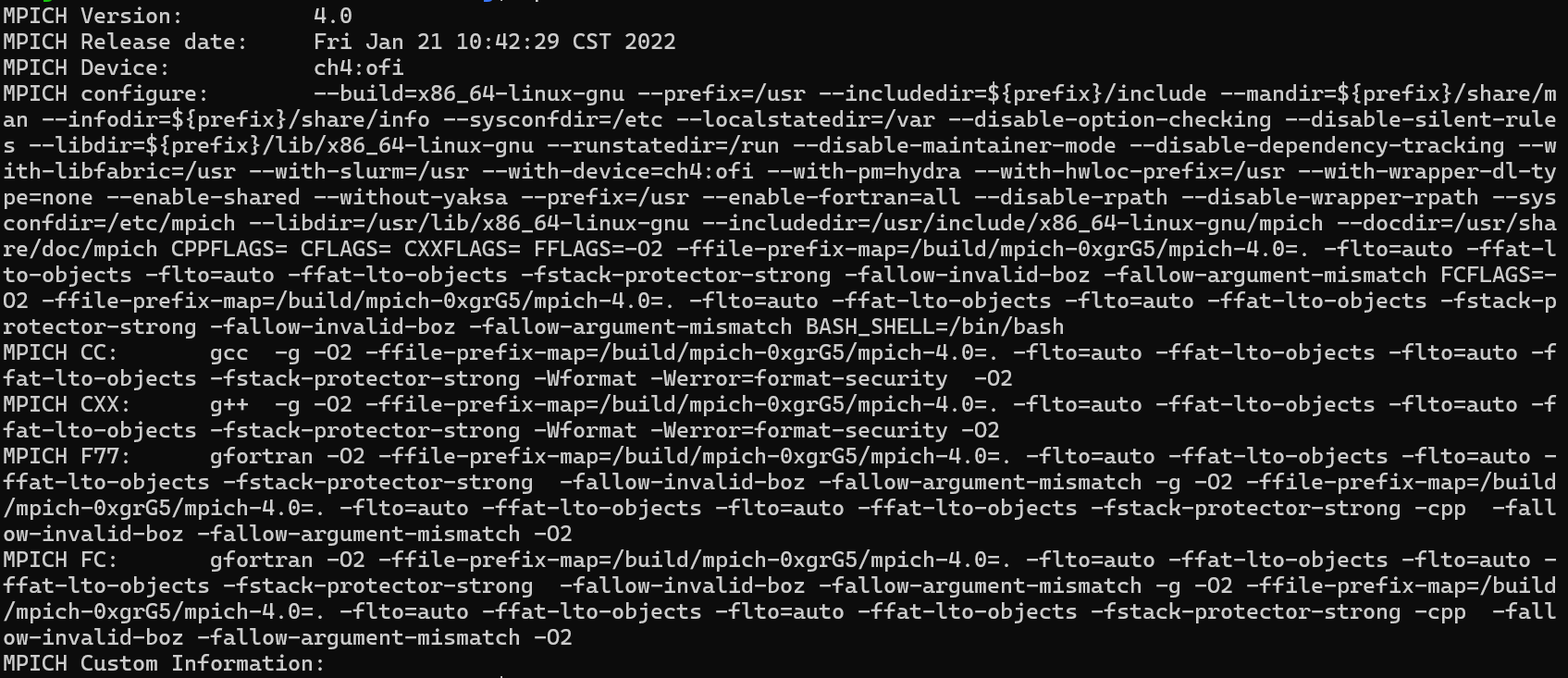
之后,尝试运行测试程序,将以下代码保存到文件 mpi_hello.c 中:
/* File:

 *    mpi_hello.c

 *

 * Purpose:

 *    A "hello,world" program that uses MPI

 *

 * Compile:

 *    mpicc -g -Wall -std=C99 -o mpi_hello mpi_hello.c

 * Usage:

 *    mpiexec -n<number of processes> ./mpi_hello

 *

 * Input:

 *    None

 * Output:

 *    A greeting from each process

 *

 * Algorithm:

 *    Each process sends a message to process 0, which prints

 *    the messages it has received, as well as its own message.

 *

 * IPP:  Section 3.1 (pp. 84 and ff.)

 */

#include <stdio.h>

#include <string.h>  /* For strlen             */

#include <mpi.h>     /* For MPI functions, etc */

const int MAX_STRING = 100;

int main(void) {

   char       greeting[MAX_STRING];  /* String storing message */

   int        comm_sz;               /* Number of processes    */

   int        my_rank;               /* My process rank        */

   /* Start up MPI */

   MPI_Init(NULL, NULL);

   /* Get the number of processes */

   MPI_Comm_size(MPI_COMM_WORLD, &comm_sz);

   /* Get my rank among all the processes */

   MPI_Comm_rank(MPI_COMM_WORLD, &my_rank);

   if (my_rank != 0) {

      /* Create message */

      sprintf(greeting, "Greetings from process %d of %d!",

            my_rank, comm_sz);

      /* Send message to process 0 */

      MPI_Send(greeting, strlen(greeting)+1, MPI_CHAR, 0, 0,

            MPI_COMM_WORLD);

   } else {

      /* Print my message */

      printf("Greetings from process %d of %d!\n", my_rank, comm_sz);

      for (int q = 1; q < comm_sz; q++) {

         /* Receive message from process q */

         MPI_Recv(greeting, MAX_STRING, MPI_CHAR, q,

            0, MPI_COMM_WORLD, MPI_STATUS_IGNORE);

         /* Print message from process q */

         printf("%s\n", greeting);

      }

   }

   /* Shut down MPI */

   MPI_Finalize();

   return 0;

}  /* main */
编译并执行:
# 编译

mpicc -g -Wall -std=C99 -o mpi_hello mpi_hello.c

# 运行,4表示进程数

mpiexec -n 4 ./mpi_hello
输出应为:
Greetings from process 0 of 4!

Greetings from process 1 of 4!

Greetings from process 2 of 4!

Greetings from process 3 of 4!
2. CLion运行环境配置
(1) 新建项目
CLion 新建一个项目 mpi,将 main.c 或 main.cpp 内容修改为:
/* File:

 *    mpi_hello.c

 *

 * Purpose:

 *    A "hello,world" program that uses MPI

 *

 * Compile:

 *    mpicc -g -Wall -std=C99 -o mpi_hello mpi_hello.c

 * Usage:

 *    mpiexec -n<number of processes> ./mpi_hello

 *

 * Input:

 *    None

 * Output:

 *    A greeting from each process

 *

 * Algorithm:

 *    Each process sends a message to process 0, which prints

 *    the messages it has received, as well as its own message.

 *

 * IPP:  Section 3.1 (pp. 84 and ff.)

 */

#include <stdio.h>

#include <string.h>  /* For strlen             */

#include <mpi.h>     /* For MPI functions, etc */

const int MAX_STRING = 100;

int main(void) {

   char       greeting[MAX_STRING];  /* String storing message */

   int        comm_sz;               /* Number of processes    */

   int        my_rank;               /* My process rank        */

   /* Start up MPI */

   MPI_Init(NULL, NULL);

   /* Get the number of processes */

   MPI_Comm_size(MPI_COMM_WORLD, &comm_sz);

   /* Get my rank among all the processes */

   MPI_Comm_rank(MPI_COMM_WORLD, &my_rank);

   if (my_rank != 0) {

      /* Create message */

      sprintf(greeting, "Greetings from process %d of %d!",

            my_rank, comm_sz);

      /* Send message to process 0 */

      MPI_Send(greeting, strlen(greeting)+1, MPI_CHAR, 0, 0,

            MPI_COMM_WORLD);

   } else {

      /* Print my message */

      printf("Greetings from process %d of %d!\n", my_rank, comm_sz);

      for (int q = 1; q < comm_sz; q++) {

         /* Receive message from process q */

         MPI_Recv(greeting, MAX_STRING, MPI_CHAR, q,

            0, MPI_COMM_WORLD, MPI_STATUS_IGNORE);

         /* Print message from process q */

         printf("%s\n", greeting);

      }

   }

   /* Shut down MPI */

   MPI_Finalize();

   return 0;

}  /* main */
(2) 添加工具链
在设置 => 构建、运行、部署 => 工具链中添加一个工具链,类型选 WSL。
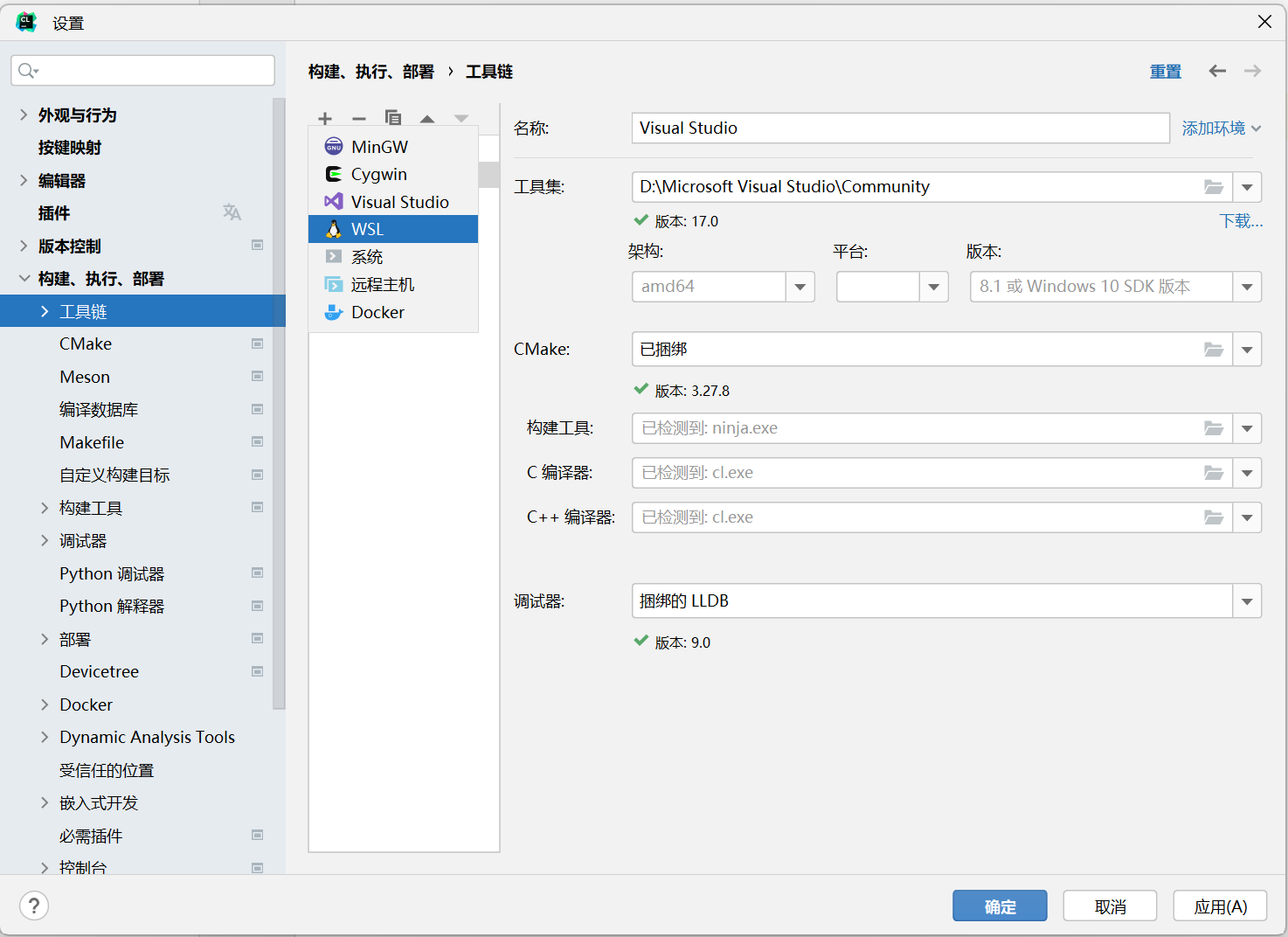
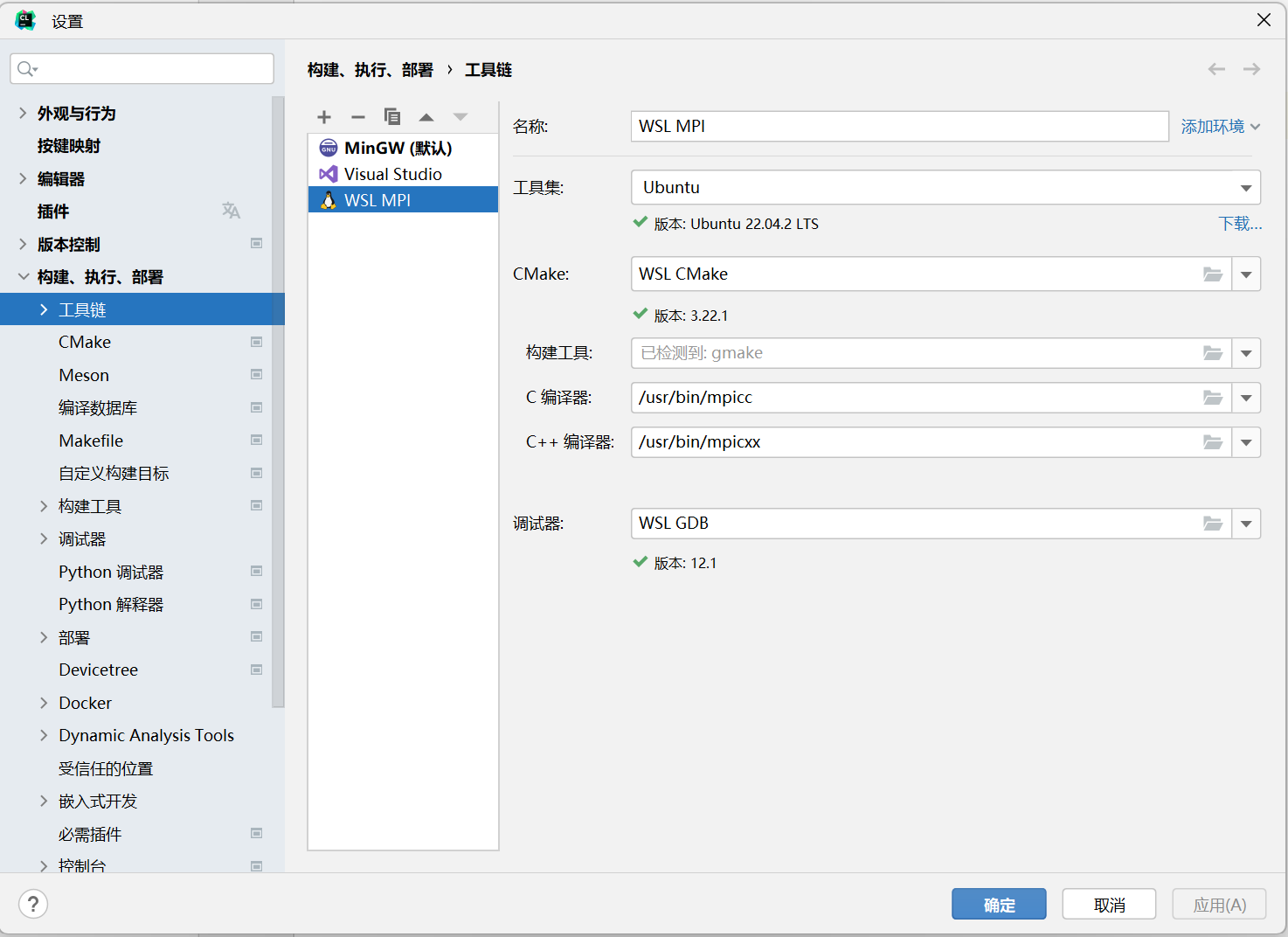
CLion 会自动检测填写,但 C 编译器和 C++ 编译器路径需要手动指定,相应路径使用 which 命令获取:
# 获取 C 编译器路径

which mpicc

# 获取 C++ 编译器路径

which mpicxx
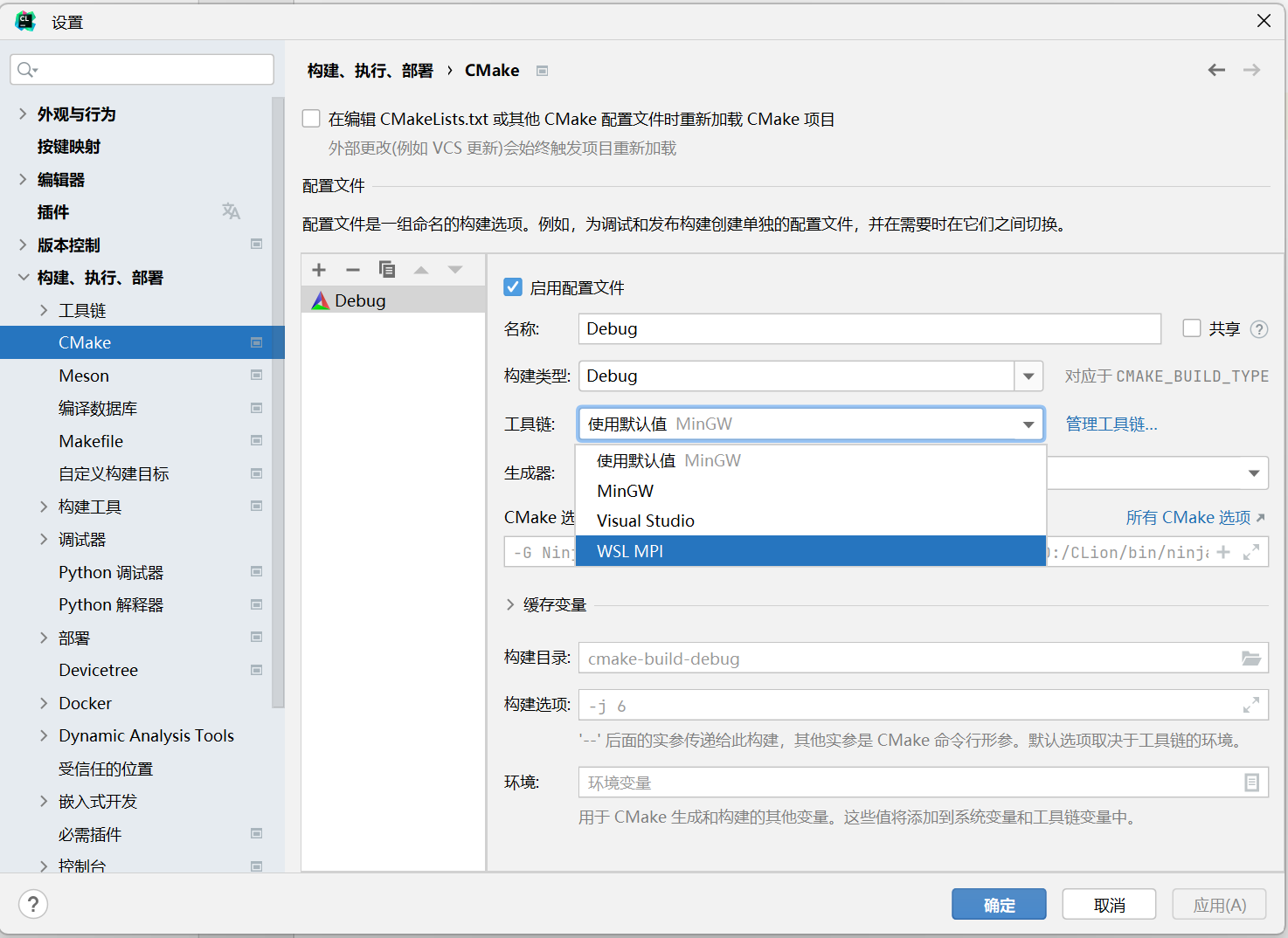
(3) 指定项目所用工具链
添加工具链后,必须手动设置项目使用新添加的工具链,在设置 => 构建、运行、部署 => CMake 中进行设置:
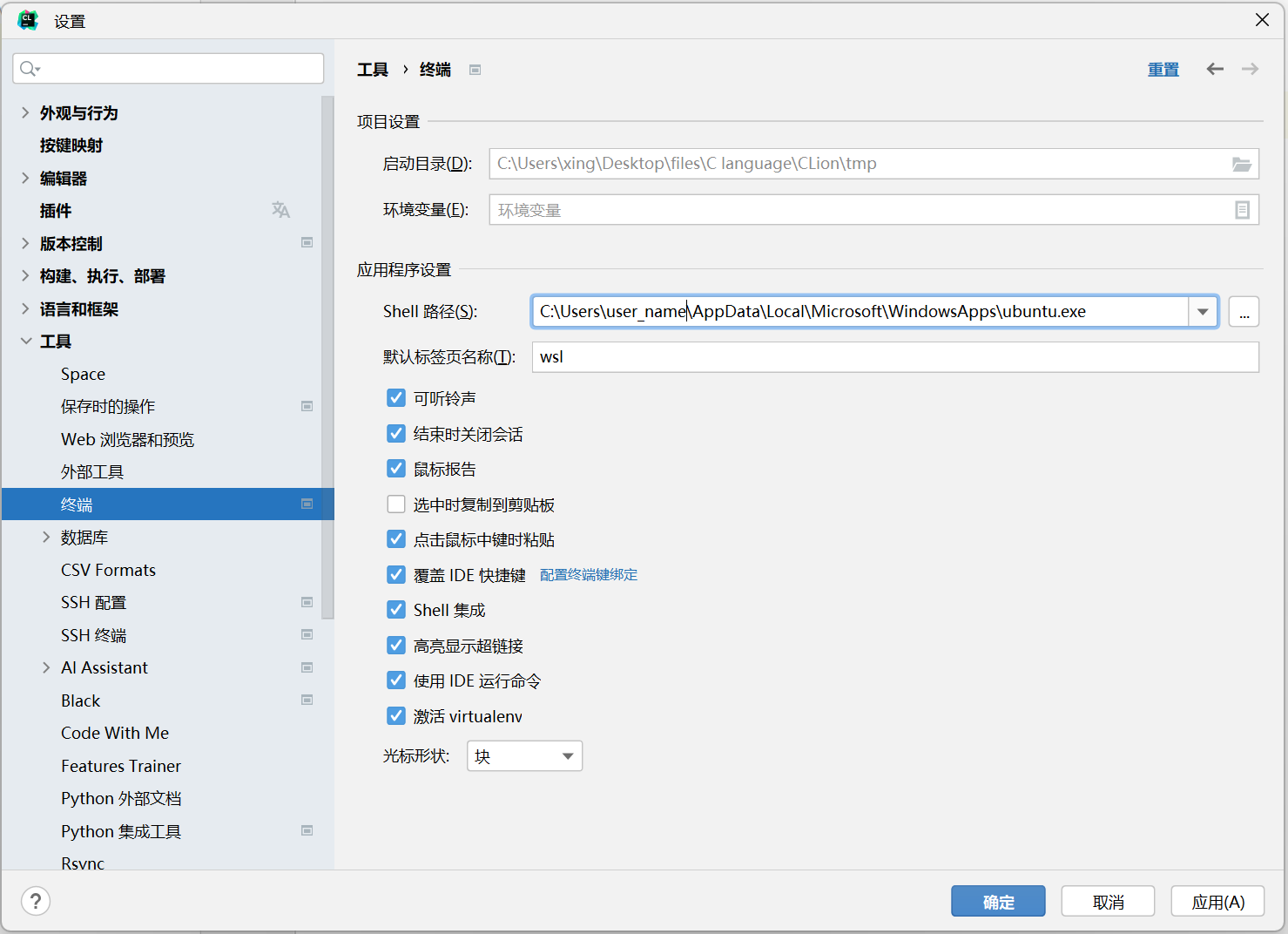
(4) 修改项目终端(可选)
在设置 => 工具 => 终端中,将 Shell 路径修改为所用的发行版路径,该路径一般为:
# C:\Users\<你的电脑用户名>\AppData\Local\Microsoft\WindowsApps\<发行版名称>.exe,如:

C:\Users\username\AppData\Local\Microsoft\WindowsApps\ubuntu.exe
(5) 修改CMake配置文件
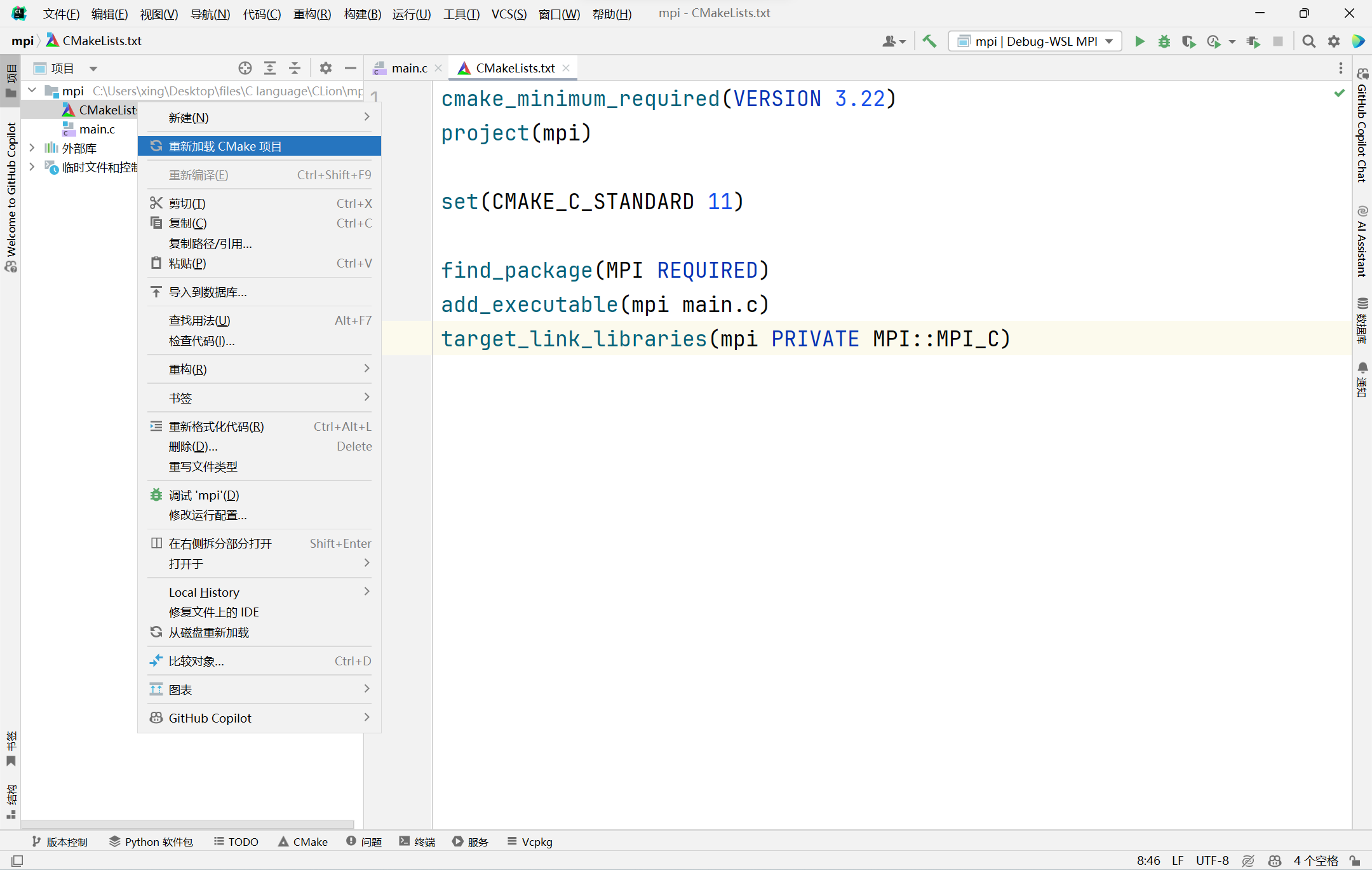
修改项目根目录下的 CMake 配置文件 CMakeLists.txt:
- 在 add_executable 所在行之前添加:
find_package(MPI REQUIRED) - 在 add_executable 所在行之后添加:
- 如果为 C 项目:
target_link_libraries(<your_project_name> PRIVATE MPI::MPI_C) - 如果为 C++ 项目:
target_link_libraries(<your_project_name> PRIVATE MPI::MPI_CXX)
- 如果为 C 项目:
- 可能需要修改 cmake_minimum_required 中的版本号,使其不高于 WSL 中安装的 CMake 版本
示例:
cmake_minimum_required(VERSION 3.22)

project(mpi)

set(CMAKE_C_STANDARD 11)

find_package(MPI REQUIRED)

add_executable(mpi main.c)

target_link_libraries(mpi PRIVATE MPI::MPI_C)
之后,重新加载 CMake 配置:
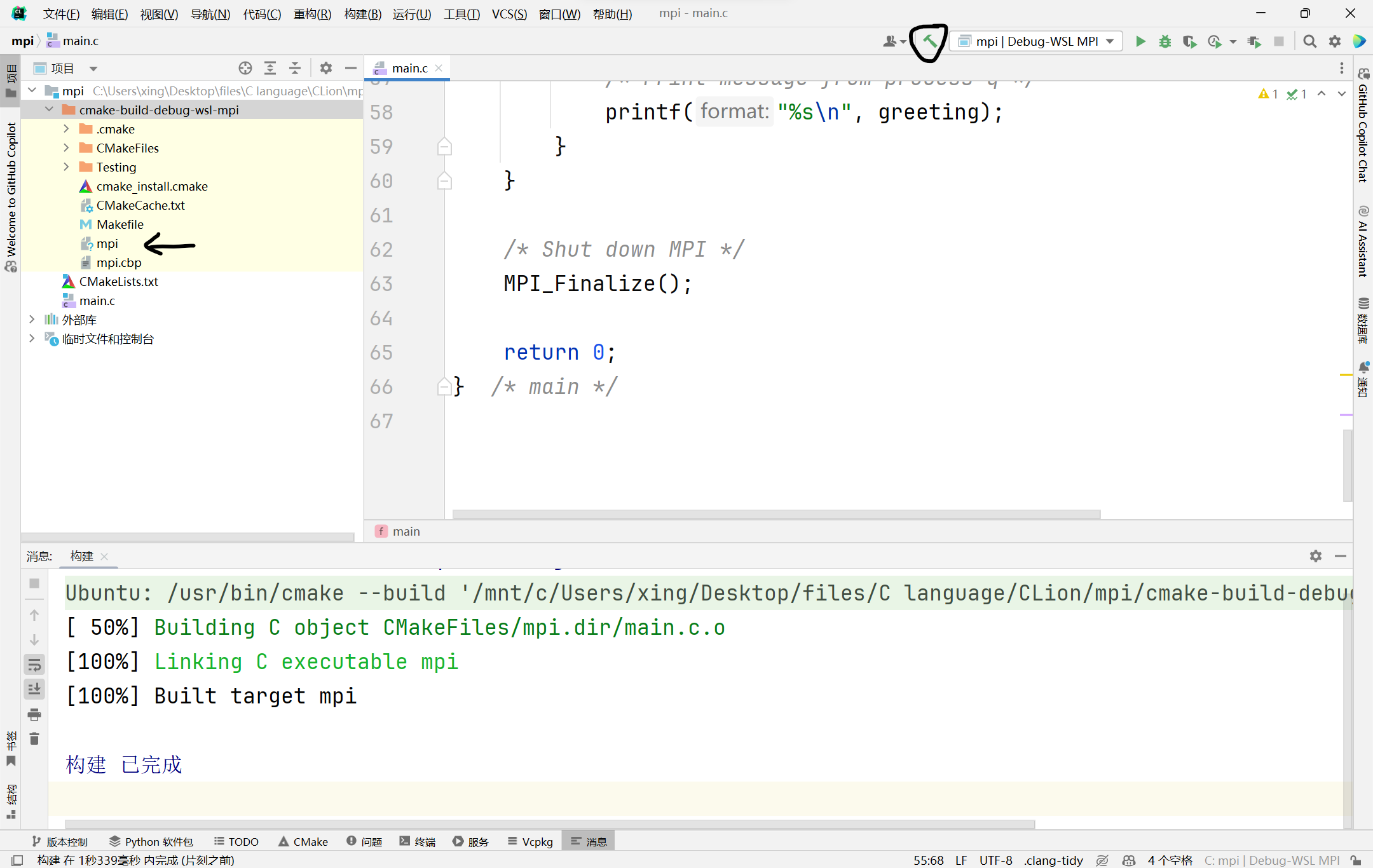
尝试构建项目:
(6) 修改运行配置
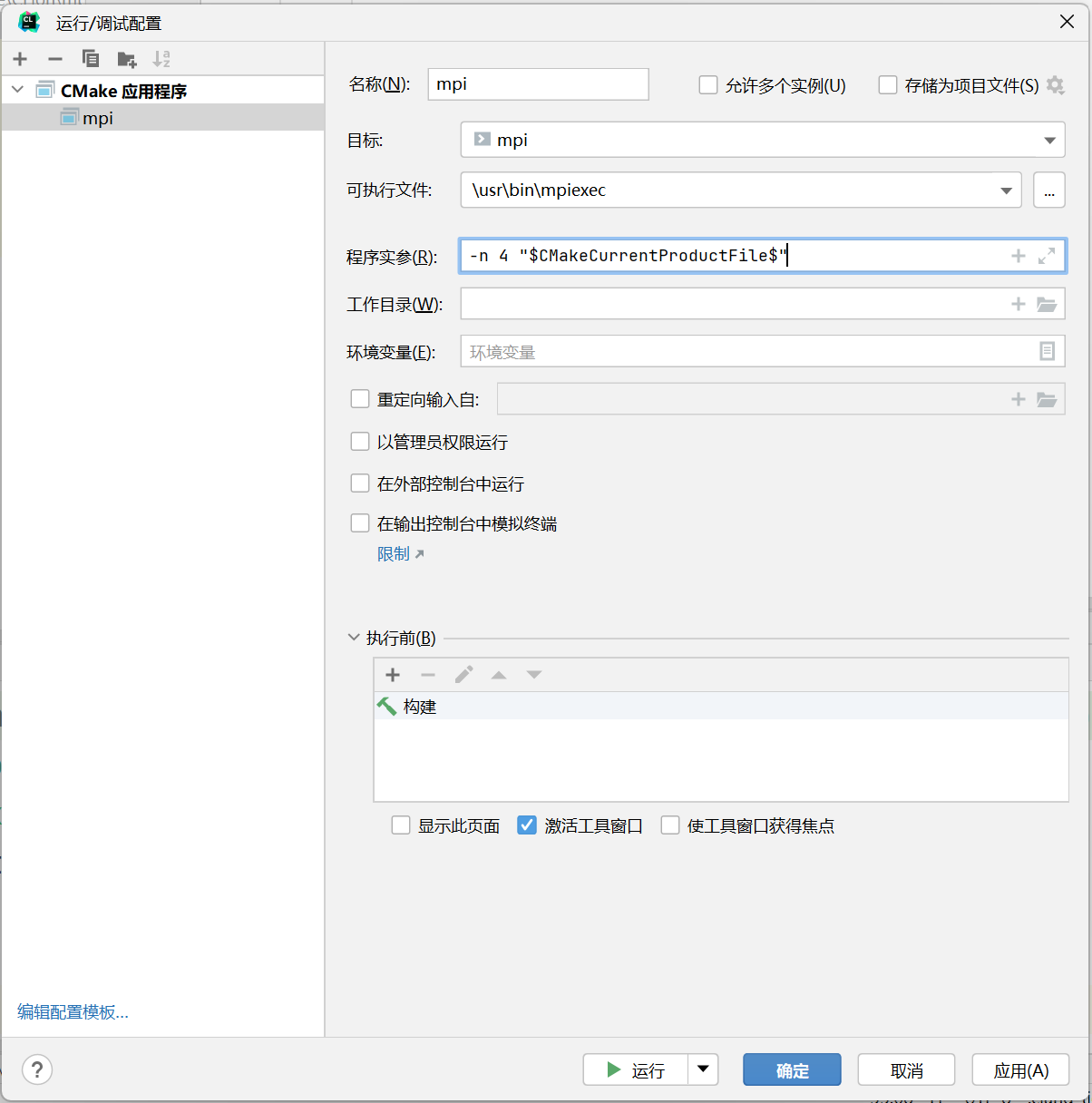
为了可以一键运行,需要修改运行配置:
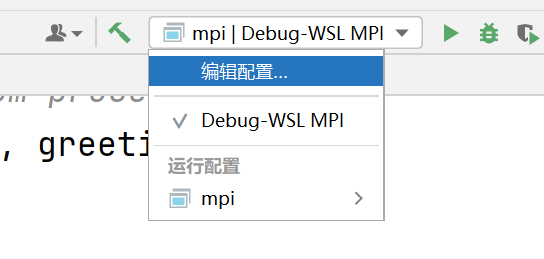
需要将可执行文件修改为 mpiexec 的路径(WSL 内通过 which 命令获取),并将程序实参填写为:-n 4 "$CMakeCurrentProductFile$",其中表示运行时使用 4 个进程,可根据需要修改
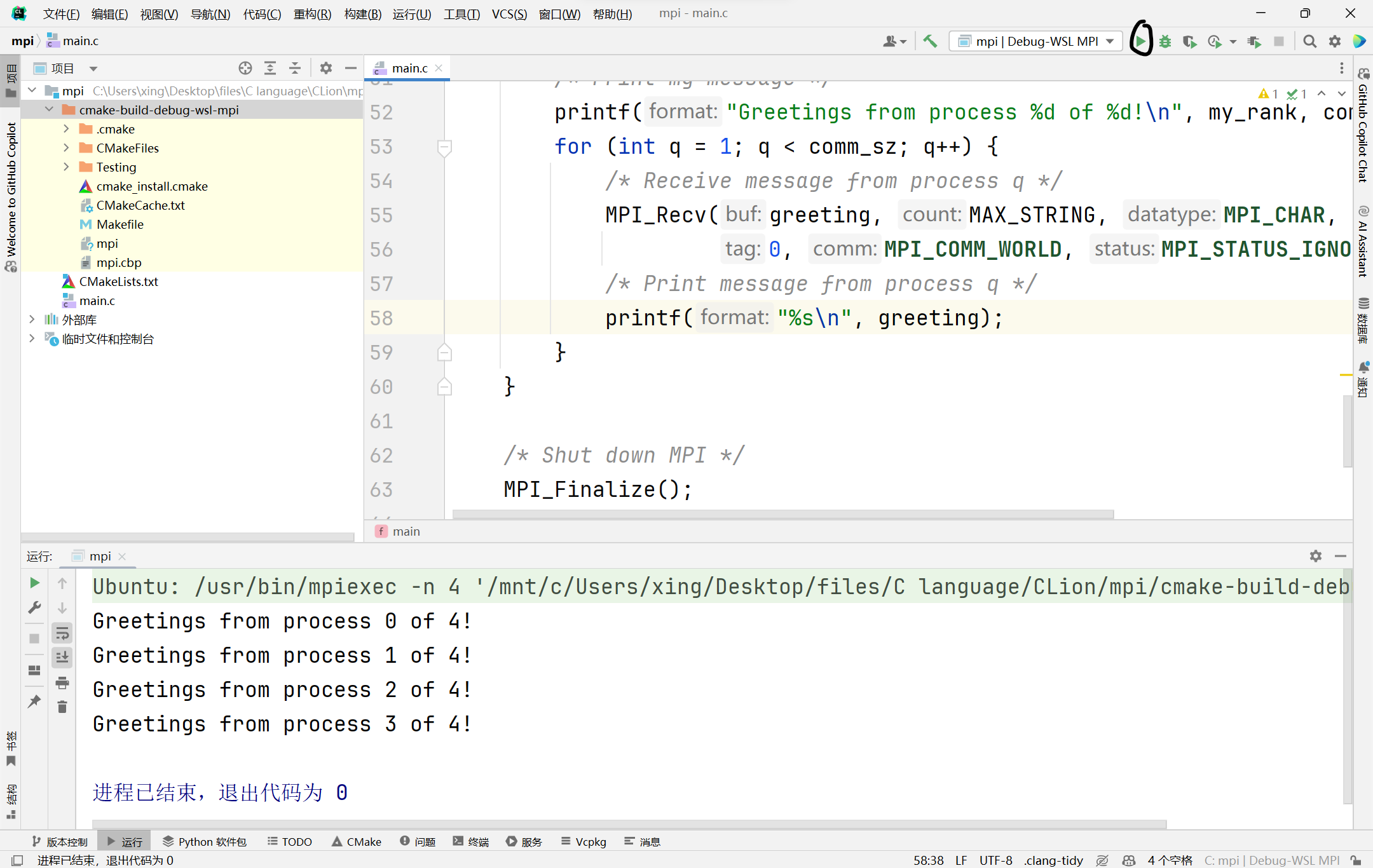
之后,点击运行,程序输出如图:
3. CLion调试MPI程序
CLion 调试 MPI 程序需要通过使用 GDB 的附加到进程功能间接实现。
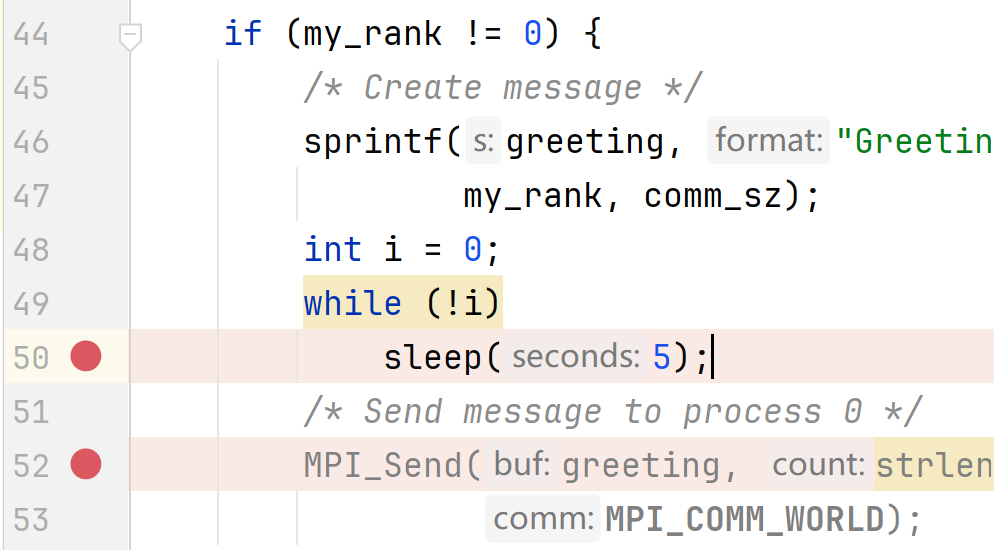
(1) 添加断点
在需要打断点的位置打上断点,并在所有断点位置上方添加如下代码:
int i = 0;

while (!i)

    sleep(5); // 需要包含unistd.h头文件
之后在 sleep(5) 一行添加断点。
(2) 运行程序
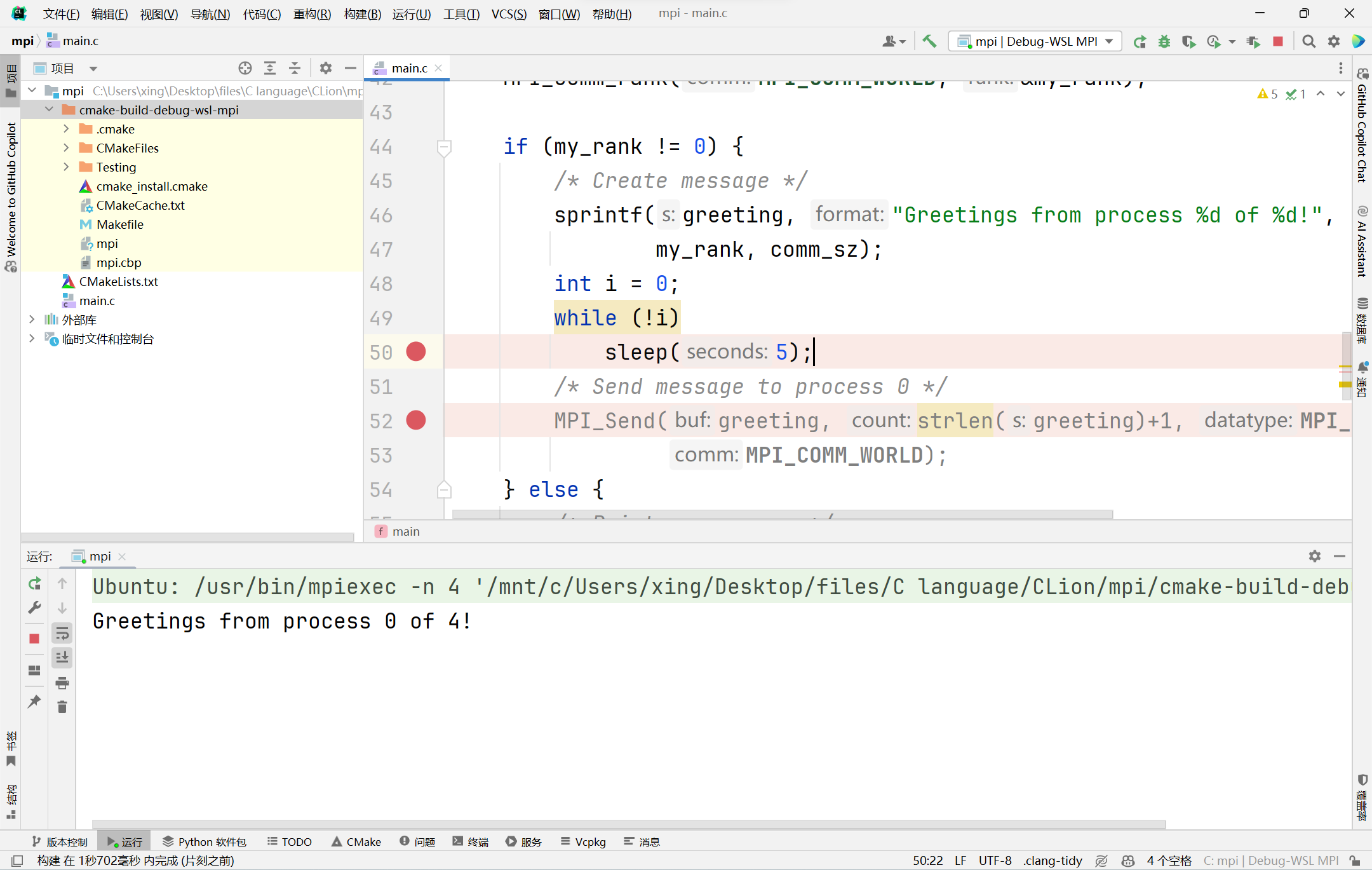
点击运行按钮,运行程序。
(3) GDB附加到进程功能
点击工具 => 附加到进程:
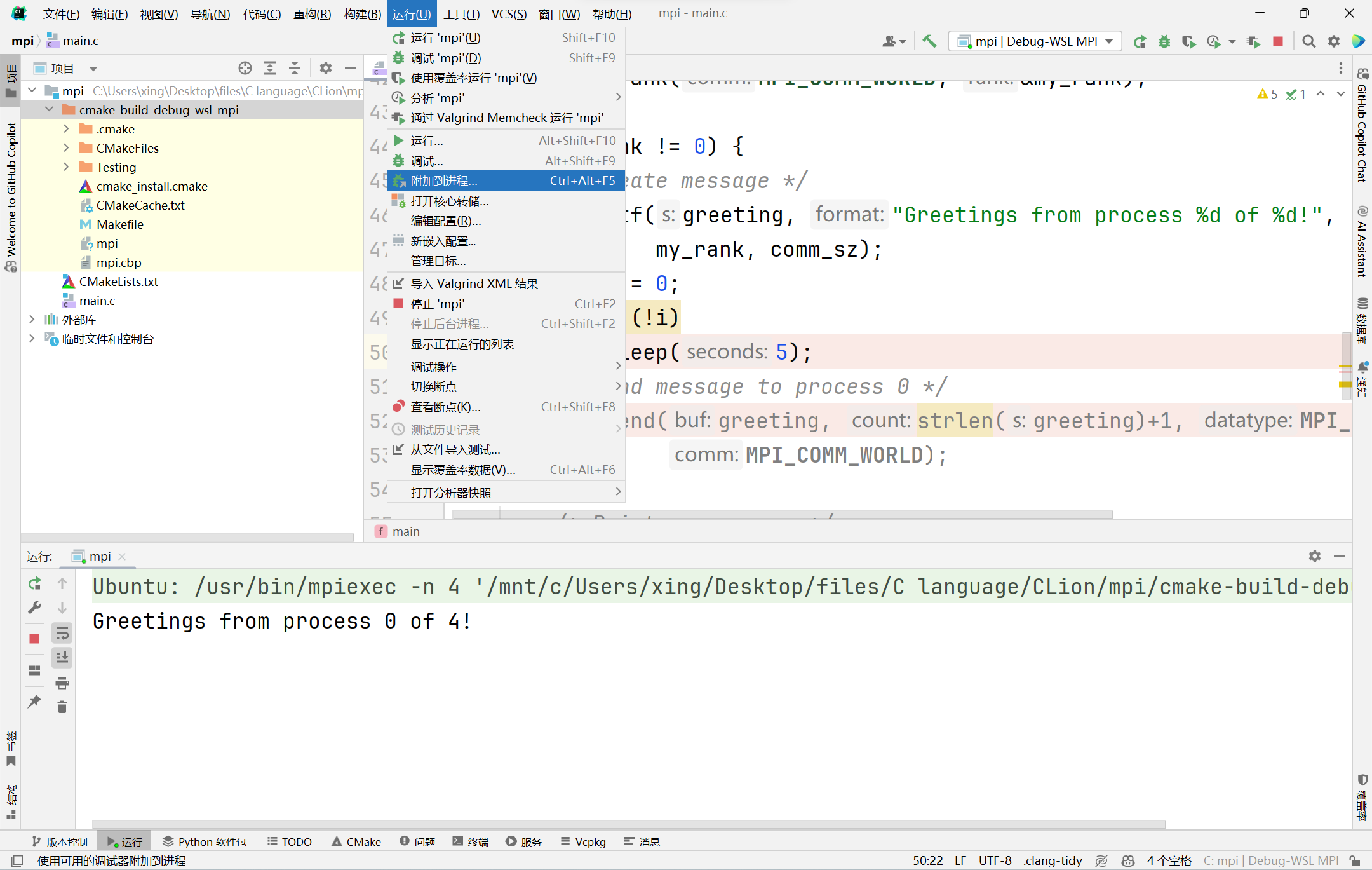
在 SSH/WSL 中搜索当前可执行文件:
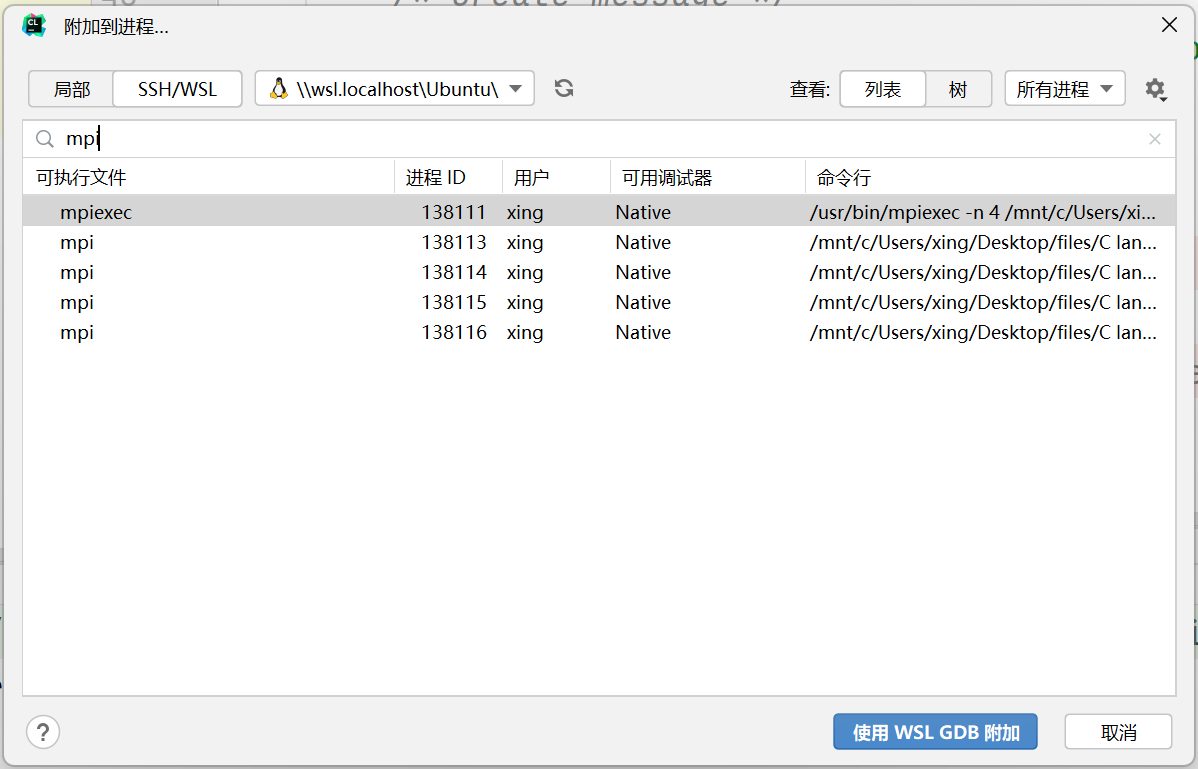
选取想要调试的进程(在实例中,因为 0 号进程中未添加断点,故不应选取进程号小的进程138113),点击使用WSL GDB附加,进入调试模式。
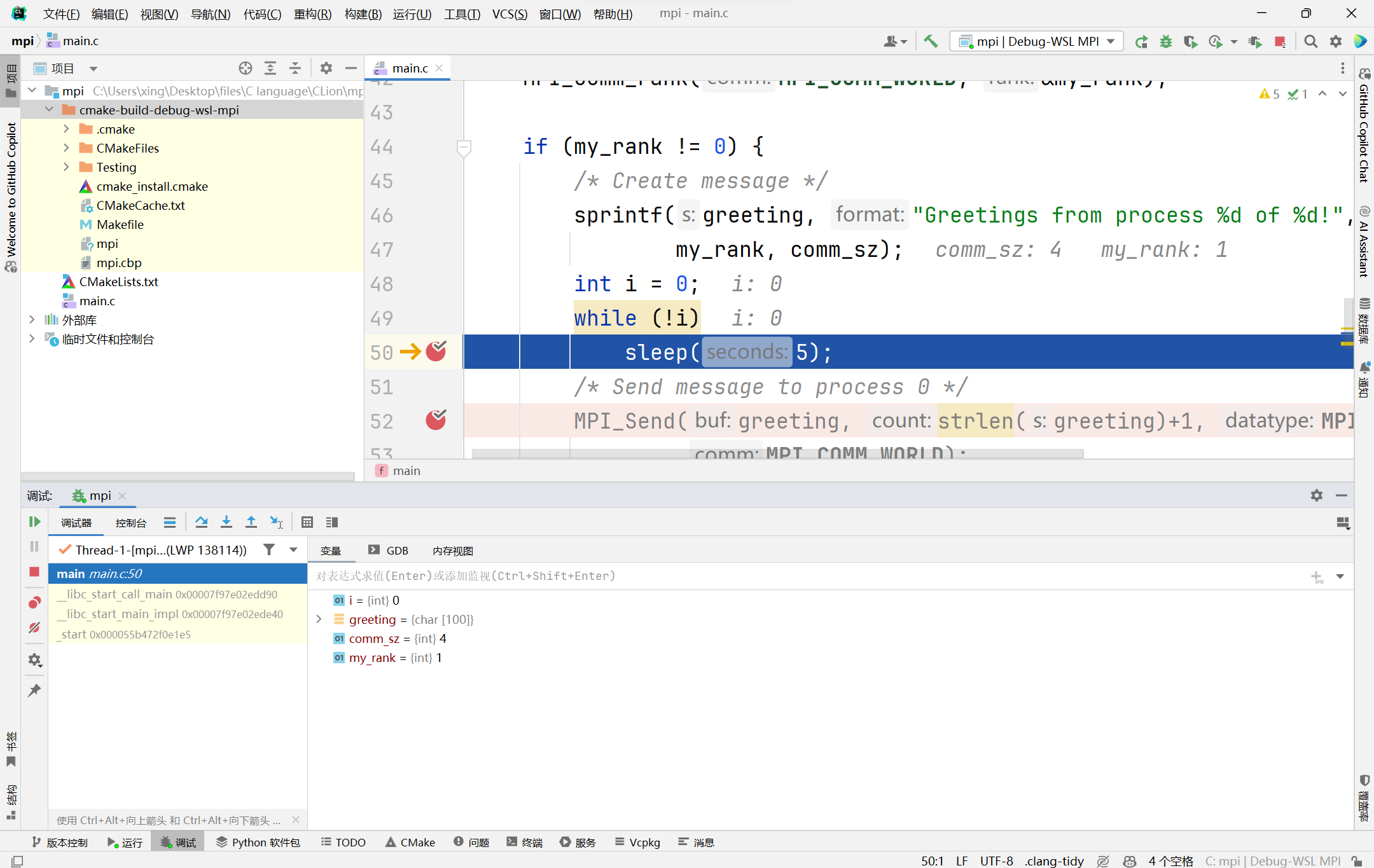
为了程序可以向下运行,需要将 i 的值设置成 1。

之后正常调试即可。
4. 后记
- 使用 CLion 只能通过 GDB 一个进程一个进程地调试,未找到方法调用 TotalView 同时跟踪和调试多个进程
- 运行配置中的程序实参可以填写为:
-n $Prompt$ "$CMakeCurrentProductFile$",实现每次运行前弹窗填写需要运行的进程数
参考资料:
CLion和WSL配置MPI运行及调试环境的更多相关文章
- vs Code配置C++运行和调试环境以及相关问题
vs Code配置C++运行和调试环境以及相关问题 第一步:下载c++插件 第二步:安装编译.调试环境 如果没有Dev-C++下载MinGW 下载地址:https://sourceforge.net/ ...
- 在Mac系统上配置Android真机调试环境
在Mac系统上配置Android真机调试环境 mac上配置安卓环境还说挺方便的,真机调试也比win上要好一些.win上被各种软件强行安装了xxx助手. 在mac上就了一个干净的感觉. 下载Androi ...
- [SoapUI]怎样配置SoapUI运行的不同环境,并在Jenkins上面通过命令调用不用的环境
配置SoapUI运行的不同环境 Groovy 脚本来控制environment 在Jenkins上面通过命令调用不用的环境 http://www.soapui.org/Test-Automation/ ...
- Eclipse IDE配置PHP开发、调试环境
前言 使用java语言开发的朋友想必对Eclipse开发工具已经不陌生了,那么Eclipse作为java主流的开发工具,是否能够开发PHP项目呢?答案如你所想,肯定是可以的!以下就是该IDE下如何配置 ...
- 配置移动前端开发调试环境(nodejs+npm+weiner的安装和配置使用)
这段时间发现做移动端的开发调试是一大难题,网上逛了逛发现有一些工具可用,如chrome的远程调试,实际测试过程中我始终调试不成功,听说被墙后是不行的,所以最终找了如下的方法. 因为基于nodeJS环境 ...
- 笔记:MAC OS X下配置PHP开发、调试环境
操作系统:MAC OS X 工具:MAMP.PhpStorm.xdebug.chrome 1.下载MAMP 2.安装比较简单,安装完成后,应用程序中会增加如下4个应用 MacGDBp是PHP调试器,使 ...
- 怎么用notepad配置来运行C语音环境
想要运行C语言,我们可以用notepad软件来进行编辑,那么怎么用notepad 配置运行c语言开发环境呢? Notepad++是一款很好的编辑器,可以用来开发很多的工具,具体大家请看下文给大家详细讲 ...
- 配置QtCreator+CDB远程调试环境(要设置_NT_SYMBOL_PATH和QT_PLUGIN_PATH和Path)
相关环境信息:开发机Win7 x64.远程机器WinXP.调试器是CDB.Qt版本5.2.1 一.部署远程机器环境 我这里用的是虚拟机(Windows XP),根据你要调试的程序选择安装不同架构的Wi ...
- MAC OS X下配置PHP开发、调试环境
操作系统:MAC OS X 工具:MAMP.PhpStorm.xdebug.chrome 1.下载MAMP 2.安装比较简单,安装完成后,应用程序中会增加如下4个应用 MacGDBp是PHP调试器,使 ...
- 配置QtCreator+CDB远程调试环境(用到了符号表) good
相关环境信息:开发机Win7 x64.远程机器WinXP.调试器是CDB.Qt版本5.2.1 一.部署远程机器环境 我这里用的是虚拟机(Windows XP),根据你要调试的程序选择安装不同架构的Wi ...
随机推荐
- Python之猜数字游戏
说明: 本例改编自<Python编程快速上手>.例子很简单我就不多说了 直接上代码,给初学python练手用. 给你6次机会猜对一个预先生成好的1-20之间的整数.覆盖一下知识点: 条件语 ...
- win32 - 监视网络流量
可以从Windows Sockets 2开始, 虽然微软提供了官方工具, Microsoft Network Monitor 3.4, 不过我们如果能够通过相关的代码和api的调用来深入研究的话,那就 ...
- SpringBoot 服务接口限流,搞定!
来源:blog.csdn.net/qq_34217386/article/details/122100904 在开发高并发系统时有三把利器用来保护系统:缓存.降级和限流.限流可以认为服务降级的一种 ...
- 并发慎用——System.currentTimeMillis()
好记忆不如烂笔头,能记下点东西,就记下点,有时间拿出来看看,也会发觉不一样的感受. System.currentTimeMillis()是极其常用的基础Java API,广泛地用来获取时间戳或测量代码 ...
- 前端保存JWT的使用方法
我们可以将JWT保存在cookie中,也可以保存在浏览器的本地存储里,我们保存在浏览器本地存储中 浏览器的本地存储提供了sessionStorage 和 localStorage 两种,从属于wind ...
- 【Azure 事件中心】Spring Cloud Stream Event Hubs Binder 发送Event Hub消息遇见 Spec. Rule 1.3 - onSubscribe, onNext, onError and onComplete signaled to a Subscriber MUST be signaled serially 异常
问题描述 开发Java Spring Cloud应用,需要发送消息到Azure Event Hub中.使用 Spring Cloud Stream Event Hubs Binder 依赖,应用执行一 ...
- 【Azure 环境】Azure CLI 获取Access Token的脚本实例
问题描述 如何使用azure CLI命令获取到中国区的Access Token呢? 问题解答 首先,需要通过 az cloud set --name AzureChinaCloud 来设置登录中国区的 ...
- Java 子类对象实例化的全过程
2 /* 3 * 子类对象实例化的全过程 4 * 5 *1.结果上来看:(继承性) 6 * 子类继承父类以后,就获取了父类中声明的属性或方法 7 * 创建子类的对象,在堆空间中,就会加载所有父类声明的 ...
- Codeforces Round 920 (Div. 3)(A~F)
目录 A B C D E F A 按题意模拟即可 #include <bits/stdc++.h> #define int long long #define rep(i,a,b) for ...
- apt-get upgrade 和apt-get dist-upgrade区别
kali linux系统或者 debian等系统 以及centos 在系统升级后经常会出现系统无法启动,或者启动之后GUI功能没有的问题: 笔记: 区别这两种用法 apt-get update ...