
Kubernetes(K8S) helm 安装
Helm 是一个 Kubernetes 的包管理工具, 就像 Linux 下的包管理器, 如 yum/apt 等, 可以很方便的将之前打包好的 yaml 文件部署到 kubernetes 上。
Helm 有 3 个重要概念:
- helm: 一个命令行客户端工具, 主要用于 Kubernetes 应用 chart 的创建、 打包、 发布和管理。
- Chart: 应用描述, 一系列用于描述 k8s 资源相关文件的集合。
- Release: 基于 Chart 的部署实体, 一个 chart 被 Helm 运行后将会生成对应的一个release; 将在 k8s 中创建出真实运行的资源对象。
在部署微服务项目时,可能有几十个服务,每个服务都有一套 yaml 文件,需要维护大量 yaml 文件,版本管理特别不方便
使用 helm 可以解决下列问题:
- 可以把微服务中的几十个 yaml 作为一个整体管理
- 实现 yaml 高效复用
- 应用级别的版本管理,当前V3,回滚到V2
helm 2019年 V3版本,变化项
- V3 版本删除 Tiller (架构变化)
- Release 可以在不同命名空间重用
- 将 Chart 推送到 docker 仓库中
安装
https://helm.sh/
https://helm.sh/zh/docs/intro/install/
下载 helm 安装压缩包,上传到 linux
解压 helm,把目录复制到 usr/bin 目录中
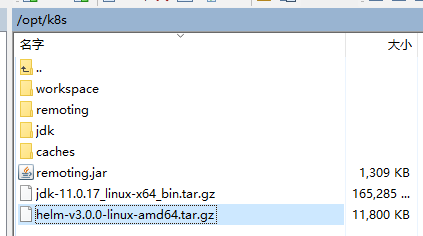
[root@k8smaster ~]# cd /opt/k8s/

[root@k8smaster k8s]# tar zxfv helm-v3.0.0-linux-amd64.tar.gz

linux-amd64/

linux-amd64/helm

linux-amd64/README.md

linux-amd64/LICENSE

[root@k8smaster k8s]# mv ./linux-amd64/helm /usr/bin/

# 显示版本,安装完成

[root@k8smaster k8s]# helm version

version.BuildInfo{Version:"v3.0.0", GitCommit:"e29ce2a54e96cd02ccfce88bee4f58bb6e2a28b6", GitTreeState:"clean", GoVersion:"go1.13.4"}

[root@k8smaster k8s]#
配置
添加仓库
# 添加 仓库

[root@k8smaster ~]# helm repo add stable http://mirror.azure.cn/kubernetes/charts

"stable" has been added to your repositories

# 添加 阿里云仓库

[root@k8smaster ~]# helm repo add aliyun https://kubernetes.oss-cn-hangzhou.aliyuncs.com/charts

"aliyun" has been added to your repositories

# 查看

[root@k8smaster ~]# helm repo list

NAME    URL

stable  http://mirror.azure.cn/kubernetes/charts

aliyun  https://kubernetes.oss-cn-hangzhou.aliyuncs.com/charts

# 更新

[root@k8smaster ~]# helm repo update

Hang tight while we grab the latest from your chart repositories...

...Successfully got an update from the "aliyun" chart repository

...Successfully got an update from the "stable" chart repository

Update Complete. ⎈ Happy Helming!⎈

# 删除阿里云

[root@k8smaster ~]# helm repo remove aliyun

"aliyun" has been removed from your repositories

[root@k8smaster ~]# helm repo list

NAME    URL

stable  http://mirror.azure.cn/kubernetes/charts

[root@k8smaster ~]#
部署应用
# 查找 chart

[root@k8smaster ~]# helm search repo weave

NAME                    CHART VERSION   APP VERSION     DESCRIPTION

stable/weave-cloud      0.3.9           1.4.0           DEPRECATED - Weave Cloud is a add-on to Kuberne...

stable/weave-scope      1.1.12          1.12.0          DEPRECATED - A Helm chart for the Weave Scope c...

# 查看 chrt 信息

[root@k8smaster ~]# helm show chart stable/weave-scope

apiVersion: v1

appVersion: 1.12.0

deprecated: true

description: DEPRECATED - A Helm chart for the Weave Scope cluster visualizer.

home: https://www.weave.works/oss/scope/

icon: https://avatars1.githubusercontent.com/u/9976052?s=64

keywords:

- containers

- dashboard

- monitoring

name: weave-scope

sources:

- https://github.com/weaveworks/scope

version: 1.1.12

# 安装,名字叫 ui

[root@k8smaster ~]# helm install ui stable/weave-scope

NAME: ui

LAST DEPLOYED: Mon Nov 28 13:15:05 2022

NAMESPACE: default

STATUS: deployed

REVISION: 1

NOTES:

You should now be able to access the Scope frontend in your web browser, by

using kubectl port-forward:

kubectl -n default port-forward $(kubectl -n default get endpoints \

ui-weave-scope -o jsonpath='{.subsets[0].addresses[0].targetRef.name}') 8080:4040

then browsing to http://localhost:8080/.

For more details on using Weave Scope, see the Weave Scope documentation:

https://www.weave.works/docs/scope/latest/introducing/

# 查看列表

[root@k8smaster ~]# helm list

NAME    NAMESPACE       REVISION        UPDATED                                 STATUS          CHART                   APP VERSION

ui      default         1               2022-11-28 13:15:05.404335352 +0800 CST deployed        weave-scope-1.1.12      1.12.0 # 查看发布状态

[root@k8smaster ~]# helm status ui

NAME: ui

LAST DEPLOYED: Mon Nov 28 13:15:05 2022

NAMESPACE: default

STATUS: deployed

REVISION: 1

NOTES:

You should now be able to access the Scope frontend in your web browser, by

using kubectl port-forward:

kubectl -n default port-forward $(kubectl -n default get endpoints \

ui-weave-scope -o jsonpath='{.subsets[0].addresses[0].targetRef.name}') 8080:4040

then browsing to http://localhost:8080/.

For more details on using Weave Scope, see the Weave Scope documentation:

https://www.weave.works/docs/scope/latest/introducing/

# 查看服务 当前是不暴露端口的

[root@k8smaster ~]# kubectl get svc

NAME             TYPE        CLUSTER-IP     EXTERNAL-IP   PORT(S)          AGE

javademo1        NodePort    10.106.43.46   <none>        8111:31452/TCP   40d

kubernetes       ClusterIP   10.96.0.1      <none>        443/TCP          45d

nginx            NodePort    10.103.87.81   <none>        80:30339/TCP     45d

nginx-nfs        NodePort    10.99.84.9     <none>        80:30205/TCP     19d

ui-weave-scope   ClusterIP   10.101.4.212   <none>        80/TCP           3m19s

# 修改 ui-weave-scpoe 暴露端口

[root@k8smaster ~]# kubectl edit svc ui-weave-scope

#  type: ClusterIP =>  改成 type: NodePort

service/ui-weave-scope edited

# 再次查看,暴露了 30690 端口

[root@k8smaster ~]# kubectl get svc

NAME             TYPE        CLUSTER-IP     EXTERNAL-IP   PORT(S)          AGE

javademo1        NodePort    10.106.43.46   <none>        8111:31452/TCP   40d

kubernetes       ClusterIP   10.96.0.1      <none>        443/TCP          45d

nginx            NodePort    10.103.87.81   <none>        80:30339/TCP     45d

nginx-nfs        NodePort    10.99.84.9     <none>        80:30205/TCP     19d

ui-weave-scope   NodePort    10.101.4.212   <none>        80:30690/TCP     5m26s

# 删除 ui-weave-scope

[root@k8smaster ~]# kubectl delete deployment ui-weave-scope

[root@k8smaster ~]# kubectl delete svc ui-weave-scope
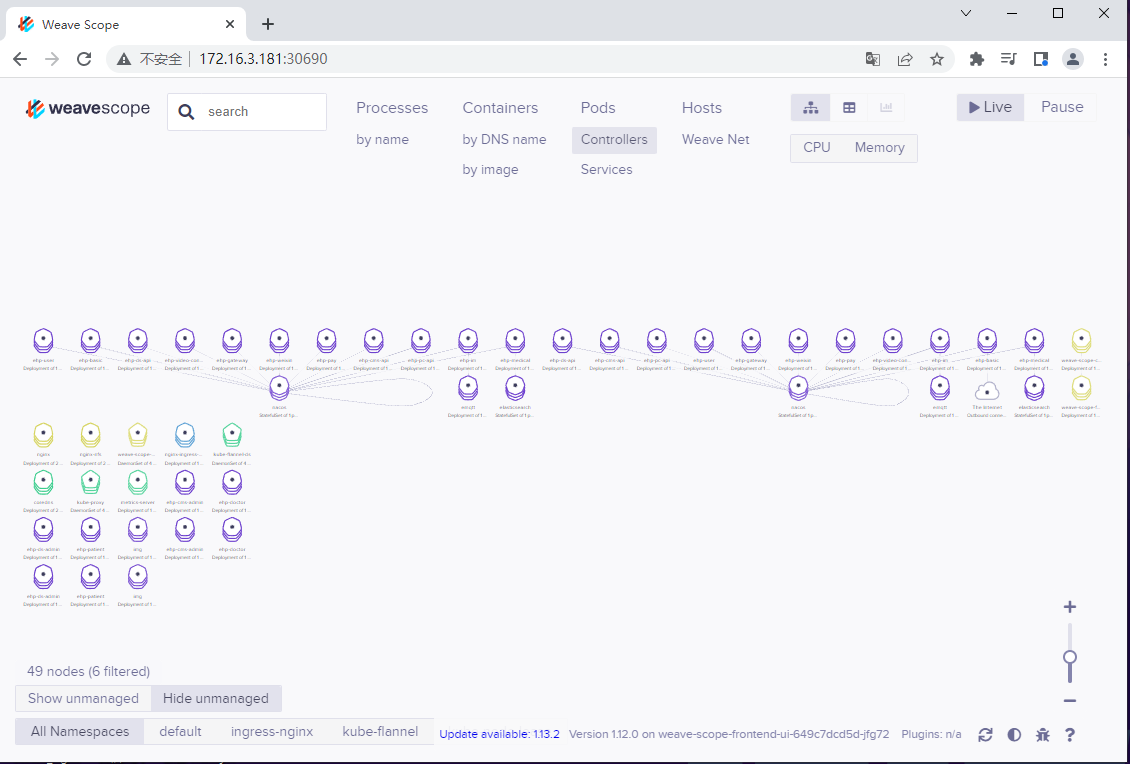
测试
Kubernetes(K8S) helm 安装的更多相关文章
- kubernetes(k8s) helm安装kafka、zookeeper
通过helm在k8s上部署kafka.zookeeper 通过helm方法安装 k8s上安装kafka,可以使用helm,将kafka作为一个应用安装.当然这首先要你的k8s支持使用helm安装.he ...
- Kubernetes(k8s)完整安装教程
Kubernetes(k8s)完整安装教程 2019-08-27 2.3k 记录 发表评论 目录 1 安装 1.1 安装 Docker 1.2 安装 VirtualBox 1.3 安装 kubect ...
- K8s Helm安装配置入门
作为k8s现在主流的一种包部署方式,尽管不用,也需要进行一些了解.因为,它确实太流行了. 这一套太极拳打下来,感觉helm这种部署,目前还不太适合于我们公司的应用场景.它更适合需要手工编程各种yaml ...
- k8s Helm安装Prometheus Operator
Ubuntu 18 Kubernetes集群的安装和部署 以及Helm的安装完成了k8s的集群和helm的安装,今天我们来看看Prometheus的监控怎么搞.Prometheus Operator ...
- ubuntu16.04 docker kubernetes(k8s) istio 安装
版本: docker: 19.03.5 kubernetes: 1.17.0 istio: 1.4.3 步骤一:给ubuntu换源 https://www.cnblogs.com/lfri/p/106 ...
- Kubernetes(K8S) kubesphere 安装
安装KubeSphere最好的方法就是参考官方文档,而且官方文档是中文的. 官网地址:https://kubesphere.com.cn/ https://github.com/kubesphere/ ...
- Kubernetes用Helm安装Ingress并踩一下使用的坑
1 前言 欢迎访问南瓜慢说 www.pkslow.com获取更多精彩文章! Ingress是Kubernetes一个非常重要的Controller,它类似一个路由转发的组件,可以让外界访问Kubern ...
- k8s helm 安装etcd
待续 helm install etcd bitnami/etcd \ --set statefulset.replicaCount=3 \ --set persistence.enabled=tru ...
- Helm 安装Kafka
helm镜像库配置 helm repo add stable http://mirror.azure.cn/kubernetes/charts helm repo add incubator http ...
- kubernetes实战(十):k8s使用Helm安装harbor
1.基本概念 对于复杂的应用中间件,需要设置镜像运行的需求.环境变量,并且需要定制存储.网络等设置,最后设计和编写Deployment.Configmap.Service及Ingress等相关yaml ...
随机推荐
- 带您了解 O2OA 流程中的人工活动处理方式
这次咱们来介绍 O2OA (翱途) 开发平台流程引擎中的人工活动的处理方式和逻辑,O2OA (翱途) 主要采用拖拽可视化开发的方式完成流程的设计和配置,不需要过多的代码编写,业务人员可以直接进行修改操 ...
- 背包DP全类型
AcWing 2. 01背包问题 #include <iostream> #include <algorithm> using namespace std; const int ...
- Pooling与马赛克的秘密
说到Pooling,相信学习过CNN的朋友们都不会感到陌生.Pooling在中文当中的意思是"池化",在神经网络当中非常常见,通常用的比较多的一种是Max Pooling,具体 ...
- 在路上---学习篇(一)Python 数据结构和算法 (3) --快速排序
独白: 前几天学的基本简单排序算法,相对来说接受起来还是可以的,今天学的快速排序,视频看了2遍加上自己的思考,才真正的研究明白.自己的编程思维在逐渐的形成,日后还需勤加练习.心得:越高级的算法,越是让 ...
- 自实现string类
一. 环境 Linux x86_64,g++ 8.5.0 二. 实现 自实现 string 之前一直想写来着,一直拖着,现在把它完稿.这个版本是比较简单的版本,有一些可能有不同的或者更好的实现方式,后 ...
- .NET8 依赖注入
依赖注入(Dependency Injection,简称DI)是一种设计模式,用于解耦组件(服务)之间的依赖关系.它通过将依赖关系的创建和管理交给外部容器来实现,而不是在组件(服务)内部直接创建依赖对 ...
- 使用Slurm集群进行分布式图计算:对Github网络影响力的系统分析
本文分享自华为云社区<基于Slurm集群的分布式图计算应用实践:Github协作网络影响力分析>,作者:yd_263841138 . 1. 引言 Slurm(Simple Linux Ut ...
- idea常用快捷键使用
idea常用快捷键使用:1.shift+u 大小写2.alt+shift+u 驼峰命名(插件:CamelCase)3.ctrl+alt 点击跳转实现类4.ctrl 点击跳转接口类5.Alt+F7 查看 ...
- springboot下添加全局异常处理和自定义异常处理
前言 在spring项目中,优雅处理异常,好处是可以将系统产生的全部异常统一捕获处理,自定义的异常也由全局异常来捕获,如果涉及到validator参数校验器使用全局异常捕获也是较为方便. 相关代码: ...
- 初始OpenGL
OpenGL到底是什么? 一般它被认为是一个API,包含一系列操作图形,图像的函数.然而,它并不是一个API,而是Khronos组织制定并维护的规范. OpenGL规定了每个函数如何执行,以及它们的输 ...