
[转帖]oracle OSWatcher安装部署
Oswatch是oracle官方提供,用于收集操作系统性能的小工具,oswatch的安装与使用也比较简单,直接解压就可以使用。oswatch是通过调用系统的命令完成信息的收集,如:ps ,top ,mpstat ,iostat,netstat ,traceroute vmstat 。支持的操作系统包括AIX,Solaris ,Linux等 。
1、解压oswbb软件到指定的目录
-
######这里我使用的是v8.4的版本,直接放到root目录下
-
[root@oracle19c ~]# tar xvf oswbb840.tar
-
oswbb/
-
oswbb/uncpr.bat
-
oswbb/sarsub.sh
-
oswbb/psmemsub.sh
-
oswbb/stopOSWbb.sh
-
oswbb/analysis/
-
oswbb/piddsub.sh
-
oswbb/arpsub.sh
-
oswbb/docs/
-
oswbb/docs/OSWatcher/
-
oswbb/docs/OSWatcher/oswbb_README.txt
2、安装jdk8.0以上版本,oswbba需要调用
-
#####解压jdk8.0版本到指定目录
-
[root@oracle19c archive]# tar xzvf jdk1.8.0_11.tar.gz
-
#####设置java home环境变量
-
vi .bash_profile
-
JAVA_HOME=/root/jdk1.8.0_11
-
PATH=$JAVA_HOME/bin:$HOME/bin
3、启动Oswatcher收集系统资源状态
-
######设置lang环境变量
-
[root@oracle19c oswbb]# export LANG=zh_US
-
[root@oracle19c oswbb]# date
-
Fri Aug 27 15:44:39 CST 2021
-
[root@oracle19c oswbb]#
-
#####示例:启动oswbb.sh 以5秒钟一次并删除1个小时前的归档数据,收集的数据存放在archive目录,默认1个小时进行归档
-
[root@oracle19c oswbb]# ./startOSWbb.sh 5 1 gzip /root/oswbb/archive/
-
[root@oracle19c oswbb]# Info...Zip option IS specified.
-
Info...OSW will use /root/oswbb/archive/ to compress files.
-
Setting the archive log directory to/root/oswbb/archive
-
Testing for discovery of OS Utilities...
-
VMSTAT found on your system.
-
IOSTAT found on your system.
-
MPSTAT found on your system.
-
IP found on your system.
-
TOP found on your system.
-
PIDSTAT found on your system.
-
NFSIOSTAT found on your system.
-
TRACEROUTE found on your system.
-
Discovery of CPU CORE COUNT
-
CPU CORE COUNT will be used by oswbba to automatically look for cpu problems
-
CPU CORE COUNT = 4
-
VCPUS/THREADS = 4
-
Discovery completed.
-
Starting OSWatcher v8.4.0 on Fri Aug 27 15:10:59 CST 2021
-
With SnapshotInterval = 5
-
With ArchiveInterval = 1
-
OSWatcher - Written by Carl Davis, Center of Expertise,
-
Oracle Corporation
-
For questions on install/usage please go to MOS (Note:301137.1)
-
Data is stored in directory: /root/oswbb/archive
-
Starting Data Collection...
-
oswbb heartbeat:Fri Aug 27 15:24:50 CST 2021
-
oswbb heartbeat:Fri Aug 27 15:24:55 CST 2021
-
oswbb heartbeat:Fri Aug 27 15:25:00 CST 2021
-
............
4、到archive目录,看到到已经收集到的系统状态
-
#####进入到archive,查看已经收集到的数据
-
[root@oracle19c oswbb]# cd archive/
-
[root@oracle19c archive]# ls
-
oswarp oswcpuinfo oswifconfig oswiostat oswmeminfo oswmpstat oswnetstat oswnfsiostat oswpidstat oswpidstatd oswprvtnet oswps oswslabinfo oswtop oswvmstat oswxentop
-
[root@oracle19c archive]#
-
#######查看已经收集到的磁盘io信息
-
[root@oracle19c archive]# cd oswiostat/
-
[root@oracle19c oswiostat]#
-
[root@oracle19c oswiostat]#
-
[root@oracle19c oswiostat]# cat oracle19c_iostat_21.08.27.1500.dat |more
-
Linux OSWbb v8.4.0
-
zzz ***Fri Aug 27 15:24:50 CST 2021
-
avg-cpu: %user %nice %system %iowait %steal %idle
-
0.25 0.00 1.01 0.00 0.00 98.74
-
-
Device: rrqm/s wrqm/s r/s w/s rkB/s wkB/s avgrq-sz avgqu-sz await r_await w_await svctm %util
-
sda 0.00 2.00 0.00 11.00 0.00 98.50 17.91 0.01 0.82 0.00 0.82 0.09 0.10
-
sdb 0.00 0.00 0.00 0.00 0.00 0.00 0.00 0.00 0.00 0.00 0.00 0.00 0.00
-
-
zzz ***Fri Aug 27 15:24:55 CST 2021
-
avg-cpu: %user %nice %system %iowait %steal %idle
-
0.50 0.00 1.51 0.00 0.00 97.98
-
-
Device: rrqm/s wrqm/s r/s w/s rkB/s wkB/s avgrq-sz avgqu-sz await r_await w_await svctm %util
-
sda 0.00 0.00 0.00 0.00 0.00 0.00 0.00 0.00 0.00 0.00 0.00 0.00 0.00
-
sdb 0.00 0.00 0.00 2.00 0.00 32.00 32.00 0.00 0.00 0.00 0.00 0.00 0.00
-
-
zzz ***Fri Aug 27 15:25:00 CST 2021
-
avg-cpu: %user %nice %system %iowait %steal %idle
-
0.25 0.00 1.26 0.00 0.00 98.49
-
-
Device: rrqm/s wrqm/s r/s w/s rkB/s wkB/s avgrq-sz avgqu-sz await r_await w_await svctm %util
-
sda 0.00 0.00 0.00 0.00 0.00 0.00 0.00 0.00 0.00 0.00 0.00 0.00 0.00
-
sdb 0.00 0.00 0.00 0.00 0.00 0.00 0.00 0.00 0.00 0.00 0.00 0.00 0.00
-
-
-
#####查看已收集到的top信息
-
[root@oracle19c archive]# cd oswtop/
-
[root@oracle19c oswtop]# ls
-
oracle19c_top_21.08.27.1500.dat
-
[root@oracle19c oswtop]# cat oracle19c_top_21.08.27.1500.dat |more
-
Linux OSWbb v8.4.0
-
zzz ***Fri Aug 27 15:25:21 CST 2021
-
top - 15:25:22 up 57 min, 3 users, load average: 0.90, 1.54, 1.37
-
Tasks: 289 total, 14 running, 275 sleeping, 0 stopped, 0 zombie
-
%Cpu(s): 2.2 us, 5.2 sy, 0.0 ni, 27.4 id, 59.3 wa, 0.0 hi, 5.9 si, 0.0 st
-
KiB Mem : 5780284 total, 2805832 free, 773836 used, 2200616 buff/cache
-
KiB Swap: 2047996 total, 2047996 free, 0 used. 1829288 avail Mem
-
-
PID USER PR NI VIRT RES SHR S %CPU %MEM TIME+ COMMAND
-
19 root 20 0 0 0 0 S 55.6 0.0 0:43.76 ksoftirqd/2
-
24 root 20 0 0 0 0 R 50.9 0.0 0:33.38 ksoftirqd/3
-
406 root 0 -20 0 0 0 S 44.4 0.0 0:01.36 kworker/2:1H
-
405 root 20 0 0 0 0 R 43.5 0.0 0:07.08 xfsaild/sda2
-
865 root 20 0 250744 8372 4680 R 19.4 0.1 1:22.31 vmtoolsd
-
13 root rt 0 0 0 0 S 18.5 0.0 0:06.99 migration/1
-
61270 root 20 0 58544 2324 1528 R 5.6 0.0 0:00.06 top
-
53917 oracle 20 0 2051652 33636 29708 S 3.7 0.6 0:01.08 ora_m002_orcl
-
33319 root 20 0 0 0 0 R 2.8 0.0 1:07.99 kworker/u256:2
-
35576 root 20 0 0 0 0 S 2.8 0.0 0:04.65 kworker/0:0
-
61237 root 20 0 4964 1264 656 S 2.8 0.0 0:00.05 pidstat
-
61239 root 20 0 4964 1264 656 S 2.8 0.0 0:00.04 pidstat
-
52752 oracle -2 0 2050060 20348 17272 R 1.9 0.4 0:11.47 ora_vktm_orcl
-
61188 oracle 20 0 109132 1404 544 R 1.9 0.0 0:00.65 dd
-
61219 root 20 0 4396 760 632 S 1.9 0.0 0:00.02 mpstat
-
42985 root 20 0 0 0 0 S 0.9 0.0 0:03.32 kworker/u256:1
-
1 root 20 0 191272 4236 2588 S 0.0 0.1 0:11.09 systemd
-
2 root 20 0 0 0 0 S 0.0 0.0 0:00.02 kthreadd
5、使用oswbba查看收集的信息
-
#####Oracle 提供了OSWbba(OS Watcher Black Box Analyzer)工具,可以分析收集的数据并用图表展示出来。
-
[root@oracle19c oswbb]# java -jar oswbba.jar -i /root/oswbb/archive/
-
Starting OSW Analyzer V8.4.0
-
OSWatcher Analyzer Written by Oracle Center of Expertise
-
Copyright (c) 2019 by Oracle Corporation
-
Parsing Data. Please Wait...
-
WARNING. oswbba has detected at least some of the files in you
-
archive have been compressed. These files will not be analyzed.
-
You must uncompress all the files in the archive for full
-
analysis and graphing capabilities.
-
Scanning file headers for version and platform info...
-
Compressed file found. Ignoring oracle19c_iostat_21.08.27.1500.dat.gz ...
-
Compressed file found. Ignoring oracle19c_pidstat_21.08.27.1500.dat.gz ...
-
Parsing file oracle19c_pidstat_21.08.27.1600.dat ...
-
Compressed file found. Ignoring oracle19c_iostat_21.08.27.1500.dat.gz ...
-
Parsing file oracle19c_iostat_21.08.27.1600.dat ...
-
This directory already exists. Rewriting...
-
Parsing Completed.
-
Enter 1 to Display CPU Process Queue Graphs
-
Enter 2 to Display CPU Utilization Graphs
-
Enter 3 to Display CPU Other Graphs
-
Enter 4 to Display Memory Graphs
-
Enter 5 to Display Disk IO Graphs
-
Enter 61 to Display Individual OS Process I/O RPS Graphs
-
Enter 62 to Display Individual OS Process I/O WPS Graphs
-
Enter 63 to Display Individual OS Process Percent User CPU Graphs
-
Enter 64 to Display Individual OS Process Percent System CPU Graphs
-
Enter 65 to Display Individual OS Process Percent Total CPU (User + System) Graphs
-
Enter 66 to Display Individual OS Process Percent Memory Graphs
-
-
Enter GP to Generate Individual Process Profile
-
Enter GC to Generate All CPU Gif Files
-
Enter GM to Generate All Memory Gif Files
-
Enter GD to Generate All Disk Gif Files
-
-
Enter L to Specify Alternate Location of Gif Directory
-
Enter Z to Zoom Graph Time Scale (Does not change analysis dataset)
-
Enter B to Returns to Baseline Graph Time Scale (Does not change analysis dataset)
-
Enter R to Remove Currently Displayed Graphs
-
-
Enter X to Export Parsed Data to Flat File
-
Enter S to Analyze Subset of Data(Changes analysis dataset including graph time scale)
-
Enter A to Analyze Data
-
Enter D to Generate DashBoard
-
-
Enter Q to Quit Program
-
-
Please Select an Option:5
-
Device Name Average Wait Times in Milliseconds
-
-
sda 87.03
-
sdb 150.21
-
Specify A Case Sensitive Device Name to View (Q to exit): sdb
-
#####
-
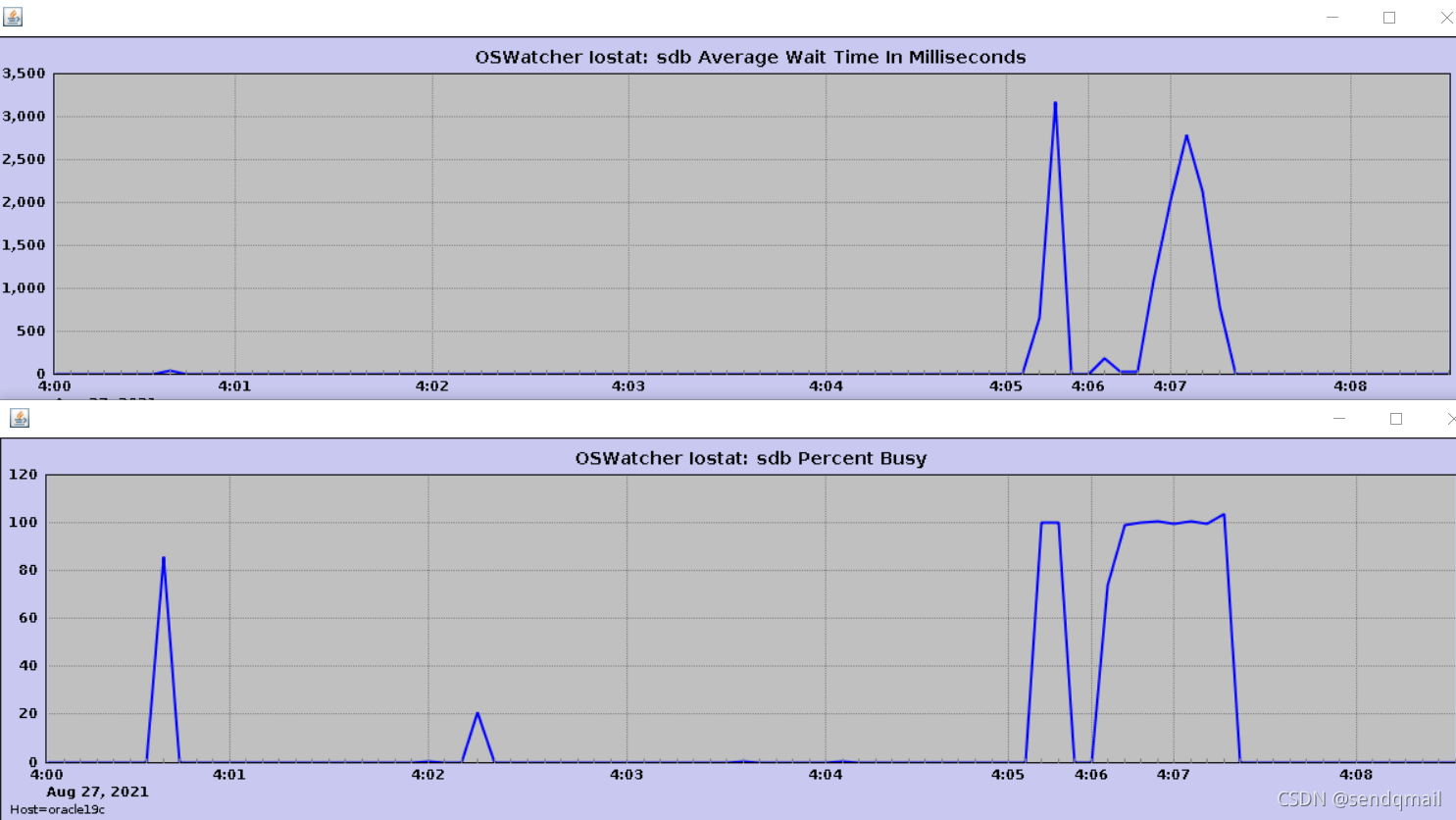
备注:图表示例:展示的是sdb磁盘等待时间及繁忙状态
oswatcher更为具体的使用方法,请参考docs内的OSWatcherOverview_840.pdf文档。
[转帖]oracle OSWatcher安装部署的更多相关文章
- Oracle RAC安装部署文档
1. 部署环境步骤 1.1 软件环境 操作系统:CentOS release 6.5(推荐使用5.*的系统)192.168.1.151 racnode1 192.168.1.152 ...
- Centos 下oracle 11g 安装部署及手动建库过程
Oracle 11g 手动建库,在虚拟环境中,不使用DBCA工具进行创建数据库 1.Linux环境的基本配置 2.ip 10.11.30.60 3.Oracle 11g安装过程 ---------- ...
- Oracle安装部署,版本升级,应用补丁快速参考
一.Oracle安装部署 1.1 单机环境 1.2 Oracle RAC环境 1.3 Oracle DataGuard环境 1.4 主机双机 1.5 客户端部署 二.Oracle版本升级 2.1 单机 ...
- Linux平台oracle 11g单实例 + ASM存储 安装部署 快速参考
操作环境:Citrix虚拟化环境中申请一个Linux6.4主机(模板)目标:创建单机11g + ASM存储 数据库 1. 主机准备 2. 创建ORACLE 用户和组成员 3. 创建以下目录并赋予对应权 ...
- Oracle Grid Infrastructure安装部署文档
1. 部署环境步骤 1.1 软件环境 操作系统: CentOS release 6.5 oracle安装包: linux.x64_11gR2_grid.zip linux.x64_11gR2_data ...
- Oracle 19C的下载和安装部署(图形安装和静默安装)
Oracle 19C的下载和安装部署(图形安装和静默安装) https://docs.oracle.com/en/database/oracle/oracle-database/19/ladbi/ ...
- Linux平台Oracle 12.1.0.2 单实例安装部署
主题:Linux平台Oracle 12.1.0.2 单实例安装部署 环境:RHEL 6.5 + Oracle 12.1.0.2 需求:安装部署OEM 13.2需要Oracle 12.1.0.2版本作为 ...
- [转帖]VMware Vsphere 6.0安装部署 (三) vCenter Server安装
VMware Vsphere 6.0安装部署 (三) vCenter Server安装 2016年08月29日 14:59:14 dAng1r0Us 阅读数:72942 版权声明:本文为博主原创文 ...
- 1. Oracle安装部署文档
一. 部署环境步骤 1.1 软件环境 操作系统:CentOS release 6.5oracle安装包:linux.x64_11gR2_database_1of1.zip:linux.x64_11gR ...
- Oracle Grid control 11g及Active DataGuard 11g安装部署
Oracle Grid control 11g及Active DataGuard 11g安装部署(一) 原贴 http://blog.csdn.net/lichangzai/article/detai ...
随机推荐
- 十分钟教你在 k8s 中部署一个前后端应用
转载至我的博客https://www.infrastack.cn ,公众号:架构成长指南 大家好,我是蜗牛哥,好多开发人员,尤其是没接触过 k8s 的人员对如何在k8s中部署一个 前后端应用很模糊,不 ...
- 下载安装Android Studio
1,安装java的jdk 2,下载安装Dart 3,下载安装 Android Studio 建议这个安装在C盘,以防后期出现各种问题 在plugins中 (1)下载dart插件 (2)下载flutt ...
- 《语义增强可编程知识图谱SPG》白皮书
语义増强可编程图谱框架:新一代知识图谱语义框架/引擎.SPG+LLM双驱架构及应用相关进展和应用.<语义增强可编程知识图谱SPG>白皮书 v1.0.pdf: https://url39.c ...
- 探索Reactor网络模型在当今应用领域的革新
本文分享自华为云社区<驾驭网络技术的未来:探索Reactor网络模型在当今应用领域的革新>,作者: Lion Long . 本文介绍了Linux网络设计中的Reactor网络模型及其在实际 ...
- 宝兰德应用服务器软件与华为云GaussDB完成兼容互认证
摘要:北京宝兰德软件股份有限公司携手华为云完成宝兰德应用服务器软件9.5与GaussDB数据库兼容性测试,并获得华为云授予的技术认证书. 本文分享自华为云社区<宝兰德应用服务器软件与华为云Gau ...
- 详解NLP和时序预测的相似性【附赠AAAI21最佳论文INFORMER的详细解析】
摘要:本文主要分析自然语言处理和时序预测的相似性,并介绍Informer的创新点. 前言 时序预测模型无外乎RNN(LSTM, GRU)以及现在非常火的Transformer.这些时序神经网络模型的主 ...
- 使用Mask R-CNN模型实现人体关键节点标注
摘要:在本案例中,我们将展示如何对基础的Mask R-CNN进行扩展,完成人体关键节点标注的任务. 本文分享自华为云社区<使用Mask R-CNN模型实现人体关键节点标注>,作者: 运气男 ...
- 火山引擎DataLeap的Data Catalog系统公有云实践 (上)
更多技术交流.求职机会,欢迎关注字节跳动数据平台微信公众号,回复[1]进入官方交流群 前言 Data Catalog 通过汇总技术和业务元数据,解决大数据生产者组织梳理数据.数据消费者找数和理解数的业 ...
- Axure 弹出框遮罩层灯箱效果
灯箱效果:比较适合Web, 效果不太理想,还是自己做个比较合适 弹出效果:就是弹框 推动效果:A 元件显示的时候,把 B元件往下.右移动.如Web左侧菜二级单效果
- Python上下文管理器的高级使用
在文件处理和网络编程时,对于打开的文件不管最后内容处理是否符合预期都要在结束时关闭文件.这时常见的处理方法是try catch finally 的方法 f = open("demo.txt& ...