
利用OpenXML获取Excel单元格背景色
利用OpenXML获取Excel单元格背景色
最近项目上遇到了关于Excel获取处理的问题,关于Excel单元格背景色的获取,水的文章都大同小异,都没注意到Excel单元格背景色是怎么赋值,这会导致出现有些背景色无法获取的情况。(PS:其实应该叫做前景色)
关于这点我们可以先来看一下,一个Excel文档的内部有关背景色样式代码。
Excel背景色样式解析
- 这是一个样例Excel,我们给它赋上了一些背景色样式,如下图所示。
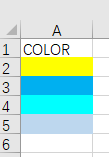
- 但是在Excel的style.xml文件中,这些颜色的表现形式不尽相同。
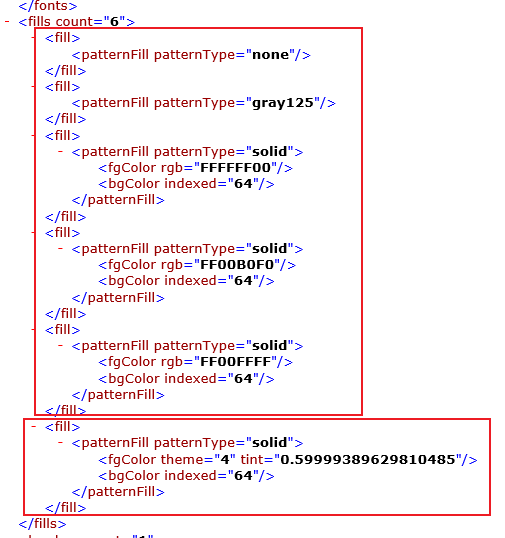
-<fill>

<patternFill patternType="none"/>

</fill>

-<fill>

<patternFill patternType="gray125"/>

</fill>
这两种为excel自带的默认填充样式
- 因此我们可以发现,前三种背景色,Excel中是直接赋予了RGB的色值。然而最后一种颜色却是使用了theme(主题色)和tint(插值)来表示。
通过以上分析,我们可以得出Excel单元格背景色的两种表现方式:rgb和theme + tint。(PS:关于有的颜色为什么可以直接用rgb,有的颜色用theme加tint的方式表示,本人在微软官方下面提问了,但是没人鸟窝。)
代码实现
- OK分析完了,上代码。
public string GetCellBackgroundColor(WorkbookPart workbookPart, Cell cell)

{

    if (cell == null || cell.StyleIndex == null) return null;

    CellFormat cellFormat = (CellFormat)workbookPart.WorkbookStylesPart.Stylesheet.CellFormats.ElementAt((int)cell.StyleIndex.Value);

    Fill fill = (Fill)workbookPart.WorkbookStylesPart.Stylesheet.Fills.ElementAt((int)cellFormat.FillId.Value);

    PatternFill patternFill = (PatternFill)fill.PatternFill;

    ThemePart themePart = workbookPart.ThemePart;

    Theme theme = themePart?.Theme;

    if (patternFill != null && patternFill.PatternType != null && patternFill.PatternType.Value == PatternValues.Solid)

    {

        if (patternFill.ForegroundColor != null)

        {

            if (patternFill.ForegroundColor.Rgb != null)

            {

                return "#" + patternFill.ForegroundColor.Rgb.Value;

            }

            else if (patternFill.ForegroundColor.Theme != null)

            {

                // 主题色获取

                string originalColor = ((Color2Type)theme.ThemeElements.ColorScheme.ElementAt((int)patternFill.ForegroundColor.Theme.Value)).RgbColorModelHex.Val;

                if (patternFill.ForegroundColor.Tint != null)

                {

                    // 颜色计算

                    return CalculateTintedColor(originalColor, patternFill.ForegroundColor.Tint);

                }

                else

                {

                    return "#" + originalColor;

                }

            }

        }

    }

    return null;

}

ublic static string CalculateTintedColor(string originalColor, double tint)

{

    // RGB转换

    int red = Convert.ToInt32(originalColor.Substring(0, 2), 16);

    int green = Convert.ToInt32(originalColor.Substring(2, 2), 16);

    int blue = Convert.ToInt32(originalColor.Substring(4, 2), 16);

    int interpolatedRed = 0;

    int interpolatedGreen = 0;

    int interpolatedBlue = 0;

    // 基于tint正负值的颜色计算

    if (tint > 0)

    {

        // 白色

        int white = 255;

        // 插值计算

        interpolatedRed = (int)Math.Round(red * (1 - tint) + white * tint);

        interpolatedGreen = (int)Math.Round(green * (1 - tint) + white * tint);

        interpolatedBlue = (int)Math.Round(blue * (1 - tint) + white * tint);

    }

    else

    {

        // 黑色

        int black = 0;

        // 插值计算

        interpolatedRed = (int)Math.Round(red * (1 + tint));

        interpolatedGreen = (int)Math.Round(green * (1 + tint));

        interpolatedBlue = (int)Math.Round(blue * (1 + tint));

        // 防止出现计算结果小于0的情况

        interpolatedRed = Math.Max(interpolatedRed, black);

        interpolatedGreen = Math.Max(interpolatedGreen, black);

        interpolatedBlue = Math.Max(interpolatedBlue, black);

    }

    // 计算结束后转化为16进制颜色

    string interpolatedColor = $"#{interpolatedRed:X2}{interpolatedGreen:X2}{interpolatedBlue:X2}";

    return interpolatedColor;

}
分享结束,如果这个分享对您有所帮助的话,请点个赞吧!
利用OpenXML获取Excel单元格背景色的更多相关文章
- POI获取excel单元格红色字体,淡蓝色前景色的内容
如果是Microsoft Excel 97-2003 工作表 (.xls) if(31 == cell.getCellStyle().getFillForegroundColor()) //判断单元格 ...
- c#怎样获取excel单元格的RGB颜色
这段时间一直在做office的工作.前2天获取单元格的颜色的问题一直没搞明确. 開始我想用的就是Npoi.主要前一部分的工作都是用Npoi完毕的 row.GetCell(j).CellStyle.Fi ...
- POI 设置Excel单元格背景色(setFillForegroundColor)
背景介绍:使用Java开发信息系统项目,项目中往往会涉及到报表管理部分,而Excel表格首当其冲称为最合适的选择,但是对单元格操作时对于设置单元格的背景颜色却很少提及,本文旨在方便单元格背景颜色设计. ...
- 以字符串形式获取excel单元格中的内容
public static String getCellValue(XSSFCell cell) { if (cell == null) { return ""; } switch ...
- 【Excel】Excel根据单元格背景色求和
例:用公式计算单元格背景色为浅蓝色的数字之和 步骤一: Office 2003 Insert->Name->Define,Names in workbook输入getColor或ge ...
- NPOI之Excel——设置单元格背景色
NPOI Excel 单元格颜色对照表,在引用了 NPOI.dll 后可通过 ICellStyle 接口的 FillForegroundColor 属性实现 Excel 单元格的背景色设置,FillP ...
- excel小技巧-用于测试用例的编号栏:“获取当前单元格的上一格的值+1”=INDIRECT(ADDRESS(ROW()-1,COLUMN()))+1
编写用例的时候使用,经常修改用例的时候会需要增加.删除.修改条目,如果用下拉更新数值的方式会很麻烦. 1.使用ctrl下拉,增删移动用例的时候,需要每次都去拉,万一列表比较长,会很麻烦 2.使用ROW ...
- NPOI设置Excel单元格字体、边框、对齐、背景色
代码: ICellStyle cellStyle = workbook.CreateCellStyle(); cellStyle.BorderBottom = BorderStyle.Thin; ce ...
- C# 对Excel 单元格格式, 及行高、 列宽、 单元格边框线、 冻结设置
一.对行高,列宽.单元格边框等的设置 这篇简短的文字对单元格的操作总结的比较全面,特此转载过来. private _Workbook _workBook = null; private Workshe ...
- 利用POI获取Excel中图片和图片位置
利用POI获取Excel中图片和图片位置(支持excel2003or2007多sheet) 转自:http://blog.csdn.net/delongcpp/article/details/8833 ...
随机推荐
- matlab gui .mat数据读取
在matlab的gui中用load函数读取.mat等类型数据 %定义全局变量 global img_correct %读取数据名称及位置 [filename,pathname]=uigetfile({ ...
- EasyExcel · 写excel
原文地址 通用数据生成 后面不会重复写 private List<DemoData> data() { List<DemoData> list = ListUtils.newA ...
- koa搭建nodejs项目并注册接口
使用nodejs注册接口逻辑处理会比较复杂,直接通过express或者koa能够简化开发流程,这里记录用koa来搭建nodejs项目并注册接口,对koa不太熟悉的话可以参考这一篇.让nodejs开启服 ...
- Web通用漏洞--文件上传
Web通用漏洞--文件上传 概述 文件上传安全指的是攻击者通过利用上传实现后门的写入连接后门进行权限控制的安全问题,对于如何确保这类安全问题,一般会从原生态功能中的文件内容,文件后缀,文件类型等方面判 ...
- 解密Prompt系列13. LLM Agent-指令微调方案: Toolformer & Gorilla
上一章我们介绍了基于Prompt范式的工具调用方案,这一章介绍基于模型微调,支持任意多工具组合调用,复杂调用的方案.多工具调用核心需要解决3个问题,在哪个位置进行工具调用(where), 从众多工具中 ...
- 一种创新的 Hybird App 技术开发模式
Hybrid这个词,在App开发领域,相信大家都不陌生.Hybrid App是指介于web-app.native-app这两者之间的app,它虽然看上去是一个Native App,但只有一个UI We ...
- 基于Supabase开发公众号接口
在<开源BaaS平台Supabase介绍>一文中我们对什么是BaaS以及一个优秀的BaaS平台--Supabase做了一些介绍.在这之后,出于探究的目的,我利用一些空闲时间基于Micros ...
- Hugging News #0821: 新的里程碑:一百万个代码仓库!
每一周,我们的同事都会向社区的成员们发布一些关于 Hugging Face 相关的更新,包括我们的产品和平台更新.社区活动.学习资源和内容更新.开源库和模型更新等,我们将其称之为「Hugging Ne ...
- Azure Storage 系列(八)存储类型细化分类说明
一,引言 Azure 存储账户功能经过官方改进迭代后,在创建的时候,存储账户的类型被分为两大类: 1)general-purpose v2 account(标准常规用途v2) Blob 存储,队列存储 ...
- 如何通过API接口获取微店的商品详情
微店是一款电商平台,对于商家而言,了解商品详情数据是非常重要的.通过API接口获取微店的商品详情,可以让商家更加便捷地管理和分析商品数据.下面就让我们详细了解一下如何通过API获取微店的商品详情. 第 ...