
Unity - UIWidgets 6. 显示列表
为了更贴近游戏实际ui的效果和使用环境, 从而讨论上一节遗留的问题, 列表显示是必不可少的
参考
修改之前的HomeRoute,
        private Widget CreateListTest()

        {

            ListView listView = ListView.builder(

                scrollDirection: Axis.vertical,

                itemExtent: 20,

                itemCount: 100,

                itemBuilder: (context, index) =>

                {

                    return new Text(data: index.ToString());

                }

                );

            return listView;

        }

        private Widget GetWidget()

        {

            Scaffold scaffold = new Scaffold(

                appBar: new AppBar(

                    title: new Text("首页")

                    ),

                body: CreateListTest()

                );

            return scaffold;

        }
创建了一个列表, 显示从0到99的数字, 每个列表项高度为20(逻辑高度), 效果如下
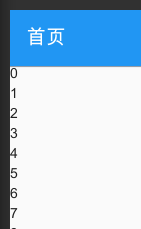
通过UIWidgets Inspector可以看到列表项是循环回收的(即看不到的列表项不作为一个UI节点存在), 但这个节点大概已经嵌套了四五十层... 对性能不太信任
显示背包道具
下面要做的是模拟一个显示背包道具的操作, 一个简单的列表显示玩家背包中的每种道具的名字和一句说明(为简化, 道具通通不可叠加)
即提前准备好state, 暂时没有action
首先我准备了几个道具
// Item.cs

using System.Collections.Generic;

namespace Data

{

    // 道具的数据类, 非常简单

    public class Item

    {

        public int id;

        public string name;

        public string description;

        // 临时模拟一个配置表

        public static Dictionary<int, Item> Table = new Dictionary<int, Item>()

        {

            { 1, new Item { id = 1, name = "木棍", description = "一根没什么用的木棍" } },

            { 2, new Item { id = 2, name = "石头", description = "一块没什么用的石头" } },

            { 3, new Item { id = 3, name = "干草", description = "一把没什么用的干草" } },

        };

    }

}
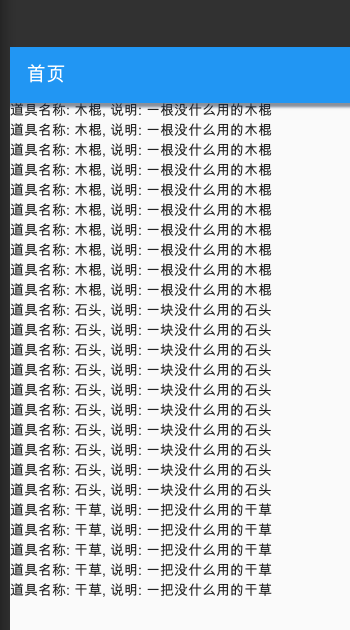
然后给主角的背包里塞了10个木棍, 10个石头, 5个干草
// GlobalState.cs

using System.Collections.Generic;

namespace UI

{

    public class GlobalState

    {

        public List<int> Items;

        public GlobalState()

        {

            Items = new List<int>

            {

                1, 1, 1, 1, 1, 1, 1, 1, 1, 1,

                2, 2, 2, 2, 2, 2, 2, 2, 2, 2,

                3, 3, 3, 3, 3,

            };

        }

    }

}
修改列表显示
// HomeRoute.cs

        private Widget CreateListTest()

        {

            var widget = new StoreConnector<GlobalState, List<int>>(

                converter: (state) => state.Items,

                builder: (context, list, dispatcher) => ListView.builder(

                    itemExtent: 20,

                    itemCount: list.Count,

                    itemBuilder: (context2, index) =>

                    {

                        int itemId = list[index];

                        Data.Item data = Data.Item.Table[itemId];

                        return new Text(data: $"道具名称: {data.name}, 说明: {data.description}");

                    }

                    )

                );

            return widget;

        }
这么写从直觉上不太对, 但目前成功了
修改背包道具
参照前面的写法给增加两个功能: 点击道具列表项使用\获取一个新道具
为了更直观删除了大部分道具
GlobalState.cs

using System.Collections.Generic;

namespace UI

{

    public class GlobalState

    {

        public List<int> Items;

        public GlobalState()

        {

            UnityEngine.Debug.Log("创建了新的GlobalState");

            Items = new List<int>

            {

                1, 2, 3,

            };

        }

        public GlobalState(List<int> items)

        {

            UnityEngine.Debug.Log("创建了新的GlobalState, 传递了items");

            Items = items;

        }

    }

}
// Actions.cs

namespace UI

{

    public class UseBagItemAction

    {

        public int positionIndex;

    }

    public class GetItemAction

    {

        public int itemId;

    }

}
// HomeRoute.cs

        public static GlobalState Reducer(GlobalState state, object action)

        {

            if (action is UseBagItemAction)

            {

                int posId = ((UseBagItemAction)action).positionIndex;

                // 这里参照了Redux规范, 复制一份新的再修改, 下同

                List<int> items = new List<int>(state.Items);

                items.RemoveAt(posId);

                return new GlobalState(items);

            }

            if (action is GetItemAction)

            {

                int itemId = ((GetItemAction)action).itemId;

                List<int> items = new List<int>(state.Items);

                items.Add(itemId);

                return new GlobalState(items);

            }

            return state;

        }

        private Widget CreateListTest()

        {

            var showList = new StoreConnector<GlobalState, List<int>>(

                converter: (state) => state.Items,

                builder: (context, list, dispatcher) => ListView.builder(

                    //itemExtent: 20,

                    itemCount: list.Count,

                    itemBuilder: (context2, index) =>

                    {

                        int itemId = list[index];

                        Data.Item data = Data.Item.Table[itemId];

                        return new RaisedButton(

                            child: new Text(data: $"{index} - 道具名称: {data.name}, 说明: {data.description}"),

                            onPressed: () =>

                            {

                                dispatcher.dispatch(new UseBagItemAction { positionIndex = index });

                            }

                            );

                    }

                    )

                );

            var btn = new StoreConnector<GlobalState, object>(

                converter: (state) => null,

                builder: (context, _, dispathcer) => new RaisedButton(

                    child: new Text("获得一根木棍"),

                    onPressed: () =>

                    {

                        dispathcer.dispatch(new GetItemAction { itemId = 1 });

                    }

                    )

                );

            var widget = new Column(

                children: new List<Widget> {

                    // 画面溢出时直接报错, 限制一下高度

                    new Container(

                        child: showList,

                        height: 400

                        ),

                    btn,

                    }

                );

            return widget;

        }

使用三个道具, 获得三个木棍, 没什么问题
之后就需要讨论ListItem更复杂化\动效\效率优化\代码重构等等问题了, 和这次的主题没有关系
Unity - UIWidgets 6. 显示列表的更多相关文章
- OpenGL中glVertex、显示列表(glCallList)、顶点数组(Vertex array)、VBO及VAO区别
OpenGL中glVertex.显示列表(glCallList).顶点数组(Vertex array).VBO及VAO区别 1.glVertex 最原始的设置顶点方法,在glBegin和glEnd之间 ...
- NeHe OpenGL教程 第十二课:显示列表
转自[翻译]NeHe OpenGL 教程 前言 声明,此 NeHe OpenGL教程系列文章由51博客yarin翻译(2010-08-19),本博客为转载并稍加整理与修改.对NeHe的OpenGL管线 ...
- SharePoint 2013 自定义翻页显示列表项
项目需求:自定义开发一个能分页显示列表项的小部件,允许左右翻页,能根据用户权限来显示管理链接等. 效果如下: 技术要求:使用sharepoint rest API 来获取列表项,这样性能高,能够快速响 ...
- Android BLE与终端通信(二)——Android Bluetooth基础科普以及搜索蓝牙设备显示列表
Android BLE与终端通信(二)--Android Bluetooth基础搜索蓝牙设备显示列表 摘要 第一篇算是个热身,这一片开始来写些硬菜了,这篇就是实际和蓝牙打交道了,所以要用到真机调试哟, ...
- [OpenGL] 斯坦福兔子与显示列表
1.调整桌子的大小. 在OpenGL绘制长方体,能够通过函数: glutSolidCube(Size) 绘制得到的是一个正方体,再利用缩放矩阵使其变成长方体.使得桌子 ...
- .NET MVC+ EF+LINQ 多表联查VIEW显示列表
1.VIEW 页面显示代码 <link href="~/Content/bootstrap.css" rel="stylesheet" /> < ...
- Draw Call(Unity 5中显示为SetPass calls
Draw Call(Unity 5中显示为SetPass calls
- 利用JqGrid结合ashx显示列表之一
最近项目决定运用JqGrid列表控件显示相关数据,以前接触比较多还是easyui和Ext.Net的列表控件,文章简单写的小实例进行一个总结: 1:引入相关的JS及CSS文件,JqGrid目前可以利用J ...
- 字符图元 & 显示列表
[字符图元] 1.typeface(字样),即设计风格,如Courier等. 2.font(字体),如10磅Courier斜体. 3.monspace即为等宽字体,proportional为非等宽字体 ...
- 尝试使用Osg共享渲染描述表(HGLRC)实现多线程编译显示列表--总结
在realize()前打开预编译选项指令: osg::DisplaySettings::instance()->setCompileContextsHint(true); mpr_osgv ...
随机推荐
- 使用 Sa-Token 实现不同的登录模式:单地登录、多地登录、同端互斥登录
一.需求分析 如果你经常使用腾讯QQ,就会发现它的登录有如下特点:它可以手机电脑同时在线,但是不能在两个手机上同时登录一个账号. 同端互斥登录,指的就是:像腾讯QQ一样,在同一类型设备上只允许单地点登 ...
- 2023-07-11:给定正整数 n, 返回在 [1, n] 范围内具有 至少 1 位 重复数字的正整数的个数。 输入:n = 100。 输出:10。
2023-07-11:给定正整数 n, 返回在 [1, n] 范围内具有 至少 1 位 重复数字的正整数的个数. 输入:n = 100. 输出:10. 答案2023-07-11: 函数的主要思路如下: ...
- JMeter脚本报错:Cannot find engine named: 'javascript'的解决方法
本文将介绍如何解决在JMeter版本5.4.1下执行脚本时出现的错误信息"javax.script.ScriptException: Cannot find engine named: 'j ...
- JPA自动生成POJO
原文地址 JPA自动生成POJO 通过表生成POJO类 这篇文章不涉及idea配置数据源教程,该文章使用前提是用户已配置好idea数据源 修改自带的生成类 import com.intellij.da ...
- 行行AI人才直播第13期:刘红林律师《AIGC创业者4大法律问题需注意》
行行AI人才(海南行行智能科技有限公司)是博客园和顺顺智慧共同运营的AI行业人才全生命周期服务平台. AIGC爆火至今,商业落地已成为各行各业焦点的问题.它的广泛应用也带来了一系列的法律风险和挑战.一 ...
- Git:多人写作时,如何保证代码一致性
解决方案 git add . git commit -m "message" git pull origin develop # 拉取并合并dev分支上的代码 git push
- 26种source-map看花了眼?别急,理解这几个全弄懂
上一篇 webpack处理模块化源码 的文章中提到了 "source map",这一篇来详细说说. 有什么作用 source map 用于映射编译后的代码与源码,这样如果编译后的代 ...
- R2在全渠道业务线的落地
随着业务的增长,系统的高频率迭代,质量保障工作迫切需要引入更加科学高效的测试方法来助力业务高质量的交付.长城项目一期测试中,全渠道质量团队引入技术平台部R2技术,极大的提升了项目交付的质量.因此,本文 ...
- Oracle表的导出、导入
有些情况下,需要单独导出某些表,用或者分析数据. 下面记录Oracle表的导出导入方法 1. 表的导出 ./exp $username/$passwd@$ORACLE_SID file=/$file_ ...
- 使用C++界面框架ImGUI开发一个简单程序
目录 简介 使用示例 下载示例 main文件 设置ImGui风格 设置字体 主循环 添加Application类 中文编码问题 界面设计 关于imgui_demo.cpp 创建停靠空间 创建页面 隐藏 ...