
带你玩转 Vite + Vue3 高低版本常用玩法
一、首先来个 Vite 的通用简介
Vite 是一种新型前端构建工具,在我们保险前端项目中已经推动并应用很久了,Vite 能够显著降低构建时间,提升前端开发效率。
它主要由两部分组成:
- 一个开发服务器,它基于 原生 ES 模块 提供了 丰富的内建功能,如速度快到惊人的 模块热更新(HMR)
- 一套构建指令,它使用 Rollup 打包你的代码,并且它是预配置的,可输出用于生产环境的高度优化过的静态资源
Vite 还提供了强大的扩展性,可通过其 插件 API 和 JavaScript API 进行扩展,并提供完整的类型支持。
二、Vite 的优势,为什么使用 Vite ?
当我们开始构建越来越大型的应用时,需要处理的 JavaScript 代码量也呈指数级增长。包含数千个模块的大型项目相当普遍。基于 JavaScript 开发的工具就会开始遇到性能瓶颈:通常需要很长时间(甚至是几分钟!)才能启动开发服务器,即使使用模块热替换(HMR),文件修改后的效果也需要几秒钟才能在浏览器中反映出来。如此循环往复,严重影响开发人员的效率。
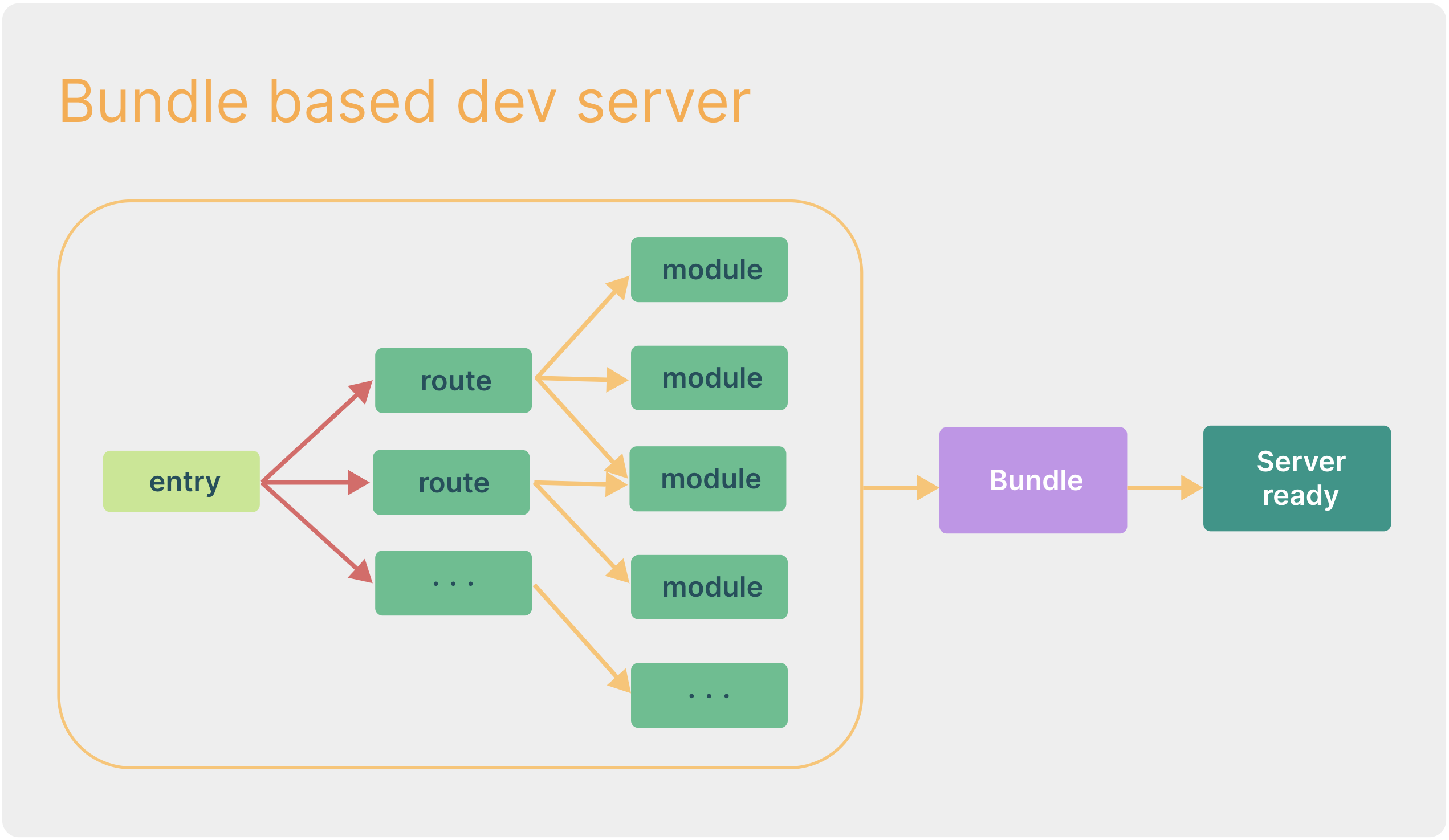
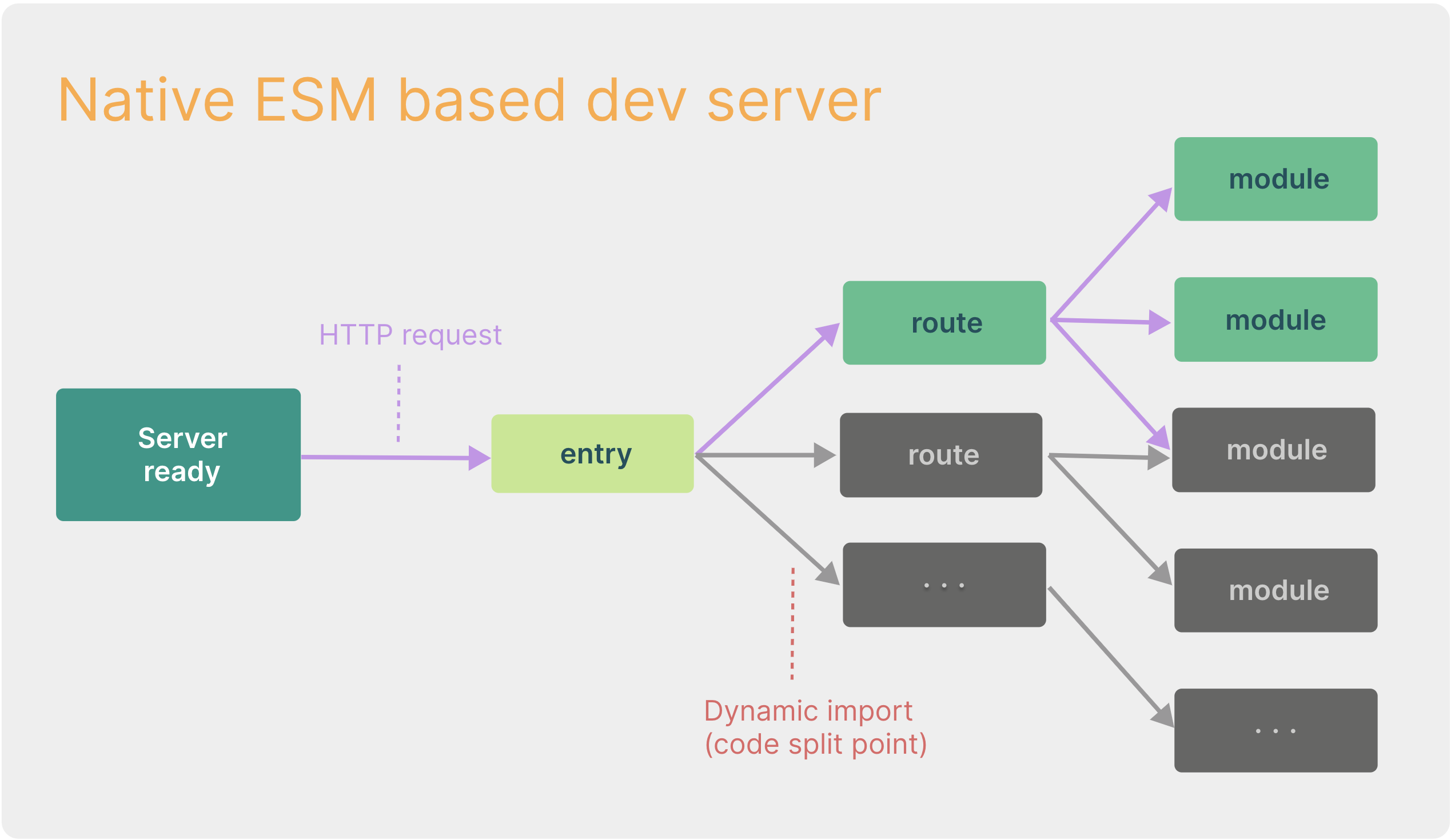
当冷启动开发服务器时,基于打包器的方式启动必须优先抓取并构建你的整个应用,然后才能提供服务,如果项目很大,导致的一个必然结果就是,服务启动很慢,热更新很慢,效率降低。Vite 只需要在浏览器请求源码时进行转换并按需提供源码。根据情景动态导入代码,即只在当前屏幕上实际使用时才会被处理,节省启动及更新时间。
如下图是新旧项目启动时长对比,Vite 启动速度,快了 30 多倍;
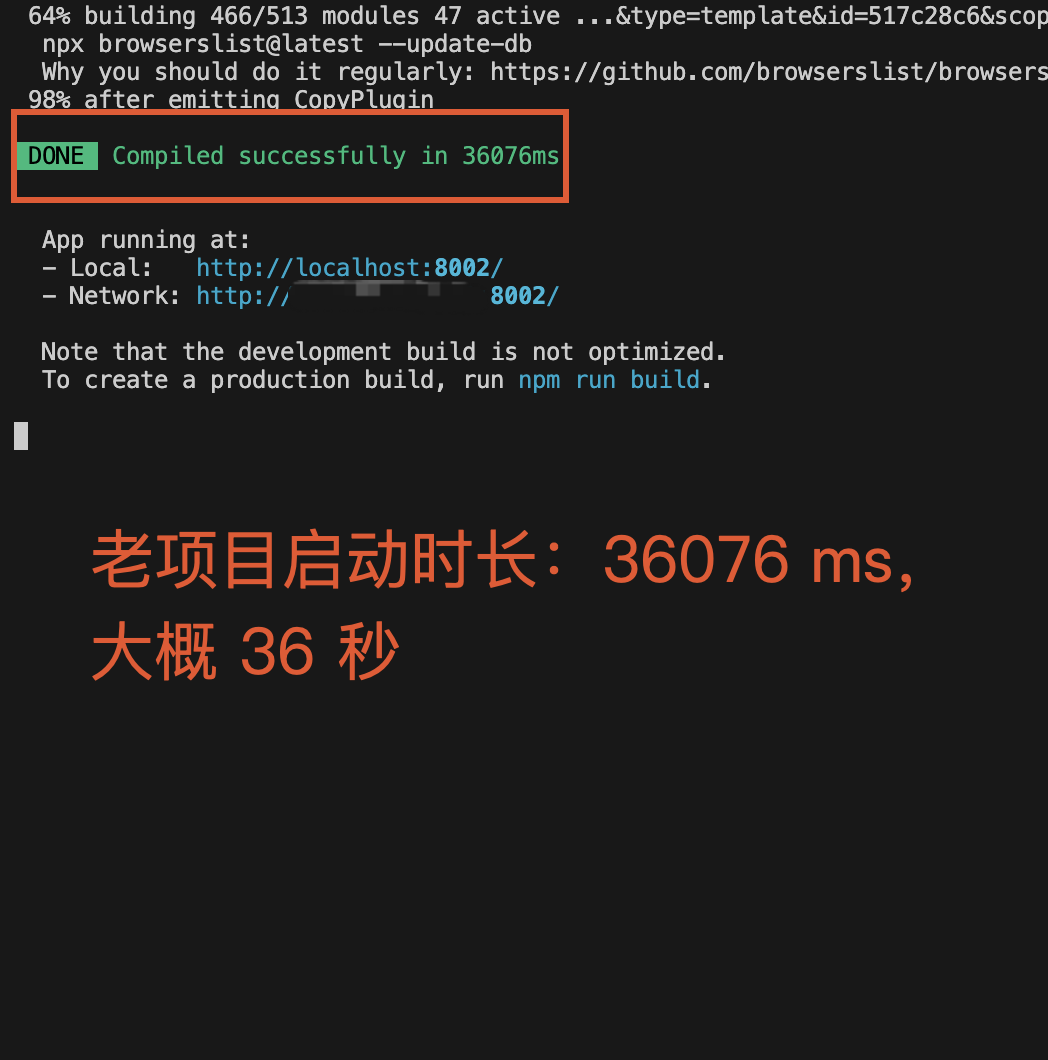
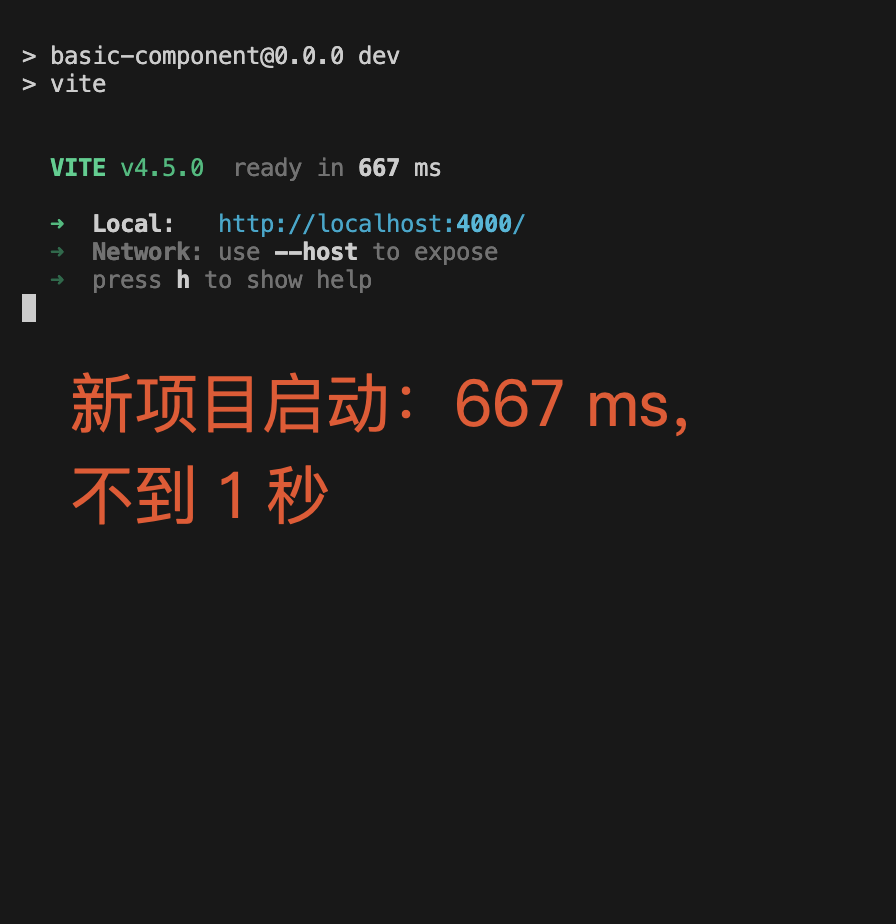
常规的通过 webpack 启动的服务,基于打包器启动,整个重新构建,即使将构建内容放到缓存中,更新速度也会随着应用体积增长而直线下降:
Vite 在原生 ESM 基础上执行 HMR,Vite 只需要精确地使已编辑的模块与其最近的 HMR 边界之间的链失活(大多数时候只是模块本身),使得无论应用大小如何,HMR 始终能保持快速更新:
三、Vite 为我们开发提升了很大的效率,但是也会有一些小问题
1、使用 Vite + Vue3 +Element-plus 或者其他 UI 库,按需加载使用时,多人开发,每人页面重新 reload 了吗?
2、低版本 Vite(2.9以下)配置 Preview 的 proxy 时,是不是不生效?
3、低版本 Vite 配合 unocss 设置样式后,是不是热更新不生效?
4、部分依赖包,使用京东镜像,是不是无法下载?
如果你遇到了以上问题,那这边文章可以帮助你解决困惑!
四、解决页面 reload 问题:高低版本 Vite 解决方法不同
- 原因:UI 库配置按需加载,点击跳转新页面,导致重新 reload 页面
- 情况:高低版本 Vite 解决页面 reload 方法不同
问题现象如下,上方图片页面会 reload,会有一段时间白屏,下方图片中文件 preload:
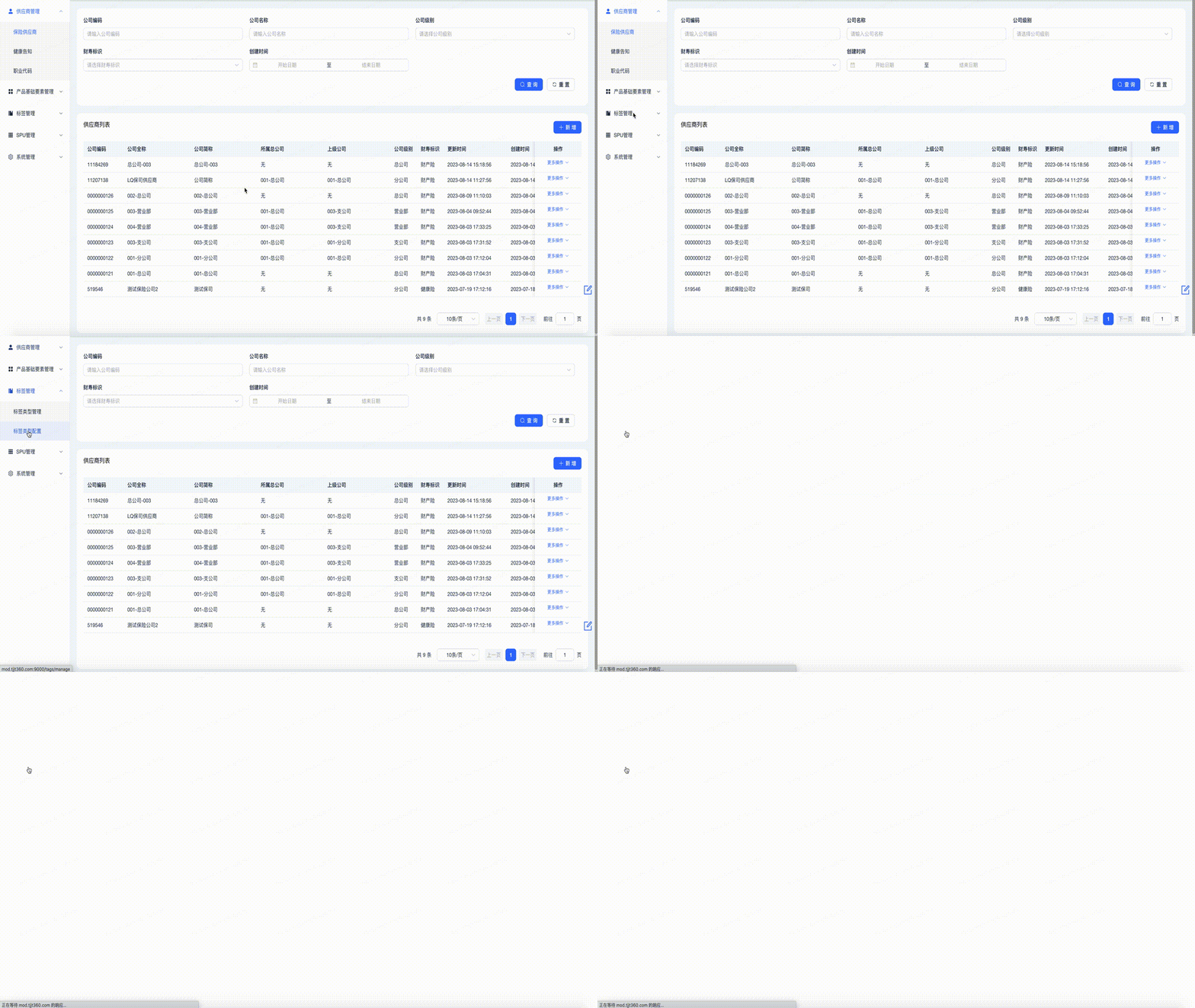
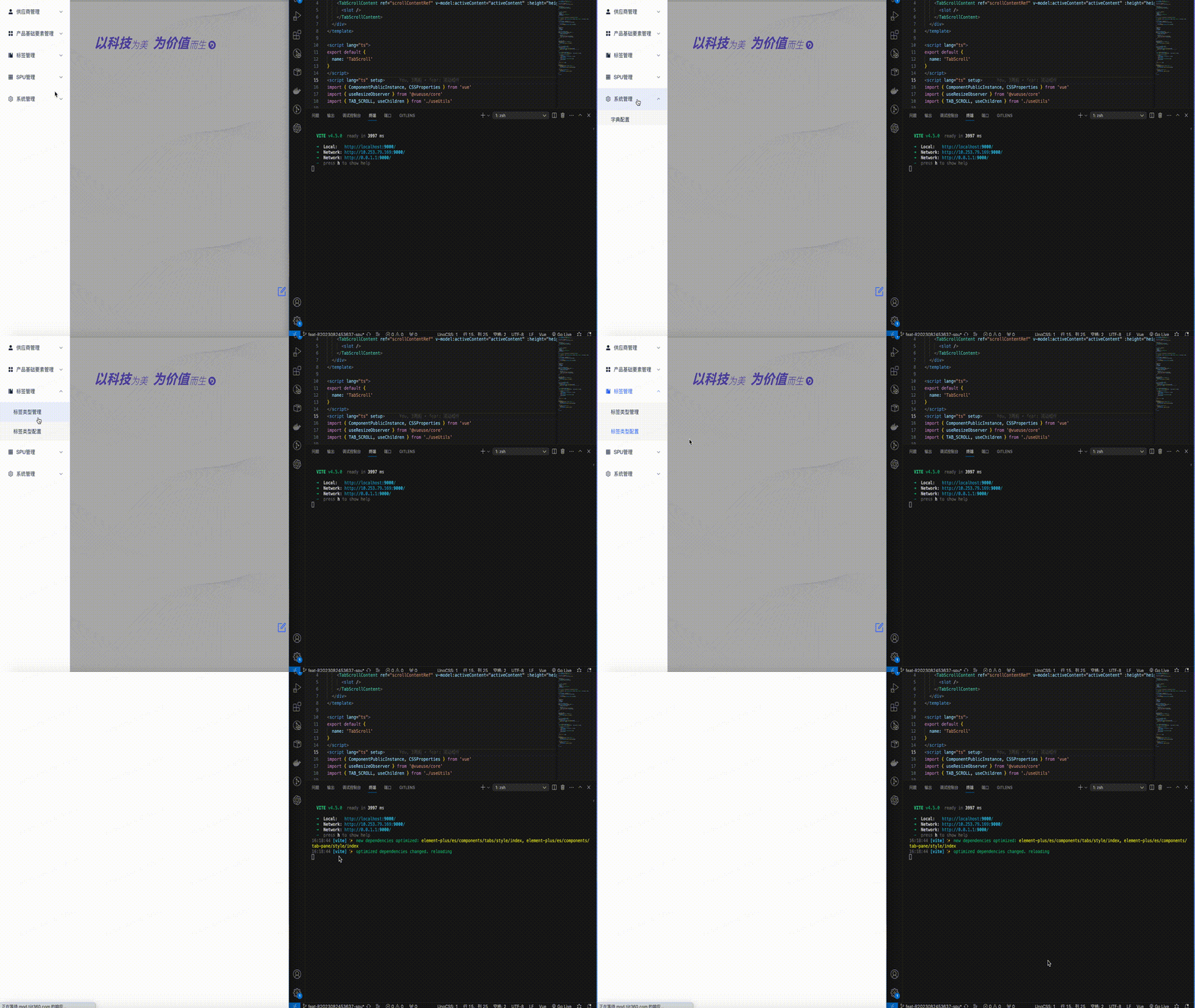
1、Vite 低版本(v2.9以下)页面 reload 解决方法;
- 解决方法:提前进行依赖包的预加载,可通过如下两种方法配置,推荐方法b(因为低版本有现成插件);
- 通过这些配置,就能够使页面 reload 在多人开发时只进行一次。
注意事项(低版本 Vite 的 bug,高版本已经修复):
- 使用 unocss 时,热更新会失效,需要手动刷新页面,如果不使用 unocss 影响不大
方法a、通过手动配置 vite.config.ts 文件的 optimizeDeps 选项;
// vite.config.js

{

    ...

    optimizeDeps: {

        include: [

            'vue',

            'vue-router',

            'pinia',

            '@element-plus/icons-vue',

            'driver.js',

            'element-plus',

            'element-plus/es',

            'element-plus/es/components/alert/style/index',

            'element-plus/es/components/badge/style/index',

            'element-plus/es/components/breadcrumb-item/style/index',

            'element-plus/es/components/breadcrumb/style/index',

            'element-plus/es/components/button/style/index',

            'element-plus/es/components/card/style/index'

            ...

        ]

    }

}
方法b、使用现成的插件 vite-plugin-optimize-persist、vite-plugin-package-config (推荐原因: 自动会生成预加载配置文件 optimizeDeps),通用配置如下:
遗憾的是高版本(v2.9及以上失效)配置无效,有兴趣的话,可以试着修改下源码。
// vite.config.ts

// 两个插件组合使用,会自动生成 optimizeDeps 配置,默认生成到 package.json 文件中,可通过 PkgConfig() 修改生成目录

import OptimizationPersist from 'vite-plugin-optimize-persist'

import PkgConfig from 'vite-plugin-package-config'

export default {

  ...

  plugins: [

    ...

    PkgConfig(),

    OptimizationPersist()

  ]

}
2、Vite 高版本(v4+)页面 reload 解决方法:
- 解决方法:上述两个插件已被弃用,只能自己配置 optimizeDeps 选项,提前进行依赖包的预加载;
全量配置案例如下,备注:如果项目中使用,根据项目需要进行相应依赖包的配置,否则会出现首屏加载过慢的问题,类似我们常规使用的 webpack 一样;
// vite.config.js

{

    ...

    optimizeDeps:{

         include: [

            '@element-plus/icons-vue',

            '@tinymce/tinymce-vue',

            '@vueuse/core',

            '@vueuse/shared',

            'axios',

            'clipboard',

            'codemirror',

            'codemirror/addon/lint/json-lint',

            'codemirror/addon/lint/lint',

            'codemirror/mode/css/css',

            'codemirror/mode/htmlmixed/htmlmixed',

            'codemirror/mode/javascript/javascript',

            'driver.js',

            'element-plus',

            'element-plus/es',

            'element-plus/es/components/alert/style/index',

            'element-plus/es/components/badge/style/index',

            'element-plus/es/components/breadcrumb-item/style/index',

            'element-plus/es/components/breadcrumb/style/index',

            'element-plus/es/components/button/style/index',

            'element-plus/es/components/card/style/index',

            'element-plus/es/components/cascader/style/index',

            'element-plus/es/components/check-tag/style/index',

            'element-plus/es/components/checkbox-group/style/index',

            'element-plus/es/components/checkbox/style/index',

            'element-plus/es/components/col/style/index',

            'element-plus/es/components/color-picker/style/index',

            'element-plus/es/components/config-provider/style/index',

            'element-plus/es/components/date-picker/style/index',

            'element-plus/es/components/dialog/style/index',

            'element-plus/es/components/divider/style/index',

            'element-plus/es/components/drawer/style/index',

            'element-plus/es/components/dropdown-item/style/index',

            'element-plus/es/components/dropdown-menu/style/index',

            'element-plus/es/components/dropdown/style/index',

            'element-plus/es/components/empty/style/index',

            'element-plus/es/components/form-item/style/index',

            'element-plus/es/components/form/style/index',

            'element-plus/es/components/icon/style/index',

            'element-plus/es/components/input-number/style/index',

            'element-plus/es/components/input/style/index',

            'element-plus/es/components/link/style/index',

            'element-plus/es/components/loading/style/index',

            'element-plus/es/components/menu-item/style/index',

            'element-plus/es/components/menu/style/index',

            'element-plus/es/components/message-box/style/index',

            'element-plus/es/components/message/style/index',

            'element-plus/es/components/notification/style/index',

            'element-plus/es/components/option/style/index',

            'element-plus/es/components/pagination/style/index',

            'element-plus/es/components/popover/style/index',

            'element-plus/es/components/progress/style/index',

            'element-plus/es/components/radio-group/style/index',

            'element-plus/es/components/radio/style/index',

            'element-plus/es/components/row/style/index',

            'element-plus/es/components/scrollbar/style/index',

            'element-plus/es/components/select/style/index',

            'element-plus/es/components/space/style/index',

            'element-plus/es/components/step/style/index',

            'element-plus/es/components/steps/style/index',

            'element-plus/es/components/sub-menu/style/index',

            'element-plus/es/components/switch/style/index',

            'element-plus/es/components/tab-pane/style/index',

            'element-plus/es/components/table-column/style/index',

            'element-plus/es/components/table/style/index',

            'element-plus/es/components/tabs/style/index',

            'element-plus/es/components/tag/style/index',

            'element-plus/es/components/timeline-item/style/index',

            'element-plus/es/components/timeline/style/index',

            'element-plus/es/components/tooltip/style/index',

            'element-plus/es/components/transfer/style/index',

            'element-plus/es/components/upload/style/index',

            'element-plus/es/components/popconfirm/style/index',

            'element-plus/es/components/backtop/style/index',

            'element-plus/es/components/affix/style/index',

            'element-plus/es/components/statistic/style/index',

            'element-plus/es/components/tree/style/index',

            'element-plus/es/components/tree-v2/style/index',

            'element-plus/es/components/tree-select/style/index',

            'element-plus/es/components/table-v2/style/index',

            'element-plus/es/components/skeleton/style/index',

            'element-plus/es/components/skeleton-item/style/index',

            'element-plus/es/components/collapse/style/index',

            'element-plus/es/components/collapse-item/style/index',

            'element-plus/es/components/collapse-transition/style/index',

            'element-plus/es/components/carousel/style/index',

            'element-plus/es/components/carousel-item/style/index',

            'element-plus/es/components/calendar/style/index',

            'element-plus/es/components/badge/style/index',

            'element-plus/es/components/avatar/style/index',

            'element-plus/es/components/aside/style/index',

            'element-plus/es/locale/lang/zh-cn',

            'fuse.js',

            'js-base64',

            'js-cookie',

            'js-file-download',

            'nprogress',

            'pako',

            'path-browserify',

            'path-to-regexp',

            'pinia',

            'prismjs',

            'qs',

            'screenfull',

            'sortablejs',

            'vue',

            'vue-json-pretty',

            'vue-router',

            'vuedraggable'

         ]

    }

}
五、解决 Vite 低版本(v2.9以下),preview 配置 proxy 不生效:
问题原因:低版本 Vite 的执行 preview 预览时,使用的 proxy 是 server 中的 proxy 配置,官方文档中提供的 preview 的 proxy 无效,这是低版本 Vite 的一个 bug,高版本已经修复,github 上有相关的 issue,也可以通过源码查看。
解决办法:
在 vite.config.js 使用 server 中的 proxy 代替
使用 switchhost 进行代理配置
六、解决 Vite 低版本(v2.9以下),unocss 热更新失效:
解决方法a:升级 Vite,从根本解决问题,以后项目升级比较方便,各种小问题容易规避,推荐升级
解决方法b:降低 unocss 的版本,可能会出现各种其他问题,不建议
针对这个问题,作者没有降低 unocss 的版本,直接进行 Vite 升级,如果使用 unocss 强烈建议进行 Vite 升级;
不升级后期如果使用其他的依赖包,可能也会有各种其他问题出现
七、解决升级 Vite 项目后,部分依赖包,使用京东镜像无法下载:
产生原因:各种依赖包之间互相依赖,京东镜像的 npm 包可能有问题;
解决方法:非京东私有依赖包,使用 npm 官方镜像下载,京东私有镜像使用京东镜像,初始化项目,生成 package-lock.json 文件,多人合作时,以 package-lock.json 文件为主。
总结:Vite 帮助我们提升开发效率,但是区分 Vite 是否需要使用最新版本,还是需要作为考虑依据:
如果你的项目不使用 unocss,同时对于 preview 下的 proxy 没有特殊要求,那么 Vite2.8.6 + Vue3 + elementPlus 可自动生成预加载文件,省时省力,开发体验好,强烈推荐;如果你的项目使用 unocss 或者对于 preview 下的 proxy 有特殊需求,强烈建议使用最新版本的 Vite,可通过手动配置 optimizeDeps 解决页面刷新的问题。
作者:京东保险 王升升
来源:京东云开发者社区 转载请注明来源
带你玩转 Vite + Vue3 高低版本常用玩法的更多相关文章
- 手把手带你实现基于 Vite+Vue3 的在线Excel表格系统
今天,葡萄带你了解如何基于Vite+Vue3实现一套纯前端在线表格系统. 在正式开始项目介绍之前,首先咱们首先来介绍一下Vite和Vue3. Vue3 2020年09月18日Vue.js 3.0发布, ...
- 如何开发一款基于 Vite+Vue3 的在线表格系统(上)
今天,葡萄带你了解如何基于Vite+Vue3实现一套纯前端在线表格系统. 在正式开始项目介绍之前,首先咱们首先来介绍一下Vite和Vue3. Vue3 Vue是什么?大多前端开发者对这个词已毫不陌生了 ...
- 如何开发一款基于 vite+vue3 的在线表格系统(下)
在上篇内容中我们为大家分享了详细介绍Vue3和Vite的相关内容.在本篇中我们将从项目实战出发带大家了解Vite+Vue3 的在线表格系统的构建. 使用Vite初始化Vue3项目 在这里需要注意:根据 ...
- 基于 vite 创建 vue3 全家桶项目(vite + vue3 + tsx + pinia)
vite 最近非常火,它是 vue 作者尤大神发布前端构建工具,底层基于 Rollup,无论是启动速度还是热加载速度都非常快.vite 随 vue3 正式版一起发布,刚开始的时候与 vue 绑定在一起 ...
- vite vue3 规范化与Git Hooks
在 <JS 模块化>系列开篇中,曾提到前端技术的发展不断融入很多后端思想,形成前端的"四个现代化":工程化.模块化.规范化.流程化.在该系列文章中已详细介绍了模块化的发 ...
- 使用vite + vue3 + ant-design-vue + vue-router + vuex 创建一个管理应用
使用vite + vue3 + ant-design-vue + vue-router + vuex 创建一个管理应用的记录 使用vite 创建项目 我创建的node 版本是 v16.17.1 使用N ...
- 使用vite + vue3 + ant-design-vue + vue-router + vuex 创建一个后台管理应用
使用vite + vue3 + ant-design-vue + vue-router + vuex 创建一个管理应用的记录 使用vite 创建项目 我创建的node 版本是 v16.17.1 使用N ...
- 玩转ArduinoJson库 V6版本
1.前言 前面,博主已经讲解了ArduinoJson库的V5版本.为了节省时间以及不讨论重复内容,博主建议读者先去阅读一下 玩转ArduinoJson库 V5版本 .重点了解几个东西: JSO ...
- 玩转ArduinoJson库 V5版本
1.前言 一直以来,博主的事例代码中都一直使用到JSON数据格式.而很多初学者一直对JSON格式有很大疑惑,所以博主特意分出一篇博文来重点讲解Arduino平台下的JSON库--Arduino ...
- 回忆那些年我玩过的ide,看看哪些你也玩过,看图回忆
闲来无聊,回忆一下这些年玩过的ide.看看哪些你也玩过. QBasic 第一个ide,兴奋程度也是最大的,从此进入了码农行列 VisualBasic 可以拖界面了,成就感爆棚 Turbo C c语言, ...
随机推荐
- 《Pro Git》起步笔记
@ 目录 什么是版本控制 本地版本控制系统 集中化的版本控制 分布式的版本控制系统 Git简史 Git是什么 安装Git 在Linux上安装 在Windows上安装 初次运行Git前的配置 用户信息 ...
- Kettle实例(获取Token并带入请求接口拉取数据到本地)
背景 近期工作中遇到许多需要协同的表单文档被放到云文档,那么我们本地做数据分析就需要先抽取云文档实时数据到本地数据库,根据接口文档我们需要先获取Token,再将返回值带到接口中发起请求拉取数据,因为在 ...
- Jmeter插件PerfMon Metrics Collector安装使用及报错解决
Jmeter作为一个轻量级的性能测试工具,开源.小巧.灵活的特性使其越来越受到测试人员喜爱.在实际的 项目中,特别是跨地区项目,排除合作方指定要求使用Loadrunner作为性能测试工具外,Jmete ...
- Solution -「洛谷 P4007」小 Y 和恐怖的奴隶主
Description Link. 这道题 的加强版. Solution 题解里面大多数都是概率 DP,或者是期望 DP 然后是逆推.甚至不给 DP 的转移式.机房 yyds Reanap 发了一篇逆 ...
- Python爬虫IP代理池的建立和使用
写在前面建立Python爬虫IP代理池可以提高爬虫的稳定性和效率,可以有效避免IP被封锁或限制访问等问题. 下面是建立Python爬虫IP代理池的详细步骤和代码实现: 1. 获取代理IP我们可以从一些 ...
- Vue 搭配 Spring MVC 创建一个 web 项目
Vue 搭配 Spring MVC 创建一个 web 项目 想要写一个登录的web应用程序.页面使用Vue,后端使用Spring MVC,最终打成war包,放在tomcat下启动. 1.创建Sprin ...
- Teamcenter RAC开发 GoToHelper
RAC开发,有时候会用到发送到我的Teamcenter 可以参考 com.teamcenter.rac.tcapps 包下 package com.teamcenter.rac.tracelinks; ...
- 算法1:寻找完数(JS)
任务一:寻找完数 打印10000以内的完数 完数:与自己所有因子之和相等的数. 1 let sum = 0, i, j; // 定义变量sum.i和j 2 3 for (i = 1; i < 1 ...
- C#归并排序算法
前言 归并排序是一种常见的排序算法,它采用分治法的思想,在排序过程中不断将待排序序列分割成更小的子序列,直到每个子序列中只剩下一个元素,然后将这些子序列两两合并并排序,最终得到一个有序的序列. 归并排 ...
- C#学习笔记---异常捕获和变量
异常捕获 使用异常捕获可以捕获出现异常的代码块,防止因为异常抛出造成的程序卡死的情况发生. try{}catch{}finally{}结构 //异常捕获 try { string str=Consol ...