
@Async实现异步任务
1、@Async是SpringBoot自带的一个执行步任务注解
@EnableAsync // 开启异步

@SpringBootApplication

public class Application {

    public static void main(String[] args) {

        SpringApplication.run(Application.class, args);

    }

}
2、同步执行
定义几个方法,模拟耗时的操作
@Service

@Slf4j

public class ServiceDemoSync {

    public void taskOne() throws Exception {

        long start = System.currentTimeMillis();

        Thread.sleep(200);

        long end = System.currentTimeMillis();

        System.out.println("线程:" + Thread.currentThread().getName() + "任务1执行结束,总耗时={" + (end - start) + "} 毫秒");

    }

    public void taskTwo() throws Exception {

        long start = System.currentTimeMillis();

        Thread.sleep(200);

        long end = System.currentTimeMillis();

        System.out.println("线程:" + Thread.currentThread().getName() + "任务2执行结束,总耗时={" + (end - start) + "} 毫秒");

    }

    public void taskThere() throws Exception {

        long start = System.currentTimeMillis();

        Thread.sleep(200);

        long end = System.currentTimeMillis();

        System.out.println("线程:" + Thread.currentThread().getName() + "任务3执行结束,总耗时={" + (end - start) + "} 毫秒");

    }

}
测试一下
/**

 * @author qbb

 */

@SpringBootTest

public class ServiceTestSync {

    @Autowired

    private ServiceDemoSync serviceDemoSync;

    @Test

    public void test01() throws Exception {

        long start = System.currentTimeMillis();

        serviceDemoSync.taskOne();

        serviceDemoSync.taskTwo();

        serviceDemoSync.taskThere();

        Thread.sleep(200);

        long end = System.currentTimeMillis();

        System.out.println("总任务执行结束,总耗时={" + (end - start) + "} 毫秒");

    }

}
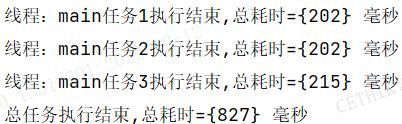
3、异步执行
@Service

@Slf4j

public class ServiceDemo {

    @Async

    public void taskOne() throws Exception {

        long start = System.currentTimeMillis();

        Thread.sleep(200);

        long end = System.currentTimeMillis();

        System.out.println("线程:" + Thread.currentThread().getName() + "任务1执行结束,总耗时={" + (end - start) + "} 毫秒");

    }

    @Async

    public void taskTwo() throws Exception {

        long start = System.currentTimeMillis();

        Thread.sleep(200);

        long end = System.currentTimeMillis();

        System.out.println("线程:" + Thread.currentThread().getName() + "任务2执行结束,总耗时={" + (end - start) + "} 毫秒");

    }

    @Async

    public void taskThere() throws Exception {

        long start = System.currentTimeMillis();

        Thread.sleep(200);

        long end = System.currentTimeMillis();

        System.out.println("线程:" + Thread.currentThread().getName() + "任务3执行结束,总耗时={" + (end - start) + "} 毫秒");

    }

}
@SpringBootTest

public class ServiceTest {

    @Autowired

    private ServiceDemo serviceDemo;

    @Test

    public void test01() throws Exception {

        long start = System.currentTimeMillis();

        serviceDemo.taskOne();

        serviceDemo.taskTwo();

        serviceDemo.taskThere();

        Thread.sleep(200);

        long end = System.currentTimeMillis();

        System.out.println("总任务执行结束,总耗时={" + (end - start) + "} 毫秒");

    }

}

4、使用自定义线程池
package com.qbb.service;

import org.springframework.context.annotation.Bean;

import org.springframework.context.annotation.Configuration;

import org.springframework.scheduling.concurrent.ThreadPoolTaskExecutor;

import java.util.concurrent.Executor;

import java.util.concurrent.ThreadPoolExecutor;

/**

 * 自定义线程池

 */

@Configuration

public class ExecutorAsyncConfig {

    @Bean(name = "newAsyncExecutor")

    public Executor newAsync() {

        ThreadPoolTaskExecutor taskExecutor = new ThreadPoolTaskExecutor();

        // 设置核心线程数

        taskExecutor.setCorePoolSize(2);

        // 线程池维护线程的最大数量,只有在缓冲队列满了以后才会申请超过核心线程数的线程

        taskExecutor.setMaxPoolSize(10);

        // 缓存队列

        taskExecutor.setQueueCapacity(2);

        // 允许的空闲时间,当超过了核心线程数之外的线程在空闲时间到达之后会被销毁

        taskExecutor.setKeepAliveSeconds(10);

        // 异步方法内部线程名称

        taskExecutor.setThreadNamePrefix("QIUQIU&LL-AsyncExecutor-");

        // 拒绝策略

        taskExecutor.setRejectedExecutionHandler(new ThreadPoolExecutor.CallerRunsPolicy());

        taskExecutor.initialize();

        return taskExecutor;

    }

}
定义线程任务
@Component

@Slf4j

public class FutureTaskExecutor {

    @Async(value = "newAsyncExecutor")

    public Future<String> taskOne() {

        return new AsyncResult<>(Thread.currentThread().getName() + "one 完成");

    }

    @Async(value = "newAsyncExecutor")

    public Future<String> taskTwo() {

        return new AsyncResult<>(Thread.currentThread().getName() + "two 完成");

    }

    @Async

    public Future<String> taskThree() {

        return new AsyncResult<>(Thread.currentThread().getName() + "three 完成");

    }

}
测试一下
/**

 * @author qbb

 */

@SpringBootTest

@Slf4j

public class FutureTaskTestExecutor {

    @Autowired

    private FutureTaskExecutor futureTaskExecutor;

    @Test

    public void runAsync() throws Exception {

        long start = System.currentTimeMillis();

        Future<String> taskOne = futureTaskExecutor.taskOne();

        Future<String> taskTwo = futureTaskExecutor.taskTwo();

        Future<String> taskThere = futureTaskExecutor.taskThree();

        while (true) {

            if (taskOne.isDone() && taskTwo.isDone() && taskThere.isDone()) {

                System.out.println("任务1返回结果={" + (taskOne.get()) + "},任务2返回结果={" + (taskTwo.get()) + "},任务3返回结果={" + (taskThere.get()) + "}");

                break;

            }

        }

        long end = System.currentTimeMillis();

        System.out.println("总任务执行结束,总耗时={" + (end - start) + "} 毫秒");

    }

}

注意点:不生效的情况
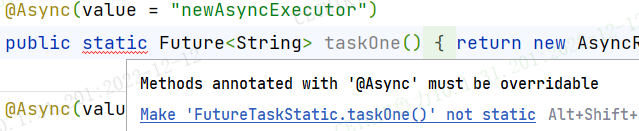
1、@Async作用在static修饰的方法上不生效
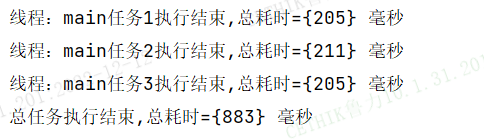
2、调用异步任务的方法和异步方法在同一个类时不生效
@Service

@Slf4j

public class ServiceDemo {

    @Async

    public void taskOne() throws Exception {

        long start = System.currentTimeMillis();

        Thread.sleep(200);

        long end = System.currentTimeMillis();

        System.out.println("线程:" + Thread.currentThread().getName() + "任务1执行结束,总耗时={" + (end - start) + "} 毫秒");

    }

    @Async

    public void taskTwo() throws Exception {

        long start = System.currentTimeMillis();

        Thread.sleep(200);

        long end = System.currentTimeMillis();

        System.out.println("线程:" + Thread.currentThread().getName() + "任务2执行结束,总耗时={" + (end - start) + "} 毫秒");

    }

    @Async

    public void taskThere() throws Exception {

        long start = System.currentTimeMillis();

        Thread.sleep(200);

        long end = System.currentTimeMillis();

        System.out.println("线程:" + Thread.currentThread().getName() + "任务3执行结束,总耗时={" + (end - start) + "} 毫秒");

    }

    @Test

    public void test01() throws Exception {

        long start = System.currentTimeMillis();

        taskOne();

        taskTwo();

        taskThere();

        Thread.sleep(200);

        long end = System.currentTimeMillis();

        System.out.println("总任务执行结束,总耗时={" + (end - start) + "} 毫秒");

    }

}
还是推荐使用CompletableFuture实现异步任务编排~~
@Async实现异步任务的更多相关文章
- ASP.NET sync over async(异步中同步,什么鬼?)
async/await 是我们在 ASP.NET 应用程序中,写异步代码最常用的两个关键字,使用它俩,我们不需要考虑太多背后的东西,比如异步的原理等等,如果你的 ASP.NET 应用程序是异步到底的, ...
- HTML5中script的async属性异步加载JS
HTML5中script的async属性异步加载JS HTML4.01为script标签定义了5个属性: charset 可选.指定src引入代码的字符集,大多数浏览器忽略该值.defer 可 ...
- spring boot中使用@Async实现异步调用任务
本篇文章主要介绍了spring boot中使用@Async实现异步调用任务,小编觉得挺不错的,现在分享给大家,也给大家做个参考.一起跟随小编过来看看吧 什么是“异步调用”? “异步调用”对应的是“同步 ...
- async/await异步处理demo
async/await异步处理demo 下载地址: async/await异步处理demo
- Promise,Generator(生成器),async(异步)函数
Promise 是什么 Promise是异步编程的一种解决方案.Promise对象表示了异步操作的最终状态(完成或失败)和返回的结果. 其实我们在jQuery的ajax中已经见识了部分Promise的 ...
- spring boot 学习(十一)使用@Async实现异步调用
使用@Async实现异步调用 什么是”异步调用”与”同步调用” “同步调用”就是程序按照一定的顺序依次执行,,每一行程序代码必须等上一行代码执行完毕才能执行:”异步调用”则是只要上一行代码执行,无需等 ...
- 【转】C# Async/Await 异步编程中的最佳做法
Async/Await 异步编程中的最佳做法 Stephen Cleary 近日来,涌现了许多关于 Microsoft .NET Framework 4.5 中新增了对 async 和 await 支 ...
- 将 async/await 异步代码转换为安全的不会死锁的同步代码
在 async/await 异步模型(即 TAP Task-based Asynchronous Pattern)出现以前,有大量的同步代码存在于代码库中,以至于这些代码全部迁移到 async/awa ...
- Spring @Async开启异步任务
1. 开启异步 @SpringBootApplication @EnableAsync //开启异步任务 public class Application { @Bean(name="pro ...
- Spring Boot使用@Async实现异步调用
原文:http://blog.csdn.net/a286352250/article/details/53157822 项目GitHub地址 : https://github.com/FrameRes ...
随机推荐
- OpenLDAP 自助修改密码系统
一.创建docker-compose文件 root@xx:~# mkdir self-service-password root@xx:~# cd self-service-password root ...
- Spring Boot 中使用 Poi-tl 渲染数据并生成 Word 文档
本文 Demo 已收录到 demo-for-all-in-java 项目中,欢迎大家 star 支持!后续将持续更新! 前言 产品经理急冲冲地走了过来.「现在需要将按这些数据生成一个 Word 报告文 ...
- 慢SQL治理实践及落地成果分享
一.治理背景 数据库系统性能问题会对应用程序的性能和用户体验产生负面影响.慢查询可能导致应用程序响应变慢.请求堆积.系统负载增加等问题,甚至引发系统崩溃或不可用的情况.慢SQL治理是在数据库系统中针对 ...
- vue2中使用antv/G6节点内容可滚动的ER图
先举一个栗子: 效果链接:https://code.juejin.cn/pen/7226264955824930816 如果不会请移步到官网的栗子,请点击查看 狠人话不多,直接给大家上代码: 整体代码 ...
- Django框架——forms组件、cookie与session
文章目录 1 forms 组件 1 校验字段功能 2 渲染标签功能 渲染方式1 渲染方式2 渲染方式3 3 渲染错误信息功能 视图 模板 4 组件的参数配置 5 局部钩子 6 全局钩子 2 cooki ...
- Ubuntu更新软件的命令
更新软件源 apt-get update 更新升级所有软件 apt-get upgrade 更新某个软件 apt-get upgrade 名 列出可更新的软件 apt list --upgradabl ...
- [ABC202E] Count Descendants 题解
Count Descendants 题目大意 给定一颗以 \(1\) 为根的树,多次询问求某点的子树中深度为给定值的点的个数. 思路分析 对于每个深度开一个 vector,从大到小存下这个深度的所有点 ...
- LangChain实战
1.概述 最近,在研究LangChain时,发现一些比较有意思的点,今天笔者将给大家分享关于LangChain的一些内容. 2.内容 2.1 什么是LangChain? LangChain是一项旨在赋 ...
- JVM指令分析
代码: 1 public class AppGo{ 2 public static void test() { 3 boolean flag = true; 4 if (flag) System.ou ...
- OpenJDK里的AsmTools简介
前言 转自:http://hengyunabc.github.io/openjdk-asmtools/ https://wiki.openjdk.java.net/display/CodeTools/ ...