
junit使用stub进行单元测试
stub是代码的一部分,我们要对某一方法做单元测试时,可能涉及到调用第三方web服务。假如当前该服务不存在或不可用咋办?好办,写一段stub代码替代它。
stub 技术就是把某一部分代码与环境隔离起来(比如,通过替换 Web服务器、文件系统、数据库等手段)从而进行单元测试的。
下面演示一个例子,利用jetty编写相关的stub充当web服务器,返回适当内容。
环境: idea + spring boot + jetty
关于jetty服务器,对比tomcat更轻量级,可轻松嵌入java代码启动它。
如何在项目中启动一个jetty服务器?
package com.lhy.junitkaifa.stubs;

import org.eclipse.jetty.server.Server;

import org.eclipse.jetty.server.handler.ContextHandler;

import org.eclipse.jetty.server.handler.ResourceHandler;

/**

 * @author xusucheng

 * @create 2018-12-20

 **/

public class JettySample {

    public static void main(String[] args) throws Exception {

        Server server = new Server( 8081 );

        ContextHandler context = new ContextHandler(server,"/");

        //默认为项目根目录

        context.setResourceBase(".");

        context.setHandler(new ResourceHandler());

        server.setStopAtShutdown( true );

        server.start();

    }

}
请求:http://localhost:8081
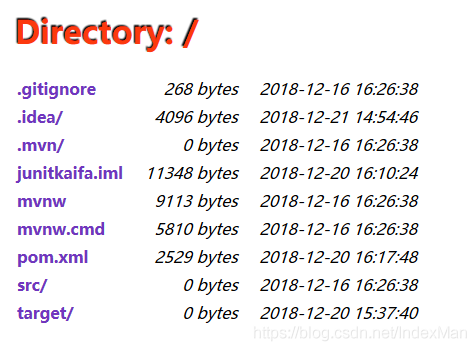
编写一个获取url内容的工具方法叫WebClient
package com.lhy.junitkaifa.stubs;

import java.io.IOException;

import java.io.InputStream;

import java.net.HttpURLConnection;

import java.net.URL;

/**

 * 读取指定URL内容

 * @author xusucheng

 * @create 2018-12-20

 **/

public class WebClient {

    public String getContent( URL url )

    {

        StringBuffer content = new StringBuffer();

        try

        {

            HttpURLConnection connection = (HttpURLConnection) url.openConnection();

            connection.setDoInput( true );

            InputStream is = connection.getInputStream();

            byte[] buffer = new byte[2048];

            int count;

            while ( -1 != ( count = is.read( buffer ) ) )

            {

                content.append( new String( buffer, 0, count ) );

            }

        }

        catch ( IOException e )

        {

            return null;

        }

        return content.toString();

    }

    public static void main(String[] args) throws Exception{

        WebClient wc = new WebClient();

        String content = wc.getContent(new URL("http://www.baidu.com/"));

        System.out.println(content);

    }

}
编写测试类TestWebClient
package com.lhy.junitkaifa.stubs;

import org.eclipse.jetty.server.Handler;

import org.eclipse.jetty.server.Request;

import org.eclipse.jetty.server.Server;

import org.eclipse.jetty.server.handler.AbstractHandler;

import org.eclipse.jetty.server.handler.ContextHandler;

import org.eclipse.jetty.server.handler.HandlerList;

import org.eclipse.jetty.servlet.ServletContextHandler;

import org.eclipse.jetty.util.ByteArrayISO8859Writer;

import org.junit.AfterClass;

import org.junit.BeforeClass;

import org.junit.Test;

import org.springframework.http.HttpHeaders;

import javax.servlet.ServletException;

import javax.servlet.http.HttpServletRequest;

import javax.servlet.http.HttpServletResponse;

import java.io.IOException;

import java.io.OutputStream;

import java.net.URL;

import static org.junit.Assert.assertEquals;

import static org.junit.Assert.assertNull;

/**

 * @author xusucheng

 * @create 2018-12-20

 **/

public class TestWebClient {

    private WebClient client = new WebClient();

    private static final int PORT=8081;

    @BeforeClass

    public static void setUp() throws Exception{

        System.out.println("====================Befor Class=====================");

        Server server = new Server(PORT);

        TestWebClient t = new TestWebClient();

        ContextHandler contentOkContext = new ContextHandler(server,"/testGetContentOk");

        contentOkContext.setHandler(t.new TestGetContentOkHandler());

        ContextHandler contentErrorContext = new ContextHandler(server,"/testGetContentError");

        contentErrorContext.setHandler(t.new TestGetContentServerErrorHandler());

        ContextHandler contentNotFoundContext = new ContextHandler(server,"/testGetContentNotFound");

        contentNotFoundContext.setHandler(t.new TestGetContentNotFoundHandler());

        HandlerList handlers = new HandlerList();

        handlers.setHandlers(new Handler[] { contentOkContext, contentErrorContext, contentNotFoundContext});

        server.setHandler(handlers);

        server.setStopAtShutdown( true );

        server.start();

    }

    @Test

    public void testGetContentOk()

            throws Exception

    {

        String result = client.getContent( new URL( "http://localhost:"+PORT+"/testGetContentOk" ) );

        assertEquals( "It works", result );

    }

    @Test

    public void testGetContentError()

            throws Exception

    {

        String result = client.getContent( new URL( "http://localhost:"+PORT+"/testGetContentError/" ) );

        assertNull( result );

    }

    @Test

    public void testGetContentNotFound()

            throws Exception

    {

        String result = client.getContent( new URL( "http://localhost:"+PORT+"/testGetContentNotFound" ) );

        assertNull( result );

    }

    @AfterClass

    public static void tearDown()

    {

        // Do nothing becuase the Jetty server is configured

        // to stop at shutdown.

        System.out.println("====================After Class=====================");

    }

    /**

     * 正常请求处理器

     */

    private class TestGetContentOkHandler

            extends AbstractHandler

    {

        @Override

        protected void doStart() throws Exception {

            super.doStart();

        }

        @Override

        public void setServer(Server server) {

            super.setServer(server);

        }

        @Override

        public void handle(String s, Request request, HttpServletRequest httpServletRequest, HttpServletResponse response) throws IOException, ServletException {

            System.out.println("======================TestGetContentOkHandler=======================");

            OutputStream out = response.getOutputStream();

            ByteArrayISO8859Writer writer = new ByteArrayISO8859Writer();

            writer.write( "It works" );

            writer.flush();

            response.setIntHeader( HttpHeaders.CONTENT_LENGTH, writer.size() );

            writer.writeTo( out );

            out.flush();

            request.setHandled(true);

        }

    }

    /**

     * 异常请求处理器

     */

    private class TestGetContentServerErrorHandler

            extends AbstractHandler

    {

        @Override

        public void handle(String s, Request request, HttpServletRequest httpServletRequest, HttpServletResponse response) throws IOException, ServletException {

            response.sendError( HttpServletResponse.SC_SERVICE_UNAVAILABLE );

        }

    }

    /**

     * 404处理器

     */

    private class TestGetContentNotFoundHandler

            extends AbstractHandler

    {

        @Override

        public void handle(String s, Request request, HttpServletRequest httpServletRequest, HttpServletResponse response) throws IOException, ServletException {

            response.sendError( HttpServletResponse.SC_NOT_FOUND );

        }

    }

}
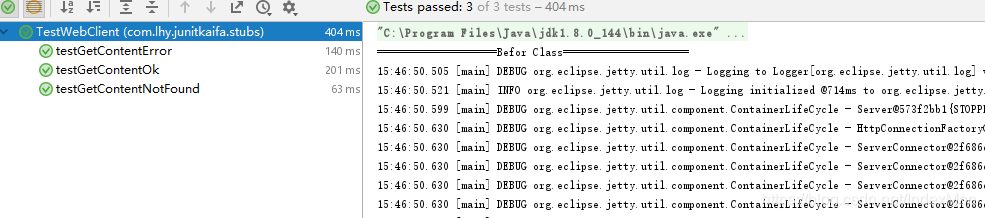
直接运行该类,结果为:
junit使用stub进行单元测试的更多相关文章
- [Java SE/Junit] 基于Java的单元测试框架Mockito
Mockito 是一个模拟测试框架,主要功能是在单元测试中模拟类/对象的行为. 1 为什么要使用Mockito? Mock可以理解为创建一个虚假的对象,或者说模拟出一个对象.在测试环境中用来替换掉真实 ...
- 使用Junit等工具进行单元测试
一.类的定义: 类是同一事物的总称,类是封装对象的属性和行为的载体,反过来说具有相同属性和行为的一类实体被称为类. 二.Junit工具的使用: 1.首先新建一个项目叫JUnit_Test,我们编写一个 ...
- (转)Eclipse中junit框架的使用——单元测试
[转]junit浅学笔记一 JUnit是一个回归测试框架(regression testing framework).Junit测试是程序员测试,即所谓白盒测试,因为程序员知道被测试的软件如何(How ...
- JUnit基础及第一个单元测试实例(JUnit3.8)
单元测试 单元测试(unit testing) ,是指对软件中的最小可测试单元进行检查和验证. 单元测试不是为了证明您是对的,而是为了证明您没有错误. 单元测试主要是用来判断程序的执行结果与自己期望的 ...
- 单元测试系列:如何使用JUnit+JaCoCo+EclEmma完成单元测试
更多原创测试技术文章同步更新到微信公众号 :三国测,敬请扫码关注个人的微信号,感谢! 原文链接:http://www.cnblogs.com/zishi/p/6726664.html -----如 ...
- Maven下使用Junit对Spring进行单元测试
主要步骤 1. 在工程的pom文件中增加spring-test的依赖: <dependency> <groupId>org.springframework</groupI ...
- 阿里知识储备之二——junit学习以及android单元测试
一,junit框架 http://blog.csdn.net/afeilxc/article/details/6218908 详细见这篇博客 juit目前已经可以和maven项目进行集成和测试,而且貌 ...
- junit配合catubuter统计单元测试的代码覆盖率
1.视频参考孔浩老师ant视频笔记 对应的build-junit.xml脚步如下所示: <?xml version="1.0" encoding="UTF-8&qu ...
- 使用Junit对Spring进行单元测试实战小结
Demo代码: @RunWith(SpringJUnit4ClassRunner.class) @ContextConfiguration(locations = "classpath*:/ ...
- 使用JUnit 和Jacoco进行单元测试
Jacoco配置 <dependency> <groupId>org.jacoco</groupId> <artifactId>jacoco-maven ...
随机推荐
- 后端开发之光!Django应用的容器化部署实践~
在此之前,我一直用uwsgi+virtualenv+nginx方式进行应用部署,操作起来比较麻烦,而且依赖于服务器上的Python版本,服务的管理方面单纯uwsgi + pid算不上特别麻烦但总没有d ...
- [转帖]Oracle 12.2 新特性 | PDB不同字符集变更
https://www.cnblogs.com/cqdba/p/8bef7c432b87807c0680d6791f427b09.html 在oracle12.1版本中,同一CDB中的所有PDB使用的 ...
- [转帖]django使用html渲染页面样式+数据库管理员的创建
一.django页面渲染 1.在templates中创建html格式的文件-index.html,在该文件中添加body,设置样式,比如: <h1 style = "backgroun ...
- [转帖]理解 Linux backlog/somaxconn 内核参数
引言 在研究IOTDB的时候,启动服务的时候会有个报警. WARN: the value of net.core.somaxconn (=4096) is too small, please set ...
- [转帖]jmeter编写测试脚本大全
目录 一.背景 二.按照功能划分 2.1 加密处理.验签处理 2.2 jmeter 使用beanshell 编写脚本 2.3 jmeter脚本报错大全 2.4 jmeter打印log 2.5 jmet ...
- 【转帖】FIO磁盘性能测试工具
https://www.jianshu.com/p/70b8c7d5d217 FIO工具介绍 FIO 工具是一款用于测试硬件存储性能的辅助工具,兼具灵活性.可靠性从而从众多性能测试工具中脱颖而出.磁盘 ...
- [转帖] Linux命令拾遗-剖析工具
https://www.cnblogs.com/codelogs/p/16060472.html 简介# 这是Linux命令拾遗系列的第五篇,本篇主要介绍Linux中常用的线程与内存剖析工具,以及更高 ...
- 不想做架构师的Gopher不是好程序员
最近我们在组队学习<手把手带你写一个web框架>,强制PUSH,坚持每天学习打卡,不完成惩罚发红包的那种. 你别说,效果还真挺好. 昨天学到了架构部分,很受启发,光学不写假把式.(还是得坚 ...
- es6新增的运算符-链判断运算符的诞生[?.]和null的判断运算符??
指数运算符 ** console.log(2 ** 2 ) //4 console.log(2 ** 3 ) //8 console.log(2 ** 4) //16 链判断运算符的诞生(?.) 在实 ...
- echarts 设置legend样式
设置legend样式 legend: { x: 'center', data: ['班车', '包车'], icon: "circle", // 这个字段控制形状 类型包括 cir ...