
FATFS(A)
(一),什么是文件管理系统
答:数据在PC上是以文件的形式储存在磁盘中的,这些数据的形式一般为ASCII码或二进制形式。简单点说就是:管理磁盘上的文件的方法的代码!
如:我们写到SD卡上面的数据管理一下,更科学的方法来管理
http://elm-chan.org/fsw/ff/00index_e.html,官网介绍 Resources下面是源码
(二),我们在移植时主要是那些函数?
答:Device Control Interface(硬件接口函数)
- disk_status - Get device status 选择操纵的模块,此处用SD卡
- disk_initialize - Initialize device 初始化函数
- disk_read - Read sector(s) 读
- disk_write - Write sector(s) 写
- disk_ioctl - Control device dependent features
- get_fattime - Get current time
(三),例程:
1,我们用的是0.09版本的
2,CC936.c中文字体库
①新建工作区间
	/* Register work area for each volume (Always succeeds regardless of disk status) */

	f_mount(0,&fs);  //(文件管理系统)注册一个工作区间,工作空间命名为0。
那么工作区间的命名范围是什么呢?
答:
FRESULT f_mount (

	BYTE vol,		/* Logical drive number to be mounted/unmounted */

	FATFS *fs		/* Pointer to new file system object (NULL for unmount)*/

)

{

	FATFS *rfs;

	if (vol >= _VOLUMES)		/* Check if the drive number is valid */

		return FR_INVALID_DRIVE;
vol就是f_mount的第一个形参(命名),当他的值大于等于 _VOLUMES,就会返回错误
#define _VOLUMES	1  //can define 9

/* Number of volumes (logical drives) to be used. */
Parameters(官网)
- Drive
- Logical drive number (0-9) to register/unregister the work area.
- FileSystemObject
- Pointer to the work area (file system object) to be registered.
②然后再工作区间里面新建文件
/* function disk_initialize() has been called in f_open */

/* Create new file on the drive 0 */

res = f_open(&fnew, "0:newfile.txt", FA_CREATE_ALWAYS | FA_WRITE );
OPEN的属性:
1.怎么打开呢?
FA_CREATE_ALWAYS 总是以创建总是新建的形式打开这个文件
FA_WRITE:此文件只能写
2.看下open函数
FRESULT f_open (
FIL* FileObject, /* Pointer to the blank file object structure */ 文件指针,把打开的文件关联到这个指针连
const TCHAR* FileName, /* Pointer to the file neme */ 文件名字
BYTE ModeFlags /* Mode flags */ 属性
);
属性:
| Value | Description |
|---|---|
| FA_READ | Specifies read access to the object. Data can be read from the file. Combine with FA_WRITE for read-write access. |
| FA_WRITE | Specifies write access to the object. Data can be written to the file. Combine with FA_READ for read-write access. |
| FA_OPEN_EXISTING | Opens the file. The function fails if the file is not existing. (Default) |
| FA_OPEN_ALWAYS | Opens the file if it is existing. If not, a new file is created. To append data to the file, use f_lseek function after file open in this method. |
| FA_CREATE_NEW | Creates a new file. The function fails with FR_EXIST if the file is existing. |
| FA_CREATE_ALWAYS | Creates a new file. If the file is existing, it is truncated and overwritten. |
可以第一次打开用:FA_CREATE_NEW,之后打开用:FA_OPEN_EXISTING(已存在)就可以了
或者:总是打开,总是关闭
当用到:FA_CREATE_ALWAYS时,我们要将 #define _FS_READONLY 0 /* 0:Read/Write or 1:Read only */ 打开
3.对于返回值(Return Values):我们只测试:FR_OK(是否成功)
③往该文件内写数据
if ( res == FR_OK )

{

	res = f_write(&fnew, textFileBuffer, sizeof(textFileBuffer), &bw);

	f_close(&fnew);      写完之后,把该文件关掉

}
④关掉之后再打开它
res = f_open(&fnew, "0:newfile.txt", FA_OPEN_EXISTING | FA_READ); // FA_READ:此时打开定义可读
⑤读取数据
res = f_read(&fnew, buffer, sizeof(buffer), &br);
⑥打印之后关闭
printf("\r\n %s ", buffer);

/* Close open files */

f_close(&fnew);
⑦在文件系统中注册掉刚才开辟的“0”工作区间
/* Unregister work area prior to discard it */

f_mount(0, NULL);
(四)文件管理系统与SD卡的关联!
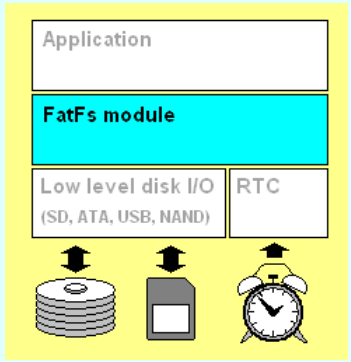
1,Application:就是我们主函数中使用的那些上层函数
2,中间是文件系统模块,文件系统要操纵底层SD卡的时候呢还需要 Low level disk I/O,这一部分驱动,这一部分驱动需要我们自己写
/*-------------------------- SD Init ----------------------------- */

  Status = SD_Init();

	if (Status!=SD_OK )

	{

		return STA_NOINIT;

	}

	else

	{

		return RES_OK;

	}

}
和
/*-----------------------------------------------------------------------*/

/* Return Disk Status                                                    */

DSTATUS disk_status (

	BYTE drv		/* Physical drive nmuber (0..) */

)

{

	return RES_OK;

}
底层的磁盘的读/写
/*-----------------------------------------------------------------------*/

/* Read Sector(s)                                                        */

DRESULT disk_read (

	BYTE drv,		/* Physical drive nmuber (0..) */

	BYTE *buff,		/* Data buffer to store read data */

	DWORD sector,	/* Sector address (LBA) */

	BYTE count		/* Number of sectors to read (1..255) */

)

{

	if (count > 1)           //多个磁盘

	{

		SD_ReadMultiBlocks(buff, sector*BLOCK_SIZE, BLOCK_SIZE, count);

			  /* Check if the Transfer is finished */

	     SD_WaitReadOperation();  //循环查询dma传输是否结束

	    /* Wait until end of DMA transfer */

	    while(SD_GetStatus() != SD_TRANSFER_OK);

	}

	else							       //单个磁盘

	{

		SD_ReadBlock(buff, sector*BLOCK_SIZE, BLOCK_SIZE);

			  /* Check if the Transfer is finished */

	     SD_WaitReadOperation();  //循环查询dma传输是否结束

	    /* Wait until end of DMA transfer */

	    while(SD_GetStatus() != SD_TRANSFER_OK);

	}

	return RES_OK;

}

/*-----------------------------------------------------------------------*/

/* Write Sector(s)                                                       */

#if _READONLY == 0

DRESULT disk_write (

	BYTE drv,			/* Physical drive nmuber (0..) */

	const BYTE *buff,	/* Data to be written */

	DWORD sector,		/* Sector address (LBA) */

	BYTE count			/* Number of sectors to write (1..255) */

)

{

	if (count > 1)

	{

		SD_WriteMultiBlocks((uint8_t *)buff, sector*BLOCK_SIZE, BLOCK_SIZE, count);

		  /* Check if the Transfer is finished */

	  	 SD_WaitWriteOperation();	   //等待dma传输结束

	    while(SD_GetStatus() != SD_TRANSFER_OK); //等待sdio到sd卡传输结束

	}

	else

	{

		SD_WriteBlock((uint8_t *)buff,sector*BLOCK_SIZE, BLOCK_SIZE);

		  /* Check if the Transfer is finished */

	   		SD_WaitWriteOperation();	   //等待dma传输结束

	    while(SD_GetStatus() != SD_TRANSFER_OK); //等待sdio到sd卡传输结束

	}

	return RES_OK;

}

#endif /* _READONLY */
IO控制为空(直接返回OK)
/*-----------------------------------------------------------------------*/

/* Miscellaneous Functions                                               */

DRESULT disk_ioctl (

	BYTE drv,		/* Physical drive nmuber (0..) */

	BYTE ctrl,		/* Control code */

	void *buff		/* Buffer to send/receive control data */

)

{

	return RES_OK;

}
嵌入式初学者,看到此文的大神们,有什么错误的地方多多意见啊!
FATFS(A)的更多相关文章
- 【STM32】使用SDIO进行SD卡读写,包含文件管理FatFs(终)-配合内存管理来遍历SD卡
[STM32]使用SDIO进行SD卡读写,包含文件管理FatFs(一)-初步认识SD卡 [STM32]使用SDIO进行SD卡读写,包含文件管理FatFs(二)-了解SD总线,命令的相关介绍 [STM3 ...
- 【STM32】使用SDIO进行SD卡读写,包含文件管理FatFs(八)-认识内存管理
[STM32]使用SDIO进行SD卡读写,包含文件管理FatFs(一)-初步认识SD卡 [STM32]使用SDIO进行SD卡读写,包含文件管理FatFs(二)-了解SD总线,命令的相关介绍 [STM3 ...
- 【STM32】使用SDIO进行SD卡读写,包含文件管理FatFs(七)-准备移植FatFs
[STM32]使用SDIO进行SD卡读写,包含文件管理FatFs(一)-初步认识SD卡 [STM32]使用SDIO进行SD卡读写,包含文件管理FatFs(二)-了解SD总线,命令的相关介绍 [STM3 ...
- 【STM32】使用SDIO进行SD卡读写,包含文件管理FatFs(六)-FatFs使用的思路介绍
[STM32]使用SDIO进行SD卡读写,包含文件管理FatFs(一)-初步认识SD卡 [STM32]使用SDIO进行SD卡读写,包含文件管理FatFs(二)-了解SD总线,命令的相关介绍 [STM3 ...
- 【STM32】使用SDIO进行SD卡读写,包含文件管理FatFs(五)-文件管理初步介绍
其他链接 [STM32]使用SDIO进行SD卡读写,包含文件管理FatFs(一)-初步认识SD卡 [STM32]使用SDIO进行SD卡读写,包含文件管理FatFs(二)-了解SD总线,命令的相关介绍 ...
- 【STM32】使用SDIO进行SD卡读写,包含文件管理FatFs(一)-初步认识SD卡
由于一张SD卡要能读写,涉及到的技术有些多,我打算分以下几篇博客 [STM32]使用SDIO进行SD卡读写,包含文件管理FatFs(一)-初步认识SD卡 [STM32]使用SDIO进行SD卡读写,包含 ...
- 【STM32】使用SDIO进行SD卡读写,包含文件管理FatFs(二)-了解SD总线,命令的相关介绍
其他链接 [STM32]使用SDIO进行SD卡读写,包含文件管理FatFs(一)-初步认识SD卡 [STM32]使用SDIO进行SD卡读写,包含文件管理FatFs(二)-了解SD总线,命令的相关介绍 ...
- 【STM32】使用SDIO进行SD卡读写,包含文件管理FatFs(三)-SD卡的操作流程
其他链接 [STM32]使用SDIO进行SD卡读写,包含文件管理FatFs(一)-初步认识SD卡 [STM32]使用SDIO进行SD卡读写,包含文件管理FatFs(二)-了解SD总线,命令的相关介绍 ...
- 【STM32】使用SDIO进行SD卡读写,包含文件管理FatFs(四)-介绍库函数,获取一些SD卡的信息
其他链接 [STM32]使用SDIO进行SD卡读写,包含文件管理FatFs(一)-初步认识SD卡 [STM32]使用SDIO进行SD卡读写,包含文件管理FatFs(二)-了解SD总线,命令的相关介绍 ...
随机推荐
- 图论——最小生成树_prim
今天是最小生成树的prim的算法,因为本人水平有限所以堆优化都不是很会啊,但邻接表好像出了点小差错所以上邻接矩阵比较好一点,尽管比Kruskal慢了很多很多但这种贪心思想还是要学习的.从第一条边开始取 ...
- 01 - nginx - 安装、配置文件、默认网站、虚拟主机
一.运维: . 介绍服务器. 服务器逻辑: 服务器选择 操作系统 部署逻辑 业务环境部署逻辑 业务部署图 软件部署文档 日常维护文档 测试 开发上传代码到源码系统 上线 - 测服务器,内测 预发布测试 ...
- Jquery获取元素的位置
$(".curr_play").position().left //元素距离父级元素左侧位置 $(".curr_play").offset().left //元 ...
- SQL Server 学习博客分享列表(应用式学习 + 深入理解)
SQL Server 学习博客分享列表(应用式学习 + 深入理解) 转自:https://blog.csdn.net/tianjing0805/article/details/75047574 SQL ...
- python2与python3之间的主要区别
python2与python3之间的主要区别 print py2:print语句,语句就意味着可以直接跟要打印的东西,如果后面接的是一个元组对象,直接打印 py3:print函数,函数就以为这必须要加 ...
- SDUT2826:名字的价值
http://acm.sdut.edu.cn/sdutoj/problem.php?action=showproblem&problemid=2806 名字的价值 Time Limit: 10 ...
- docker搭建本地仓库并制作自己的镜像
原文地址https://blog.csdn.net/junmoxi/article/details/80004796 1. 搭建本地仓库1.1 下载仓库镜像1.2 启动仓库容器2. 在CentOS容器 ...
- 将Mongo装为Windows的服务
PHP的mongo扩展: 首先 下载一个PHP的mongo扩展, 地址:http://download.csdn.net/detail/qq_36387589/9819259 然后修改php.ini. ...
- sql中字符串如何比大小
从字符串的第一个字符开始比较ASSCII码值,如果相等则看下一个,以此类推. 数字的ASCII码<大写字母的ASCII码<小写字母的ASCII码. ASCII码
- xhtml 的三种 doctype
{1}文档宣告 <!ODCTYPE html PUBLIC"-//W3C//DTD XHTML 1.0 [there]//EN" "http://www.w4org/TR/xhtml1/DTD/ ...