
在eclipse里配置Android ndk环境 适用于windows mac 和linux(转)
由于做Android在底层有库的时候需要交叉编译环境,c代码需要用ndk-build来进行编译,而java代码则需要用Android sdk编译。之前由于对eclipse ide不太熟悉,所以往往编译的时候都是在记事本里写好c代码,然后用cygwin搭建ndk-build环境,用ndk-build来编译出相关的so 之后再用eclipse里去编译java程序,从而使用该so。
其实并不用这么复杂,利用eclipse完全可以达到编译so的目的
点击project->builders->new->Program
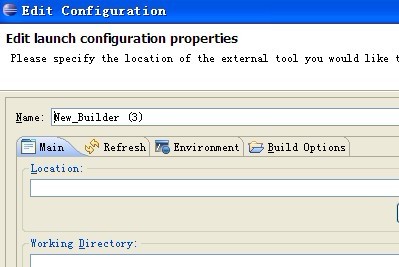
然后选择Location
在windows下为
D:\Android\ndk\ndk\ndk-r7-windows\ndk-build.cmd
在linux和mac下为可执行的ndk-build路径
然后选择
Working Directory
D:\Android\ndk\ndk\android-ndk-r6b\samples\<your jni project name>
选择到您对应的jni路径,然后在我们编译运行的时候,这个builder就会自动地去编译so库,而sdk会去编译java代码,实现利用eclipse实现交叉编译
如果还有疑问,可以看这篇文章
http://mobilepearls.com/labs/ndk-builder-in-eclipse/
Setting up Automatic NDK Builds in Eclipse
When editing native JNI code in an Android project using the Android NDK you may configure Eclipse to automatically rebuild your project when editing native code, just
as it does for java. The below steps shows how to perform the necessary configuration (note that this requires revision 4 or later of the NDK – previous revisions does not contain the necessary ndk-build binary):
Start by right clicking on your android project (named hello-neon in the below screenshots) with JNI resources, and select Properties. In the resulting dialog, choose the Builders entry in the list to the left and press the New... button:

A new dialog will open presenting a list of builder types. Select the Program type and press the OK button:

In the Main tab, fill in the following:
- Name:
- NDK Builder
- Location:
- /opt/android-ndk/ndk-build (or wherever your ndk-build binary is). You may use a variable as in ${system_property:user.home}/lib/android-ndk/ndk-build
- Working Directory:
- ${workspace_loc:/hello-neon} (replace hello-neon with your project name. Press the
Browse Workspace...button to select it graphically)
The result should look something like the below:

Now continue with the refresh tab. Make sure the two checkboxes Refresh resources upon completion. and Recursively include sub-foldersare checked. Choose the Specific resources radio button and press the Specify button:
Resources...

Since the ndk-build process will generate files in the lib folder, we want Eclipse to discover changes made there without having to refresh manually. So select the lib folder in the project (create one if necessary) and press the Finish button:

Now skip the Environment tab and go to the final Build Options tab. Make sure the Run the builder: During auto builds checkbox is checked.

Since the NDK build only needs to happen when editing files in the jni folder, check that folder and press the Finish button.

Now finally press OK in the builder configuration dialog – the new NDK builder should now be up and running. Try editing any file in the jni folder and check that the Console view produces output from the build process:

Contact support@mobilepearls.com for feedback
在eclipse里配置Android ndk环境 适用于windows mac 和linux(转)的更多相关文章
- eclipse里配置Android ndk环境,用eclipse编译.so文件
做Android NDK开发时,c代码需要用ndk-build来进行编译,而java代码则需要用Android sdk编译. 编译c代码有两种方法: 一.写好c代码后,然后用cygwin搭建ndk-b ...
- 在eclipse中配置android ndk的自动编译环境builders
无论linux还是mac在jni目录中直接运行 ndk-build 就可以生成 lib目录及所需要的 so文件: windows 装上lnx模拟器也是一样: 每次修改完 c++代码, 都要运行一下 ...
- 在Eclipse下搭建Android开发环境教程
我们昨天向各位介绍了<在NetBeans上搭建Android SDK环境>,前不久也介绍过<在MyEclipse 8.6上搭建Android开发环境>, 都受到了读者的欢迎.但 ...
- Ubuntu配置Android编译环境
1.Ubuntu安装 VMware安装ubuntu之后,安装Vmware tools: 1.安装完ubuntu后,VMware Workstation菜单:虚拟机-->安装 Vmware Too ...
- Windows XP环境下 搭建Android NDK环境
搭建Android NDK环境 Windows XP环境下 1 一些下载 ① NDK r7:http://developer.android.com/sdk/ndk/index.html ② cygw ...
- 【转】在Eclipse下搭建Android开发环境教程
本文将全程演示Android开发环境的搭建过程,无需配置环境变量.所有软件都是写该文章时最新版本,希望大家喜欢. 一 相关下载 三 Eclipse配置 (1)Java JDK下载 1 安装andr ...
- ubuntu配置android开发环境和编译源码遇到的一些问题
---------------------------------------------环境变量设置--------------------------------------------- 1.设 ...
- Android开发:修改eclipse里的Android虚拟机路径
一.发现问题: 今天打开电脑发现C盘缩了不少,这才意识到:eclipse里配置的安卓虚拟机默认放在了C盘里. 当然,在不同的电脑上可能路径有所不同,我的默认路径是:C:\Users\lenovo\.a ...
- Ubuntu Linux下如何配置Android开发环境
下载和安装Win7系统Android开发环境中讲了怎样在Win7系统中安装Android开发环境,那么怎样在Linux系统中配置Android开发环境呢?本篇文章就将演示如何使用Eclipse.And ...
随机推荐
- ssh : how to add "hostkey" to “know_hosts”
有时后端daemon或者脚本在执行ssh连接时,会遇到以下提示: The authenticity of host 'git.sws.com (10.42.1.88)' can't be establ ...
- USB2.0相关应用笔记集锦
在AN65209中 有一些应用笔记集锦,希望对大家有用.当然AN65209这篇应用笔记很重要,希望大家一定要看!!!一定要看!!!!
- GRAPH ATTENTION NETWORKS
基本就是第一层concatenate,第二层不concatenate. 相关论文: Semi-Supervised Classification with Graph Convolutional Ne ...
- SAP DBDI 网银接口实现案例
在财务共享中心SSC实施中,为了提高AP和对账的效率,不可避免的需要实现和网上银行的集成.笔者为各位分析该案例如下: 为什么要上网银? 2).和SAP的无缝集成 3).直接在SAP中和银联对接 4). ...
- qualcomm 查看 wifi 配置生效
iwpriv wlan0 getConfig 然后收集dmesg, 或者执行这条命令: dmesg | grep gEnableBmps
- 2015年第六届蓝桥杯C/C++B组省赛题目解析
一.奖券数目 有些人很迷信数字,比如带“4”的数字,认为和“死”谐音,就觉得不吉利.虽然这些说法纯属无稽之谈,但有时还要迎合大众的需求.某抽奖活动的奖券号码是5位数(10000-99999),要求其中 ...
- vector 去除重复元素(sort + unique)
struct SIndexData { string sCode; int iDate; int iTime; double f1; SIndexData(): iDate(0), iTime(0) ...
- SpringMVC系列(八)国际化
一.页面国际化 1.在pom.xml引入国际化需要的依赖 <!--国际化相关依赖 begin --> <dependency> <groupId>jstl</ ...
- e792. 建立一个包括所有数据的SpinnerListModel
By default, if the user is browsing the values in a SpinnerListModel, the iteration stops when eithe ...
- e587. Filling Basic Shapes
There are two ways to fill basic shapes like lines and rectangles. The first is to use specific draw ...