
android studio常用控件
1.Button设置不同的样式
<?xml version="1.0" encoding="utf-8"?>

<selector xmlns:android="http://schemas.android.com/apk/res/android"

    android:layout_width="match_parent"

    android:layout_height="match_parent">

    <!--android:drawable="@drawable/ic_launcher"-->

    <item android:state_pressed="true" >

        <shape>

              <solid android:color="#ff1234"></solid>

              <corners android:topLeftRadius="5dp"

                android:topRightRadius="5dp"

                android:bottomRightRadius="5dp"

                android:bottomLeftRadius="5dp"

                />

        </shape>

    </item>

    <item android:state_focused="true"

        android:drawable="@drawable/ic_launcher" >

        <shape>

            <solid android:color="#ffaeff5d"></solid>

            <corners android:topLeftRadius="5dp"

                android:topRightRadius="5dp"

                android:bottomRightRadius="5dp"

                android:bottomLeftRadius="5dp"

                />

        </shape>

        </item>

    <item>

        <shape>

            <solid android:color="#ffffb757"></solid>

            <corners android:topLeftRadius="5dp"

                android:topRightRadius="5dp"

                android:bottomRightRadius="5dp"

                android:bottomLeftRadius="5dp"

                />

        </shape>

    </item>

</selector>
如果是加载图片,item代码更改
<item android:state_pressed="true" android:drawable="@drawable/ic_launcher">
2.EditText xml: android:hint="type something here"提示语句 获取text:oast.makeText(this,inputText,Toast.LENGTH_SHORT).show();如果edittext被键盘挡住,需要在androidmanifest中加一句:android:windowSoftInputMode="adjustPan|stateHidden"
<activity

            android:name="******"

            android:configChanges="keyboardHidden|orientation|screenSize"

            android:screenOrientation="portrait"

            android:theme="@style/AppTheme.NoActionBar">
            android:windowSoftInputMode="adjustPan|stateHidden"

        </activity>
editText显示多行
textMultiLine显示多行 minLines最小行数 gravity="left|top"光标置顶
<EditText

                    android:layout_width="match_parent"

                    android:layout_height="match_parent"

                    android:layout_margin="10dp"

                    android:background="null"

                    android:inputType="textMultiLine"

                    android:minLines="6"

                    android:gravity="left|top"

                    android:hint="变更事项"/>
3.ImageView:xml需要:android:src="@drawable/ic_launcher" 代码:imgView.setImageResource(R.drawable.ic_launcher);
4.ProgressBar 加载进度提示,就是进度条
<ProgressBar

        android:id="@+id/progressBar1"

        android:layout_width="fill_parent"

        android:layout_height="fill_parent"

        android:layout_centerHorizontal="true"

        android:layout_centerVertical="true"

        />
progressBar.setVisibility(View.GONE);
5.TextView:跑马灯效果
android:ellipsize="marquee"
android:focusable="true"
android:focusableInTouchMode="true"
android:singleLine="true"
android:marqueeRepeatLimit="marquee_forever"
如果有文本框焦点将会没有,跑马灯效果就会停止,所以需要增加一句
<requestFocus/>
5.AlertDialog,样式很多,写一个
dialog.setPositiveButton方法是确定按钮的点击事件
dialog.setNegativeButton取消按钮的点击事件
dialog.setCancelable(false);
dialog弹出后会点击屏幕或物理返回键,dialog不消失
dialog.setCanceledOnTouchOutside(false);
dialog弹出后会点击屏幕,dialog不消失;点击物理返回键dialog消失
 AlertDialog.Builder dialog = new AlertDialog.Builder(main.this);

                dialog.setTitle("this is a dialog");

                dialog.setMessage("something important");

                dialog.setCancelable(false);

                dialog.setPositiveButton("ok",new DialogInterface.OnClickListener(){

                    @Override

                    public void onClick(DialogInterface dialog, int which){

                    }

                });

                dialog.setNegativeButton("cancel",new DialogInterface.OnClickListener() {

                    @Override

                    public void onClick(DialogInterface dialog, int which){

                    }

                });

                dialog.show();
使用alertview创建一个简单的选择列表
第一步:在xml中创建一个Button 和一个TextView
第二步:创建选择数组的数据源
private String []fruits = new String[]{"苹果","香蕉","橘子","凤梨","芒果"};
第三步:展示
 AlertDialog.Builder builder = new AlertDialog.Builder(MainActivity.this);

                builder.setTitle("请选择你喜欢吃的水果");

                builder.setItems(fruits,new DialogInterface.OnClickListener() {

                    @Override

                    public void onClick(DialogInterface dialog, int which) {

                        textView.setText(fruits[which]);

                    }

                });

                builder.show();
6.ProgressDialog
ProgressDialog progressDialog = new ProgressDialog(main.this);

                progressDialog.setTitle("this is a progressDialog");

                progressDialog.setMessage("load...");

                progressDialog.setCancelable(true);

                progressDialog.show();;

 停止显示progressDialog.dismiss();
7.ImageView加载网络图片
package com.android.antking.imageview;

import java.io.InputStream;

import java.net.HttpURLConnection;

import java.net.MalformedURLException;

import java.net.URL;

import android.app.Activity;

import android.graphics.Bitmap;

import android.graphics.BitmapFactory;

import android.os.Bundle;

import android.util.Log;

import android.view.View;

import android.widget.ImageView;

public class MainActivity extends Activity {

    //定义一个图片显示控件

    private ImageView imageView;

    /** Called when the activity is first created. */

    @Override

    public void onCreate(Bundle savedInstanceState) {

        super.onCreate(savedInstanceState);

        setContentView(R.layout.main);

        //图片资源

        String url = "http://s16.sinaimg.cn/orignal/89429f6dhb99b4903ebcf&690";

        //得到可用的图片

        Bitmap bitmap = getHttpBitmap(url);

        imageView = (ImageView)this.findViewById(R.id.imageViewId);

        //显示

        imageView.setImageBitmap(bitmap);

    }

    /**

     * 获取网落图片资源

     * @param url

     * @return

     */

    public static Bitmap getHttpBitmap(String url){

        URL myFileURL;

        Bitmap bitmap=null;

        try{

            myFileURL = new URL(url);

            //获得连接

            HttpURLConnection conn=(HttpURLConnection)myFileURL.openConnection();

            //设置超时时间为6000毫秒,conn.setConnectionTiem(0);表示没有时间限制

            conn.setConnectTimeout(6000);

            //连接设置获得数据流

            conn.setDoInput(true);

            //不使用缓存

            conn.setUseCaches(false);

            //这句可有可无,没有影响

            //conn.connect();

            //得到数据流

            InputStream is = conn.getInputStream();

            //解析得到图片

            bitmap = BitmapFactory.decodeStream(is);

            //关闭数据流

            is.close();

        }catch(Exception e){

            e.printStackTrace();

        }

        return bitmap;

    }

}
第二种方式:使用ImageLoader库文件,第一步gitup下载 https://github.com/nostra13/Android-Universal-Image-Loader,导入jar包文件
androidmanifest ,注册
<uses-permission android:name="android.permission.WRITE_EXTERNAL_STORAGE" />

<uses-permission android:name="android.permission.READ_EXTERNAL_STORAGE" />
dependencies声明
compile 'com.nostra13.universalimageloader:universal-image-loader:1.9.5'
使用代码
 DisplayImageOptions options;

        options = new DisplayImageOptions.Builder().showImageOnLoading(R.drawable.ic_launcher) // 设置图片在下载期间显示的图片

                .showImageForEmptyUri(R.drawable.ic_launcher)// 设置图片Uri为空或是错误的时候显示的图片

                .showImageOnFail(R.drawable.ic_launcher) // 设置图片加载/解码过程中错误时候显示的图片

                .cacheInMemory(true)// 设置下载的图片是否缓存在内存中

                .cacheOnDisk(true)// 设置下载的图片是否缓存在SD卡中

                .imageScaleType(ImageScaleType.EXACTLY_STRETCHED)// 设置图片以如何的编码方式显示

                .bitmapConfig(Bitmap.Config.RGB_565)// 设置图片的解码类型//

                .resetViewBeforeLoading(true)// 设置图片在下载前是否重置,复位

                .build();// 构建完成

        String uri = this.list1.get(position);

         ImageLoader imageLoader;

        imageLoader = ImageLoader.getInstance();

        imageLoader.init(ImageLoaderConfiguration.createDefault(this.context));

//        imageLoader.init(ImageLoaderConfiguration.createDefault(this));

        imageLoader.displayImage(uri, holder.imageView, options);
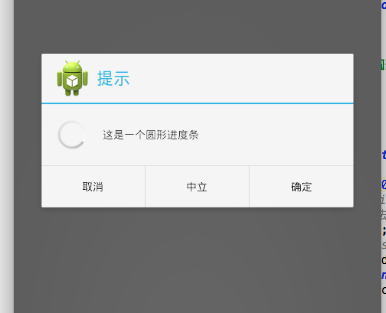
8.progressdialog
final ProgressDialog dialog = new ProgressDialog(this);

        dialog.setProgressStyle(ProgressDialog.STYLE_SPINNER);// 设置进度条的形式为圆形转动的进度条

        dialog.setCancelable(true);// 设置是否可以通过点击Back键取消

        dialog.setCanceledOnTouchOutside(false);// 设置在点击Dialog外是否取消Dialog进度条

        dialog.setIcon(R.drawable.ic_launcher);//

        // 设置提示的title的图标,默认是没有的,如果没有设置title的话只设置Icon是不会显示图标的

        dialog.setTitle("提示");

        // dismiss监听

        dialog.setOnDismissListener(new DialogInterface.OnDismissListener() {

            @Override

            public void onDismiss(DialogInterface dialog) {

                // TODO Auto-generated method stub

            }

        });

        // 监听Key事件被传递给dialog

        dialog.setOnKeyListener(new DialogInterface.OnKeyListener() {

            @Override

            public boolean onKey(DialogInterface dialog, int keyCode,

                    KeyEvent event) {

                // TODO Auto-generated method stub

                return false;

            }

        });

        // 监听cancel事件

        dialog.setOnCancelListener(new DialogInterface.OnCancelListener() {

            @Override

            public void onCancel(DialogInterface dialog) {

                // TODO Auto-generated method stub

            }

        });

        //设置可点击的按钮,最多有三个(默认情况下)

        dialog.setButton(DialogInterface.BUTTON_POSITIVE, "确定",

                new DialogInterface.OnClickListener() {

                    @Override

                    public void onClick(DialogInterface dialog, int which) {

                        // TODO Auto-generated method stub

                    }

                });

        dialog.setButton(DialogInterface.BUTTON_NEGATIVE, "取消",

                new DialogInterface.OnClickListener() {

                    @Override

                    public void onClick(DialogInterface dialog, int which) {

                        // TODO Auto-generated method stub

                    }

                });

        dialog.setButton(DialogInterface.BUTTON_NEUTRAL, "中立",

                new DialogInterface.OnClickListener() {

                    @Override

                    public void onClick(DialogInterface dialog, int which) {

                        // TODO Auto-generated method stub

                    }

                });

        dialog.setMessage("这是一个圆形进度条");

        dialog.show();

        new Thread(new Runnable() {

            @Override

            public void run() {

                // TODO Auto-generated method stub

                try {

                    Thread.sleep(5000);

                    // cancel和dismiss方法本质都是一样的,都是从屏幕中删除Dialog,唯一的区别是

                    // 调用cancel方法会回调DialogInterface.OnCancelListener如果注册的话,dismiss方法不会回掉

                    dialog.cancel();

                    // dialog.dismiss();

                } catch (InterruptedException e) {

                    // TODO Auto-generated catch block

                    e.printStackTrace();

                }

            }

        }).start();
dialog.setProgressStyle(ProgressDialog.STYLE_SPINNER);// 设置进度条的形式为圆形转动的进度条
dialog.setCancelable(true);// 设置是否可以通过点击Back键取消
dialog.setCanceledOnTouchOutside(false);// 设置在点击Dialog外是否取消Dialog进度条
dialog.setIcon(R.drawable.ic_launcher);//
- // 设置提示的title的图标,默认是没有的,如果没有设置title的话只设置Icon是不会显示图标的
- dialog.setTitle("提示");
android studio常用控件的更多相关文章
- 五、Android学习第四天补充——Android的常用控件(转)
(转自:http://wenku.baidu.com/view/af39b3164431b90d6c85c72f.html) 五.Android学习第四天补充——Android的常用控件 熟悉常用的A ...
- Android笔记---常用控件以及用法
这篇文章主要记录下Android的常用控件以及使用的方法,Android 给我们提供了大量的UI控件,合理地使用这些控件就可以非常轻松地编写出相当不错的界面,这些是Android学习的基础,没有什么业 ...
- Android中常用控件及属性
在之前的博客为大家带来了很多关于Android和jsp的介绍,本篇将为大家带来,关于Andriod中常用控件及属性的使用方法,目的方便大家遗忘时,及时复习参考.好了废话不多讲,现在开始我们本篇内容的介 ...
- android xml 常用控件介绍
android常用控件介绍 ------文本框(TextView) ------列表(ListView) ------提示(Toast) ------编辑框(EditText) ...
- Android Studio 之 控件基础知识
1. TextView 和 EditText 控件常用属性 android:layout_width="match_parent" 宽度与父控件一样宽 android:layou ...
- Android Studio gridview 控件使用自定义Adapter, 九宫格items自适应全屏显示
先看效果图,类似于支付宝首页的效果.由于九宫格显示的帖子网上已经很多,但是像这样九宫格全屏显示的例子还不是太多.本实例的需求是九宫格全屏显示,每个子view的高度是根据全屏高度三等分之后自适应高度,每 ...
- android测试--常用控件测试及测试经验(常见)
1.图片选择器 ================测试中遇到的问题记录(除表中记录的)================================================== ①.曾出现,断 ...
- Android Studio 基础控件使用
TextView android:gravity="center" //文字对其方式 top bottom left right center android:textColor= ...
- Android App常用控件
随机推荐
- Lua中的注释
Lua中有两种注释:行注释和块注释.行注释以“--”开头,可以注释这一行后面的内容.块注释以“--[[”开始,以“--]]”结尾,可以注释这个范围内的整个内容:块注释可以注释多行内容.下面是一个示例: ...
- Android学习之Spinner
Android给我们提供了一个spinner控件,这个控件主要就是一个列表,那么我们就来说说这个控件吧,这个控件在以前的也看见过,但今天还是从新介绍一遍吧.Spinner位于 android.widg ...
- Web程序员应该知道的Javascript prototype原理
有同事问了我几个和Javascript的类继承的小问题,我在也不太理解的情况下,胡诌了一通. 回来以后有些内疚, 反省一下, 整理整理Javascript的prototype的原理, 自己清楚点, 也 ...
- x64免签名驱动程序
DSEFix GitHub https://github.com/hfiref0x/DSEFix
- QT——信号槽
结合教程,写出如下关于信号槽的代码,将教程中信号槽两种方式写入同一个界面中. #include "mainwindow.h" #include <QApplication&g ...
- shell 获取脚本的绝对路径
basepath=$(cd `dirname $0`; pwd) 在此解释下basepath : dirname $0,取得当前执行的脚本文件的父目录 cd `dirname $0`,进入这个目录(切 ...
- 【前端系列】移动前端开发之viewport的深入理解
在页面上没有设置width所以样式显示有问题,本来选择的响应式模式的320*410结果看到页面的实际宽度确实980px. 本文转载自: 在移动设备上进行网页的重构或开发,首先得搞明白的就是移动设备上的 ...
- Windows正向绑定shell和反向反弹shell的Python代码
Windows下的shell原理 经过查阅资料,使用os.dup2(nfd, ofd)的方式重定向socket的输入输出到windows系统的cmd是无法做到的,属于系统原因,不能直接复制Linux下 ...
- Android中openmax实现框架
OMX中 OMXNodeInstance 负责创建并维护不同的实例,这些实例是根据上面需求创建的,以node作为唯一标识.这样播放器中每个OMXCodec在OMX服务端都对应有了自己的OMXNodeI ...
- C程序设计语言习题(3-3)
编写函数expand(s1,s2), 将字符串s1中类似于a-z一类的速记符号在字符串s2中扩展为等价的完整列表abc……xyz.该函数可以处理大小写字母和数字,并可以处理a-b-c.a-z0-9与a ...