
arcgis license manager 10.2服务无法启动
(步骤)1. 用cmd切换到 license manager 安装目录,如 C:\Program Files (x86)\ArcGIS\License10.2\bin,输入: Lmgrd -z -c service.txt
结果运行为:(提示Failed to open the TCP port number in the license.)
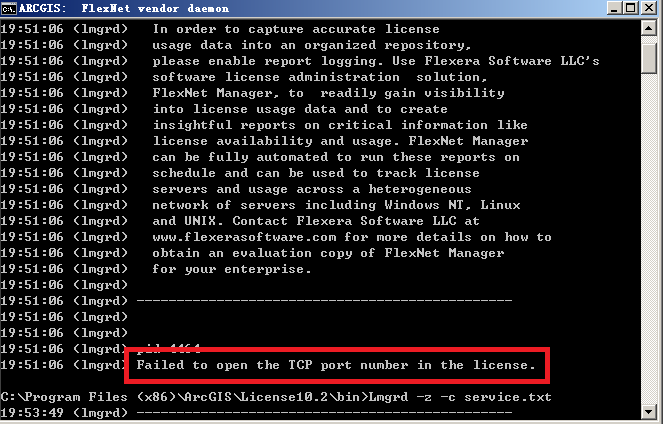
(步骤)2.描述虽然已经将 ARCGIS.exe及service.txt都替换了 C:\Program Files (x86)\ArcGIS\License10.2\bin目录下的两个文件,并且service.txt已经指明当前计算机名,
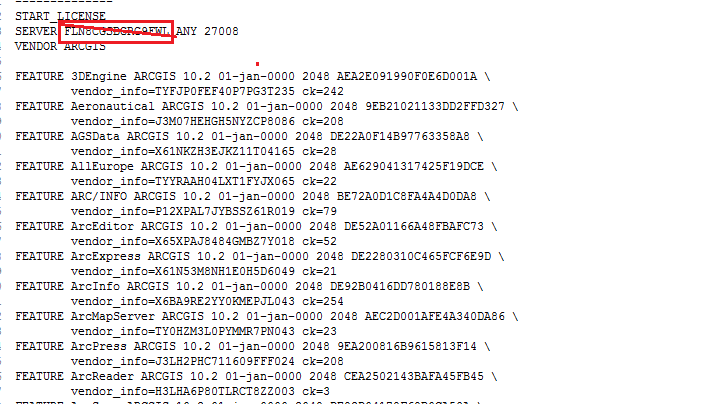
(步骤)3,原因是端口 27000已被占用,需要更改,如 27008, 再次操作步骤1,则发现结果为
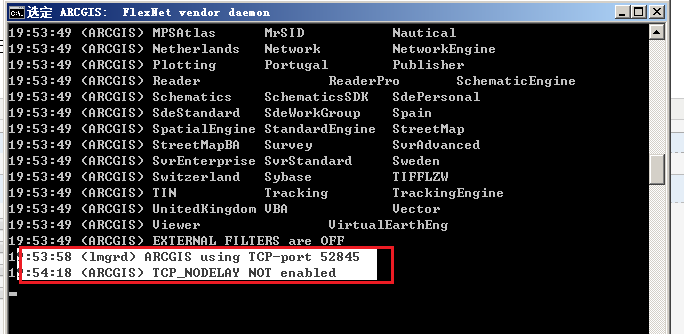
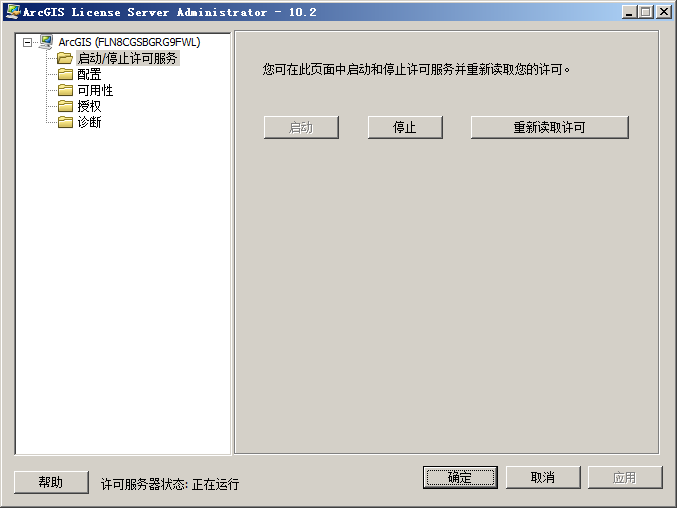
4,此时,可以启动 license manager服务.
arcgis license manager 10.2服务无法启动的更多相关文章
- “连不上 ArcGIS License Manager ”的一点常用诊断方法
在 ArcGIS Desktop 的问题库中,有一类不算做核心技术问题,但却可能会位列“最常见的问题”之一.简言之一句话,”许可服务器连不上怎么办?!“ 下面就来演绎下问题的诊断过程. 本文仅适用于客 ...
- 静默安装、授权及卸载Microsoft SQL Server、NET Framework、Windows Installer 、ArcGIS License Manager、ArcGIS Engine(Silent install、uninstall and Authorization.. .through Setup Factory)基于Setup Factory
通过Setup Factory写的代码大概有1700行,所以就不整理了.思路如下: 静默安装都是通过去Microsoft 和Esri的官网找到静默安装的命令,然后File.Run(...)或者Shel ...
- License Manager 10.3启动失败解决方法
参考:http://jingyan.baidu.com/article/c275f6bac8763ae33d756788.html 安装ARCGIS10.3过程中无法启动license. 解决办法: ...
- ArcGIS for Sever 10.1 服务迁移与恢复
=== 声明:以下内容本是自己写给单位内部同事的参考手册,但是被传到百度文库中.陆续有用户就这方面的问题,通过电话,邮件等方式联系我.首先,感到荣幸.其次是,由于本人当时测试和编写的时候,由于仓促,可 ...
- Arcgis Server Manager发布ArcGISTiledMapServiceLayer服务
用ArcgisServer manager发布一个ArcGISDynamicMapServiceLayer服务: Add New Service->填写name,type 选择Map servi ...
- 使用Advanced Installer 自动部署 Arcgis Engine Runtime 10.0
原文:使用Advanced Installer 自动部署 Arcgis Engine Runtime 10.0 目前采用Arcgis9.2 + c#(vs2008)作为程序开发平台,是一个不错的搭配. ...
- arcgis破解的时候,不能启动license manager的问题
1.防火墙没关:(非常重要) 2.win+R,调出控制台,输入services.msc.然后手动开启ArcGIS license manager服务,关闭其余类似erdas,matlab影响该服务的开 ...
- Arcgis License的安装及破解
1.双击LicenseManager安装目录下的Setup.exe. 2.点击“Next”. 3.选择“I accept the license agreement”,点击“Next”. 4.点击“C ...
- 安装ArcGIS License 10.1 许可管理器 破解版 服务启动又失败的解决办法
安装破解文件的提示执行 替换许可管理器Bin下面的service.txt 文件,之后会发现,许可管理器启动不了(有时候又可以,挺郁闷), 经过多次的试验,我找到了一种折中解决的方法,供大家参考 解决 ...
随机推荐
- POJ 1008 简单模拟题
e.... 虽然这是一道灰常简单的模拟题.但是米做的时候没有读懂第二个日历的计时方法.然后捏.敲完之后华丽的WA了进一个点.坑点就在一年的最后一天你是该输出本年的.e ...但是我好想并没有..看di ...
- learngin uboot design parameter recovery mechanism
pseudocode: if( getenv(“uboot_env_init”) != NULL){ if(uboot_env_init != HAVE_INIT){ Set uboot_en ...
- Automatic Login Using sshpass
#! /bin/bash user=root password=12345678 remote_ip=192.168.3.140 sshpass -p $password ssh $user@$rem ...
- TypeScript安装
1.Installing Node.js and updating npm Updating npm----npm install npm@latest -g Installing TypeScrip ...
- IScroll的诞生和缺点
转自http://lhdst-163-com.iteye.com/blog/1239784 iscroll.js是Matteo Spinelli开发的一个js文件,使用原生js编写,不依赖与任何js框 ...
- Shiro 学习资料
参考链接:http://jinnianshilongnian.iteye.com/blog/2018398
- DevExpress v18.1最新版帮助文档下载大全
DevExpress v18.1.4帮助文档下载列表大全来啦!包含.NET.VCL.HTML/JS系列所有帮助文档,提供CHM和PDF两个版本.除已停止更新的Silverlight.Windows 8 ...
- SharePoint 企业搜索-PowerShell
1. 显示企业搜索服务信息 Get-SPEnterpriseSear1chService 2. 显示企业搜索服务实例 Get-SPEnterpriseSearchServiceInstance 3. ...
- GET_DDL提取建表语句:ddl
创建对象的语句就是了 提取表 set line 200 pages 50000 wrap on long 999999 serveroutput on SQL> select dbms_meta ...
- 【c++基础】如何获取工程项目当前路径
工程项目当前路径 #include <direct.h> int main( ) { ]; _getcwd(buffer, ); std::cout << buffer < ...